Maybe PC World Should Rethink the Whole Self-Censoring Thing

Maybe PC World needs to think about a little self-censoring itself, as opposed to proclaiming, based on perhaps the most unscientific poll ever by Mashable,  that netizens (awesome word) oppose Craigslist self-censorship.

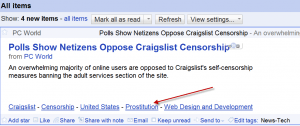
Here’s the news reader (crappy partial feed) entry for the PC World story about Craigslist’s so-called self-censorship.  There are so many tracking links, ad server calls and whatnot embedded in the link that it took me about 6 tries to get the article page to load.

feeditem1-300x126

In the meantime, I decided I’d click on one of the links sitting there, without comment, at the bottom of the (crappy partial) feed.

The noted link takes you to a page on something called Shyftr (which I vaguely recall reading about a year or two ago), where you can get lots of great, thoughtful commentary on the selected topic.  Really impressive stuff like this.

badcomments2-300x244

That’s the kind of thing I just can’t get enough of.  Who needs the New York Times when there’s this sort of thing just a click or two away?

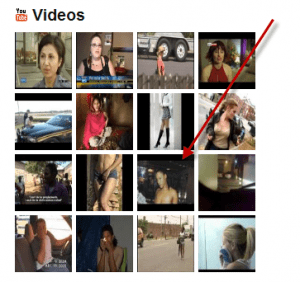
And, there’s more.  Under Videos, you can browse through all sorts of thought-provoking, supposedly related videos.

badvideos3-300x282

Like the one noted above, for example.

videodetail4-300x127

Seriously?

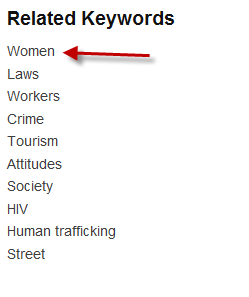
And, if that’s not enough, there’s a helpful list of “Related Keywords” at the bottom of the page.

That is one big heaping example of awesome.  Not.

It looks like the path from PC World to Shyftr goes through one of the endless ad servers, in this case Pheedo.com.  I’m guessing that PC World is using Pheedo to serve ads (we certainly need more of those) in its RSS feed, and Shyftr is buying some of those ad spots.

Still, you can’t ignore the beautiful irony of this.

The Holy Grail of Social Network Sharing: Single Clicks, Native Shares & Clean Streams

Enchanter-300x165

I’ve been thinking about the distribution of my content across the various social networks.  My challenge is to use the social networks in a way that benefits me and my readers, while keeping control of my brand and managing my content at a central, owned-by-me location.  That location being here at Newsome.Org, and my primary distribution tool being the “Send to” feature of Google Reader.  I consume 90% of my online content via Google Reader.

Networks I Use

At this point, I use two primary social networks.

I use Twitter (follow me, if you’re interested in hand-picked links to good tech, music and life articles) as a largely list-and-search-driven resource for third party content.  You simply have to rely on lists and saved searches to manage what would otherwise be complete chaos.   Via Twitter I  give (via my hand-curated “Interesting” links) and receive (via lists and saved searches) links to stories of interest.  In other words, the “what are you doing” Twitter updates are of very little interest to me (mostly because, as we’ll see in a moment, I find Facebook much better for that sort of thing), but the pointers to news articles and blog posts are very much of interest.

I use Facebook (Friend me, if we are)  as more of an interactive, conversation stream.  I find the connections between people on Facebook much more meaningful, and much more enjoyable, than on Twitter.  In other words, Twitter feels like an internet creation.  Facebook feels more like real life.

They are very different things.

How I Share

Which means that content producers like me need to carefully decide what parts of our content get pushed where.  Until today, I pushed all of my Twitter content into my Facebook stream.  Primarily, this was to get my curated “Interesting” links into both Twitter and Facebook, via a one-click “Send to” Google Reader process.

grshare-300x110

I would send an item to Twitter, which in turn would be  sent to Facebook.  It worked, but it was noisy.  There was too much static on the line.

For example, when I publish a new blog post, it gets linked in my Twitter stream, via the WP to Twitter plug-in.  Then, in turn, it would show up on Facebook, the same way.   Like this.

newpostimport-300x41

But Facebook’s native sharing process produces a much better stream entry, with a thumbnail, etc.  It looks less spammy and more elegant, giving a result like this.

fbnewpost-300x99

Duplication and Dirty Streams

Which meant that I had to either allow duplicate new blog post entries in my Facebook stream (bad) or manually delete the automatic Twitter posting and then re-post the item using the Facebook’s native sharing process (inefficient).  Ultimately, I found myself rushing to Facebook to delete certain Twitter-imported items and replacing them with native Facebook shared links.  I felt like George Jetson on the treadmill, with no Jane in sight.

Then I finally realized I was doing it backwards.

The interactive quality of my stream (both incoming and outgoing) is better and more valuable at Facebook.  So that’s where I need to use the most care.  I very much wish I could one-click export selected items from my Facebook stream to Twitter.  That would allow me to pick and choose the links and other content that I wanted to send over the Facebook walls, without having to clutter my Facebook stream with a bunch of imported content.  But you can’t do that.

Tossing Twitter Out of Facebook

So I decided to cut the cord.  As of today, my Twitter feed is no longer pushed to Facebook.  Rather, my curated “Interesting” links will continue to be the most valuable part of my Twitter stream, and any of them that I want to also share in my Facebook stream will have to be re-shared.  This double effort will serve as a mighty filter on my Facebook stream, which is good and bad.  Good because the quality of the content will be higher.  Bad because there will be some interesting stuff that never makes it into my Facebook stream.

Call Me Percival

holygrailcup2-270x300

Which leads to the search for the holy grail.

What I want, but have not yet found, is a way to share content from Google Reader one of three ways:

1. To Twitter (can do this);

2. To Facebook (can do this); or

3.  To both simultaneously, but using each service’s native sharing API (cannot do this).

There needs to be a way to select, slice and dice and distribute content via a Google Reader “Send to” (or the equivalent), which will send the selected content to Twitter and Facebook, simultaneously and separately (without going into one and then being imported into the other).  Another, likely easier to develop, solution would be to create an application that only pushed certain content from Twitter to Facebook.  It would be rules based.  For example, I could create a rule that would push any Twitter post that starts with “Interesting:” to my Facebook stream, but would not push other Twitter posts.

For me, this is the holy grail of social network sharing.  I thought perhaps Ping.fm might be a vehicle to do this or something acceptably close, but I don’t see a way to push the same link through Ping.fm to Twitter as a Twitter post and to Facebook as a natively shared (as opposed to imported) item.  In other words, it seems my ability to push things from my Twitter stream to my Facebook stream is an “all or nothing” decision.

In the meantime, I guess I’ll have to share especially interesting items twice, in order to keep my Facebook stream clean.  But I’ll keep looking for the holy grail.  It’s out there somewhere, or will be one day.

Good News for (at Least a Few) Google Apps Users

google_apps-300x223

I’ve been a Google Apps user for a long time.  Though I am generally satisfied with the email and light word processing features, I have also been highly critical of what I see as some gaping deficiencies in the experience.  In general, these deficiencies are:

1. The fact that the suite of apps looks tossed together, both in design and function.  Some of the apps, like Gmail, are beautiful.  Others, like Sites and Moderator (whatever that is), are so bad I can’t even suggest how to fix them.

2. The fact that few of the new apps and features that Google releases find their way into Google Apps.

Finally, it looks like there is hope.  Wired tells us today that Google has invited “select users” to test a version of Google Apps that includes all the features that regular Google users have:

[Google’s] now asking some Apps users — known as Trusted Testers — to help test out the infrastructure, according to an e-mail seen by Wired.com.
Good.  I hope this represents a trend that will ultimately make all these features available in Google Apps.  For everyone.

Did the Fighting Dinosaurs Just Get Gobbled Up Like an Apple?

You just have to feel bad for Google.  Poor little thing.

It’s running around, buying everything in sight, trying to cobble together something that can avoid being immediately killed by Facebook, and here comes Apple, announcing Ping, a social network built around iTunes (and its massive day-one user base).

It reminds me of those Saturday afternoon movies, where one brave but doomed dinosaur is bravely trying to fight a bigger dinosaur, only to have some bigger, larger, scarier creature stomp up out of nowhere and devour them both.

I don’t know that Ping can unseat Facebook as the sharing, dating, time wasting, etc. hub for the masses, but I know that it has a better chance of competing with Facebook than anything I have read or reasonably imagined about the forthcoming (for months) Google.Me.

For a company that makes its money via advertising, Google seems unable to properly market itself.  Everyone from Amazon to Roku saw this coming and at least tried to make a pre-emptive grab for relevance.  Meanwhile Google just keeps buying arms and legs, leaving us to wonder what manner of creature it is assembling.

I’d like to be wrong.  I’d like to see Google get it right and release something powerful, and elegant.  Not tossed together and crammed into Gmail.  I’m trying to keep my hopes up, but that rumbling sound in the distance scares me.

Poor Google.  It just can’t buy a break.

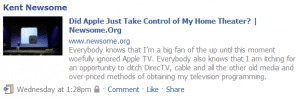
Did Apple Just Take Control of My Home Theater?

Everybody knows that I’m a big fan of the up until this moment woefully ignored Apple TV.   Everybody also knows that I am itching for an opportunity to ditch DirecTV, cable and all the other old media and over-priced methods of obtaining my television programming.

applefall-300x198

It looks like Apple may have just given  me that opportunity.  Maybe.

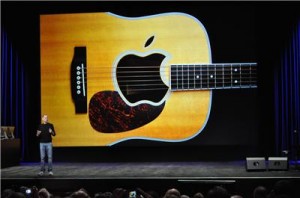
I really like the (tiny) look and details of the new Apple TV, announced by Steve Jobs himself at today’s Apple Fall Event.  I’m totally cool with the rent-only, no local storage thing.  I’m very cool with the 99 cent HD TV show rentals.  I love the way Netflix has been incorporated (as an aside, Netflix seems like the big winner here, and Redbox the big loser).

newappletv-300x198

Some details  I need to see include:

1. The other networks need to join ABC and Fox in capitulating to the inevitable dominance of Apple in the TV content provider space.

2. The cost of movie rentals  needs to come down a little.  $4.99 for a 48 hour rental doesn’t seem like much of an improvement.  I’ll pay a little extra for first day access, but I’m thinking $3.00 would be the sweet spot.  Maybe Apple will charge less for movies that have been on DVD for a while.

3. I need to know that I can get cable TV shows on the same basis.  I’m not asking for True Blood for 99 cents, but I should get regular cable programming at the same price.

4. I need shows to be available sooner.  The same day would be awesome.  Days later is not awesome.

My initial reaction is that for the massive amount of money I currently pay DirecTV, I could probably rent all of the shows I really care about.

I just need an acceptable combination of content, speed and price.  It’s too early to tell if we’re there yet.

But we’re definitely closer.

Update: Roberto Bonini asks some good questions about the new device.

Case Studies in Good and Bad Tech Support

As I’ve said before, the best way a company, any company, can take advantage of so-called social media is not to ask people over and over to “Like” their fan page on Facebook, but to increase accessibility for customers when they have a problem.  Unfortunately, I think so many companies are dedicating so much of their resources to increasing their fan count on the various networks that no one is left to mind the support store.

I’ve reached out to three companies recently for tech support.  Two of them I pay money to.  One of them I don’t, but I would if they’d release and support a premium product that works better.

Let’s take a look at three levels of tech support.  Great, trying, and horrible.

Great: Casper
image

I have bought and used Future System’s Casper for copying hard drives for years.  It is a great program, and I have recommended it many times.  After my recent experience, these recommendations will keep flowing.

I’ve known for some time that the C: drive in my primary desktop was failing.  I keep most of my data files on another disk, so this wasn’t a huge problem.  I just needed to get a new hard drive, copy my current one, and switch it out.  When I tried doing that, using Casper, I had some problems.  The hard drive wouldn’t copy all the way (and I ruled out a physical disk problem as the cause).  So I emailed Casper support.

Within a day, I had a personal, very detailed response from Jim, with Future Systems’ technical support.  I’m sure there are knowledge bases and templates for troubleshooting inquiries, but the email was detailed and told me several, specific things to do.  In other words it didn’t feel like a canned response.  I tried again, and it worked like a charm.

In the meantime, I had figured out that if I wanted to get rid of the recovery partition that HP had placed on my C: hard drive (which had a separate drive letter), I’d need to do a fresh install of Windows 7 (Casper will copy a letter drive, but if you want the disk to be bootable, you need to copy the entire hard drive, which in this case included the recovery partition I wanted to get rid of).  So I copied my C: drive with Casper to protect my data and then installed a fresh version of Windows 7 on a new C: drive.

Great support.  And now I’m talking about it.

Trying: Disqus

image

Everyone knows I like the Disqus commenting system.  It is beautifully designed, and feature-rich.  The problem, of course, is that the Reactions feature (which compiles the mentions of the blog post at Twitter, etc.) just doesn’t work.  At all.  And having all blog posts say “no Reactions” is much worse than not even trying to compile the Reactions.  I’ve been emailing with Disqus for months and months about this.

I get responses.  The emails are nice, but not terribly helpful.  Sometimes a few Reactions will show up.  Then, nothing.  So I email again, and we repeat the process.  Disqus badly needs to create a premium account system so they can make some money and use that money to make the Reactions feature work.  I’d pay for it.  If it worked.

After my most recent email campaign, which I began when I noticed the link to force Disqus to manually rescan for Reactions had disappeared, I got an email assuring me that they were working on it.  Then nothing.  When I followed up, I learned the manual rescan link was back.

disqusscan2-300x102

So while Disqus is still not automatically compiling Reactions correctly (or at all), the rescan link seems to work, if you’re willing to do manual scans for your posts.

In other words, at least they are trying to provide support.  And now I’m talking about it.

Horrible: SugarSync

image

For a long time, I was on the fence about which remote back up and access service I was going to use for my primary off-site backup.  I looked at all sorts of services, and tried many of them.  While I am a committed Dropbox user for general web storage (you and I get a little free storage if you sign up for a free account via that link), I ultimately decided to use SugarSync for my automatic backup and access services.

I have a lot of music (both that I create and that I buy to listen to), videos and photos, so I need a lot of space.  In fact, I quickly blew right through SugarSync’s $250/year plan and into a larger, more expensive plan.  I’m happy to pay, for the peace of mind and the ability to access my files via my iPhone and iPad.  However, as a premium customer I expect at least pretty good tech support, on the rare occasions when I need it.

When I replaced my C: drive, I decided to go ahead and replace my storage drive with a bigger one.  Once I did this, I made some minor changes to my file storage names and locations.  When I installed SugarSync it showed my reconfigured computer as a new computer (because I renamed it, to preserve my Windows Home Server backups of my prior configuration).  I sent a support request to SugarSync asking how I could make sure that my already uploaded files would be associated with my newly reconfigured computer, without having to re-upload massive amounts of stuff that is already on SugarSync’s servers.

The form promised a response within one business day.  I got some canned link to a page showing me how to download and restore my files to a new computer.  Not my problem, fellers.  My data is here, and there.  Just under different computer names (because my reconfigured computer shows up as a new computer on SugarSync).  I’m trying to avoid having to re-upload hundreds of GBs of data.  It’s been a full business week.

Data is important.  C-notes paid for a service are important.  Add all that up, and I should already know exactly how to address this issue.

Horrible support.  And now I’m talking about it.

Maybe SugarSync should hire Jim.

Why Are Google Apps Users Always at the Back of the Line?

appslineHere’s the way it goes when Google announces some new feature, like today’s announcement that Gmail users can make phone calls right from Gmail.  First, I read a little about it to see if it’s something I’m interested in.  Often, it is.  I get excited about it, and when I get home, I eagerly sit down at my computer to try it out.
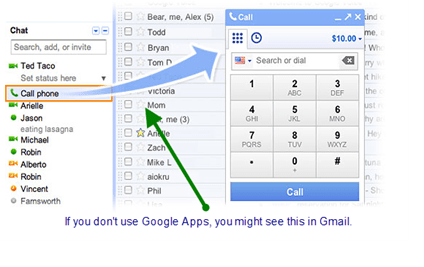
Only to find out that the nifty new feature is not available to Google Apps users.  You know, those who use the platform Google wants us to use instead of those expensive Microsoft Office apps.  The same apps that Google would like for us to pay for.

The Gmail blog post announcing this new feature has this all-too-familiar nugget:

If you’re using Google Apps for your school or business, then you won’t see it quite yet. We’re working on making this available more broadly – so stay tuned!

I can’t imagine how pissed off I’d be if I was paying for Google Apps.  It’s sort of like if Microsoft rolled out feature after feature to its Docs users and promised to get back with paying Microsoft Office customers “soon.”  That probably won’t happen.

SNAGHTML3e5a815

But it keeps happening with Google Apps.  It’s messed up.  It’s backwards.  And it irks the dickens out of me.

Audio Updates are a Cinch, with Cinch

I’m generally not all that excited about video blogging, or listening to podcasts that I’m not on, simply because I can read faster than you can talk and I like to consume information at my pace, not yours.  However, after looking at Cinch for a few days, I became intrigued enough to give it a try.

Cinch, for those of you who remain unlearned in the ways of audio updates, is:

A free and easy way to create and share audio, text and photo updates using your phone or computer. Cinch enables you to capture and report on your experiences in a way that simple text just can’t do. Using a simple interface, you can make and broadcast your content creations through Facebook, Twitter, CinchCast.com and more.

Sign-up is simple.  It’s pretty much a two-click process if you sign up via Facebook, which I did.  You can choose a Cinch page URL and add links to your other social media locations.  There is a nifty iPhone app, that lets you record Cinches, add a photo and upload them.  I did an initial Cinch, reviewing Cinch, added a photo and tried to publish (e.g., upload) it via 3G.  The bad news was that the process timed out, leaving me with a “Pending” Cinch on my Cinch page.

The good news is that the next time I opened the Cinch iPhone app, it prompted me to recover the audio recording.  The photo was lost forever, but between the two, save the recording.  A photo retake is faster and easier.  I retook the photo, and tried again.  Bingo.

That’s good, because for Cinch to be useful, reliable 3G uploading is a must.

It also publishes your Cinches to your Facebook profile.  And to Twitter if you want.  At the moment, I’m adding my Cinches to Facebook, but not to Twitter.  As a non-Cinch-related aside, there badly needs to be a way to filter out certain of your Tweets before your Tweets get published to your Facebook profile, to avoid duplicate Facebook posts.

Happily, you can embed your Cinches.  This will greatly increase the likelihood that I use Cinch, since anyone who has read Newsome.Org knows that I have long believed in consolidating most of my content on my page, and only pushing some of it to the various third-party networks.

My initial impression is that Cinch is well put-together, though it is still in public beta.  I wish it had video capability, and perhaps that will be added in the future.  In sum, I like it.  The as yet unanswered question is, do I need it?

I’m not sure how much need I have for a micro-audio-blogging service, but if I do have a need, Cinch certainly fits the bill.

Blog from Your Browser with ScribeFire

In my stop and start journey towards cross-platform utopia, I am experimenting with ScribeFire, a Firefox, Chrome and Safari add-on that promises to let you blog away from the comfort of your web browser.

I like the layout.  I can’t get the image upload or Live Preview functions to work (one down; the image upload seems to work).  This may be a firewall problem.  It doesn’t have the best feature about my beloved Live Writer: the ability to paste an image directly into a blog post and have that image uploaded when you publish (that feature alone saves me scads of time when I use Live Writer).

It does allow you to insert images from Flickr, but I don’t see a way to log into your account.  When I searched under my name, it found three photos.  One of an anole (that’s a “n”).  I’d prefer a way to pick and choose from my photos.


What an anole

I like the idea, but I think the firewall and the photo thing are going to be may be the deal-stoppers for me.  If I could get Live Preview to work, and figure out some better way to access photos, we might have a contender.