Cassidy’s school choir performed two songs at an open house earlier this week for prospective parents. They sang “Woke Up This Morning” and “Lullaby of Broadway.” They did great and I am so proud of her.
Cassidy is on the left end of the first row.
Cassidy’s school choir performed two songs at an open house earlier this week for prospective parents. They sang “Woke Up This Morning” and “Lullaby of Broadway.” They did great and I am so proud of her.
Cassidy is on the left end of the first row.

I like Robert Scoble. I really do. But, like my 8-year old, if I don’t watch him like a hawk he gets distracted and starts doing all kinds of crazy shit. Like pooping all over Google Reader, which is really a stand-in for RSS readers in general. I know he doesn’t really mean it. It’s like the time my 8-year old announced that she was giving up Skittles. It was a radical thought. There was logic to it. Shoot, it made me proud.
But it wasn’t real.
Two days later she was back in the grip of her Skittles addiction, insisting that no right-thinking person would choose a granola bar when those colorful, chewy, irresistible sugar pills were just sitting there on the shelf. Our battle over her junk food habit rages on, but I know in my heart that all the wishful thinking in the world won’t make a granola bar taste like a Skittle.
So let’s put Robert in virtual time out and see if we can get him to behave. One step at a time.
He says Google Reader is slow. I think that’s more of a problem with the front end platform that pushes the RSS feeds (e.g., FeedBurner), but I see his point. But as I have said over and over, Skittles are bad for you. Uh, I mean, faster is not always better. I simply don’t need to read about some dude’s latest Farm Game achievement or Mafia Wars battle in real time. And the flexibility of Google Reader (folders, the ability to rename feeds, archive feeds, search feeds, etc.) outweighs any marginal speed benefit you might get from the other sources (more on those below).
Of course, there’s a bigger flaw in that argument. Most Twitter posts are links to other content that got served by. . . RSS feeds or some other platform. The live on the scene Twitterer is the vast exception and not the rule. So even if Twitter is instantaneous, most of the information put on Twitter is not.
And while I’m debunking the speed canard, let’s be honest. When we thought that kid was in the balloon flying all over Colorado, we turned on CNN, not Google Reader and certainly not Twitter. For live important news, the internet just ain’t the place, and the difference between 5 minutes later and 15 minutes later just isn’t that big of a deal.
 He says Google Reader’s UI is confusing. I agree that all that sharing stuff is unnecessary screen clutter. All we need to get our data out of Google Reader are the newish “Send to” buttons. But Google has gotten caught up in the sharing hysteria like everybody else. When all this sharing nonsense blows over, the internet will be a much more useful and fun place. But come on man, all you have to do is ignore all that crap, just like I do. And if you think Google Reader is confusing, then you must think Facebook is a big, non-intuitive mountain of Rubik’s Cubes.
He doesn’t like seeing all those unread items. I have a folder of traditional news feeds (CNN, USA Today, etc.) that fills up faster than a cheetah can run. You simply mark the entire folder as “read,” with one click. It’s not hard. Now trying to actually follow news topics on Twitter, that’s hard (more on that below).
Speaking of Twitter, does anyone really go to Twitter to consume content? Be honest. All I see are over there are people pushing unilateral content, like a flea market-cum-mailing list. And social? There’s more interaction on top of Mount Everest than there is on Twitter. Seriously, I get the sense that the Twitter hysteria among the general public is fading. If I owned Twitter, I’d sell it. Now, while there are still a lot of greater fools thrashing around with someone else’s money to spend.
He says the social network features suck. I would completely agree with this if it was an absolute statement, and not limited to Google Reader. They probably do suck in Google Reader, which is one of it’s strongest points. I don’t follow (or whatever the right word is) anyone via Google Reader. I just find my content there, and push it from there to my blog, Facebook page, etc. Let’s be honest, the social networks aren’t all that social, so why does a feed reader have to be social?
About this interaction business. If you want to interact online with real people, the fact is that there is only one place to do it- Facebook. The infrastructure is there. The developers are there. And most importantly, the non-nerds are there. The battle for the mind of the so-called social networker is over, and everyone but Facebook lost. Hell, I did everything I could to stay off of Facebook and I failed. Lots of my real world friends are there, and none of them are on any of these lesser services.
He says he sees most news faster on Twitter than in Google Reader. Uh, OK. That’s like saying I got to California faster on a horse than when I walked. The greatest myth in the history of the internet is that Twitter is the place to get news. First of all, you have to separate those who actually know the news and have the desire and ability to accurately describe it from the spammers and nut-jobs. Then you have to wade through the chaos and scrolling pages to find it. At least on the CNN and Google News pages, there is some semblance of an organizational structure that the nut-jobs must adhere to.
He says headline scanning is easier on Twitter. This is simply wrong. Robert, I challenge you to walk me through this and show me how it is easier on Twitter. If I’m wrong, I’ll eat my pocket protector. Hell, I’ll go one step further- it’s impossible to scan headlines on Twitter. Because there are none.
He says the iPhone apps are better for Twitter. I agree with that. Of course they are better, because Twitter has enjoyed a lot of momentum. Like Hanson did at one point, and the Jonas Brothers do now. Pretty soon all the kids will gravitate to the next big thing and Twitter will be relegated to the opening act. Like Isaac, Taylor and Zac.
The only question is who will get rich before that happens.
What do use to get your online content? And why?
As we all now know, I have totally capitulated to Google. And I love me some music. So I was interested when I read that my new master was going to release a music search thingy. Until I read more about it. Then it made me sad. Not as sad as the lack of folders in Evernote makes me. But sad.
Partnering up with MySpace? Are you kidding me. Now that Geocites is gone, MySpace rules supreme as the most butt-ugly collection of bad web design on the internet. Lala? What about Tinky Winky and Po? Pandora has been a favorite of mine for years, but even they did their part to screw up the internet recently by letting people litter their Facebook and Twitter feeds with 30-second song clips, and then acting like that was a good thing.
I’d rather hear Edward Scissorhands play a Jonas Brothers song on a chalkboard that listen to a 30-second clip of anything. Is this 2009 or 1995? Rhapsody? It took me a decade to rid my computer of all the Real Networks bloatware. No way am I going to get snared in that net again.
But being a good little Google minion, I had to check out its new baby. So I dutifully searched for my new favorite band, the Wrinkle Neck Mules.
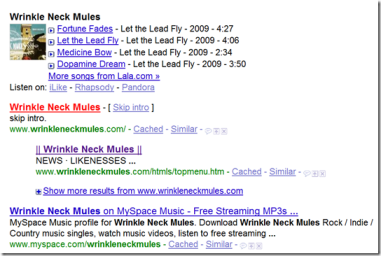
OK, nothing too horrifying there.
I clicked on the play button beside Medicine Bow.

And it played, via Lala. Hmmm. Cool, but I want to hear Lowlight, the biggest of my numerous Mules song-obsessions. So like the internet-savvy cat I am, I clicked on the “More songs” link. I got a list of 61 songs. No Lowlight, but I found the incredibly wonderful Mecklenburg County.

And it played too, not in a pop-up player like before, but in the player at the top of the Lala page.
OK, so what about the little sharing button up there. In the name of all that is sacred, no clips please. Let’s send this to my Facebook page and see what happens.

Damn, the song plays right there. Now I’m starting to be impressed. I just know there’s a catch. Let’s look at the Lala help pages.

OK, now I get it. You can listen once. When I tried to play the song again from my Facebook page, I was confronted with the most horrifying thing.

A 30-second clip. The horror.
Actually, it’s not all that bad. If I can let all my Facebook friends hear the entirety of a song once, that’s still semi-cool. I don’t know that I’ll do it a lot, but I may send a song or two along. At the end of the day, this seems like a way for Google to capture a lot of the growing music search market, which it wants for ad-serving purposes, and for Lala and some of the other services to get (or more likely buy) a lot of exposure.
I’m not blown away by any means. But it’s probably a worthwhile addition to our music sharing toolbox.
Three really good films. 5-point scale. Links to Netflix.

Kill, Baby, Kill (4): This 1966 Mario Bava gem is a creepy, semi-gothic ghost story, that proves Italians did horror as well as westerns. It made me an instant Fabienne Dali fan.
Black Sunday (4): Another excellent Bava film (1960), with the great Barbara Steele in a double role as a witch and her look-alike descendant. One of my favorite vintage horror films, with perhaps the most interesting commentary track I’ve ever watched.
Drag Me to Hell (4; unrated version): A new to DVD, supernatural scare-fest that made me jump a lot, even though it doesn’t break any new ground. It’s the scariest movie I’ve seen since The Strangers, and you’ll never look at goats the same way again.
Tag: movie review
Why I did, and why you should.
Over the last year or so, my resistance to the Borg-like inevitability of Google has proven futile, as I have moved more and more of my online life into Google applications. First, I started using Google Reader to manage and access my RSS feeds. I have always used Gmail as a spam filter and a means to access my Newsome.Org email online and via my iPhone. I have used Google Docs for podcast and church-related stuff.
But a couple of weeks ago, I went all in.
The cost of upgrading Microsoft Office, my pending move to Windows 7 via a new HP Computer that is frustratingly delayed, and the convenience of one-stop, online accessible apps got me thinking about moving me and my entire family to Google Apps. I took the plunge, and boy am I glad I did. There are some gaping holes in the Google Apps experience (more on that below), but there are also many elegant, useful features that I wasn’t aware of until I started to enjoy them.
Making the Move
I have used my Newsome.Org email address, on a dedicated server, for many, many years. I knew changing to a Gmail address was not an option. I wanted to keep my email address, as well as my massive set of personal folders and all the emails and data therein. So the only- and best- option was to move my Newsome.Org email services to Google Apps. Additionally, the move to Google Apps allows you to create a custom calendar site (e.g., calendar.yourdomain.com), a custom Google Docs site (e.g., docs.yourdomain.com), a shared Contacts site (e.g., contacts.yourdomain.com) and more.
Best of all, it’s free.
And, believe it or not, really easy.
Rather than recreate the wheel here, I’ll direct you to Mark O’Neill’s excellent walk-through. Changing the MX records for my domain was really easy via Network Solutions’ Domains Management page (don’t forget the period at the end of the hostnames ).
And unlike in years past, the changes propagate pretty fast, sometimes within minutes. After I had my mail page set up, I used a similar process to create CName records for my calendar, contacts, Google Docs, and even a short links (Google Short Links) and discussion board (Google Moderator) service.
Note than none of this affects your web site, as you do not modify the www, @none or *(all others) settings. Any host (e.g., www) other than the ones you specifically change as set forth above will continue to point to their current locations.
After maybe an hour’s work, I had dedicated, Newsome.Org-branded and web accessible email, calendar, documents and contacts pages for myself and my entire family.
The first thing I did was to create and upload a Newsome.Org Web Apps logo (see above and below) and customize a theme to match the Newsome.Org color scheme. One annoyance that Google should address is that your custom theme only applies to Gmail. There should be a way to cause your theme or custom color scheme to apply across all the various apps. The custom logo appears in all the Google Apps.
As a Firefox user, the next thing I did was install the most excellent Better Gmail add-on. Among many other indispensible features, this add-on lets you create labels- Gmail’s folder-substitute- in a nested tree structure, like folders and sub-folders. Since I want to keep my Outlook personal folders, this was a huge help. It also allows you to hide the Chat box and other screen wasting stuff. Then I used Google’s Gmail Uploader app to upload my 10 or so years worth of personal folders. I was worried that 10 years of emails would use most of my allocated 7 GB of storage, but happily it only took 472 MB! In a few minutes, I had recreated my personal folders, as well as the primary labels (e.g., folders) I use for email and efficiency management.
Note how the Archive Songs folder expands when I click on it. I also added POP access or forward rules (on those third party email apps, like Yahoo, that don’t allow free POP access) to capture my old AOL, Gmail, Hotmail and Yahoo email. I have a filter set up to archive (e.g., move from my Inbox to the designated folder) that third party email as it arrived.
Next, I went to the Settings tab and added Quick Links (a way to create and save email searches, such as Unread or ones with certain attachments), the Google Calendar gadget, the Remember the Milk gadget (via the Add Any Gadget by URL feature under the Labs tab), and the Google Docs gadget. Now, I can access everything I need.
Note how elegantly the calendar is incorporated into the Gmail sidebar. I mentioned above that there are a lot of unexpected features. One great example is that when you get an email with an address in it, a link to a Google Map appears. Little things like that make the online world go around.
Calendar
I also moved my calendar to Google Calendar. Via the Settings tab, I added some gadgets (World Clock and Jump to Date). I gave and got access to Raina’s calendar, and I added US holidays, weather and phases of the moon.
In order to create a centralized calendar, I synch my Office calendar with my Google Calendar via Google Calendar Synch.
Via the Settings tab, you can configure Google calendar to email you an agenda each morning and to notify you via text message and/or email prior to each calendar event. Again, this sort of small, but immensely helpful, feature is what makes these apps so compelling.
Documents
I uploaded my personal letterhead, a few forms I use a lot and some other key documents to my new, Newsome.Org-branded Google Docs page.

Google Docs is probably the weakest link in the application group, if only because word processing is so important in the business world. Tables and complex formatting in Word documents can be lost on the upload. And the addition of a tracked changes feature (or a close equivalent) should be job one for Google if it really wants businesses to use Google Apps. But, warts and all, Google Docs works well enough for me to dump Microsoft Office. I can’t believe I just typed that- but it’s true.
I don’t think Google Docs is the best choice for archiving old documents, pdfs, etc. (though implementation of the oft-rumored GDrive would be a welcome addition). For that I use my other favorite (and free) app- Dropbox (sign up here and we both get extra free space). I happily pay for the premium 50 GB Dropbox plan, which gives me plenty of space for document archives, etc.
Contacts
As I have noted before, Google Contacts is a train wreck, that should be completely rewritten. In the meantime, however, consolidation trumps design, and I imported all of my contacts to Google Contacts.
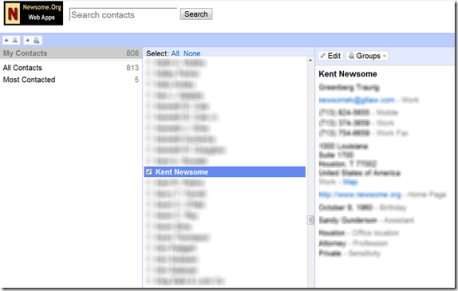
Online Utopia?
At the end of the process, my entire family has easy, accessible and efficient email, calendar, documents and contacts, all consolidated and branded. It works really well.
But it could be better.
The individual apps still seem too much like individual applications tossed together, as opposed to an integrated suite of apps. The ability to customize the look and feel of the apps should apply uniformly throughout. Some of the apps, in particular Gmail, need to give us much more control over sidebar content, without the need for browser add-ons. I don’t want the Chat box, but I do want customized links to my Dropbox and other sites I use a lot.
Google Sites is a really crappy, impossible to use, app. Google Moderator is only marginally better.
Picasa should be integrated into Google Apps, and certainly Google Voice should be. I’d like to see Google Reader integrated as well. There should be a way to create personalized, private and integrated Google Groups. Google Docs needs either GDrive to launch, or the ability to integrate another online storage service into Google Docs for document storage and retrieval.
In sum, Google Apps aren’t perfect. But with a tweak here and there, they could be.
After inadvertently recording Volume 1 in standard definition, I made it a point to shoot in HD today while shooting the South Course with my buddy J.C. MacBarker (known to some as Robert Brannon). I had some camera angle issues, but the higher definition makes the clay visible, which is cool. Things will get much better after today, as my gun camera mount arrived in the mail this afternoon.
We did good on the South Course, other than my continuing difficulty shooting the rabbit. Later, we shot the harder North Course with another buddy. We all did good, but not great, over there. The gun camera mount is going to be handy for calculating some of the harder shot leads. When you’re practicing and can take as many shots as you want, it’s relatively easy to zero in on most targets. When you’re shooting in a competition, it’s important to get the lead right from the first shot.
All in all, a beautiful day. And there’s no better way to spend a beautiful day than shooting some clays in the country.
Cassidy, Delaney, Luke, Lucky Dog and their friends Evie, Aiden and Loossee conceived of, designed (with help from the moms) and wore Wizard of Oz costumes for this year’s Howl-O-Ween canine costume contest and dog parade. They won, for the second year in a row.
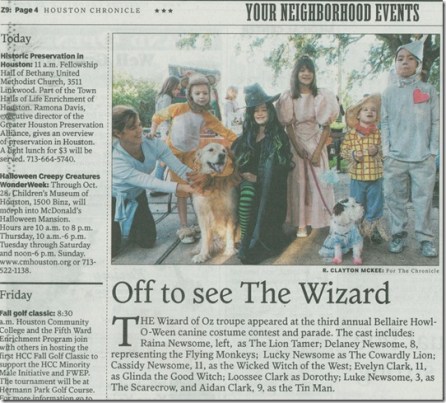
Here’s the story in The Houston Chronicle
 This week I bought a JVC GC-FM1A HD camcorder. Although I am starting to suspect that this camera might suck, other than the complete lameness of the included MediaBrowser LE software, which does not even recognize HD video on the camera, the jury is still out. I do like the fact the camera records onto a flash card, which allows me to remove the card and manipulate the video within Corel VideoStudio 12 (VS 12 users should note that non-HD video is in 4:3 format, to avoid the squished appearance that will result if you set your non-HD video project files to 16:9).
I decided to test the camera by combining two of my favorite things: tech and shotguns. When I went out to shoot some sporting clays today, I took the camera and my spider tripod and filmed a few shots at each station. I inadvertently shot the video in non-HD, so the resulting video is in lower than ideal resolution. One of the features this camera needs is a way to lock the resolution, to avoid accidental resolution changes.
When editing the video footage, it became apparent that my camera placement and, more importantly, the lower resolution made it difficult to see the clays in flight. It is likely that you would need to follow the clays with the camera to get a good shot shot (to coin a phrase). Since I was by myself, that was not an option today. Cassidy and Delaney often go shooting with me, so we’ll have to try a moving camera next time. I hope that HD resolution will allow you to see the clays in flight, even with a stationary camera.
I love the fact that HD video cameras are getting smaller. What I would really love would be for the iPhone to shoot HD video. When that happens (and eventually it will), I will be a happy camper. In the meantime, I continue to search for a small, full feature HD camcorder that will let me shoot video and easily upload it to YouTube or Vimeo or download it to my computer for use within an editing application. Suggestions would be appreciated.
As far as the shooting went, I did good with everything in the air, particularly since the pull-delay wasn’t working at some of the stations and I was shooting alone, and horrible with the rabbit shots, where the clays bounce along the ground. It’s hard to believe I can hit so many of one and so few of the other.
Here’s another good set for your weekend listening pleasure. Willis Alan Ramsey, Travis Tritt, Slobberbone, Mercury Dime, CDB and more. (Update: the embed feature doesn’t work at WordPress.com and I have switched to 8tracks. You can listen to the mix here.)

I noticed the glitches in the first song, and am looking into it. It could be a problem with the original rip.
Tag: ranchocast
Maybe, if it can just stay in business.
Rather than bore you with a long discussion of what Mixcloud is, I think I’ll just show you. (Update: the embed feature doesn’t work at WordPress.com and I have switched to 8tracks. You can listen to the mix here.)
That’s right. An easy, legal way to create and share playlists.
The only tools you need to easily create your own playlists are a free Mixcloud account and a way to combine some MP3s into a single file. There are lots of options for that, but I use and recommend Merge MP3. It’s free, easy and installs on a flash drive so you can take it with you.
In less than 15 minutes, I registered, installed Merge MP3, picked 10 songs, combined them and uploaded our first Mixcloud RanchoCast.
Pretty awesome, if you ask me.
 Newsome.Org