Book Review: Cold Black Earth

A few weeks ago, my never-ending search for new authors led me to Sam Reaves’ new book, Cold Black Earth.  Here’s my quick review.

Author: Sam Reaves
Title: Cold Black Earth
Genre: Mystery/Thriller (rural setting)

Interesting Fact:
I bought this book because the cover looks like rural fiction (recall my beloved South of the Big Four), but it’s actually a mystery/thriller set in rural Illinois.

Review:
It’s a mystery/thriller about a series of murders in and around an Illinois farming town. Most of the characters are farmers or the children of farmers, so the surroundings and much of the lifestyle elements are right in my wheelhouse. Add in a very realistic and scary depiction of some seemingly connected murders and a potential loss-of-farmland motive, and you’ve got a page turner.  I really liked it.

Purchase Links:

Amazon
iBook

Ad Blocking as Social Activism

adblocker

“As a user, I’m ecstatic about Content Blockers. Some might say it’s not morally acceptable to block ads, but when publishers reach the point where a single 80 KB article weighs 6 MB, maybe it is time for a wake up call.”

via MacStories.

I’ve used Adblock plus and other ad-blocking solutions for as long as I can remember.  I don’t see a moral issue in any context, but when content providers load up pages with so much excess bloat, there’s no moral issue with blocking them.  To the contrary, I believe there’s a moral imperative to block them in their tracks.

I spend a fair amount of money to avoid ads.  I never watch TV in real-time, so I can skip ads.  I rarely listen to traditional radio.  I skip over ads in my podcasts (though, in fairness and loyalty, I already use many of the products who place ads in the podcasts I listen to).  If there comes a time when some content I like goes away because folks block their ads, oh well.  Figure out a better way to do it.

It’s not that all ads are horrible.  Just most of them.  But there are exceptions.  I will stop fast-forwarding and rewind a Subaru ad on TV.  They are that good.  I’m not getting tracked.  The ads don’t bloat my TV and stall my experience.  They’re just well-made, minimally intrusive and interesting.

Unlike almost all of the repetitive and bloated ads people want to heave upon us on the web.

I Give Up: Apple Music Has Beaten Me

I tried to be diplomatic.

After a few more hours wrestling with Apple Music’s needlessly confusing layout and incomprehensible import and organization processes, and wasting even more of my time trying to create some semblance of order to my music, I gave up and am now officially done.  The indisputable fact is that the one and only reason to suffer Apple Music’s torturous interface is because it was made by Apple. Imagine just for a second if Microsoft or any other company had foisted this chaos on us.  Mac users would be having a field day crapping all over it.

In fact, many are, but the Apple-love deep within our DNA causes a lot of us to step back, put our heads down and keep trying.  After all, Apple made this.  It’s on all our Macs.  We get 3 months free.  It will get better.

And maybe it will.  I’m going to resist the temptation to wonder if tossing this confusing, disjointed mess upon us is a sign of larger problems at Apple.  I’m going to focus on how much I love my MacBook Pro and my iMac.  I’m going to assume all the display and touch issues with my iPhone 6+ are anomalies shared by the two people beside me with similar issues when I last visited the Genius Bar.  I’m going to keep on loving Apple, because that’s what I do.

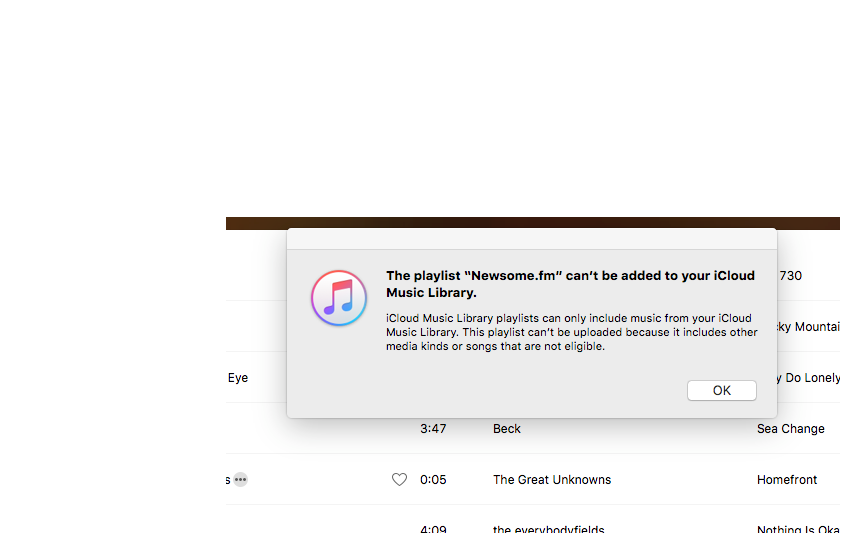
But I am done with Apple Music, at least for the foreseeable future.  There were endless straws, any of which could have broken the camel’s back. But here’s the very last one.  A perfectly confusing, and unhelpful pop-up message, after I tried for the fifth time to import a playlist.

click for a larger view

Perfectly confusing. Completely unhelpful. If I, a huge Apple fan who has been writing on tech since the 90’s, have no idea what this means, or how to fix it, or what the difference is between iCloud Music Library, iTunes Match and/or a buffalo fart, then I’m reasonably sure the typical user doesn’t either.  I want someone to do a feature-length documentary on how this message was written and who thought it was sufficient.   If it takes longer than a few seconds to figure out how to successfully import songs into your music app, your music app is not ready for public consumption.

I’m done.  I give up.  I’ve been beaten.

GoodSongs: Well Worn Soles

wellwornsoles

I get a lot of music to (hopefully) review.  Most of it is good.  Some of it is great. Every now and then a record matches up perfectly with my musical DNA.  Like the one I received recently from Well Worn Soles.  This record is wonderful from the first listen.  It sounds like what I want to hear when sitting on the porch at the farm.  It sounds like music I’d love to hear live.  It sounds like life.  Real, authentic, natural.  When I read their bio, I began to understand why .

They met while enrolled in the bluegrass program at East Tennessee State University and quickly recognized that there was something special about the two of them together.

Yes, there is.  Emerson Wells-Barrett and Chelsea Dix-Kessler make some amazing music.  I could share just about any of the 11 songs on their forthcoming record, “Country/Folk by Well Worn Soles,” which is scheduled for release on August 4, 2015, and you’d love it.  But when someone writes and sings “We were something, me and you.  Two happy spiders, all tangled up in our web,” well, that’s the one I have to pick.

Big Red Fire – Well Worn Soles

There’s a lot more to love on this record.  Chelsea plays a beautiful fiddle and Emerson plays a mean mandolin, among other instruments.  There’s traditional country, there’s bluegrass arrangements, there’s honky-tonk, and there’s even the right amount of humor (humor on a record is like whiskey; a little is good, too much makes my head hurt).  They remind me of so many of my favorite bands.  Freakwater, The Be Good Tanyas, The Everybodyfields (the benchmark for Tennessee duos), etc.

When this record comes out, buy it, stream it, heck, steal it if you have to (not really).  If you like well written, well-played rural American music, you’ll love this record.

I do, and I do.

Keep up with Well Worn Soles via their website, Facebook, and Instagram.

CarPlay Will Be a Requirement for My Next Vehicle

applecarplay

“The big question is, are the auto companies are willing to partner with Apple in this way?”

via Understanding Apple’s Car Strategy | Re/code.

I drive a 7-year-old Toyota Tundra.  I like it.  When my 14-year-old turns 16, she will likely inherit this truck and I’ll get a new one.  When that happens, there are two guarantees.  One, it will be another pickup truck.  Two, it will have Apple CarPlay.

I’m not the least bit interested in an Apple car.  It would be some super-expensive luxury model for rich folks, and I’m a truck guy.  But I am very interested in inserting the Apple ecosystem into my vehicle.  If Toyota sticks to this idiotic decision, I guess this one will be my last Toyota.

Car makers need to stop trying to hack together their own system, and treat CarPlay as a selling point.  Few will buy a new vehicle just to get CarPlay, but I imagine CarPlay will be a distinguishing factor for a lot of people comparing similar cars and trucks.

Apple Watch: River Test

IMG_4150

We spent the last week on the Frio River, in Concan, Texas.  We tubed the river, we swam, we jumped off rocks.  The Apple Watch handled two out of the three like a waterproof champ.  More accurately, the watch handled all of them.  The watch band had a slight problem (that could have been prevented, had I not spaced out for a moment).

For those who don’t know, tubing a river involves a lot of floating, a fair amount of backstroke paddling (during which your watch is dunked in the water repeatedly with every downstroke), and an occasional tumble down the rapids after your tube flips.  I wore my Apple Watch the entire time, and it was completely unaffected by the water.  In fact, after the first hour of the first float, I didn’t think about it again.  My watch spent a lot of time under water, and handled it perfectly.

There is a tall rock we always jump off near the end of one of the floats (Happy Hollow, for those of you fortunate enough to be familiar with the sacred waters of the Frio).  As I was climbing the rock, I thought “I need to hold my watch when I jump, so it won’t fall off.”  But when I jumped, I naturally forgot to do that.  Yep, my watch (sports band) came off when I hit the water.  Fortunately, my buddy Kyle performed some amazing Jacques Cousteau action and managed to find it 10 feet or so beneath the surface on the river bottom.  It was down there for a minute or two, and- no problem.

In sum, the Apple Watch seems pretty darn water-proof, and it is clearly fit for tubing rivers.  Jumping off tall rocks, not so much.

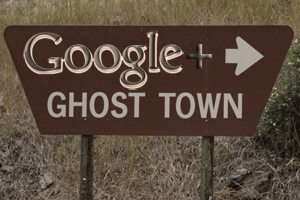
The End of Google+ As We Know It

And I feel fine.

googleplusgt

“It’s no secret that Google+ didn’t quite work out the way Google envisioned….  The focus of Google+ – which still isn’t quite dead – will be on ‘becoming a place where people engage around their shared interests, with the content and people who inspire them.'”

via Google Stops Requiring Google+ For Services Like YouTube And Moves Features Out.

Google+ as an aggregation of all things Google was dead on arrival, because people don’t want to use or be conscripted into all things Google.  But that doesn’t mean Google+ has nothing to offer.  The code is solid, the interface is plenty usable, and it provides a ready-made platform for communities.  For example, David Sparks and Katie Floyd have created quite a Mac Power Users community on Google+.  There’s also a community for Text Expander snippets.

Google may have envisioned Google+ as the new Facebook, but it may end up being the new Google Groups, which was the new newsgroups.  Anyone who’s been around the internet as long as I have remembers the fun, frontier-like days of the newsgroup.  Many of us learned our way around the internet via various newsgroups.

So maybe Google+ won’t be quite as all-encompassing as Google planned.  Maybe it will just be a platform for interest-based communities to gather and share ideas and information.

There’s nothing wrong with that.  In fact, I feel good about it.

Apple Music vs iCloud Photos

beautybeast

“iCloud Photos gets right everything that Apple Music gets wrong.”

via Daring Fireball, discussing a post by Marco Arment.

Amen.  It’s hard to believe the same company that makes Photos and iMovie also makes iTunes and its bolted-on appendage, Apple Music.

One of the reasons Photos is so, so much better than Apple Music is because iPhoto, for all its issues, was a pretty awesome app to begin with.  Yes, Photos is a “new” app, but my point is that Apple already had photos figured out.  Apple has never had music figured out, beyond, you know, the selling it part.  Steve Jobs wrangled the music industry, but the corral is still a hot mess.

And there’s the fact that gazillions of people are buying gazillions of songs and movies and whatnot, making Apple gazillions of dollars, and they are doing it with iTunes.  Changing out the storage room is one thing.  Remodeling the storefront is another thing altogether, sadly.

Backup Update

backupplan15

I wrote about my computer data backup plan a few months ago, noting that:

1.  any backup plan is better than none,
2. most tech-savvy people who backup over think it and go overboard, usually with redundancy overkill, and
3. all you really need to back up are photos, music, data files (documents, scans, etc.), and videos, but you should have a safety net.

I have never restored a complete hard drive from a backup, because on the rare occasions I’ve lost a drive, I’ve taken the opportunity to do a clean install of the operating system, and imported only the stuff I still needed.  Yes, everyone should do a complete system backup, but primarily for redundancy and as a safety net.  I backup both my Mac and my MacBook Pro to a Synology NAS device, via Time Machine.  Again, I can’t imagine a scenario in which I’d restore an entire drive, but it’s so easy to do a Time Machine backup, and it’s good to have a full (and redundant) backup, just in case.  Another approach would be to clone your hard drive to network device or an external USB drive via Carbon Copy Cloner (a great and easy to use app).

But when I need to find something I’ve lost, the first place I look is my content-specific backups (e.g., the backups of certain files, not the Time Machine backup of the entire hard drive.).

The migration to the cloud is changing the conventional wisdom on backups, making some traditional backup techniques unnecessary, and providing many options to put data in many places.  It’s far too easy these days to scatter your digital bits all over the internet, but it’s better to be deliberate about how and where you backup your data.

Let’s take a look at the categories of things to be backed up, because that will show what’s easy and what’s not, what’s taken care of more or less automatically as we migrate to the cloud, and what needs help getting there.

Photos: There are a million ways to automatically backup photos to the cloud. DropboxApple’s Photos app (which is what I use), Google Photos, Flickr, Amazon, etc.  So photos are easy- just pick one and stick with it.

Music: There are half a million ways to back up your music to the cloud, assuming you own some of the music you listen to and haven’t gone all-in on streaming (most of my music is played via Sonos playlists comprised of Spotify streaming tracks (lots of good music can be heard via that link) and some old, hard to find stuff I have on the network.  The cloud-based choices for storing owned music include Amazon, Apple Music, and Google Music.  I use Google Music to store in the cloud and access my owned music, and so should you.  It will accept a huge library (50,000 song limit) and it’s easy to access it via computers and devices.  Mac people are genetically predisposed to try to make the Apple solution work, but Apple Music is a train wreck, so avoid it for now.

Data files: Now it gets a little more complicated.  There are lots of options, but you have to know where your documents are, so you know what folders to back up.  Mac users can keep documents, spreadsheets and other iCloud enabled  files in iCloud (that’s what I do), but there are always lots of other files that don’t naturally fit into the Pages/Numbers/Mac app iCloud workflow (for me, most notably song files for new songs I’m working on and scanned documents, as I’ve been paperless for close to a decade).  I back that stuff up to my Synology NAS via Carbon Copy Cloner.

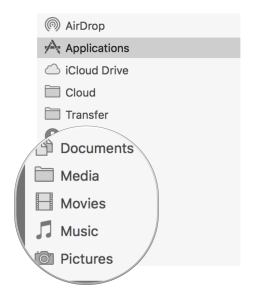
I don’t want to gloss over an important issue mentioned above. To do an effective targeted backup of data files, you have to know where they are.  This means creating, managing and being disciplined about the folder and storage structure on your computer.  By way of example (any logical approach will do), here’s mine.
folderstructurebackup

The circled folders contain subfolders where I keep all of the associated data files.  The stuff in there comprises the data I want to backup, one way and another.

Everyone who uses a Mac should be syncing their contacts and calendar via iCloud, which will take care of backups for you.  To the extent you aren’t keeping your contacts and calendar online via one service or another, (a) why in the heck not?, and (b) make sure the associated data files are located in one of the data folders backed up as described above.

Videos: Here comes the hard part.  Videos are both important (especially home movies, etc.) and large (I have 600 GB of home movies).  Unlike photos and music there aren’t a horde of free or close to free options to automatically and effectively back them up.  Previously, I backed up my movies to Amazon Glacier, via Arq (see the prior post for more details).  This worked fine, and was cheap. I’ve never had to recover videos from the backup, but I know that one of the trade-offs with Amazon Glacier is the delay and time it takes to recover data. When Amazon released Amazon Cloud Drive– unlimited cloud space for $60 a year, that seemed like a perfect place to store backup files.  $60 a year is even cheaper than Glacier.  When Arq released an update that supports Amazon Cloud Drive, I decided to give it a try.  I switched my Arq preferences to back up my Movies folder to Amazon Cloud Drive.  A week later (600 GB takes a while to upload), my videos are residing happily on Amazon Cloud Drive.

In sum, do a complete back up of your computer for redundancy, let the cloud-enabled app you choose handle your photos automatically, put your owned MP3s in Google Music, and organize and backup your other data files to either Amazon Cloud Drive via Arq or an external or network drive via Carbon Copy Cloner.

Easy peasy