Apple Watch: River Test

IMG_4150

We spent the last week on the Frio River, in Concan, Texas.  We tubed the river, we swam, we jumped off rocks.  The Apple Watch handled two out of the three like a waterproof champ.  More accurately, the watch handled all of them.  The watch band had a slight problem (that could have been prevented, had I not spaced out for a moment).

For those who don’t know, tubing a river involves a lot of floating, a fair amount of backstroke paddling (during which your watch is dunked in the water repeatedly with every downstroke), and an occasional tumble down the rapids after your tube flips.  I wore my Apple Watch the entire time, and it was completely unaffected by the water.  In fact, after the first hour of the first float, I didn’t think about it again.  My watch spent a lot of time under water, and handled it perfectly.

There is a tall rock we always jump off near the end of one of the floats (Happy Hollow, for those of you fortunate enough to be familiar with the sacred waters of the Frio).  As I was climbing the rock, I thought “I need to hold my watch when I jump, so it won’t fall off.”  But when I jumped, I naturally forgot to do that.  Yep, my watch (sports band) came off when I hit the water.  Fortunately, my buddy Kyle performed some amazing Jacques Cousteau action and managed to find it 10 feet or so beneath the surface on the river bottom.  It was down there for a minute or two, and- no problem.

In sum, the Apple Watch seems pretty darn water-proof, and it is clearly fit for tubing rivers.  Jumping off tall rocks, not so much.

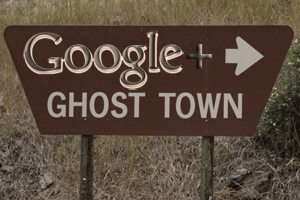
The End of Google+ As We Know It

And I feel fine.

googleplusgt

“It’s no secret that Google+ didn’t quite work out the way Google envisioned….  The focus of Google+ – which still isn’t quite dead – will be on ‘becoming a place where people engage around their shared interests, with the content and people who inspire them.'”

via Google Stops Requiring Google+ For Services Like YouTube And Moves Features Out.

Google+ as an aggregation of all things Google was dead on arrival, because people don’t want to use or be conscripted into all things Google.  But that doesn’t mean Google+ has nothing to offer.  The code is solid, the interface is plenty usable, and it provides a ready-made platform for communities.  For example, David Sparks and Katie Floyd have created quite a Mac Power Users community on Google+.  There’s also a community for Text Expander snippets.

Google may have envisioned Google+ as the new Facebook, but it may end up being the new Google Groups, which was the new newsgroups.  Anyone who’s been around the internet as long as I have remembers the fun, frontier-like days of the newsgroup.  Many of us learned our way around the internet via various newsgroups.

So maybe Google+ won’t be quite as all-encompassing as Google planned.  Maybe it will just be a platform for interest-based communities to gather and share ideas and information.

There’s nothing wrong with that.  In fact, I feel good about it.

Apple Music vs iCloud Photos

beautybeast

“iCloud Photos gets right everything that Apple Music gets wrong.”

via Daring Fireball, discussing a post by Marco Arment.

Amen.  It’s hard to believe the same company that makes Photos and iMovie also makes iTunes and its bolted-on appendage, Apple Music.

One of the reasons Photos is so, so much better than Apple Music is because iPhoto, for all its issues, was a pretty awesome app to begin with.  Yes, Photos is a “new” app, but my point is that Apple already had photos figured out.  Apple has never had music figured out, beyond, you know, the selling it part.  Steve Jobs wrangled the music industry, but the corral is still a hot mess.

And there’s the fact that gazillions of people are buying gazillions of songs and movies and whatnot, making Apple gazillions of dollars, and they are doing it with iTunes.  Changing out the storage room is one thing.  Remodeling the storefront is another thing altogether, sadly.

Backup Update

backupplan15

I wrote about my computer data backup plan a few months ago, noting that:

1.  any backup plan is better than none,
2. most tech-savvy people who backup over think it and go overboard, usually with redundancy overkill, and
3. all you really need to back up are photos, music, data files (documents, scans, etc.), and videos, but you should have a safety net.

I have never restored a complete hard drive from a backup, because on the rare occasions I’ve lost a drive, I’ve taken the opportunity to do a clean install of the operating system, and imported only the stuff I still needed.  Yes, everyone should do a complete system backup, but primarily for redundancy and as a safety net.  I backup both my Mac and my MacBook Pro to a Synology NAS device, via Time Machine.  Again, I can’t imagine a scenario in which I’d restore an entire drive, but it’s so easy to do a Time Machine backup, and it’s good to have a full (and redundant) backup, just in case.  Another approach would be to clone your hard drive to network device or an external USB drive via Carbon Copy Cloner (a great and easy to use app).

But when I need to find something I’ve lost, the first place I look is my content-specific backups (e.g., the backups of certain files, not the Time Machine backup of the entire hard drive.).

The migration to the cloud is changing the conventional wisdom on backups, making some traditional backup techniques unnecessary, and providing many options to put data in many places.  It’s far too easy these days to scatter your digital bits all over the internet, but it’s better to be deliberate about how and where you backup your data.

Let’s take a look at the categories of things to be backed up, because that will show what’s easy and what’s not, what’s taken care of more or less automatically as we migrate to the cloud, and what needs help getting there.

Photos: There are a million ways to automatically backup photos to the cloud. DropboxApple’s Photos app (which is what I use), Google Photos, Flickr, Amazon, etc.  So photos are easy- just pick one and stick with it.

Music: There are half a million ways to back up your music to the cloud, assuming you own some of the music you listen to and haven’t gone all-in on streaming (most of my music is played via Sonos playlists comprised of Spotify streaming tracks (lots of good music can be heard via that link) and some old, hard to find stuff I have on the network.  The cloud-based choices for storing owned music include Amazon, Apple Music, and Google Music.  I use Google Music to store in the cloud and access my owned music, and so should you.  It will accept a huge library (50,000 song limit) and it’s easy to access it via computers and devices.  Mac people are genetically predisposed to try to make the Apple solution work, but Apple Music is a train wreck, so avoid it for now.

Data files: Now it gets a little more complicated.  There are lots of options, but you have to know where your documents are, so you know what folders to back up.  Mac users can keep documents, spreadsheets and other iCloud enabled  files in iCloud (that’s what I do), but there are always lots of other files that don’t naturally fit into the Pages/Numbers/Mac app iCloud workflow (for me, most notably song files for new songs I’m working on and scanned documents, as I’ve been paperless for close to a decade).  I back that stuff up to my Synology NAS via Carbon Copy Cloner.

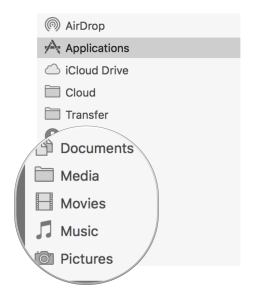
I don’t want to gloss over an important issue mentioned above. To do an effective targeted backup of data files, you have to know where they are.  This means creating, managing and being disciplined about the folder and storage structure on your computer.  By way of example (any logical approach will do), here’s mine.
folderstructurebackup

The circled folders contain subfolders where I keep all of the associated data files.  The stuff in there comprises the data I want to backup, one way and another.

Everyone who uses a Mac should be syncing their contacts and calendar via iCloud, which will take care of backups for you.  To the extent you aren’t keeping your contacts and calendar online via one service or another, (a) why in the heck not?, and (b) make sure the associated data files are located in one of the data folders backed up as described above.

Videos: Here comes the hard part.  Videos are both important (especially home movies, etc.) and large (I have 600 GB of home movies).  Unlike photos and music there aren’t a horde of free or close to free options to automatically and effectively back them up.  Previously, I backed up my movies to Amazon Glacier, via Arq (see the prior post for more details).  This worked fine, and was cheap. I’ve never had to recover videos from the backup, but I know that one of the trade-offs with Amazon Glacier is the delay and time it takes to recover data. When Amazon released Amazon Cloud Drive– unlimited cloud space for $60 a year, that seemed like a perfect place to store backup files.  $60 a year is even cheaper than Glacier.  When Arq released an update that supports Amazon Cloud Drive, I decided to give it a try.  I switched my Arq preferences to back up my Movies folder to Amazon Cloud Drive.  A week later (600 GB takes a while to upload), my videos are residing happily on Amazon Cloud Drive.

In sum, do a complete back up of your computer for redundancy, let the cloud-enabled app you choose handle your photos automatically, put your owned MP3s in Google Music, and organize and backup your other data files to either Amazon Cloud Drive via Arq or an external or network drive via Carbon Copy Cloner.

Easy peasy

Here’s Why I Refuse to Consider Social Media a News Source

stupidfbnews

I’ve said for years that newspapers and magazines are obsolete media.  By the time it’s in a paper form, I either already know about it or don’t care about it.  I’m not kidding, the combination of caring about news and then getting it from a newspaper the next day seems like a logical disconnect Evel Knievel couldn’t jump over on a rocket bike.  I find the evening television news to be only slightly less untimely.

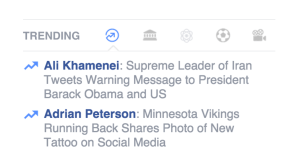
But that doesn’t mean I’m ready to get my news from social media.  The screen capture above, just taken from my Facebook page, explains why, perfectly.

The fact that some football player’s new tattoo is in a list (of 2 items) with the increasing tension in the Middle East tells me that what I thought was only the funniest movie ever made may also have been an accurate prediction of things to come.

If you want to know where I do get my news, there are three primary sources:

1. Rancho DeNada Times, the real time news aggregation page I created years ago.  I can quickly scan the headlines and see if there is anything I want to know about.

2. My RSS feeds, via Feedly.  I subscribe to Google News, The Atlantic, and NPR.

3.  NPR audio, via XM radio if I’m driving or via my Amazon Echo if I’m at home.

If there’s something major happening, I’ll tune into CNN via the internet or on my TV, but that’s a rare occasion.

American culture is celebrity-obsessed, serially focused on the media created drama-of-the week, and attention deficient.  As such, it’s important to decide where you get your news from.  Otherwise, your experience may start to look like this:

Apple Music Is Missing Some Notes

brokenrecords

“Apple Music is just too much of a hassle to be bothered with. Nobody I’ve spoken at Apple or outside the company has any idea how to fix it, so the chances of a positive outcome seem slim to none.”

via Apple Music is a nightmare and I’m done with it.

Here’s my conclusion.  Apple Music is geared towards young people who grew up in an era when few of their friends bought, listened to or cared about the entire album experience.  They just want to hear music they like, and maybe save (e,g,. buy, add or steal) a song or two here and there.

That may work out OK for lots of people, but it’s not going to work for people like me who have spent decades compiling, organizing and curating a vast music library.  I find the Apple Music experience to be a jumbled mess (compare just about any screen in Apple Music to the comparable one in Spotify; I gave up on Apple Music when I realized it was going to take more time figuring it out, slogging through its interface and getting things organized the way I want than I would spend enjoying the results).  I’m not interested in “personally curated playlists,” because no persons are curating playlists of the sort of music I like (and, as I noted the other day, no personally curated playlist will ever top Pandora when it comes to finding new music).  Neither am I naïve enough to think the marketing scheme feathered up to look like a way to “connect” with artists is anything more than a new age advertising platform.  America is celebrity-obsessed, so I understand the logic behind it.

But like the rest of Apple Music, it’s not for me.

Radio Test: Spotify vs Apple Music

oldradio

For the past few days, I’ve been experimenting with Apple Music.  While I am naturally skeptical of anything that involves iTunes, Apple has already proven, with the sale of music downloads, that it can revolutionize an industry.  Can it do for streaming and radio what it did for music sales?  That’s hard to say, largely because there are already a lot of streaming and radio options out there, many of which provide elegant solutions, and all of which have a head start on Apple in the streaming space.

I’m putting together a podcast about my views on Apple music overall, but I thought I’d take a look at one specific part of the music experience: radio.

First, if all you want is streaming, personalized radio, stop reading right now and stick with Pandora.  Pandora is, by far, the most effective and rewarding solution for personalizing radio stations.  Anyone who tells you different is confused or lying.  I have very specific music tastes (alt. country, meaning countryish songs played by rock musicians; as distinguished from Americana, which I view largely as old cats trying to be philosophical or clever), and I know virtually nothing about the artists that play on mainstream radio in 2015.  Nevertheless, Pandora does an excellent job of understanding what I like and providing me with music I’ve never heard that suits my tastes.

But if radio is merely a part of your overall music experience, and you also want the ability to listen to records on demand and to build custom playlists, etc., many of the broader music applications provide radio as a feature.  Let’s compare Spotify, my current primary music service, and Apple Music to see how they do with creating a radio station tailored to my musical preferences.

Again, because I don’t listen to much new, mainstream music, it’s important to pick a good starting point.  Both Spotify and Apple Music let you start a radio station based on a specific song.  Because it’s one of the best songs I’ve heard recently, and because I think the title makes a good name for a radio station, I decided to start with” Blue Light” by Jimbo Mathus.  Let’s see how each service does creating a radio station from that song.

For this experiment, I’ll start a radio station with “Blue Light,” play 15 subsequent songs, thumb the good and bad songs up and down and see what happens.  In the list below, Great means I thumbed up the song, Good means I didn’t thumb it up, but like it, and Bad means it got a thumbs down.  The number is my rating from 1-5 on how well I think it fits the vibe established by the initial song and any prior thumbs up or down.

Spotify

1. The Black Lillies – The Soul of Man (Good; 4)
2. Patterson Hood – 12:01 (Good; 3)
3. Otis Gibbs – When I was Young (Great; 5)
4. Slaid Cleaves – Horseshoe Lounge (Great; 5)
5. Catherine – The Black Lillies (Good; 3)*
6. Nothing’s Gonna Change the Way You Feel – Justin Townes Earle (Great; 5)
7. Tillamook County Jail – Todd Snider (Good; 3)
8. Moving On – Lauderdale (Great; 5)
9. Come Back Little Star – Patterson Hood (Good; 4)*
10. Gulf Road – James McMurtry (Good; 4)**
11. By the Wayside – The Black Lillies (Good; 3)***
12. Where Only the Graves Are Real – Otis Gibbs (Good; 5)*
13. Smile When You Call Me That – Jakob Dylan (Bad; 2)
14. Cemetery Road – Fred Eaglesmith (Great; 5)
15. Black T Shirt – Slaid Cleaves (Good; 5)*

* I didn’t thumb this down because I didn’t want to confuse the algorithm, but I consider it a fail if a station plays too much of the same artist.
** This excellent song would warrant a thumbs up, but I’m not generally a McMurtry fan, so I didn’t thumb it up because I thought that would result in more of his songs than I prefer.
*** 3rd song out of 11 gets a thumbs down on principle.

Summary: Spotify did a decent, but not fantastic, job with a pretty obscure song as a starting point.  Clearly, it has a harder time with a more narrow genre, which is a little surprising since there are a ton of songs on Spotify that fit within my target, including those on Rancho Radio, my hand-curated playlist.

Apple Music

1. Lonely Days – Deadstring Brothers (Great; 5)#
2. I Don’t Wear No Sunglasses – Watermelon Slim (Bad; 2)
3. Knockdown South – Jimbo Mathus (Bad; 2)
4. Ballad of Henry & Jimmy – Paul Burch (Good; 4)
5. Fightin’ – Cedric Burnside & Lightnin’ Malcolm (Bad; 1)
6. Goin’ Down South – North Mississippi Allstars (Bad; 2)##
7. Asked My Captain – Jimbo Mathus (Good; 3)###
8. Only Time Will Tell – The Better Angels of Our Nature (Great; 5)
9. John Henry – Furry Lewis (Bad; 2)####
10. Loose Diamonds – Jimbo Mathus (Good; 5)#####
11. Shotgun – Ashes and Angels (Good; 4)
12. Wild Bill Jones – Luther Dickinson (Great; 5)
13. In My Time of Dying – Alvin Youngblood Hart (Bad; 2)##
14. Self – Jimbo Mathus (Good; 5) #####
15. Goin’ Down South – Jake Leg Stompers (Bad; 2)

I have to add a 16, because it’s a great cover of a great song…

16. They Don’t Know – Lydia Loveless (Great; 5)

# Great, great start.
## This is an awesome jam of a song, but nothing like Blue Light.
### I didn’t thumb this down because I didn’t want to confuse the algorithm, but I consider it a fail if a station plays too much of the same artist.
#### Very clearly, Apple Music incorrectly made this a blues station.
##### 3rd or more song out of 11 gets a thumbs down on principle.

Summary:  Apple Music also struggles mightily with an obscure starting point.  I don’t like the excessive artist repetition, or the fact that it somehow decided I was making a blues station.  On the other hand, Only Time Will Tell  by The Better Angels of Our Nature was the best new song I heard on either station.

Conclusion:  As noted above, if you want radio, use Pandora.  As a part of a larger music service, neither Spotify nor Apple Music covered itself in radio glory, but Spotify is currently the better of the two.

This Was Going to Be a Review of Blogo

The desktop blogging app for Macs.

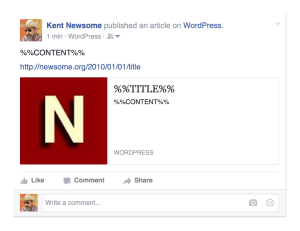
Until, after writing my test post, I tried to “preview” it, and without warning this happened.

blogonogo

And this.

blogonogo2

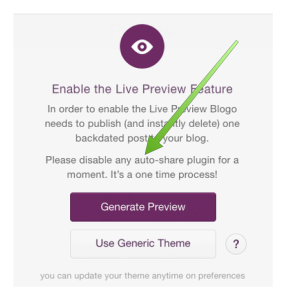
I have my WordPress.Com account connected to my Facebook and Twitter accounts (though I don’t always automatically share posts to Facebook), and when I previewed the blog post, the app apparently published the post to Facebook and Twitter.  And to my email subscribers.  Thankfully, I subscribe to my own email feed, and was alerted by an email that a new post had been (prematurely) published.

Not cool.  Not cool at all.

Interestingly, the non-post did not publish to my blog, only to the sharing locations and my email feed.

Blogo looks promising based on the screenshots and app store reviews.  But an app like this needs to be written in a way that it will not publish anything anywhere until you are completely and clearly ready to do so.

I may take another look later, but for now Blogo is a no go.

Update: Blogo tells me the app warns you to turn off auto-sharing during the setup process.  I was moving so fast, I didn’t read the entire message.  My bad.

blogonotice


The TV Walls Are Starting to Crumble

cordcutting

Hulu is a great idea, with a horrible execution (so far), because of ads.  Like many people, I spend significant amounts of money each month (Netflix, Spotify, XM radio, DVRs, etc.) in an effort to avoid ads.  Hulu has previously been unbearable because not only does it have ads, it has a lot of repetitive, brain-inflaming ads.  If I have to choose between ads and a cord, I’ll take the cord.  That Hobson’s choice has been one of the biggest issue in cord-cutting.  Now it seems like that’s about change.

Hulu is planning to offer an ad-free plan.  Apple inches closer and closer to announcing and releasing its streaming television service (the sleuth in me wonders if Hulu’s ad-free announcement is an effort by its owners- some of the very nervous content providers-  to get in front of the forthcoming Apple streaming avalanche.).  Weekly, we see new announcements from content providers making their content available via streaming, and apart from the traditional and obsolete cable bundles.

It will take some time, but the walls are crumbling and one thing technology has shown us is that once cracks start appearing in obsolete, unwanted gatekeeper monopolies, those cracks are almost impossible to repair.  The generation of consumers, like my kids, who have never felt tied to a cord will ensure victory for the cord-cutters (by way of example, my daughter loves Teen Wolf, but isn’t watching the current season because she doesn’t know or care what channel it’s on or how to record it on the DVR; “I’ll just wait ’til it’s on Amazon or Netflix.”).  The only question is how long it will take.

I still have a DirectTV package, which I would love to abandon in favor of something as close to a la carte streaming as possible.  When I can get the channels I want reliably and at a comparable cost, I’ll cut the cord, for sure.  The big, unspoken, hitch in this giddy-up is the requirement for fast, reliable broadband (a decade or so from now, all the pipes and waves currently delivering television content will be delivering data, which will vastly increase the size of the pipe, but for the time being pipe size will be an issue.).  My broadband at home is plenty fast enough to accommodate all the content my screen-addicted family wants to consume.  The farm, like most of rural America, is another story.  I am fortunate enough to have fairly reliable wireless broadband at the farm (because I am at the top of a hill with a good line of sight to the tower), but I am the exception, and the broadband I have, while perfectly adequate for web surfing and the occasional Apple TV download, is nowhere near fast and wide enough to accommodate mass streaming consumption.  I don’t know how this problem can be solved, but once cord-cutting becomes a more realistic option, at least we’ll have one less obstacle standing between us and our scissors.