How to Point a Domain to a Blog Category

One of my long-time and oft-stated problems with all of the so-called social networks is the brand and attention dilution that occurs when content producers cast their content across numerous networks, sending readers on a wild goose chase as they try to keep up with everything.  While I’ve done a lot better than most when it comes to keeping my content centered around my web site (Newsome.Org), I too have been lured into spreading myself too thin, network-wise.

I’m going to fix that.  I am in the process of consolidating most of my content and much of my applications.  When all is said and done, I will be a power user of this blog and a small number of ancillary networks (maybe as few as two: Twitter and Facebook).  Additionally, I intend to shrink my cloud toolbox down to a manageable size.  More on that later.

Today I want to take the first step, which is to consolidate our music recommendation blog, which was previously hosted at Tumblr, into Newsome.Org.  Specifically, I want that content to be included here- under the Music category.  But I want to continue to use the cool and valuable top level domain (GoodSongs.Com) that I have been using for song recommendations.

Here’s how that can be done.

What You’ll Need

To have this need and to make this work, you’ll need a blog platform that includes categories, tags or some other naming convention that has a URL.  I use WordPress, and I have a Music category (see the menu at the top of the page).  The URL for that category is http://www.newsome.org/category/music.

You’ll also need a domain (or a sub-domain) separate from the one that you use for your blog, that you want to point to the category.  As noted above, I am going to cause GoodSongs.Com, which previously pointed to a custom domain at Tumblr, to be redirected to my Music category here.

Use a Redirect

One way to redirect a domain to a blog category is through URL redirection  or a refresh meta tag.  A redirection makes sense if you have a long-standing or popular site that you want to move, so you can preserve links and Google juice.  If you, like me, just want to use your domain as an alternate address for a blog category- or if you don’t have the technical chops or server access to do a redirection, web forwarding might be your solution.

Configure Web Forwarding

I use Network Solutions as my primary domain registrar.  Here’s how you configure your domain for web forwarding via Network Solutions.  The process is probably similar at other registrars, but you may need to explore the configuration dashboard and maybe the help files to find the right pages and settings.

From your primary Dashboard, select the Web Forwarding option.  At Network Solutions, it’s under the Domain Names tab at the top of the page.
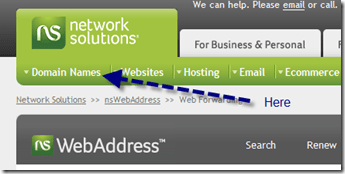
image

From the resulting page, select the domain you want to forward, then click on “Continue with Web Forwarding.”

image

On the next screen, fill in the URL of the category in the blank.  Web masking won’t work if your URL is a directory or database, but that’s OK.  The purpose is to get the readers to the new location at the blog category page.  You can brand the forwarded domain from within the category.

It Might Cost a Little

I don’t know what other registrars charge for web forwarding.  Network Solutions charges $12.00 a year.  A buck a month doesn’t seem too bad for a little consolidation.  Particularly consolidation that can be accomplished (or changed) via a few clicks on a web page.  Simple is good.

Don’t Forget to Feed Your Feed

If you have an RSS feed at the domain you are forwarding to the blog category, don’t forget to update the feed once you make this change.

In my case, I already had an RSS feed for GoodSongs.Com, which I publish via Feedburner.  My WordPress theme creates a feed for each category, so all I had to do was change my feed location for GoodSongs.Com to the category feed.

From the main Feedburner dashboard for the applicable feed, select Edit Feed Details.
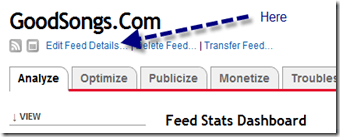
 image

Then replace the current “Original Feed” with your new one.

image

That’s It

Once you’ve taken those simple steps, your domain will be forwarded to the blog category you selected.  Notice how GoodSongs.Com now points to the Music category here at Newsome.Org.

That’s step one in my consolidation and simplification process.  Stay tuned for more.

GoodSongs: A Fine Alt. Country Mix

gslogo

As a part of my online simplification and consolidation project (more on this later), I am moving our music recommendation blog, GoodSongs.Com, to the Music category here at Newsome.Org.  We’ll post a GoodSongs music recommendation list no more than once a week, where we’ll feature a wide variety of off-the-beaten path music.

Here’s the first installment of our hand-picked music recommendations.

Purchase links are at Amazon unless otherwise noted.

image

Steve Pride – Big Time.  Steve Pride and His Blood Kin do the excellent Welcome to the Big Time off of the also excellent Pride on Pride.

Star Room Boys – Angel Flying too Close to the Ground.  Maybe the best country band ever doing a live one (via the highly recommended music blog, Southern Shelter).

image

South Filthy – Sandra Lynn’s Blues.  One of my favorite songs, from You Can Name It Yo’ Mammy If You Wanna.

image

Gosdin Brothers – There Must Be Someone I Can Turn To.  The excellent Gosdin Brothers, from the best country rock record you’ve probably never heard.  With the great Clarence White on guitar.

image

Four Year Bender – New Orleans LamentFour Year Bender does an excellent song about the Crescent City.

image

Sixty Acres – Saint Rose.  Great song from their excellent record, Good Ethel.

image

Okra All-Stars – She’s Taken All My Toys Away.  From from their excellent self-titled 1999 album.

image

The Buckets – Postmarked Virginia.  My buddy Ray’s band.  Buy their records at CD Baby

image

Mount Pilot – 3 Years in October.  Off of the great but hard to find Help Wanted Love Needed Caretaker album.

image

The Figments – Feel the Fields, off of All the Gone Days.  Available at CD Baby.  This is as good as a song can get.

These are great records, by some fantastic bands.  Go buy these records and support people who make this great music.

Artist Notice: I am a musician and songwriter.  I do these posts to draw attention to great music in the hopes that our readers will buy these records and allow these artists to continue making great music.  If you don’t want us to feature your music, let us know and we’ll take the song file down immediately.  On the other hand, if you are an artist who does the sort of music we feature, let us know.  We’re always looking for new artists to feature.

The Lamest Spam I Have Ever Received

I got an email the other day that makes those 419 scam emails seem like Pulitzer Prize material.  Let’s break it down (my comments are in italics).

From: [Sender of Lame Spam]
Sent: February **, 2010
To: [My Email Address]
Subject:

[The first hint that this was a lame spam from a clueless spammer was the fact that he (a) didn’t know that email should have or (b) forgot to add a Subject.  By itself, this could be an inadvertent oversight, but oh no, much more lameness to come.]

Dear Valued Partner:

[This is my all time favorite salutation.  From now on when you speak to me, or even think about me, I require that you address me as “Valued Partner.”  Nothing could possibly demonstrate any more clearly that this dude blasted a bunch of spam and has no idea who he’s trying to talk to.  The only thing that would have been better is if he’d addressed me as Buddy or Sport.  Or Chief.  Chief would be cool.]

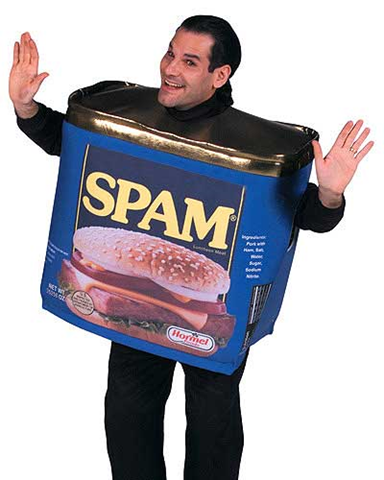
image My name is [Spammer] and I am the [Cat Daddy] with [Company of Spammer], a search firm. I wanted to take a moment to
introduce myself and my firm to you, and to let you know that based upon your practice area  [You can tell he has no absolutely idea what I actually do and instead refers cleverly to my “practice area.”  He blasted this to a universe of “Valued Partners,” “Buddies,” “Sports” and “Chiefs” and it would be far too burdensome to actually research all those people.  Apply a Universal BS Translator to this and it really says “I’m too lazy to identify real leads, figure out who the heck I’m trying to communicate with and suggest possible jobs that might actually be a good fit, so I’m going to throw some terrible BS against the wall and see if anyone is desperate enough that it sticks.”], we currently have a number of very exciting opportunities which I felt you might be interested in hearing about. [Sure you do.  You don’t know my name, what I do or even who you’re writing to, but you have the perfect job picked out for me.  Wow. Thanks.]

I appreciate your time and consideration [But mostly I appreciate mine, because blasting out a ton of spam is faster than actually developing leads.], and if I can ever be of service, either now or in the future, please don’t hesitate to give me a call.

Best regards,

[Sender of Lame Spam]

How to Set Up Email Subscriptions for Your Blog

image There are a lot of nerds out there- like me for example- who think that RSS and feed readers are the only way online information should be consumed.  We feel bad about being nerds, until we remember there is a whole class of uber-nerds, who think that not only information,  but every part of life, is derived from Twitter.  Or, God forbid, via Google Buzz(kill).  Just kidding, both of those guys are smart dudes and friends of mine, in addition to being uber-nerds.
But enough about those so-called social networks.

Because today I want to show you how to do a subscription service that someone with tan lines might actually use.  An email subscription.  You remember email, right?  That service that millions of people who either (a) have never heard of or (b) laugh hysterically at those who use Twitter use every day.  All day.

So let’s assume that (1) you’ve been outside in the past 48 hours and (2) you’d like to put together an email subscription service for your blog.

Step 1: Pick a Service

If you use Feedburner for your RSS feed, this is pretty easy.  Use Feedburner.  The other major choice is Feedblitz.  I used Feedblitz for a while, but its navigation structure makes Facebook’s byzantine navigation system seem downright GPS-like.  Plus, Feedblitz wants you to to (cover your ears webkidz) pay for its premium service.  So as a part of my forced march to WordPress and Blogger Custom Domains, I decided to take my email party back to Feedburner.

Step 2: Configuring Feedburner

Here’s how to configure your Feedburner account to permit and manage email subscriptions.

From your Feedburner dashboard, click on Publicize and then Email subscriptions.

image

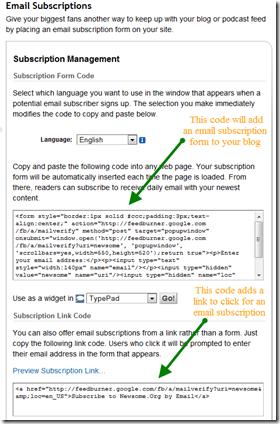
From the Subscription Management page, you can get code to embed a form or a link on your blog.  You can also enable a notification feature that will inform you when someone unsubscribes.  I wish Twitter had that feature.

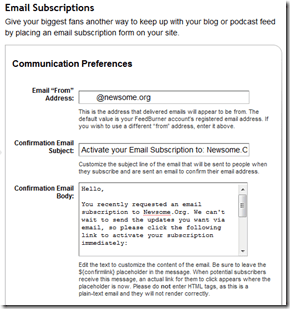
Next, go to the Communications Preferences page.  From here, you can set up your email address and the subject line and message for your email confirmations.

image

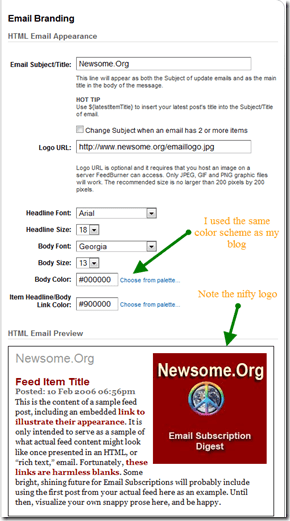
The next stop is the Email Branding page.  Here’s where you can really customize the look and feel of your emails.  You want the email to have the same branding, look and feel as your blog.  Note that you can create and upload a custom logo that will appear in your emails.

image

Finally, you can set your time zone and preferred delivery time via the Delivery Options page.

Step 3: Displaying the Subscription Option on Your Blog

Once you have configured your email subscription service, you’ll need to make potential subscribers aware of it.  Many WordPress themes and Blogger templates are pre-configured to display email subscription information.  See the top of this blog (WordPress) or Err Bear Music (Blogger) for examples.

image

Even if your theme or template doesn’t come pre-configured, you can easily add a subscription form or link, by adding the code that Feedburner provides on the Subscription Management page.

In addition to displaying the option on your blog, you should consider adding a link to your email signature, as those who would be most interested in an email subscription may not visit your blog, but do use and see email.

Step 4: Post as Normal and Let the Service Do the Work

After setting up your service and displaying a subscription form or link, your email subscribers will receive one email each day containing your blog posts for that day.

Here is a sample, from one of my recent subscription emails.

image

Step 5: While You’re Thinking About It, Subscribe to Newsome.Org Via Email

By clicking here.

That’s it.  Let the emailing begin!

Record LPs to CDs Without a Computer

As most of you know, I’m a big music fan, having bought records, 8-tracks, cassettes, CDs and MP3s pretty much non-stop since I bought my first LP (Glen Campbell) back in the mid-sixties, and having been a songwriter and (starving) musician for years.

The combination of music and evolving technology means I often find myself with some great records on outdated media.  Generally, this means great LPs that aren’t available on CD or MP3.  I’ve converted quite a few records, and did a tutorial that remains one of my most viewed posts.

The approach I describe in that tutorial is as workable today as it was the day I wrote it.  But recently I decided to try another approach.  I wanted to bypass the computer altogether, and record directly from LP to CD.  Then, and only then, do I want to move or rip the songs to my MP3 library.

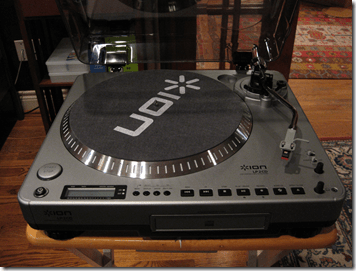
The tool I chose to do this is an Ion LP2CD turntable.  This is one versatile turntable.  It will connect to your receiver or your computer (via USB), and it has a built-in CD burner that will burn the LP directly to CD.  Or, actually, to its internal flash drive, and then to a CD.  This intermediate step is a good thing, since you can trim the song files, correct any glitches in the automatic song splitting and even reorder the songs, before you burn the CD.

Sweet, huh?

Unboxing

image

The turntable is fairly compact for one that includes a built-in CD burner.  I was able to put it together without reading the instructions.  Two hints: look closely for all the small pieces (the 45 insert, the counter weight for the arm, the needle, etc.), which come taped to various parts of the packing styrofoam; and don’t forget to pull the rubber drive belt around the spindle (see page 5 of the Quickstart Guide).  It took me less than 5 minutes to get the turntable put together,  plugged in and ready to rock and roll.

Picking a Test Record

image

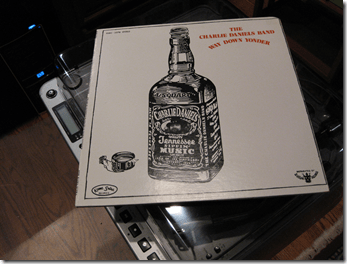
One the the best records you’ve never heard is The Charlie Daniels Band’s 1974 record, Way Down Yonder.  This is pre-Devil Went Down to Georgia Charlie Daniels, and sounds much more like the Allman Brothers or good, early and bluesy Elvin Bishop, than later era Charlie.  Sadly, it’s not available on CD or MP3.  But I have the record, and decided to use it to test the turntable.

Recording

The turntable has a handy headphone jack, so you can hear what you’re doing.

To record an album, put it on the turntable, play it a bit to get the sound levels right.  There’s a recording level knob and a level indicator on the led screen.

image

Once you’re ready, put the turntable in “INT” mode (internal flash drive), put the needle where you want to start, press Record button (the red light will come on), press the Play/Pause button, and then immediately the Start/Stop button, to begin the recording.  The turntable will attempt to automatically split the tracks based on gaps.  It does a good job, unless the record has a fair amount of scratches.  Fear not, it’s easy to manually split tracks once you’ve finished the recording.

In my test, Side A, which had a few scratches, didn’t split perfectly, but Side B did.

Splitting and Trimming

After you’ve recorded the record onto the flash drive, you can split tracks by navigating via Fast Forward or Reverse to the desired place and pressing the Split button.  You can also easily split out and erase long silences between tracks, if necessary.

In sum, this process works very well.  It’s easy, and even fun.

Recording to CD

Once you’re ready, recording to a CD is as easy as putting a blank CD-R into the CD drive and pressing the Burn CD button.  It literally could not be any easier.

The Results

The CD sounds great.  Sure, you can hear the same scratches you hear when you play the LP, but the reproduction is excellent.  Ripping the CD to your MP3 library is quick and easy.

My only wish would be that the device record to the CD in MP3 format.  It would be great to save a step and avoid having to rip the CD.

But It Ain’t Cheap

The biggest, and just about only, drawback to the LP2CD turntable is its price: $321 (at Amazon).  If you have one or two records to convert, it’s definitely not for you.  If you have- or would like to buy- a lot of hard to find LPs, it just might be your ticket.

It’s going to be mine.  Time to browse eBay for some classic vinyl.

image

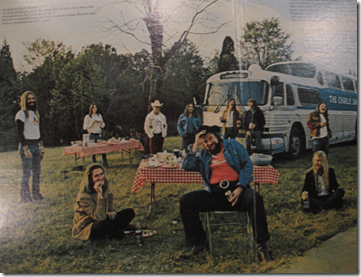
The inside cover of this excellent record

Seesmic Web Makes Good Twitter

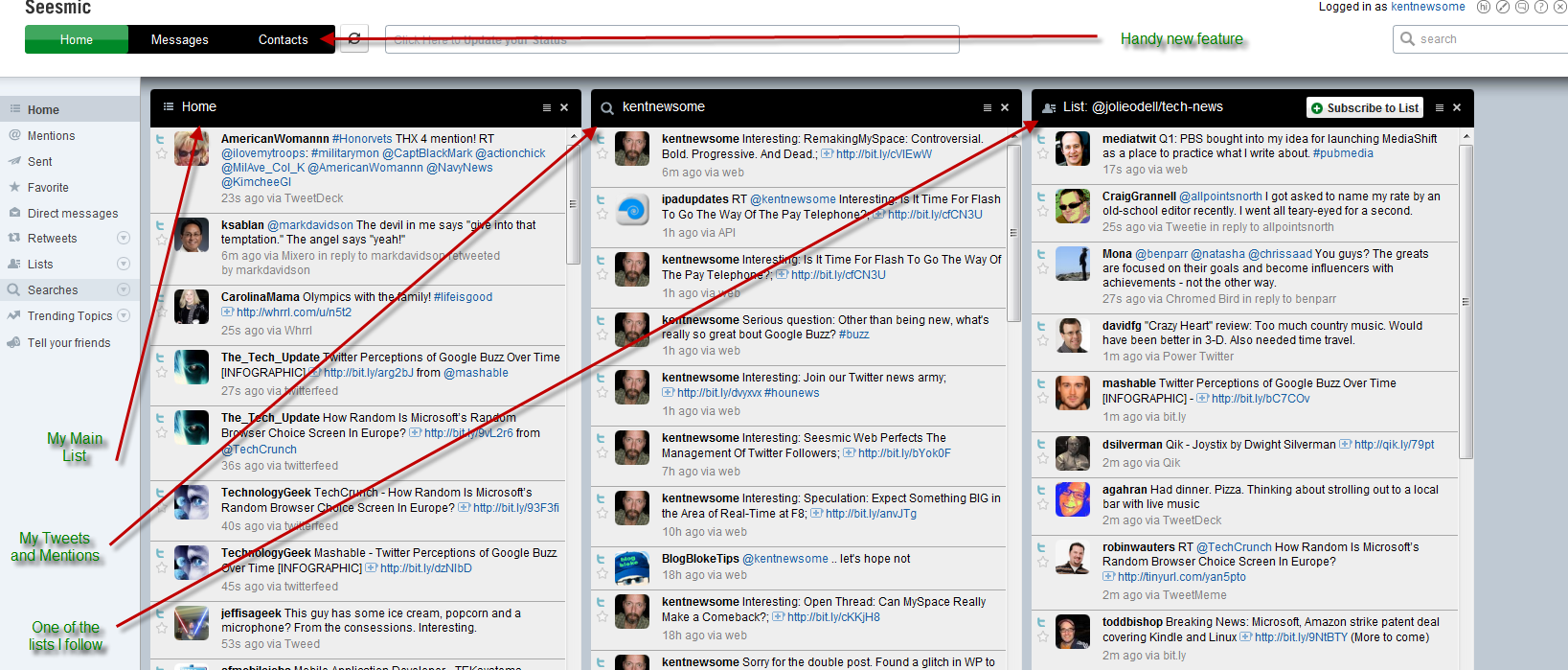
I was way late to the party, but have been using and enjoying Seesmic Web for the past few weeks.  It takes the chaos and user-unfriendliness that is the native Twitter web site, and makes it darn near usable.

I like the way I can select, see and manage three columns of content on one screen.

image
click for a bigger, annotated image

I keep my main feed in the first column, and either a saved search or one of the lists I follow in the second or third column.

Today, Seesmic updated the app to include some really helpful new features.  One of those is pretty close to the feature I asked for the other day- better subscription management.

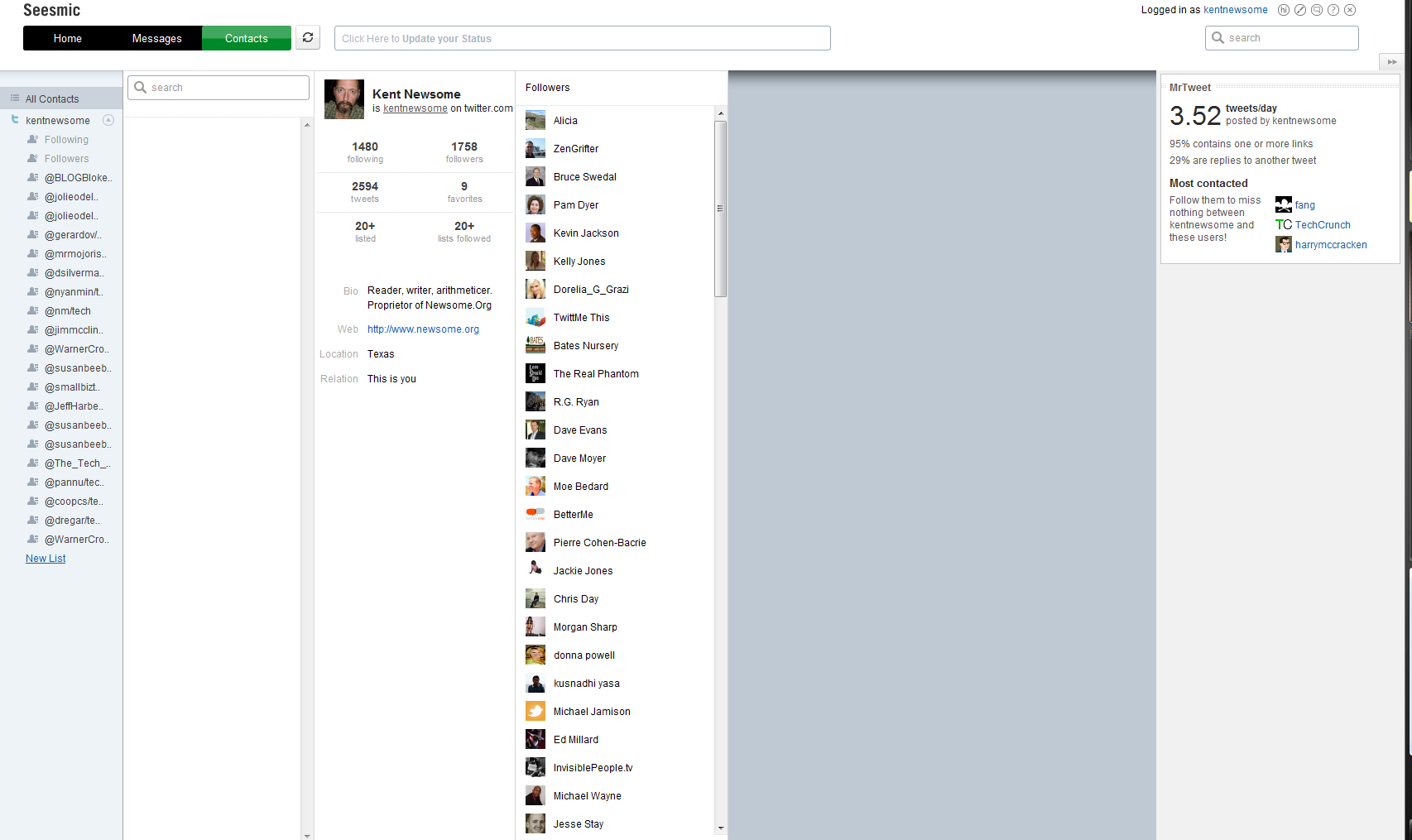
See the Contacts link?

Click on it, and you get a screen and toolset that makes managing your follows a lot easier.

image
click for a bigger image

Click on the “following” link beneath your photo, and you get a list of the people you follow.  Click on a person, and you get a screenful of information.image

I’m following the Dalai Lama, but alas he is not following me (can’t imagine why not).  If he was, that message would say “This user and you are following each other.”

From this screen, you can also send a message or unfollow someone.  Not perfect, but better.

It’s also easy to manage lists from this screen, and like Facebook, lists are crucial to an efficient Twitter experience.

The new version still has some issues.  I’ve had some log-in problems, lockups and script errors in Firefox 3.5.8, and the All Contacts button doesn’t seem to work after you view a contact’s details.

But it’s a definite step forward.

Are We Talking Ethics or Grudges or Just Funny?

Let me begin by making two important points.  One, other than a brief handshake at a conference once or twice, I’ve never met any of the main players involved in this TechCrunch/Crunchgate thing.  Two, I have no personal knowledge about the facts, as they exist or as they have been described, other than what I’ve read online.

Having said that…

A Quick Recap

image TechCrunch, a very popular website, had an intern or part-time employee who may have asked for or been offered some manner of compensation from companies seeking coverage on TechCrunch.  Such an act would be bad mojo for a new media web site trying to be taken seriously, and make lots of money in the process.  Mike Arrington, the founder and presumably majority owner of TechCrunch, wrote an apology and sacked said intern.

Loren Feldman, of 1938media, wasn’t all that impressed with Mike’s mea culpa.  It was noted in Loren’s post, and may be relevant to the discussion, that Mike and Loren apparently had a falling out in the past.  I don’t know the details, and they don’t matter at this point.

All of which led me to wonder, as I read the posts discussed below, how much of this is ethical activism, how much is some inside joke between two of the popular geeks, how much is grudge-fighting, and how much is just good old fashioned humor.

It gets confusing.

And while we’re talking about confusion and disclosure, let me note that I have written negatively about a lot of stuff Mike has said and done.  On the other hand, I have written in support of other things he has said or done.  See, I’m fair and balanced and transparent and confused.

Back to Mike and Loren…

Some of the things Loren says are spot on:

Why is TechCrunch even covering Yazzem? As a commenter points out, talking about “M&A”, “advertising” and “premium features” as part of a $15,000 deal between two companies with no web traffic clearly isn’t news.

And much is hilarious:

The Gillmor Gang may or may not be a TechCrunch production. It consists of non-technical people yelling at each other about technology and runs for what feels like eleven hours. Visuals focus on odd angles of nostril hair, bad cell phone call-in audio, and lighting that makes them look like lizards. Their most popular video is a 90 second YouTube clip where keyboard cat plays jazz organ after Mike acts like an idiot, a Google employee throws his Skype headset down in disgust, and I roll my eyes uncomfortably.

There are good points, and there are funny lines.  There is also hostility and belittling.

Maybe there’s a topic here we should discuss.  If I could stop laughing.  And cringing.  And laughing.  And cringing.

I Know You Are, But What Am I

Before I read all about this latest blogospat (or whatever it truly is), I did note with some interest that TechCrunch was throwing rocks at InfoWorld for not being as quick or as good at apologizing.  Maybe this is the best defense is a good offense thing, but I would think that’s a story Mike could have let pass right by without comment.

And Now for Something Completely Similar

All of this led to a post yesterday by Loren in which he takes some more, admittedly generally funny, shots at TechCrunch and then provides a list of over 100 companies whose mentions at TechCruch were deleted.  Including such juggernauts as Microsoft, Facebook, Intel and Yazzem.  Thank God Bebo wasn’t on that list.

See, I can be funny too…

Which, Finally, Leads to My Point.  Hey Wake Up!

I love a good blogospat.  I’ve written about some of the best of them.  I’ve been involved in a few.

But beneath all the punches and humor, isn’t there an important issue here?

People talk about blogs.  They love ‘em or they hate ‘em.  They are either the evolution of journalism or the new neighborhood papers for persistent nerds.

All of that is wrong.  Well, except for the nerd part.  That’s sort of right.

Blogs don’t really exist.  Not in the way most people describe them. Blogging is merely a content creation and management platform- like WordPress or Blogger.  Content is still content, and media is still media.  If someone wants to be taken seriously, whether as a blogger, a musician or a chimneysweep, he or she has to respect the rules of the game, manage their brand and nurture their credibility.  Whether you publish on dead tress, blogging platforms, email or signs behind airplanes is irrelevant.

So I think it’s fair and appropriate to debate TechCruch’s (and InfoWorld’s) actions in the wake of material credibility issues.  But if what we are really doing is having some personal grudge-match or engaging in extreme and generally hilarious satire (Disclosure: I think the funniest move ever made is Idiocracy, so I love satire as least as much as the next geek), let’s just say so.

I’d like to either promote distributed media (my pre-owned cars word for what some erroneously call blogging) or bury it in absurdity.

I’m happy either way.  Let’s just pick one.

2009 Record of the Year

Well, I guess under the better late than never theory, let’s announce the Newsome.Org record of the year for 2009.

This will surprise no one who knows me well or has ridden in my truck in the past 9 months or so.  In my semi-humble opinion, the best record released in 2009 was Let the Lead Fly (purchase and download @ Amazon) by the Wrinkle Neck Mules.

image

This record is alt. country in its finest form.  Not that crappy Americana stuff that has invaded XM-12 and other so-called outlaw radio.  This is the real deal, in writing, playing and singing.  If Son Volt had stayed together in its original form, they would have eventually gotten around to making this record.

The record starts off with a bang, literally and figuratively, with the title track, Let the Lead Fly.  This is about as good as a song gets, and the fiddle at 2:35 sends a shiver down my spine, even after a hundred or so listens.  As a hunter and sporting clay enthusiast, this song has a special attraction for me.  In fact, I used it for a video largely comprised of pictures of me and Cassidy shooting clays.

Other great songs are Medicine Bow, which really channels early Son Volt, and One Hand in the Furnace, which has a lead banjo track that really, really works.  Things drag just a tad in the middle, but pick back up nicely with the fantastic Cracks and Seams.

And just when you think it couldn’t get any better, the record ends with maybe my favorite song, Before the Rise and Fall.

I’ve bought every record the Mules have released, and they are all excellent.  Great songwriting, great playing, fantastic singing.  Very few filler songs.

If you like alt. country or good music in general, you absolutely owe it to yourself to check out this excellent record, as well as the rest of their work.

image

More Record Reviews.

How About a Free Copy?

I really want to support the Wrinkle Neck Mules, so here’s what I’m going to do.  Leave a comment telling us your favorite record from 2009-date.  In a couple of days, I’ll randomly pick two of the commenters (three if we get more than 15 recommendations) and buy them a copy of Let the Lead Fly via Amazon.

Share some record recommendations, and get some free music.

Three Simple Things Twitter Should Do to Improve the User Experience

Twitter-Logo-150x150As everyone who reads this blog knows, I run hot and cold on Twitter.  On the one hand, I just don’t  get what’s so magical about trying to have a conversation in a what amounts to a public chat room often inhabited by a horde of spammers. MLM’ers and self-promoters.  I didn’t like chat rooms in the nineties, and I don’t see the appeal now.  On the other hand, a lot of my friends really love Twitter, and I have been wrong before (about Facebook, among other things).
So I keep trying to figure out how to use and enjoy Twitter.  During this process, I came up with three simple things that would greatly improve the Twitter user experience.  Without further adieu, here are three things that Twitter should do right now, today, that would help me and a lot of other people use and enjoy Twitter more.

1. Escalate the Spam Battle

I can’t give you numbers, but I am confident that a large number of the people who follow me in any given day or week are doing so only in the hopes that I’ll follow them back so they can turn around and send me some sort of spam.  MLM crap, outright scams, you name it.  I am equally confident this is the case for other people as well.

Twitter should fight the spam fight for us, or at least give us better tools to fight it ourselves.

Sure, you can send a spam report off into the ether.  I have reported a number of users for spam.  Maybe some action has been taken on some of them, but you can’t prove that by me.  Twitter should value the quality of its network- not just the quantity- and take a stand against spam.  I can’t remember the last time I saw a story about Twitter’s efforts to reduce the spam that runs rampant on its network.

But make no mistake.  There are ways to fight spam.

One of the most effective ways would be to take a page from the message board book and appoint a class of community “moderators” (call them whatever you want) who volunteer to monitor the network for bad behavior and who are empowered to take action against it.  Sure, you have to clearly define what is grounds for action, and you have to err on the side of allowing content, but I can tell you from experience that it can be done.  Cheaply and effectively.

Why hasn’t Twitter done this, or something similar?  The cynic in me says the developers are too busy reading their own press.  But maybe I’m wrong about that too.

I hope so.

2. Allow Embedded Media

This is something Pownce did years ago, and Facebook and Google Buzz do now.  You don’t have to host the files.  You just need a way for people to link content and allow others to hear or see it in line, right there on Twitter.

Some will want to play the copyright card, but if you aren’t hosting the content, I see that argument as a canard.

And even if someone who matters at Twitter thinks this is a bad idea, I don’t think Twitter has a choice.  Why? Because other services are doing it.  Twitter has all the mindshare right now, but as we’re seeing with all the Buzz hoopla this week, things can change.

Spam might kill Twitter.  The failure to stay feature competitive would, for sure.

3. Better Subscription Management

I try to keep up with my inbound and outbound Twitter follows, and in this regard let me give a mighty shout out to and recommendation of Topify.  If you don’t use it, you should. In fact, Twitter should buy Topify and make it part of the core Twitter code.  It’s that good.

Even with Topify, it’s inexplicably difficult to manage your Twitter follows and followers.  There’s no way to mass unfollow people, for example.  There are some services that try (or used to try) to provide this sort of thing (Your Twitter Karma, for example), but Twitter doesn’t like them, and has taken the position that some of them violate Twitter’s terms of service.

Here’s the problem with that.  Why is it OK for spammers to follow 999 people a day, unfollow them and then spam them, but there’s no way for a user to generate a list of people they follow and choose (e.g., by uncecking a box) which ones to unfollow?  Stated another way, why doesn’t Twitter allow us to manage our subscriptions any way we want?

Sure, you can unfollow people via the list of people you follow (click on the “following” link below your photo), but the list doesn’t easily tell you if the person follows you.  You can figure it out by clicking the Actions button and looking to see if you have the ability to DM the person (yes, they follow you; no, they don’t).  But why does it have to be this hard?

Last night, I decided to browse my follows and remove obvious spammers and most of the people I follow who aren’t major media writers and don’t follow me back (you know, my Pink Floyd policy).  This should have taken 60 seconds, but it took forever, because I had to find this list via FriendOrFollow, and then unfollow people one at a time.

Note: my Pink Floyd policy is not absolute.  There are plenty of people I find interesting enough to follow, regardless of whether they follow me.

fof0210-300x149

Another  problem: there are a ton of people who follow me, that I don’t follow back.  My general Twitter approach is to follow back anyone who follows me who (a) has more than a few posts, and (b) isn’t an obvious spammer or  MLM’er (Topify makes this pretty easy by including recent posts in the new follow email notice).  But, again, I come and go with Twitter, and I get behind.  There are tons of people who follow me that I’d like to follow back.  But I don’t have time to visit each person’s profile and decide whether to follow or not.

Twitter makes this a little easier by showing whether you you follow your followers (the “followers” link below your photo).  This is clearly designed to encourage following and to discourage unfollowing.  Why?

You should be able to slice and dice your follows, any way you want.

Users should have access to a page with profile information and a box that can be checked or unchecked to follow or unfollow people.  Candidly, I can’t conceive of why there isn’t something like this already.

That’s it.  Three simple things that would vastly improve the Twitter experience.  For me, and for everyone else.