Reason No. 572 Why I’m Glad We Didn’t Have the Internet When I was a Kid

brain

British neuroscientist says that Facebook and other social networks are bad for children’s brains:

Social networking websites are causing alarming changes in the brains of young users, an eminent scientist has warned.

Sites such as Facebook, Twitter and Bebo are said to shorten attention spans, encourage instant gratification and make young people more self-centered.

She also says that computer games and “fast paced” TV shows are also causing damage.

Well, there’s always the golf channel.

Evening Reading: 2/23/09

Here’s a list of the Oscar nominated movies on Netflix.  I wish Mickey Rourke had won, just for the acceptance speech.  Mostly, I’m glad the Oscars are over so I won’t have to keep reading about them.  Unfortunately, SXSW is about to take its place in the media overload department.

You know the economy is irrevocably messed up when it costs more to use a bank’s ATM than to buy a share of its stock.  My hands are bloody from trying to catch that falling knife.

Two-fer squirrel humor:  sort of funny & utterly hilarious.

I love my iPhone.  I love my AppleTV.  I like my Mac Mini.  I hate iTunes, mostly because it pisses me off that I can’t create folders.  I’m glad to see I’m not the only one.  The Apple command center should be as elegant as the hardware it controls.  It is not, by a long shot.

News Flash: Bebo now emphasizes lifestreaming.  Wow, I wonder why nobody else thought of that.  More on this earth shattering development.  I love me some Bebo.

I am very, very interested in ZumoDrive.  Anyone got a beta invite to spare?  If it does what it says it does for something close to the quoted price, I’ll sign up for at least 50G on day one.  Come on Dudes, hook me up!

Whoa, Last.fm puts a Mike Arrington-like beat down on TechCrunch for claiming Last.fm gave listener data to the RIAA.  I don’t care if they did or they didn’t, but I like a good blogospat.  Mathew Ingram defends TechCrunch with the everybody does it argument.  I’m not sure I buy that, but, again, I could care less if they did it or not.  Like NASCAR and hockey, I’m just here for the violence.

OK, much of the Alltop content aggregation pages are underwhelming to me (I’ve been doing a mini-version of that for so long I forgot about it), but this is cool.  Hey Guy, how about a Monty Python version!

Monday Night Mellowness: Gillian Welch and OCMS do the Band.  Stunning.

In the sheer joy to utter disappointment category:  Today I thought I had discovered that you can play the Apple II game Odyssey on the frickin’ internet.  This would have been a before and after moment.  I’ve posted about that game several times.  I used to LOVE that game.  Then it wouldn’t load.  Tears.

I got (upper case) Friended today by Chris Mills, one of my all-time favorite songwriters and musicians (sample of why).  That’s cool.  Go buy all his stuff here.

Technorati Tags:

Evening Reading: 2/20/09

I am putting some good music up on my Blip.fm page.  Here’s a sample:

I really needed this in college.  Although had I had that, that would mean I would’ve had the internet and had I had the internet, I would never have graduated from college.  Got it?

This dude fought the (digital transmission) law and won, sort of.  I feel like shooting my TV every time I watch a Wake Forest game.  Maybe if I drank more, I could learn to express my feelings.

I keep posting on Twitter, and I still like it, but I’m not finding it all that “social.”  I’d estimate the response rate on my @ replies is somewhere south of 10 percent.  Maybe I’m just boring.  Nah, that can’t be it.

The other thing Skype 4 does is not work worth a crap.  Tin cans and string would have been more effective than Skype 4 on our (attempted) podcast the other night.  My microphone stopped working about every 10 seconds.

This lady didn’t know the first rule of farting:  make sure it’s a fart.

Is this litigate like a pirate day?

All these eggheads can continue to navel gaze into the future of newspapers, but the reality is that old media didn’t have the first clue about the internet, so they tossed all their content out there for free in some virtual land grab and only began to realize they couldn’t pay the taxes on that land when the black gold ad revenue dried up.  It’s a pretty simple equation: either you have something to sell that people want to buy, or you don’t.  If you do, then you can make money by selling it.  If you don’t, all the hand-wringing in the blogosphere will not create a business plan based on giving away all your goods.  The internet is the paper.  It is the words that go on that paper that determine value.  As usual, Nick Carr is the most right.

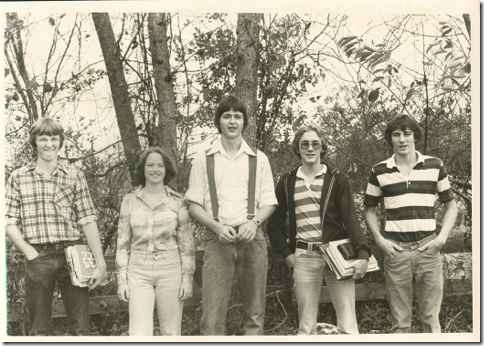
One of the cool things about my recent Facebook experiment is seeing the old photos some of my (both upper and lower case) friends have posted.  I found a photo of my first grade class.  So I created a Hall of Ancients photo album and uploaded some old pictures, including this one of me and some friends from 1978.

1978
Kevin Morris, Karen Winburn, me, Alan Smith, Michael Graham

Both Kevin and Alan (we called him “Side”) are mentioned in my song The Kansas Reflector Incident.

Facebook Revisited

As anyone who reads Newsome.Org, listens to our podcast, knows me in the real world or receives my ESP transmissions knows, I do not drink the Facebook cool aid.  I’ve consistently found it to be restrictive, chaotic and generally uninteresting.

I also readily admit that I am apparently in the minority where Facebook is concerned.  Millions of people and many of my (lower case) friends seem to live on Facebook, and they wouldn’t do that unless they were getting something out of it.  I was talking to my buddy Taters at work today.  He was telling me how much his (lower case) friends like Facebook.  Taters is a young guy, so he and his crowd were a part of the target demographic before Facebook let all the geezers in.  He’s not a Facebook user, but admits that at some point he’ll probably capitulate and join.  Interestingly, he had never heard of Twitter.

knfbpage Anyway, we were talking about Facebook, and I told him how non-intuitive I find the Facebook layout and navigation routines.  He said while they may be confusing to old farts like me, they are second nature to the millions of kids who grew up in Facebook and made it the focal point of their online (at least) lives.  To prove my point, I logged into Facebook for the first time in many months and started showing him all the things I don’t like about it.

Then something interesting happened.

I looked at my piled up list of (upper case) Friend requests.  And right there at the top of the list were several of my old friends from my hometown and two of my best friends from college.  Hmmm.  Any of these folks could have (and may have) found me here via a Google search.  But Facebook made it easy to reach out, and they did.  So after dinner, I went back to my Facebook page, accepted some of the (upper case) Friend requests, updated my profile, imported my blog feed, Flickr photos and YouTube stuff, and actually traded messages with a few old friends.  I saw some photos of my college roommate and his son.  I even found a photo of my second grade class in a (upper and lower case) friend’s photo page.  All of the sudden, I started to sense a lurking usefulness.

So I decided to take a look at the layout of the Facebook pages.

The Left Side

On the left hand side, you get a profile photo (I updated mine to my nifty new Newsome.Org logo, to match the walking billboard t-shirts I make my kids wear), a little blurb (I wrote “I still don’t get Facebook, but I’m trying…sort of”), pictures of your (upper case) Friends (Mike Miller has a funny picture) and whatever applications you elect to put there (I must have added some previously).

The third party Blip.fm app doesn’t work (surprise), so I need to remove it.  I don’t remember what the FunSpace and SuperWall do, but they don’t appear to be all that fun or super.  There’s something called Likeness over there.  Mine has pictures of Ayelet Noff and Angelina Jolie, which certainly pretty-up my page, but I’m not sure what Likeness does.  I decided to click on it and it presented me with a little quiz.  After every question, it prompted me to invite/spam my (upper case) Friends to take the quiz.  Lame.  I never saw any results, but the fact that I wasted 3 minutes of my life on that quiz shows up at the top of my Facebook page.  I bet all my (upper case) Friends will be really excited to learn that.

Also, why does “Relationship Status” assume such an important place in your “Information” box.  I’ll tell you why, because for most of its life, Facebook was the playground for college kids on the prowl.  Facebook needs a grownup makeover.

Basically, other than the pictures of my (upper case) Friends, nothing on the left side of the page interests me.

The Middle

At the top of my page, there are tabs for:

Wall: this seems to be the stream of content I imported plus whatever else I do within the Facebook walls.  The latter will be a short list.

Info: Here’s all my contact info, and school information.  I like the way you can click on your school and year to find other Facebook users.  Jeff Pulver is listed at the bottom of this page as “Other Public Figure.”  OK.

Photos: I only have my nifty profile picture, but as noted above I saw some interesting photos on my (upper case) Friends’ pages.  My photos will continue to reside on Flickr, however, and will only make it to Facebook if the importation feature works.  Why can’t you automatically import your public Flickr photos to your Facebook Photos tab?  I think I know why, and it has to do with keeping the walls intact.

Boxes: I have no earthly idea what this is.  One little box says I am a “Rockstar Vampire.”  That’s cool; I’d hate to be just a regular vampire.

The bottom line is that all of this may be the coolest stuff on the planet, but you sure can’t tell from an initial look or two.  I find the Wall and Photos to be a little bit useful, but all that other stuff is noise.

Next, I waded into the “Home” page, where I can see information created by my (upper case) Friends.  This seems interesting, though I imagine if you have a lot of (upper case) Friends, you could miss a lot of stuff from your (lower case) friends.  One problem with Twitter is that you only see the information that’s posted shortly before you visit.  I sense this stream of content would have a similar drawback.  Still, Taters’ better half posted some hilarious photos that I can use to blackmail Taters, and I have already made contact with some old (lower case) friends.

But I keep wondering why I wouldn’t just subscribe to the RSS feeds of people I’m interested in, and read their content at my leisure?  I can think of only one reason: they don’t have RSS feeds.  Facebook is a nice, controlled environment where I can catch up with people who don’t have blogs and RSS feeds.  But you have to wade through a lot of quicksand to get to the gold.

The Right Side

On the right side of my page, there’s a list of Applications, Pokes (that’s an interesting word) and “People You May Know.”  It asks if I want to add Jason Calacanis and Jeff Jarvis as (upper case) Friends.  Sure, I could add them, but the chances of them adding me back (which, in a good move by the developers, is required before users can access each others’ content) is somewhere between statistically impossible and absolute zero.  Still, we are all long-time bloggers with some common interests, so maybe the algorithm works, even if it’s unintentionally funny.

Again, though, there’s nothing on that side of the page that grabs me.

Conclusions

My conclusions are that Facebook is a good tool to reconnect with old friends who don’t publish their content outside the Facebook walls.  Sort of like a kinder, gentler Classmates.Com (no link love for that toll booth).  I’d much rather subscribe to someone’s blog or Yahoo Pipes feed (here’s mine), but lots of people don’t have those feeds.  There’s some good content and connections to be found on Facebook, though it is wrapped in an extremely inefficient package and may get lost amid the static.  I’ll probably check my Facebook page periodically, but it will never be my preferred place to create or to access content.

It just happens to have a monopoly on access to some people I care about.  So I guess whether I like it or not doesn’t really matter.

Hey Websense, Get Off Our Clouds

Follow. But. Follow only if ye be men of valour, for the entrance to this cave is guarded by a creature so foul, so cruel that no man yet has fought with it and lived.
-Tim

So I set up my private cloud.  Reports were positive.  I was feeling good.

Until I got to the office this morning.  Since my network permissions will always override my internet permissions when I am accessing my cloud from home, I decided to see how true remote access worked.  I gleefully pointed my browser to BuffaloNAS.com, Buffalo’s remote access portal.  As I was preparing for the sheer awesomeness that my private cloud was surely about to deal. . .

ws

That happened.

“Peer-to-Peer File Sharing?”  Are you freakin’ kidding me?  I hadn’t thought about Websense since 2006, when it concluded that a bunch of web sites, including mine, should be censored for the good of society, or something like that.  Just when I thought it was all good and the world was one giant field full of butterflies, unicorns and A-Listers about to start linking wildly to my blog posts, I get another beatdown by the man.

I know, from talking to our IT folks, that my company only uses Websense to restrict access to porn sites (that’s certainly appropriate) and, as noted above, “Peer-to-Peer File Sharing” sites.  This would also be appropriate, if you’re talking about torrent sites and whatever has replaced Napster.  Lots of computer un-saavy folks use computers at work and there is an eager clicker for every trojan horse or phishing scam.  Unless they want to spend all day wiping and restoring computers, the IT folks have to protect people from themselves.  On the other hand, if Websense defines every site that allows the possibility of accessing a file as a peer-to-peer file sharing site, we’re talking about a pretty wide net.  Right click on almost any link, anywhere and, as big as Elvis, there’s an option to save (e.g., download) the target file.

Interestingly enough, while Buffalo’s NAS site was snared in this net, several online storage sites (no names because I don’t want to inadvertently nark) were not.

Other than a general skepticism about companies that get paid to decide what falls within or without the forbidden zone, I’m not proposing any specific reforms.  I’m certainly not proposing that everyone should have the right to access their private clouds from their offices.  Practically speaking, I would rarely if ever need to access my cloud from my office 8 miles away.  If I’m in town, I’m staying at home and can get whatever I need when I get there.

But nets too wide and an overly active distrust of technology are not conducive to the sort of technological advancements I am interested in using and writing about.  I also think a lot of people are kidding themselves if they think corporate America is about to toss all its content into the very same cloud it is currently so wary of.

And it’s kind of a bummer that the same company that decided my entire web site should be blocked has now rained all over my private cloud parade.

Creating a Private Cloud

After thinking about the various online storage options, and particularly the high cost for those who need or want a lot of space, I started to think there might be a cost savings to creating a private cloud.  Like lots of other business people, I have a remotely hosted, dedicated server to host my web sites.  I could always use a desktop, web based or plug in FTP client to access space on that server, but that would require me to separately configure each computer I want to use to access that space, including borrowed computers.  It would work, but it wouldn’t be fun or efficient.

I could also set up some space through Amazon S3, find a web based front end, and access my data that way.  Again, it would work, but it wouldn’t be ideal.  Plus, the cost formula used by S3, while inexpensive, doesn’t lend itself to certainty.  The fee is based on both the space you have and the amount of data transfer in and out (and out could be a big number if your shared items become popular).

So I decided to experiment with a private cloud.  Here’s how I made one and what I think of it so far.

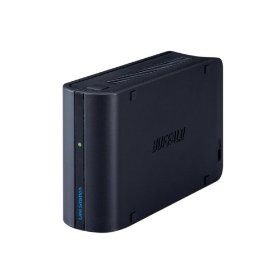
bls First, the hardware.  I have a home server that I use to serve audio and video content throughout the house, to back up our computers and for storage that I don’t need to access remotely.  Because that box has plenty on its plate already, I elected not to use it for my private cloud, even though it has the ability to permit remote access.  Rather I bought a Buffalo Linkstation Mini.  It’s small (5.2 x 1.6 x 3.2 inches ; 1.1 pounds) and fits easily inside the electronics chest in my study (an old chest of drawers with grommets drilled in the back, so I can charge laptops and other devices in drawers and out of the way).

I ran a network cable from the nearest switch (the one that serves my Mac not-so-Mini) to the Linkstation, ran the power cables through the grommet and out to the the power strip I previously installed on the back of the electronics chest.  Less than 15 minutes after opening the box, the Linkstation was installed and ready to go.

Next, the software.  The Buffalo installation disk is reasonably straight forward.  It identified my Linkstation on the network right away and installed the NASNavigator 2 software, that allows you to manage the Linkstation via your computer.  Like with a router, most of the Linkstation setup is done via your web browser (always change the default password right away with routers, wireless access points and web accessible drives).  If you’ve ever set up a router, this process will be a breeze.  Even if you haven’t, the process is pretty simple and the manual is helpful if you need some hand holding.

You name your Linkserver, set the date and time, assign it to an existing Windows workgroup if you want (though it will be visible on most networks even if you leave the default workgroup name).  You create folders to share via this same web based application.  It’s not hard to do, but it’s not as easy as it would be if you could set up shared folders via Windows Explorer.  You can also switch between a RAID 1 or RAID 2 setup, but no action in this regard is necessary unless you want to switch arrays.

Setting up web access consists of selecting the folders you created as described above and selecting the desired level of access: none; users who have accounts you set up via the setup application; or anyone.  You can (and should) also set access levels- generally read only- for publicly shared folders.

To complete the web access setup, you pick a name for your web accessible space, which is then accessible via a Buffalo owned and administered remote access domain and create a key to give to those who you want to allow access to your “non-everyone” folders.  If you have a firewall or a router, you need to configure it to permit access.  The Buffalo application will attempt to automatically configure your firewall/router, but this did not work for me.  Having some experience setting up routers, I was able to manually configure my router pretty quickly.  This would be a major pain for someone without this experience but it is unavoidable.  Anyone who has ever set up a Slingbox has already been through this process.

All in all, the software is about as simple as can reasonably be expected.  It worked, but it could be more elegant.

Finally, my first impressions.

Once you test your settings and happily get the all clear sign, accessing your private cloud is as easy as pointing your browser at the web address Buffalo creates for you, and filling in the shared space name and your name and password.  The Buffalo web access application works reasonably well, though it is not as appealing as the interfaces for some of the commercial online storage services.  I greatly prefer the Box.Net interface, for example.  On the other hand, once you access the shared folders, when you click on a file you are presented with options to link to a file or to email a link to the file.  You can also remotely add files to the cloud if you have the requisite permissions.

I wanted the ability to serve some content from my private cloud to this blog and my other web sites.  To accomplish that, I created a new folder, set the sharing level at anyone and the permissions as read only.  Here’s a cloud theme song (buy this excellent Jayhawks record on Amazon), which is temporarily located in that folder to see if it works.  Initial results are mixed.  It looks like the files can be accessed, but it doesn’t seem to play well with Yahoo Media Player (which I use and recommend to allow readers to easily play embedded audio), and buffering times vary.

It’s too early to tell if a private cloud will do the trick for me, but it might.  More on my private cloud later.

The Changing Face of Online Interactivity

Ken Stewart, writing at Louis Gray, tells us how to use Friendfeed as a productivity tool.  I think how productive you can be whilst Twittering away or clicking around Friendfeed has a lot to do with your (or your boss’s) definition of productive, but that’s not the topic I want to talk about.  I want to explore whether these “conversation aggregation services” increase or decrease the quality of online conversation.

twitgrp Initially, I was pretty skeptical about these services.  I have tried to enjoy Facebook, but I don’t.  Same with Linkedin.  I just don’t think they’re fun or interesting.  Or even particularly well designed.  Maybe they’re good places to find a job or market your goods or services, but I’m not hiring or job hunting and I definitely don’t want to be marketed to while online.  In fact, because I am so ad-adverse, I almost never watch live TV.  At a minimum, I’ll wait 15 minutes or so and watch the show on my digital recorder (what do we call these things post-TIVO?) so I can skip over the commercials.  It’s the same way online.  I have applications that block banner ads.  Other applications that filter spam.  I go online to find content that’s fun and interesting- not to be subjected to ads, disguised or not.

At first, I felt the same way about Twitter.  It’s the latest online darling-without-a-business-plan.  Even after reading post after post singing its praises, I didn’t feel the attraction.  Until recently.  Over the past couple of weeks, I’ve made an effort to get the full Twitter experience.  I made a background for my Twitter page, began to Tweet more and, more importantly, began to read more Tweets and follow more people.  To my surprise, I have found the experience enjoyable, and even managed to have some meaningful, though brief, conversations.  While some of the former blogging celebrities (if that’s not an oxymoron) are just as non-engaging on Twitter as they were during the Gatekeeper Wars, there are so many people on Twitter, you can generally wrestle the microphone away from those who would monopolize it.  This is more egalitarian and a very good thing.  Twitter works for me, at least for now.

Completely thanks to the great music I was hearing via John Asher, I started to experiment with Blip.fm.  I wish the site still allowed you to upload audio files to their servers, but even so I think there is real potential here.  The sharing of music seems to be evolving towards a more flexible, less restrictive system- in practice even if not under the law (yet).  Assuming this trend continues, I think Blip.fm could be a great service for both artists and music fans.  Maybe one day a business plan will appear out of thin air and they will again allow audio uploads.  In the meantime, it’s a fun service.  I’ve found a few folks there who share my musical tastes, and I expect as I spend more time there, my experience will get even better.

I have also tried Friendfeed, because I kept getting emails that someone had subscribed to my Friendfeed (apparently I signed up when the service was in beta and forgot) and because a lot of people I respect kept telling me that Friendfeed was the greatest thing since Pownce (I keed, I keed).  I must be at the apex of my social networking adventure, however, because I don’t get Friendfeed.  I know that it compiles my various content from this blog, Flickr, Twitter, etc., but how exactly that improves online interactivity is not yet clear to me.  At some point, I inserted Steve Rubel’s Friendfeed into my feed reader in place of his blog feed.  You get a lot more content this way, but, candidly, there aren’t too many people I want that much content from.  Nor do I think there are that many people who are interested in turning their Kent spigot on that full.  Even so, because so many people love Friendfeed, I keep wondering if I’m missing something.  Maybe I’ll figure it out eventually, like I did with the iPhone, Twitter and, almost, but not quite, Macs.

What I do know is that the more time I spend on these various services, the more it seems like I am chasing conversation snippets all over the interwebs.  It feels like I’m in a room where several conversations are going on simultaneously and I’m twisting my neck trying to keep up.  It’s supposed to feel more centralized, but it feels less centralized.

And it’s killing, or at least replacing, blog comments.

Blog comments are somewhat centralized, which makes keeping up with a particular conversation thread pretty simple.  Unfortunately, I’ve seen a significant drop in the Comments here and the comments I make elsewhere.  I can’t help but think that this is a result of the effort and content being placed at these various third party services.  I’m not necessarily saying that this is a bad thing, but it’s different.  And even though I am having more short and sweet interactions, the sense of depth is lacking.  The blogosphere has always been an inefficient conversation medium, but lately it feels even more so.

Sure, you can centralize some of the scattered content via widgets and other applications.  I have my Tweets in the left column of my blog (though it was way harder than it had to be to customize the widget to suit my tastes).  If I can get Blip.fm to lose the ridiculously large and space eating graphic that it puts in its widget, I may add that content to my blog as well.  Friendfeed has a very flexible widget, but I’m not sure how to use it- just like the service as a whole.

All of these services make it easy to publish content, and to interact, at least on a superficial level.  The quantity is certainly there.  I’m just not sure about the quality.

The State of Online Storage

yahoobriefcase

Ever since Yahoo shocked the world by shuttering Yahoo Briefcase, I have been stumbling around, punch drunk, trying to find a new home for my online storage needs.

Not really.

But I do have online storage needs and I have been trying to come up with a long term game plan.  I am a long-time Box.Net user, and the recent site updates made an elegant and easy to use (and share) site even better.  From the user experience perspective, Box.Net is the clear leader.  It has the must have “drag and drop” upload feature, and the sharing options are intuitive and extensive.  In sum, it’s just cool.  But all that coolness comes at a price, at least if you want to upgrade your account.  5GB of space is $80 a year, and 15GB is $200 a year.  If you really want to go all-in on online storage, even 15GB is too little.  I suspect that I will keep my Box.Net account for some stuff, and because I like the interface so well, I may upgrade at some point.

I have also looked at ADrive (here’s a detailed review).  You can get 50GB of storage space for free, and it has the drag and drop feature.  100GB is $140 a year, and 250GB is $340.  These prices are much lower, but ADrive doesn’t have all the features Box.Net has.  The deal killer for me is that you can’t stream audio files from ADrive, though the FAQ says that feature is coming.  See me when it gets here.  Also, I don’t have the history with ADrive that I do with Box.Net, and putting a gigabyte or so of files on Box.Net seems less risky than putting 100GB or so on ADrive.  Still, if I got comfortable that ADrive was here to stay and it enabled audio file streaming, I’d probably give it a try.

wlive Then, there’s Windows Live or SkyDrive or whatever they call it.  The good news is that free accounts get 25GB of space, plus the staying power generated by Microsoft’s pile of dollars and desire to capture a part of the online app/social media/whatever you want to call it market.  Shuttering all these Live or whatever they call it apps would not be conducive to that effort.  So I think we can assume that these apps will be around for a while (though as a Photo Story mourner I should probably know better).  But, gawd, are those Microsoft sites ugly.  Microsoft needs badly to do two things: pick a name and brand build it into the public’s consciousness and turn their web designers loose to create something pretty, with consistent, cutting edge (and not last year’s) features.  Microsoft has the brand (only angry geeks and hardcore Apple fanboys hate Microsoft), the money and presumably the talent to be a major player in this online app game.  I can’t figure out why they have had such a hard time becoming one, but I think it has more to do with presentation than features.  Well, except for one.  Unless it’s hidden somewhere, I don’t see any drag and drop uploading.  No one who values his or her time is going to go through the hell on earth of browse and choosing a bunch of files to upload.  I gave up before I could figure out the sharing and streaming situation.

The elephant in the room in all of this is Amazon’s S3 service.  A lot of the Web 2.0 companies buy their space and bandwidth from Amazon, and users can buy theirs directly from Amazon as well.  You’ll need a front end to manage the file transfers and there are some not entirely intuitive procedures to enable access, sharing and streaming.  But more and more front ends are available all the time.  There’s a good one for redundant backups via Windows Home Server (now there’s an excellent Microsoft product), with more on the way.  I don’t want to have to worry so much about bandwidth (S3 charges based on space and amount of date transferred), but I continue to monitor S3 and the emerging enabling applications.  In sum, it’s not the best choice now, but it may be later.

Lastly, of course, there’s the maybe soon to be released Google GDrive.  As I noted the other day, if anyone can bring the cloud to the people, it’s probably Google.  Google has the brand and the money, but after the shuttering of Google Notebook and other apps, we can’t assume (like we thought we could) that all Google apps have staying power.  Still, GDrive will probably become the space leader the day it launches.

There are a lot of choices out there.  For now, I’m sticking with Box.Net.  ADrive is the number one contender.  GDrive is the x-factor.

I bet that list changes significantly by this time next year.

Tech for Grownups: Your Second Tech Blog

Since you’re reading this, congratulations on picking Newsome.Org as your first!

Harry McCracken, smart and interesting guy and former editor of PC World, writes and edits a blog called Technologizer.  If you are at all interested in computers, software, gadgets or other tech topics, it’s a must read.

Here are just a few of Technologizer’s recent posts to whet your appetite:

A Consumer’s Guide to Apple Rumors
The Pleasures and Perils of Going Digital (by the also highly recommended Ed Bott)
Hey, Let’s Design the Kindle 3!
Sony vs. Microsoft: A History of Trash Talk
Microsoft Bows to Critics, Will Change Windows 7 UAC (thank God)
Report: Apple May Enter TV Business

I also really dig his 5 Words reading list posts.

If this one isn’t in your feed reader, add it now.

Evening Reading: 2/10/09

As Google continues to take over my data and my life, I have capitulated to a Shared Items page.  There’s a list of shared items in the Interesting Reading Elsewhere box on the right hand side of this page and here is the RSS feed for my shared items.

I’ll still do the Evening Reading posts, just not as often.

It looks like Sirius XM Radio may be about to follow Circuit City to the bankruptcy court.  Fortunately, it doesn’t look like Sirius XM will follow Circuit City all the way to the deadpool.  I can live without Circuit City, but I need my Grateful Dead channel.

Paging Mrs. Puff: Granny fails driving test 771 times.  Maybe the 772nd try will be the charm.

Earl photographs and writes about Williamsburg.  There’s a great song about Williamsburg by 5 Chinese Brothers.

Only 6 episodes of BSG left.  Very sad.  The BBC is trying to fill the sci-fi void.  Speaking of BSG, does anyone else think the dying leader who will lead them to Earth will be a cylon?

Tropic Thunder moment: I was talking to Suzanne Carr‘s mom today, and she tells me John Denver is hugely popular in China.

I climbed onboard the netbook train with an HP 2133.  I got it because it runs Vista and has a 120 GB hard drive.  James Kendrick liked it.  I do too.  I bought it as a server for Rancho Radio, but I may end up carrying it around with me.

On the other hand, I have no intention of spending $2399+ for a new Dell tablet.  I customized one for grins-  $3104.  No way Jose.  GottaBeMobile has more.  Or should I say less.

Today’s Thought:  On Louisiana.  First it was Kirk and Spock, then just Spock, and now a couple of dogs.

Technorati Tags: