Biggest iPad App? Safari, in a Webslide

We’re less than a week away from getting our hands on the much-awaited Apple iPad.  As iPaday approaches, more and more details about the iPad experience are emerging.  Many are speculating on what apps will be the most useful.

ipad

I already know.  Safari, which will return us to that most useful jungle: the world wild web.

Yes, I love my iPhone.  But let’s be honest.  Surfing the web on the iPhone sucks.  Epicly.  That’s why good developers are making a fortune (99 cents at a time) writing apps that use the network to deliver content in a more accessible and manageable form.  By that, I mean as far away from Safari as possible.

I estimate my success rate when trying to accomplish anything substantial on an iPhone via the native web (i.e., in a browser on a regular web site) at around 10%.  Most of the time, I either find another way to access what I’m looking for (such as a dedicated app or a laptop), or I just give up.  I have talked to many others who admit to similar experiences.

The biggest difference between our iPhones and our iPads will be that the larger screen size will allow us to actually use the web.

Need an example?  Here’s one of many: corporate email.  I have expressed frustration for years about the insane degree to which my company’s IT department hobbles (my word) my iPhone experience in the name of security (their word).  I actually considered making Outlook Web Access my default method of reading email on my iPhone, but the screen is just too small.

That won’t be a problem on an iPad.  Yes, I think it is important and good that the iPad will support Microsoft Exchange.  But I think it’s even better that I will have another option should I find my iPad excessively hobbled in the name of security.

April 3, 2010 is not just iPaday- it’s the day the web becomes useful again.

I can’t wait.

Is Something Rotten at the Apple Store?

First, here’s my Apple story.  I think Macs are way overpriced, and I think the Mac OS is terrible.  Now that I’ve offended those Apple fans that are still in the denial stage, here’s the other side of the story.

I love much of the other stuff Apple makes.  The sadly under-marketed and overlooked Apple TV is a wonderful device for serving audio and video to home theatres.  I have two (well, actually only one- see below).  I think the iPhone is a world-changer as far as phones- and handheld devices in general- are concerned.  My kids love their iPods.

Heck, I happily ordered my iPad the first minute I could do so.  Even though this dude thinks I’m an idiot for doing so.

The point is that, other than Macs (which, by the way, will ultimately be saved when Apple ports the grandchild of the current iPhone OS to its computers), I am a loyal Apple user.  1 iPod mini, 2 iPod Touches, 3 iPhones, a prematurely dead Mac Mini, 2 Apple TVs, and an iPad on the way.

One of the things I used to cite as a reason to love Apple products was the existence of, and great support at, the local Apple Store.  But somewhere between the launch of the company saving iPhone and today, something changed.

Thomas Hawk thinks so too.

A few years ago, my first iPhone stopped charging.  I took it to the Apple Store, without an appointment.  After a short wait, I spoke to someone at the Genius Bar, and got a new one on the spot.  I was happy enough to buy all of the additional gear listed above.

image Lately, however, my Apple Store experience has been decidedly less positive.

First, one of our Apple TVs stopped booting, for no apparent reason.  It has all of the symptoms of a bad hard drive.  We took it to the Apple Store, hoping- but not expecting- that Apple would replace the hard drive at little or no charge.  Realistically, all I expected was a good, helpful attitude and a reasonable labor charge to replace the hard drive.  After all, don’t hard drives generally have good warranties?  Surprisingly, the genius at the Genius Bar didn’t seem to want to diagnose the problem.  When we insisted, we left the device to be diagnosed, hoping the attitude was just a blip on the radar.  A few days later we got a call saying the hard drive was bad, and we should just buy a new Apple TV.  For $229.

So based on my Mac Mini and Apple TV experience, are these things disposable?  Seriously, I love Apple products, but based on my experience and the sense I have from talking to others, the failure rate must be enormous.  Which, of course, makes support critical.

And, presumably, expensive for Apple.  Who has to support that stock price.  Hmmm.

Then came the customer happiness-killing blow.  My wife, who destroys electronics  like Sherman destroyed Atlanta, pays, via ATT, for some sort of insurance that promises to replace broken iPhones.  Her ringer silence switch fell off.  She went to the same Apple Store to get it fixed.  This time the genius told her he could tell that the switch fell off due to water-damage, which is not covered by the insurance plan.  While the ATT salesman told her water damage was covered, that’s not the point.  The point is that the phone is not water damaged.  The darn switch fell off, and Apple is refusing to fix it.  Again, the proposed solution: buy another iPhone.

This just sucks.  Period.

By itself, I could explain away parts of this.  But taken as a whole, and compared to my past experiences, something smells at the Apple Store.

Consultants, Questions and Some Dude’s Secret Formula

As we all know, I have recently moved to WordPress after years of blogging via Blogger and FTP publishing.  The move went well, and so far I am happy with WordPress.  As noted in my WordPress Process series, I hired Aaron Brazell to help with some of the more difficult parts of the switch.  Aaron did a great job, and I recommend him for anyone needing a WordPress expert.

image We took the final step of the trip today when we set up the new permalink structure, and redirected the old-style permalinks to the new permalink pages.  During the process, I asked a some specific questions about some plug-ins I had read about and a back-up solution,  and ended with “is there anything else/different you recommend?”

Presumably in response to this, and no doubt other similar questions he has received over the years (as my job was less than miniscule compared to big corporate gigs), Aaron wrote an interesting blog post, that is a good read for anyone looking to hire a consultant, or anyone else who provides services for a fee.  I agree with some of it, but I’m not so sure about some of it.

First, some preliminary matters:

1. In no way, shape or form am I offended by Aaron’s answer, which was a short version of his blog post, or the post itself.  Aaron’s post is intended to help those who hire consultants save money.  It just raised some issues that got me thinking enough to write this post.  In sum, Aaron’s cool by me, and I will without a doubt turn to him if the need arises in the future.

2. I don’t know squat about the business of consulting, as it relates to the stuff Aaron does.  So my experience may not be completely relevant to that arena.

3. Having said that, I know a little bit about making a living via the sale of professional services, having managed large practices at two mega-law firms.  I can’t help but believe there are similarities.

So let’s look at this a little bit further.

One of Aaron’s points, which I whole-heartedly agree with, is that everyone benefits from clear, defined expectations.  If I think I’m selling you something for X and you think you are buying something more for 0ne-half of X, no one is going to be happy.  Only those looking for an unfair gain want to go into transactions with undefined expectations.  It is, stated simply, a recipe for disaster.

So we all have some concept of good practices that we should try to adhere to.  The best laid plans, and all that.

Because, to one extent or the other, market conditions will determine what is and is not the custom when it comes to professional services and the delivery of and price for the same.  I can only charge you X for my services as long as there isn’t a giant population of others who are similarly qualified and will do it for less than X.

The qualified part cannot be overlooked, but it doesn’t always carry the day.  Falling tides, all ships, etc.

I got a lot of responses to my RFP, and most of them were less than what I happily paid Aaron.  He has a reputation as the best.  I wanted the best.  A deal was made.

Likewise, I charge more than many others who do what I do, having spent 25 years building my personal brand (I’m not going strangle myself with a self-embrace, but let’s just say I have a pretty high profile in the industry).  So I’m all about the “getting what you pay for” thing.  I’ve preached that sermon for years.

But these aren’t the good old days.

Which means two things.  One, most of us have to work harder to keep the same level of business, at least until the economy gets better.  And two, questions and requests that used to be buzz kills are now sometimes life lines.

Stated another way, I think there is a middle ground between scope creep and a blank checkbook.  And I think there are many, many cases when an open ended question is both unavoidable and appropriate.  I recently hired a top notch landscaper, who charged me a lot of money.  I told him what I wanted, we came up with a plan and he did the work.  When it was done and I could visualize how I might use the new area,  I asked the same question: “is there anything else I should consider?’”  He said I should think about some lights.  I did, and I hired him to do it.

He made more money.  I got lights that let us play soccer at night.  Good times.

Sometimes you can’t really know where you want to end up until you’re on the journey.

I get open ended questions in my business all the time.  Sure, sometimes it’s an attempt to expand the scope of my work or get my time for free.  But most times it’s another way of saying “OK, I’ve bought this and that from you and I like it.  What else do you have that I might be interested in?”

Show me what else you can do for me.

Additionally, for a fair-minded, reasonably sophisticated person to ask that question shows a level of trust.  No one would ask that question to someone he or she felt was only interested in making a quick buck.

So maybe it comes down to the difference between jobs and relationships.  In my business, you can’t really be successful in one-off jobs.  You need a stable of clients who over time will need a bunch of your services.  So when I hear an open ended question or two, I see a horse thinking about entering the barn.  It may be different in other fields.

All of this certainly could result in doing work for free or busting the budget, as Aaron points out.  It could also be grounds for a new budget.  For a new job.

Now about that one dude.  The one who won’t take a job under $50K.  I don’t know what world he’s living in, but unless he has some secret formula, he’s not living in the same one I am.  I know lots and lots and lots of really well qualified, highly sought after people (lawyers, doctors, architects, plumbers, indian chiefs and rodeo clowns) who would be living under a bridge somewhere if they took that approach.  Particularly in this economy,

In other words, I want that dude’s job.

Evening Reading: 3/1/10

Start that Gaming Addiction Now: Color Me Happy looks like a neat little app for kids.  I’ll have to get a copy for Luke- on Raina’s iPhone.

The Once and Future M.U.L.E.:  One of the best games ever has been reincarnated.

Great Video, Great Cause: This is one of the best music videos I have ever seen.  Led by the great Shane MacGowan.  Recognize the guitar player near the end?

Speaking of Videos: Camera Plus Pro brings video recording to older iPhones.  So does iVideoCamera.

Ain’t I Groovy:  And Phototropedic makes your iPhone photos cool.

image

My Dog Can Kick Your Honor Roll Dog’s ButtAt surfing.  Caption inspired by a hilarious bumper sticker I saw today.

Apptic Blast: RunKeeper, already a must-have iPhone app, has been updated and improved.  Ground Effect, which looks cool, is free today.

Your Life is an Empty Void:  Until you email something to a fax machine.

Speaking of Spam:  Answer me this- what is a bigger spam-fest, fax machines or trackbacks?  Spam killed fax machines for me (I unplugged the one in my study years ago).  90% of the trackbacks I get are spam.  That’s a pity, as trackbacks were the blog version of a handshake.

Cat (Cougar?) Fight:  Marcia and Jan are fighting again.

Netflix Sucks Now:  Netflix’s capitulation to the greedy movie industry is bugging me.  I am thinking about bailing.  Sad.

Why Google’s Shot Across Twitter’s Bow Missed the Mark

Erick Schonfeld has three interesting theories as to why Google pushed Google Buzz out the door and into the email client of millions of users, before it was ready for prime time.

I’ve tried Google Buzz, and found it to be pretty uninspiring.  I’d been thinking that one of Erick’s theories might be at play.  A theory that, if true, is going to backfire on Google.  I also came up with a fourth theory that I think plays at least a part in this drama.

The Twitter Negotiating Power Theory

One of Erick’s theories is that Google really wants to buy Twitter, and launching Buzz was a shot across Twitter’s bow, indicating that if Twitter doesn’t come to the bargaining table, Google will use some of its war chest to do battle with Twitter on the micro-blogging front.  Certainly Gmail provides Google with a ready-made user base, and you would think that Google could easily be a force to be reckoned with.

The ability to put Buzz front and center in the Gmail email app gives Google a clear path to the stream.

Or does it?

image 
image via TechCrunch

If the Buzz as a negotiating tactic theory is even partially correct- and I’ve been thinking the same thing, it’s going to fail epicly.  I’m sure somewhere in the bowels of Twitter Control, the powers that be have been worrying about what Google might do to steal some of Twitter’s stream flow.  Google is the potential exit strategy and Death Star for most start-ups, so it gets complicated.  One way or another, anyone operating on the web has to keep a constant eye on Google, who could bring pleasure or pain at any moment.  If Google came out of the gate with a mature, elegant and at least evolutionary  micro-blogging alternative, it would combine naturally with Gmail’s massive user base, and it would be game on.

Which means that the swoosh sound you heard in the halls of Twitter Control on the night Buzz was heaped front and center onto the world’s email screen was a giant sigh of relief.

Other than infesting our inboxes with needless Buzz-related email, Buzz isn’t horrible.  But it’s not evolutionary either.  It’s just another Twitter clone.  If anyone other than Google had released Buzz, it would be almost universally referred to as Butt.  As in of jokes.

Stated simply- if this is how Google intends to scare Twitter back to the negotiating table, this effort won’t only fail.  It will actually increase Twitter’s bargaining power.

The Toss Apps Against the Wall Theory

I have another theory that I believe may also be at work here.

Google has done some great things, and is, for many, the backbone of the online experience.  It owns search, which was its lightning in a bottle beachhead in the battle for the ownership of the web.  Ads spring naturally from search and page views, and Google was able to leverage the first to dominate the second.

But after that, there is no denying that Google has had a decidedly mixed record with new projects and apps.  It got there with email, because of its search presence, and because Yahoo and Microsoft were asleep at the wheel.

But it has also had its share of failures.  Google puts on a brave front, but Google Docs is still, at best, a work in progress.  Google Apps looks and acts like a bunch of unrelated applications haphazardly tossed together.

And there have been plenty of others.  Remember Google Catalog?  That’s OK, neither does anyone else.  What about KnolLively?  Something called Orkut?   Dodgeball?  Shoot, even Wave, which came out to a parade of hype, seems to have already lost its mojo.

Google has a track record of tossing a lot of stuff against the wall, and waiting for something to stick.  Some things do, and some things don’t.  It’s too early to tell how Buzz will turn out, but I can say with confidence that it is not now- and is very unlikely to ever become- a threat to Twitter.

How to Create a Life Stream Page on Your Blog, With Posterous

We’re really rocking the blog development lately.  Yesterday, I showed you how to point a domain to one of your blog categories.

Today, we’re going to create a life stream page, on your blog, using Posterous.

You can use the life stream page we’re about to create for just about anything.  You could send all of your life stream content there, autopost it to Twitter, Facebook, etc. and end up with a great, chronological and searchable archive of all of your content.  I have Twitter already integrated into Newsome.Org, via the widget in the right hand column, so I’m going to do something a little different.

I want to create a page where I can automatically upload and share impromptu iPhone photos, and maybe some other tidbits from time to time.  Notwithstanding the limited chops of the iPhone camera, I find a lot of iPhone photos really compelling, partially because of those limitations.  Plus I almost always have my iPhone with me.

image

But, as part of my ongoing content consolidation and simplification project, I want my iPhone photo stream to be available here, as a Page.

Let’s get started.

Get a a Posterous Page

If you don’t already have a Posterous page, go sign up.  Learn how to use it– it’s about as easy as it could possibly be.  Theme your Posterous page to have the same look and feel as your blog.  You’ll probably have to start with a canned theme and then customize it to your liking.

image

Make a Content Plan

Next, decide how you’re going to use your life stream page.  Posterous makes it really easy to autopost content to the social networks and other sites.  With a little work you can make Posterous your content hub and control panel.

Get Any Ancillary Apps You’ll Need

As noted, I want to use my page primarily as a place to upload and share impromptu iPhone photos.  A great way to do this is via the iPhone app PicPosterous (iTunes link).  It will make sharing iPhone photos via Posterous easy and almost completely automated.

I’m not crazy about the way it forces you do use albums, but it works OK.  I do like the fact that photos from each album are posted together.  I’ll just do an album for each day.  That seems burdensome, but it’s not really.  You’d need to name the photo anyway, and this means you only have to name the first one (e.g., 02/28/10) you post each day.  Any others can be sent directly to that album.

Embed into a Blog Page with an iFrame

Now to embed the Posterous page you have crated into your blog via an iFrame.

In WordPress

I use WordPress.  Here’s how you do it with my theme.  The process may differ slightly from theme to theme, but the basic concepts should be the same.

Create a new Page, and name it.  I called mine iStream.

If you have columns on your main blog pages, you’ll probably need to use a full width template for this page.  Many WordPress themes have this option for Pages.  If yours doesn’t, you’ll have to create a Page template.  Or change themes.

Add the iFrame code.  Here’s mine:

image

In Blogger

If you use Blogger, simply create a new Page, via Posting>Edit Pages>New Page, and include the iFrame code.  Be sure to select the Edit HTML tab first.

I don’t know that many, if any, Blogger templates have full width templates available for Pages.  If not, the resulting life stream Page may require horizontal scrolling, which is not good.  If I find (or someone provides in a comment) a solution for this, I’ll add it here.

The best bet if you really want a life stream page in Blogger might be to select a wide, one or two column template.

Add the New Page to Your Page Navigation

Once I created my new Page, I added it under the Media tab at the top of the Newsome.Org blog pages.

That’s all there is to it.  Looks great.  Easy to use.  Consolidated.

I like it.

Brother, Can You Spare a Word?

I’m working hard so you don’t have to.  If you like what I’m doing here at Newsome.Org, please spread the word via Retweets and links.

How to Point a Domain to a Blog Category

One of my long-time and oft-stated problems with all of the so-called social networks is the brand and attention dilution that occurs when content producers cast their content across numerous networks, sending readers on a wild goose chase as they try to keep up with everything.  While I’ve done a lot better than most when it comes to keeping my content centered around my web site (Newsome.Org), I too have been lured into spreading myself too thin, network-wise.

I’m going to fix that.  I am in the process of consolidating most of my content and much of my applications.  When all is said and done, I will be a power user of this blog and a small number of ancillary networks (maybe as few as two: Twitter and Facebook).  Additionally, I intend to shrink my cloud toolbox down to a manageable size.  More on that later.

Today I want to take the first step, which is to consolidate our music recommendation blog, which was previously hosted at Tumblr, into Newsome.Org.  Specifically, I want that content to be included here- under the Music category.  But I want to continue to use the cool and valuable top level domain (GoodSongs.Com) that I have been using for song recommendations.

Here’s how that can be done.

What You’ll Need

To have this need and to make this work, you’ll need a blog platform that includes categories, tags or some other naming convention that has a URL.  I use WordPress, and I have a Music category (see the menu at the top of the page).  The URL for that category is http://www.newsome.org/category/music.

You’ll also need a domain (or a sub-domain) separate from the one that you use for your blog, that you want to point to the category.  As noted above, I am going to cause GoodSongs.Com, which previously pointed to a custom domain at Tumblr, to be redirected to my Music category here.

Use a Redirect

One way to redirect a domain to a blog category is through URL redirection  or a refresh meta tag.  A redirection makes sense if you have a long-standing or popular site that you want to move, so you can preserve links and Google juice.  If you, like me, just want to use your domain as an alternate address for a blog category- or if you don’t have the technical chops or server access to do a redirection, web forwarding might be your solution.

Configure Web Forwarding

I use Network Solutions as my primary domain registrar.  Here’s how you configure your domain for web forwarding via Network Solutions.  The process is probably similar at other registrars, but you may need to explore the configuration dashboard and maybe the help files to find the right pages and settings.

From your primary Dashboard, select the Web Forwarding option.  At Network Solutions, it’s under the Domain Names tab at the top of the page.

image

From the resulting page, select the domain you want to forward, then click on “Continue with Web Forwarding.”

image

On the next screen, fill in the URL of the category in the blank.  Web masking won’t work if your URL is a directory or database, but that’s OK.  The purpose is to get the readers to the new location at the blog category page.  You can brand the forwarded domain from within the category.

It Might Cost a Little

I don’t know what other registrars charge for web forwarding.  Network Solutions charges $12.00 a year.  A buck a month doesn’t seem too bad for a little consolidation.  Particularly consolidation that can be accomplished (or changed) via a few clicks on a web page.  Simple is good.

Don’t Forget to Feed Your Feed

If you have an RSS feed at the domain you are forwarding to the blog category, don’t forget to update the feed once you make this change.

In my case, I already had an RSS feed for GoodSongs.Com, which I publish via Feedburner.  My WordPress theme creates a feed for each category, so all I had to do was change my feed location for GoodSongs.Com to the category feed.

From the main Feedburner dashboard for the applicable feed, select Edit Feed Details.

 image

Then replace the current “Original Feed” with your new one.

image

That’s It

Once you’ve taken those simple steps, your domain will be forwarded to the blog category you selected.  Notice how GoodSongs.Com now points to the Music category here at Newsome.Org.

That’s step one in my consolidation and simplification process.  Stay tuned for more.

How to Set Up Email Subscriptions for Your Blog

image There are a lot of nerds out there- like me for example- who think that RSS and feed readers are the only way online information should be consumed.  We feel bad about being nerds, until we remember there is a whole class of uber-nerds, who think that not only information,  but every part of life, is derived from Twitter.  Or, God forbid, via Google Buzz(kill).  Just kidding, both of those guys are smart dudes and friends of mine, in addition to being uber-nerds.
But enough about those so-called social networks.

Because today I want to show you how to do a subscription service that someone with tan lines might actually use.  An email subscription.  You remember email, right?  That service that millions of people who either (a) have never heard of or (b) laugh hysterically at those who use Twitter use every day.  All day.

So let’s assume that (1) you’ve been outside in the past 48 hours and (2) you’d like to put together an email subscription service for your blog.

Step 1: Pick a Service

If you use Feedburner for your RSS feed, this is pretty easy.  Use Feedburner.  The other major choice is Feedblitz.  I used Feedblitz for a while, but its navigation structure makes Facebook’s byzantine navigation system seem downright GPS-like.  Plus, Feedblitz wants you to to (cover your ears webkidz) pay for its premium service.  So as a part of my forced march to WordPress and Blogger Custom Domains, I decided to take my email party back to Feedburner.

Step 2: Configuring Feedburner

Here’s how to configure your Feedburner account to permit and manage email subscriptions.

From your Feedburner dashboard, click on Publicize and then Email subscriptions.

image

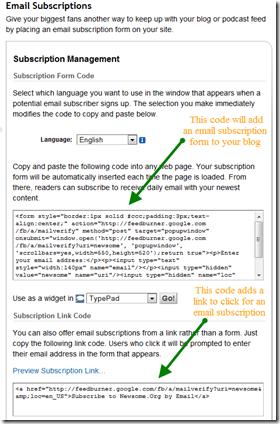
From the Subscription Management page, you can get code to embed a form or a link on your blog.  You can also enable a notification feature that will inform you when someone unsubscribes.  I wish Twitter had that feature.

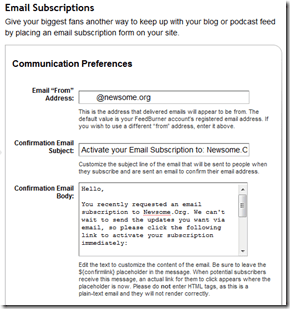
Next, go to the Communications Preferences page.  From here, you can set up your email address and the subject line and message for your email confirmations.

image

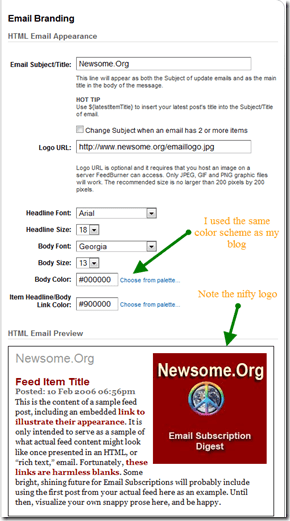
The next stop is the Email Branding page.  Here’s where you can really customize the look and feel of your emails.  You want the email to have the same branding, look and feel as your blog.  Note that you can create and upload a custom logo that will appear in your emails.

image

Finally, you can set your time zone and preferred delivery time via the Delivery Options page.

Step 3: Displaying the Subscription Option on Your Blog

Once you have configured your email subscription service, you’ll need to make potential subscribers aware of it.  Many WordPress themes and Blogger templates are pre-configured to display email subscription information.  See the top of this blog (WordPress) or Err Bear Music (Blogger) for examples.

image

Even if your theme or template doesn’t come pre-configured, you can easily add a subscription form or link, by adding the code that Feedburner provides on the Subscription Management page.

In addition to displaying the option on your blog, you should consider adding a link to your email signature, as those who would be most interested in an email subscription may not visit your blog, but do use and see email.

Step 4: Post as Normal and Let the Service Do the Work

After setting up your service and displaying a subscription form or link, your email subscribers will receive one email each day containing your blog posts for that day.

Here is a sample, from one of my recent subscription emails.

image

Step 5: While You’re Thinking About It, Subscribe to Newsome.Org Via Email

By clicking here.

That’s it.  Let the emailing begin!

Seesmic Web Makes Good Twitter

I was way late to the party, but have been using and enjoying Seesmic Web for the past few weeks.  It takes the chaos and user-unfriendliness that is the native Twitter web site, and makes it darn near usable.

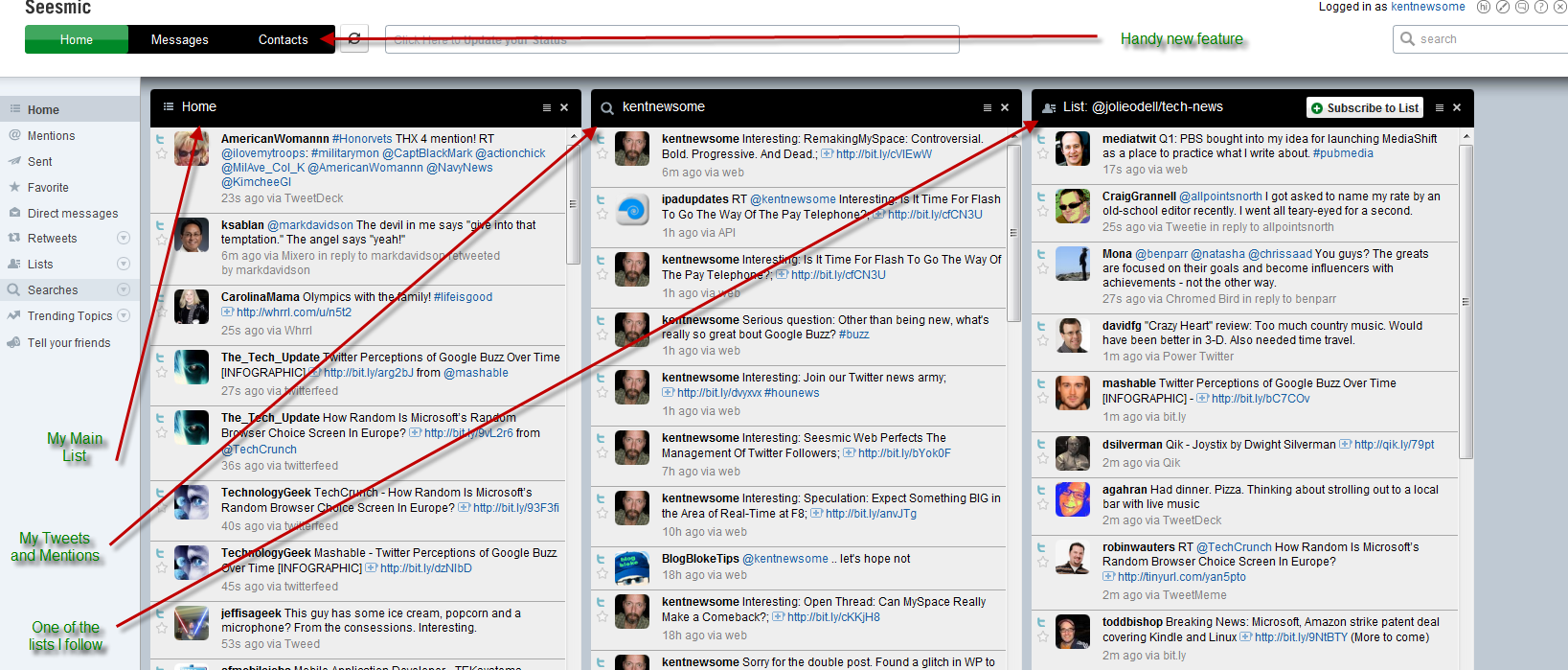
I like the way I can select, see and manage three columns of content on one screen.

image
click for a bigger, annotated image

I keep my main feed in the first column, and either a saved search or one of the lists I follow in the second or third column.

Today, Seesmic updated the app to include some really helpful new features.  One of those is pretty close to the feature I asked for the other day- better subscription management.

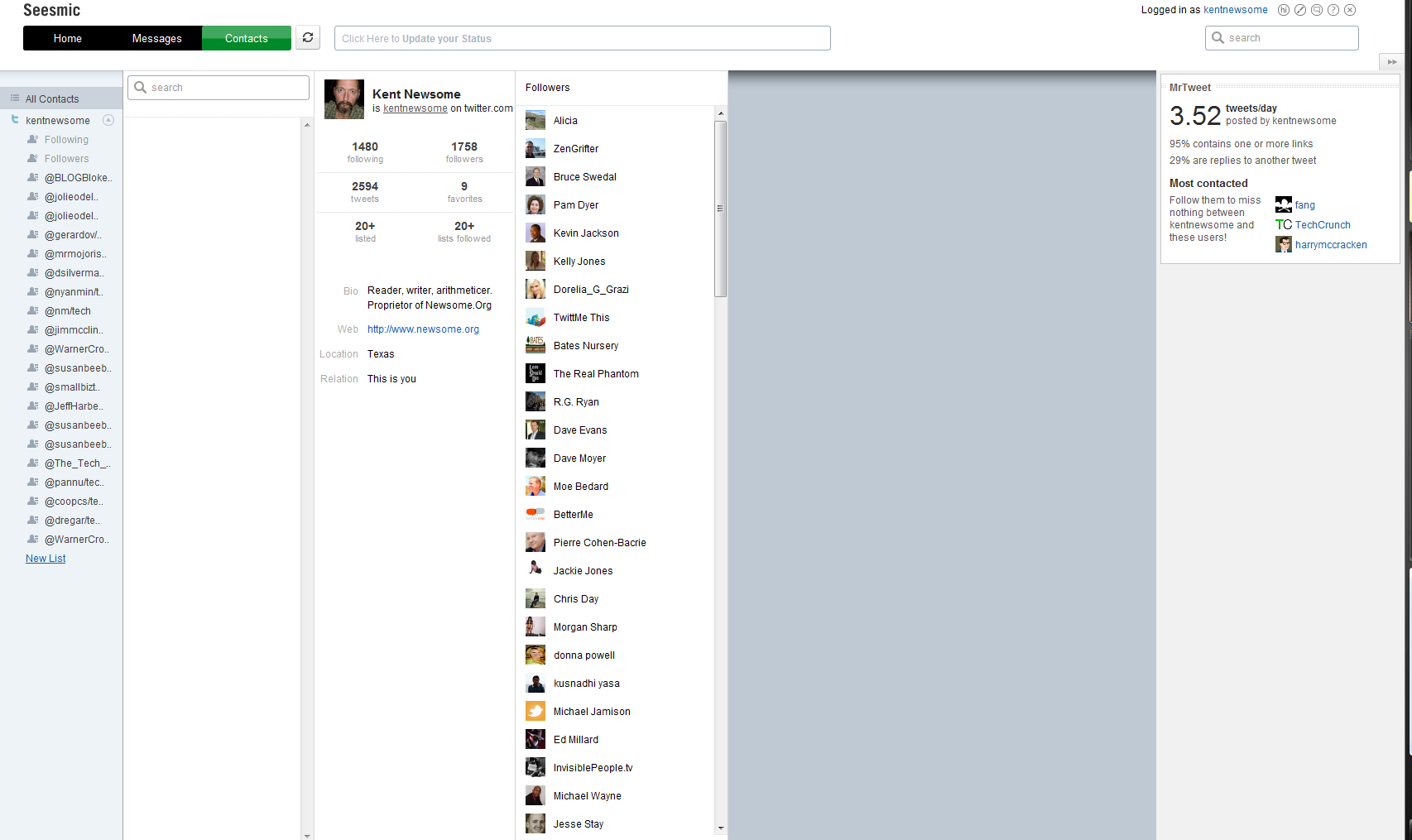
See the Contacts link?

Click on it, and you get a screen and toolset that makes managing your follows a lot easier.

image
click for a bigger image

Click on the “following” link beneath your photo, and you get a list of the people you follow.  Click on a person, and you get a screenful of information.image

I’m following the Dalai Lama, but alas he is not following me (can’t imagine why not).  If he was, that message would say “This user and you are following each other.”

From this screen, you can also send a message or unfollow someone.  Not perfect, but better.

It’s also easy to manage lists from this screen, and like Facebook, lists are crucial to an efficient Twitter experience.

The new version still has some issues.  I’ve had some log-in problems, lockups and script errors in Firefox 3.5.8, and the All Contacts button doesn’t seem to work after you view a contact’s details.

But it’s a definite step forward.

Are We Talking Ethics or Grudges or Just Funny?

Let me begin by making two important points.  One, other than a brief handshake at a conference once or twice, I’ve never met any of the main players involved in this TechCrunch/Crunchgate thing.  Two, I have no personal knowledge about the facts, as they exist or as they have been described, other than what I’ve read online.

Having said that…

A Quick Recap

image TechCrunch, a very popular website, had an intern or part-time employee who may have asked for or been offered some manner of compensation from companies seeking coverage on TechCrunch.  Such an act would be bad mojo for a new media web site trying to be taken seriously, and make lots of money in the process.  Mike Arrington, the founder and presumably majority owner of TechCrunch, wrote an apology and sacked said intern.

Loren Feldman, of 1938media, wasn’t all that impressed with Mike’s mea culpa.  It was noted in Loren’s post, and may be relevant to the discussion, that Mike and Loren apparently had a falling out in the past.  I don’t know the details, and they don’t matter at this point.

All of which led me to wonder, as I read the posts discussed below, how much of this is ethical activism, how much is some inside joke between two of the popular geeks, how much is grudge-fighting, and how much is just good old fashioned humor.

It gets confusing.

And while we’re talking about confusion and disclosure, let me note that I have written negatively about a lot of stuff Mike has said and done.  On the other hand, I have written in support of other things he has said or done.  See, I’m fair and balanced and transparent and confused.

Back to Mike and Loren…

Some of the things Loren says are spot on:

Why is TechCrunch even covering Yazzem? As a commenter points out, talking about “M&A”, “advertising” and “premium features” as part of a $15,000 deal between two companies with no web traffic clearly isn’t news.

And much is hilarious:

The Gillmor Gang may or may not be a TechCrunch production. It consists of non-technical people yelling at each other about technology and runs for what feels like eleven hours. Visuals focus on odd angles of nostril hair, bad cell phone call-in audio, and lighting that makes them look like lizards. Their most popular video is a 90 second YouTube clip where keyboard cat plays jazz organ after Mike acts like an idiot, a Google employee throws his Skype headset down in disgust, and I roll my eyes uncomfortably.

There are good points, and there are funny lines.  There is also hostility and belittling.

Maybe there’s a topic here we should discuss.  If I could stop laughing.  And cringing.  And laughing.  And cringing.

I Know You Are, But What Am I

Before I read all about this latest blogospat (or whatever it truly is), I did note with some interest that TechCrunch was throwing rocks at InfoWorld for not being as quick or as good at apologizing.  Maybe this is the best defense is a good offense thing, but I would think that’s a story Mike could have let pass right by without comment.

And Now for Something Completely Similar

All of this led to a post yesterday by Loren in which he takes some more, admittedly generally funny, shots at TechCrunch and then provides a list of over 100 companies whose mentions at TechCruch were deleted.  Including such juggernauts as Microsoft, Facebook, Intel and Yazzem.  Thank God Bebo wasn’t on that list.

See, I can be funny too…

Which, Finally, Leads to My Point.  Hey Wake Up!

I love a good blogospat.  I’ve written about some of the best of them.  I’ve been involved in a few.

But beneath all the punches and humor, isn’t there an important issue here?

People talk about blogs.  They love ‘em or they hate ‘em.  They are either the evolution of journalism or the new neighborhood papers for persistent nerds.

All of that is wrong.  Well, except for the nerd part.  That’s sort of right.

Blogs don’t really exist.  Not in the way most people describe them. Blogging is merely a content creation and management platform- like WordPress or Blogger.  Content is still content, and media is still media.  If someone wants to be taken seriously, whether as a blogger, a musician or a chimneysweep, he or she has to respect the rules of the game, manage their brand and nurture their credibility.  Whether you publish on dead tress, blogging platforms, email or signs behind airplanes is irrelevant.

So I think it’s fair and appropriate to debate TechCruch’s (and InfoWorld’s) actions in the wake of material credibility issues.  But if what we are really doing is having some personal grudge-match or engaging in extreme and generally hilarious satire (Disclosure: I think the funniest move ever made is Idiocracy, so I love satire as least as much as the next geek), let’s just say so.

I’d like to either promote distributed media (my pre-owned cars word for what some erroneously call blogging) or bury it in absurdity.

I’m happy either way.  Let’s just pick one.