
Any Port in a Storm: A Silent Fly in Google Voice’s Otherwise Lovely Ointment

portstorm-300x238

I was finally able to port my cell number to Google Voice during last week’s test period (the porting feature is now open to everyone).  Without going into a lot of detail, let me just say that Google Voice is an awesome (and free) service that anyone even remotely interested in using tech to increase ease and efficiency should be using.  In fact, I’ll port my last remaining land line as soon as land lines can be ported directly to Google Voice.

First, a little about my porting experience, and then a serious problem that greatly detracts from the all-in Google Voice experience.  Anyone from Google Voice who is reading this, feel free to skip to the Sound of Silence section below, where I eloquently describe the problem I desperately want you to fix.

Long and Winding Road

ATT is my cell provider.  I am still under contract.  When I walked into the local and empty ATT store the other morning, I had a plan.  A mighty and logically flawless plan, that initially went nowhere.  I told the customer rep that I wanted to port out my cell number to Google Voice, and then port in my second land line to ATT and have that number become my new cell number.  In essence, I wanted to swap out phone numbers and keep everything else in-place.  Easy peasy.

“Oh, hell no.”  Was the gist of the response.  To port out my number would require me to cancel my contract and pay a fat early termination fee.  I was told I could plead my case to customer service, if I wanted to call the toll free number (611).

So I did. And, at least by ATT standards, it went really well.  ATT was very cooperative (I did mention, very nicely, that if I had to pay an early termination fee, I’d surely move all of our lines to Verizon).  Without too much difficulty, ATT was on board.  I was able to start the port-in process for my land line immediately (you need the number and your account number with the current land line carrier).  Porting a land line into ATT Wireless takes 5 days, but once I had the port underway, ATT removed my then current cell number from the contract, so I could port it to Google Voice.  That process takes around 24 hours, and is seamless.

Once I confirmed, via the web site ATT provides when you port-in a number, that the port-in of my land line was complete, I stopped back by the local and again empty ATT store and switched out my SIM card.  When I got there, the basic ATT account system did not yet show my ported-in number, but we were able to find it once my customer rep called the ATT Porting Department.  It took a while to get this all sorted out, but overall it was really easy.

So, finally, I’m ready to experience the full-on Google Voice life.  Not so fast.

The Sound of Silence

I ran home, eager to configure my Google Voice account.

When I went to my Google Voice page, my cell number was already in place (you’ll still get calls from your old Google Voice number for 3 months, to help you make the transition), and automatically removed from my list of  forwarding phones.

This is when the clouds began to darken.

When I tried to add my new cell number as a forwarding phone (which is mandatory if you actually want to receive calls on your cell phone), Google Voice could not ring my cell phone to verify it (verification via a 2-digit code is part of the configuration process).  Nothing happened.  I tried teens of times.  Then I tried to call my cell number from Google Voice (using another forwarding phone), so I could hear what happens.  It rang and rang on the calling end, and then eventually went to something similar to a busy signal.

After much hacking, I was finally able to verify my new cell number by forwarding my cell number via my cell phone (and not via Google Voice) to another number.  I tried many variations of this hack before I got one to work.

But even now, when someone calls my Google Voice number, my cell phone does not ring.  Silence.  Initially, I could not receive text messages via the Messages app on my cell phone (you can always get them via the Google Voice app, but when fully functional, the text messages also show up as native texts in your cell phone text app).

So I called ATT last night.  Again, the people I spoke to tried to help.  One lady told me she thought it was an LRN issue, as my LRN was from a prior carrier.  She fixed it, and said to wait until today and try again (because the changes they make “roll out” into ATT’s system on a staggered basis).

Today I am able to get text messages on my phone.  But my cell phone still does not ring when people call my Google Voice number.  My other phones and Google Talk ring fine, but not my cell phone.

nosilence-300x174

So I tried again to call my cell phone, using Google Voice and another forwarding phone.  After 14 rings on the calling side, my cell phone rings.  14!!!  No one is going to wait that long.  Equally as troublesome, I never hear the cell phone ring when people call my Google Voice number, presumably because the call goes to voicemail long before that (though, according to many users in the Google Voice forums, it still takes too long to go to voicemail).

I have no idea how to fix this, but it makes Google Voice virtually unusable for me, which is a pity given all the work I’ve done to set it up.  And the fact that my cell number is now ported to Google Voice.

I’ve  researched this issue extensively online, and there does not seem to be a known fix within the user community, even though this problem or some variation thereof is pretty common.

Hey Google, can you please shed some light on this, for all of us?  You have to answer our call before we can answer yours.
Do Androids Dream of Electronic Mail?

“Emigrate or degenerate! The choice is yours!”

android

I finally dipped my toe into the Android pool last weekend, with mixed results.  Here are the highs, the lows and the one mind-boggling deal stopper when it comes to the Android OS.

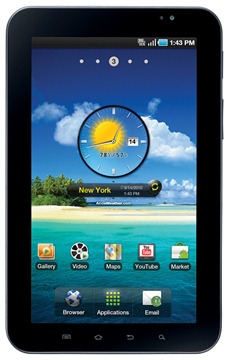
First, the hardware.  After reading about Android tablets forever, and specifically after reading Kevin Tofel’s pants pocket defense of the Samsung Galaxy Tab, I found myself braving the unspeakable horrors of Best Buy to look at one.  I was pleased to see that Verizon offers a monthly wireless broadband service with a $100 subsidy.   A chaotic half hour later, I walked out of Best Buy with a shiny new Galaxy Tab and a month to month contract with Verizon, which gives me 3 GB of monthly bandwidth for $35.

Things started off swimmingly.

Samsung-Galaxy-Tab

I was immediately surprised by how much I liked the smaller size of the Galaxy Tab, compared to the iPad.  It fits easily in the back pocket of my jeans.  It doesn’t really seem any smaller than the iPad when you’re using it.    It has a solid, well detailed feel, and is easy to set up and use.  In sum, it’s really pretty.

I was even more surprised by how much I like the Android OS.  With a little work, I found and installed most of my mandatory apps (Pandora, Google Reader, HeyTell, Foursquare, Evernote, Kindle, WordPress, etc.).  Most of these apps look and operate very similar to their iOS counterparts.  Sadly, there is no Words with Friends or Reeder app for Android.  I could find just about everthing else I needed, including the Newsome.Org app, which I hadn’t been able to use before.

With a little rearranging, I created a very nice Home screen, complete with a clock, weather and my most used apps.  I actually like the layout of this screen better than the one on my iPad.  I’d love to show you, but one of Android’s deficiencies is the lack of an easy way to take screenshots.

But it’s really pretty.  Trust me.

I thought the Android configuration process would be a chaotic mess based on what I’d read, but it wasn’t bad at all.  You have much more control in Android than in iOS, and so things occasionally go wrong.  But the process is enjoyable, nonetheless.

The Galaxy Tab serves as a wireless hotspot, something the iPad does not (yet) do.  This is huge for my wife and youngest daughter, who have a wi-fi only iPad and iPod, respectively.

And then, irritation and tragedy.

Just when I was thinking the Galaxy Tab might actually replace my iPad as my day to day tablet, I found something out that completely defies logic and sense: the Android OS does not play well with Google Apps.  Specifically, it is somewhere between extremely difficult and completely impossible to configure Google Sync to work with Google Apps email.

googlesync

I tried over and over, deleting all of the email content multiple times.  I tried via the Account manager, and I tried via the Gmail stand alone app.  I can send email.  I can see email in folders.  What I cannot do is access my inbox and see my incoming mail.  I get a recurring, frustrating and grammatically incorrect ""Cannot connect server" message.

I thought this might be a problem on the Google Apps end, but it works perfectly with TouchDown Exchange, a $20 app.  I’d pay multiples of $20 to get this problem fixed, but what I will not do is rely on a third party app- and interface- to manage my email.  I’m used to doing email via Exchange and Google Sync, and, by golly, that’s what I want.

I was also able to configure my work email via Exchange, so this problem seems to be limited to Android and Gmail and/or Google Apps.  You would think that Gmail and Google Apps seamless integration would be the one thing you could count on with the Google owned Android, which is tirelessly marketed as a robust alternative platform.  But no.

Sure, you can configure your Google Apps email to work via IMAP.  You can also travel by horse and buggy, but it’s slow, no fun and backwards.

For now, I’m using IMAP and frowning a little every time I check my mail.  This may have been inevitable, since, unlike with iOS, you are limited to a single Exchange account.

For the most part, I am really impressed with both the Galaxy Tab and the Android OS.  For the most part.

This email thing will, however, reduce my Galaxy Tab to toy status if I can’t resolve it.

That’s too bad, because other than a glaring defect in its email app, the Galaxy Tab is a neat little tablet.  That fits in my pocket, and could fit into my mobile strategy.

WordPress for Android

image

As part of my homewok in preparation for an upcoming post on the Android OS and my new Samsung Galaxy Tab, this is a post written via the WordPress Android app.   It is very similar to the iPad app, which is not necessarily a good thing

Links are done in the same slightly cumbersome way as in the iPad app.  It is managable with a URL shortener, but just barely.  Half my links were broken and had to be fixed via a computer edit.

I never feel like I’m in control of the content or appearance of posts when using these apps.

Adding photos is a strange and unsatisfying process.  I wonder where the random photo I chose will end up.

UPDATE: It gets stuck up at the top, and- as always- is too big.

I wish you could place and manipulate photos more easily.   Media manipulation is clearly the Achilles’ heel of all of the WordPress apps.

The auto-correct on this tablet/app is not very good.

More soon on Android and this tablet.

There is a lot of good and one almost incomprehensible  problem (hint: involving that all important feature, electronic mail), to report.

Apptic Storm: This Week’s Interesting Apps

Here are the apps, hacks and  updates I found interesting over the past week.

Smart File Advisor.  an application that helps in identifying  programs that can be used to open an unidentified  file.

Chrome Clipper.  A handy little Chrome extension that lets you save and manage text snippets for future use.

Snackr.  A robust app that adds RSS feeds to your desktop.

WindowSeat.  An iPhone app that shows you your location on the flight path while airplane mode is on.  Neat idea, but $6.99 is way too much.

SE-DesktopConstructor.  A powerful app that helps you customize your desktop background.  I like the clock and calendar features.

Bookmark Bar Switcher.  Another Chrome extension, that let’s you create and select multiple bookmark bars.

Wallcast.  Turns your desktop background into a personalized display of pictures from you, your family and your friends.

How to Integrate Facebook into a WordPress Blog

facebook_logo

Following up on my surprising, even to me, change of heart regarding Facebook, I’ve added some more Facebook integration at Newsome.Org.  Here’s what I have done, how you can do it with your WordPress blog, and how your picture can instantly appear right over there.   ——>

Sharing

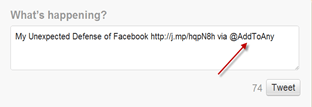
I’ve used the AddtoAny plugin for some time.  It appears at the bottom of each post and allows readers to instantly share my posts to Facebook (Friend me if we are), Twitter (follow me via that link) and just about every other social network, with just the click of a button.

image

A couple of caveats.

I hate the way the plugin adds the marketing plug to the end of items you share on Twitter.  I always delete it before hitting the final Tweet button.

image

Finally, be sure to add this important code to the Additional Options blank in the plugin settings, to avoid an annoying privacy glitch.

1. Open the AddtoAny Settings menu (found under Plugins)

2. Scroll down to the text box labeled Additional Options

3. Add the following text:

var a2a_config = a2a_config || {};
a2a_config.no_3p = 1;

Facebook Likes

It is much, much easier for a reader to Like a post via a one-click button than it is to go through the Sharing process.  For this reason, I think a Facebook Like button is a mandatory addition to blogs.

It’s not easy to manually add the required code to the various WordPress files.  Fortunately for WordPress users, there is a handy plugin that does it for you.  Why not test it out at the top of this post.  Come on!  It will be fun.

Facebook Activity

The third prong of my Facebook implementation involved adding a Facebook Activity widget that will show who has Shared or Liked my posts.  See the box in the right hand column?  If you click the Like button at the top of a post or Share any post via the AddtoAny plugin described above, your name and photo will appear in that box.

Right now, it’s all me, which is sort of lame.  So add your picture there and help beautify Newsome.Org!

It’s really easy to add this feature.  Just go to the Facebook plugin page, get your code and add that code in the desired place.  With my WordPress theme, it’s a simple matter of creating a text widget called Facebook Activity and inserting the code.  If you run into any problems leave a question in the Comments and I’ll try to help.

That’s it, for now.  Do you have any ideas for adding Facebook connectivity to a blog?

A Comprehensive Spotify Walk-Through for Curious, Excluded & Impatient Americans

Now that I have sufficiently expressed my irritation with the tendency of Spotify and those who obsess on it to tell us every day that tomorrow will be the day Spotify officially launches in the U.S., maybe I should take a look at it and see what’s what.

Here’s what will happen if and when we get access to Spotify here in the new world.

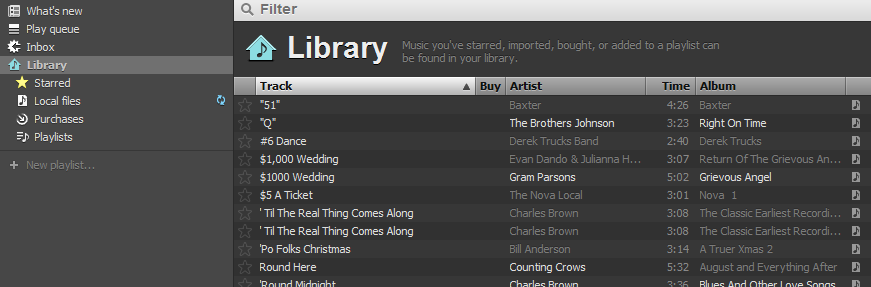
After registering and downloading the Spotify music player app, you land at the Library page.

image
Click for larger size

When you click the “Start using Library” button, Spotify quickly scans your computer,  imports your local music, and adds it to the “Local files” folder.  I didn’t know this was going to happen, but OK.

image
Click for larger size

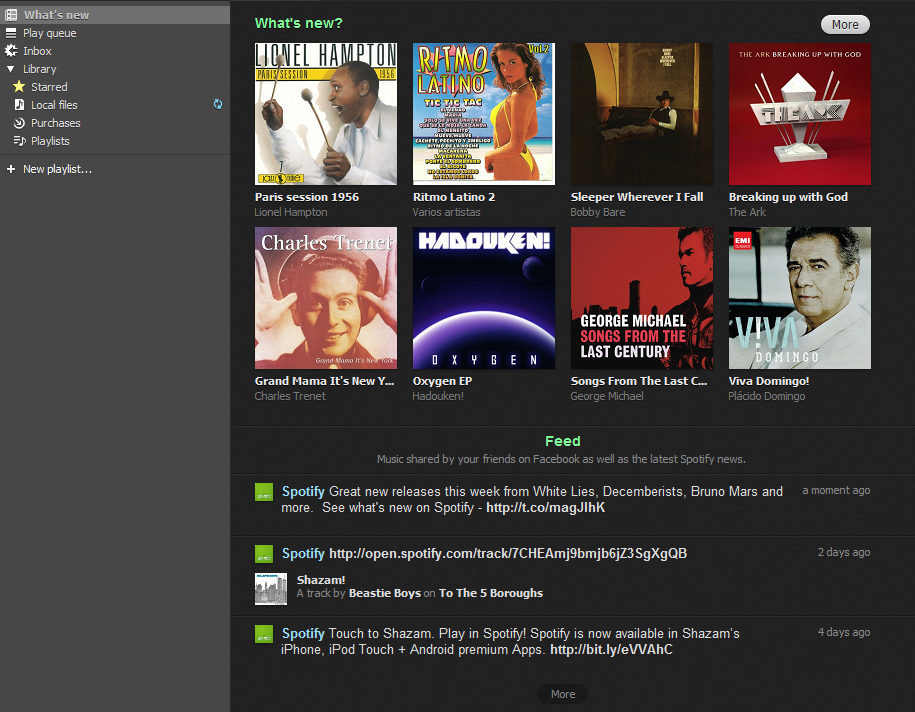
There’s a “What’s new” link at the top of the navigation column, that clearly doesn’t yet know my musical tastes, though it knows my taste in bathing suits.

image
Click for larger size

Via the navigation column, you can create Playlists, and view and download to your computer the songs you purchase via Spotify.

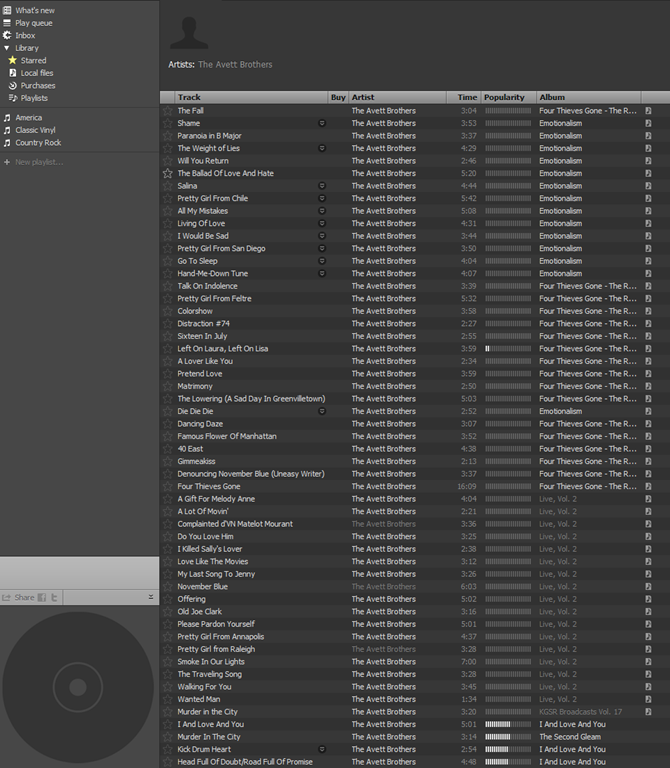
Let’s search for some music.  How about The Avett Brothers.

image

Tons of available songs.  Local files are marked with a little icon on the right hand side.

image
Click for larger size

I decided to listen to one of my favorites, A Gift for Melody Anne.  Plays immediately, via my Local files library.  That’s pretty nifty, to automatically use the local file when available.  The integration between local files and streamed content looks pretty seamless.

image

Right click on the song in the main window and you can add it to your play queue and/or star it as a favorite.

Now let’s try one that’s not local.  When I Drink.  No problem.

image

Let’s see if I can share this via the little Facebook link.  That will surprise some people.  Worked like a charm.

image
Click for larger size

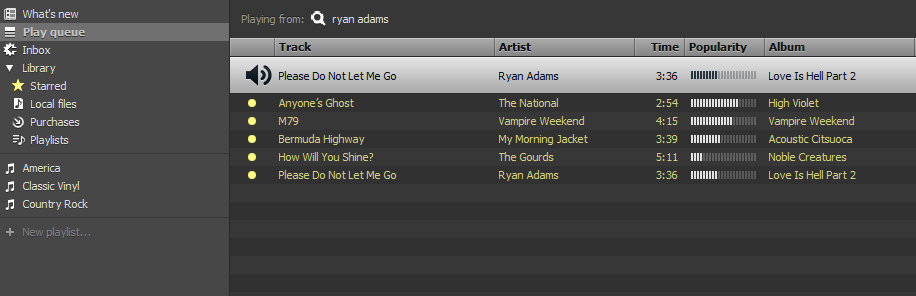
Let’s queue up some music, with some stuff that I know isn’t local.  Easy as pie.  There are some ads in the stream, but that’s to be expected with the free version.

image
Click for larger size

I really like that acoustic version of Bermuda Highway by My Morning Jacket.  I think I’ll try to buy the record.  I clicked on the name of the record and landed on the album page, with a handy “Buy Album” button.

image

The 5 song EP was $2.85 (converted).  No Paypal option, though.  Had there been, I would have bought it on the spot (pun intended).

Being a faithful music fan, I went to Amazon and bought the record.  For $8.32!  It wasn’t available in MP3 format.

So, the questions.

Would I use it?  Probably so.  I’d at least give it a try.

Would I pay $8.00 a month (this is the UK converted price; if it ever comes to the U.S., it might cost more) for an Unlimited subscription, to lose the 20 hours a month time limit and the ads?  Probably, but that would mean that I would pay for three premium music services.  Spotify, Pandora and Slacker Radio.  The on-demand nature of Spotify’s service would be a distinguishing factor that could very lead me to subscribe, assuming the cost was reasonably equivalent.

How about  $16.00 a month (this is the UK converted price; if it ever comes to the U.S., it might cost more) for all of that plus better sound quality, offline mode and full mobile access?  I’m not sure.  Maybe.  It would depend on the iPhone app.

My hunch is that it would be hard for Spotify to supplant Pandora and Slacker as my mobile music source.  But you never know.

The biggest problem I see right now is the jump from the $8.00 plan to the $16.00 plan (and again, it may be more in the U.S.) that is required to get offline (cached) access and mobile access.  Slacker Radio gives you all of that right now for  $48.00 a year.

But in spite of that, I can’t deny that I find Spotify pretty appealing.  Even if it’s only a mirage on the horizon at this point.

Heck, if I can learn to like Facebook, I guess anything is possible.

My Unexpected Defense of Facebook

Here’s a post I bet no one ever thought I’d write.

John Dvorak, whose articles and posts I have long enjoyed, sets forth a persuasive argument against Facebook.

I’m not going to try to summarize years of my posts and podcast rants, so let me just say for any new readers that I long held, and argued with anyone who would read or listen, that identical position.  I called Facebook the new AOL more than a few times (for the record, MySpace, not Facebook, is the new Geocities).  I protested over the walls.  I proclaimed that I would always keep my content out here, free, accessible and controlled by me on the wide open web.

doyouhavefb

Then I realized something important.  Facebook and web sites are not an either/or equation.  Just because you use Facebook doesn’t mean you have to let your blog lie fallow.  Most of my content originates and lives here.  Some of it, I push to Facebook or Twitter (though I do not push my Twitter posts to Facebook and generally filter those who do).

But I have found Facebook to be a very fun and useful supplement to this blog, for two reasons.  It’s easy, and popular.

Easy, because it lets me post short thoughts and share items that don’t warrant a full blog post here.

Popular, because that’s where the people are.  There are tons of people on Facebook that would rarely if ever come here and leave a comment.  Many of them are not tech savvy.  Others are not particularly interested in the subjects I focus on here.

By using Facebook the right way, I can expand my interaction to another group of people, many of whom are real world friends of mine.  I can actually drive some traffic here, by sharing some of my posts here on Facebook.  And I can have more regular interaction with people.

John should give it a try.  If I can learn to like Facebook, anyone can.

If we are, Friend me on Facebook.

Hey Google, Let’s Fix Contacts Too

Since I tend to use my Google Apps Gmail page as mission control for scheduling, organization and communication, I was very happy to read that Google is going to (finally) make some much needed improvements to Google Tasks.  I like the way Tasks are integrated into Gmail, and I generally keep my Tasks open at the bottom of my Gmail page.

I agree with Mashable that these five improvements will vastly improve Tasks.  I was already using Tasks, having moved away from RTM and other third party options, and most of the things I miss are covered in Google’s recently announced Task task list:

1. A Tasks API and synchronization
2. Reminders and notifications
3. Recurring tasks
4. Shareable task lists
5. Visual distinction for overdue tasks

So, good job Google.

fixmeNow, what about Google Contacts?  Can we please fix them too?  Gmail is beautiful.  Google Calendar is powerful and elegant.  Google Contacts sort of sucks.  But we can fix it, and I’ll help by giving you the list- right now.  Together we can make Google Contacts awesome.

1. Make the Contacts Page Simpler and More Useful

The page looks, well ugly.  Compare it to Calendar and you’ll see what I mean.  Google can create the new design, but here are a few ideas.  We simply must have alphabetical links at the top somewhere, at least as an option.  No one wants to have to search just to get to the S’s.  Please lose the “All Contacts” list.  I don’t know what that is.  I want the people I add to my Contacts to be in here.  Not people I may have at one point emailed or chatted with.  Or yelled at to stop spamming me.

image

Again, this can be an option, if Google believes there is  value to auto-adding contacts.

Let’s add a tag for “Favorites” and have that list appear in a separate column on the landing page.  There’s plenty of room.  I know there is a “Most Contacted” list, but I want more control over this, and I want the list to appear all the time.

Finally, let’s move the Contacts link from the left column up to the top, beside Mail, Calendar, Documents, etc. and have it appear on all of the app pages, just like the others.

2. Let Us Choose to Default to Home or Work

If we only get one wish, this would clearly be mine.

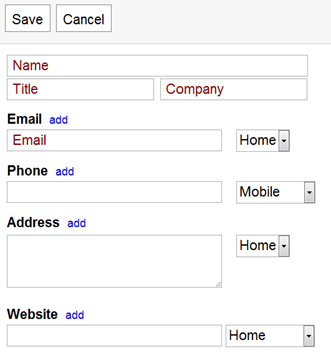
I can’t tell you how many of my contacts have their work information stored under “Home,” because that’s the way the entry form defaults.  See?

image

This one simple improvement would save me a ton of time.

3.  Auto-convert Phone Numbers and States to Designated Format

I’ll admit I’m a little anal about this stuff, but I hate to have some phone numbers with periods and some with dashes.  And I want all of my states to be abbreviated.  Outlook has done this with phone numbers for years, so we know it can be done.

4.  Let Us Create Custom Fields

I love the fact that the default form has a blank for birthdays, but I want the ability to add other information.  For example, I might want a field for Facebook Page, Twitter Name,  etc.  I know you can add multiple “Websites” now, but I want total control over the info I add, and the way it appears.

5.  Better Google Maps Integration

When I display a contact, a Google Map should appear somewhere on the page showing me his or her address, and offering to give me directions there.  A link that would let me email the address and directions to someone would also be nice.  I know I can click "Map” under the address and get a map, but that requires me to leave the Contacts page.  I want all of this to be integrated and embedded.

And Two Wishful Bonuses

The last two might be a stretch, but it would be awesome to have the ability to email a photo of a business card to a designated email address, and have that card converted into a Contact entry.  It would need to go into a special list, perhaps “Scanned,” so we could check it for accuracy and then add it to our main Contacts list.

It would also be awesome to have a box beneath the Contact entry with customizable search results for the name of the Contact and/or his or her company.  We should be able to configure the search results as we like: web, news, blogs, social networks or any combination thereof.

Add Your Wish list

Add your wish list in the Comments and I’ll compile a list and send it to one of my Google contacts for consideration.

A Room with No View: Microsoft and the Marketing of Windows Phone 7

Two of my pals posted two very different takes on Windows Phone 7 and its less than stellar sales figures so far.

James Kendrick asks if Microsoft can snatch victory from the jaws of defeat.  JK uses some quotes by hardware partner LG to show that maybe Windows 7 has stumbled out of the gate:

Even though typical of smartphones today, Microsoft’s hardware requirements for WP7 are apparently seen by LG as raising the bar too high for the market. “There is a lot of skepticism at the moment, but once Windows Phone 7 handsets that are mid-tier to low tier start appearing the market share will grow. Right now it’s only exclusively present in a high tier, because of its hardware requirements, and that’s limiting growth.”

Windows Phone 7JK goes on to wonder if Windows Phone 7 will end up in the bargain bin.  Sounds sort of like a possible Kin sequel.
Steven Hodson, on the other hand, says Window Phone 7’s lack of traction is not Microsoft’s fault, and that the carriers and sales outlets are not doing their part to market the phones.

I tend to agree with Steven that the marketing has been lacking.  In fact, I haven’t seen this little marketing buzz surrounding a similar product since the Palm Pre was tossed out there and thudded to the ground, never to be heard from again.  Having said that, I don’t know that the lack of marketing isn’t Microsoft’s fault.  Clearly it bears some of the blame.

I’ve been saying for a long time that Microsoft needs a major paradigm shift in the way it names, releases and markets its products.  Seriously, could the name Windows Phone 7 be any less exciting?  They could have picked a random name out of the dictionary and it would have been better.  Want me to prove it, hold on.  I got a dictionary, closed my eyes and picked a word: “knuckle.”  At least there’s imagery with that.

Maybe if Microsoft created an air of true 2011 era (and not Victorian Era) excitement about its products, the carriers and resellers and users and tech bloggers would get excited.  It’s kind of hard to get excited about Windows Phone 7.

I continue to believe that Microsoft’s marketing is like Masterpiece Theater.  It’s high quality, but boring as hell.  And I don’t always understand what they’re saying.

It is Mathematically Impossible for Me to Care Less Whether Spotify Launches in the U.S.

spotify_logo

I just want everyone to stop talking about it.

Nothing amuses me any more than when someone who knows someone who has a friend who knows people at Spotify cuts a fart and the entire world goes nuts claiming that the glorious sound of flatulence  means, for the thousandth time, that Spotify is just about to launch in the United States.

Look, I’m a tech blogger, a music blogger, a songwriter and musician and a huge music fan.  So demographically speaking, no one should be more excited about Spotify than me.  But, after all the half-starts, bluster and overreactions, I could not possibly express how little I care if Spotify launches or doesn’t or if the whole thing is some long con by the Onion.

I just don’t care.  Either launch or don’t.  But please, please, please…stop talking about launching.  Really.

But today, there was more.  A possibly off-hand comment by an anonymous music industry “executive” (what does that even mean in 2011) causes the entire internet to grab its collective headphone and proclaim that this, finally, may be the day the music is reincarnated.  It was a virtual conga line, over nothing more than the latest unattributed hint that maybe one day Spotify will actually be available on this side of the Atlantic.

For what it’s worth (and I hate to talk about Spotify in the US as if it’s anything more than  vaperware), I don’t think it’s too late.  Pandora’s six skips an hour limit is killing me (mainly because on connected DVD players, at least, it seems to be per hour of playing time, as opposed to an hour of real time).  I love Slacker’s caching and unlimited skips, but the mix I get with Slacker isn’t as good as on Pandora.  I’d rather yank out my ear drums with rusty pliers than use Rhapsody, and I don’t know what MOG is.

Spotify could be huge.  If it ever happens.

Until then, can we all shut up about it?