As part of my homewok in preparation for an upcoming post on the Android OS and my new Samsung Galaxy Tab, this is a post written via the WordPress Android app. It is very similar to the iPad app, which is not necessarily a good thing
Links are done in the same slightly cumbersome way as in the iPad app. It is managable with a URL shortener, but just barely. Half my links were broken and had to be fixed via a computer edit.
I never feel like I’m in control of the content or appearance of posts when using these apps.
Adding photos is a strange and unsatisfying process. I wonder where the random photo I chose will end up.
UPDATE: It gets stuck up at the top, and- as always- is too big.
I wish you could place and manipulate photos more easily. Media manipulation is clearly the Achilles’ heel of all of the WordPress apps.
The auto-correct on this tablet/app is not very good.
More soon on Android and this tablet.
There is a lot of good and one almost incomprehensible problem (hint: involving that all important feature, electronic mail), to report.
I thought we were done with Season One of Deacon Blues after the big season finale, but recent events have mandated another episode.
In this highly informative and much anticipated episode, Ron Wellman and PhDeac hold a joint press conference behind a Motel 6 in Durham, NC.
Episode 1 is here. Episode 2 is here. Episode 3 is here.
Note: All characters and events in this show—even those based on real people—are entirely fictional. All celebrity voices are impersonated…..poorly. The following program contains coarse language and due to its content it should not be viewed by anyone.
Obviously, this is satire and humor. No offense to any person, real or fictional, is intended.
Following up on my surprising, even to me, change of heart regarding Facebook, I’ve added some more Facebook integration at Newsome.Org. Here’s what I have done, how you can do it with your WordPress blog, and how your picture can instantly appear right over there. ——>
Sharing
I’ve used the AddtoAny plugin for some time. It appears at the bottom of each post and allows readers to instantly share my posts to Facebook (Friend me if we are), Twitter (follow me via that link) and just about every other social network, with just the click of a button.
A couple of caveats.
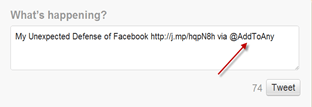
I hate the way the plugin adds the marketing plug to the end of items you share on Twitter. I always delete it before hitting the final Tweet button.
Finally, be sure to add this important code to the Additional Options blank in the plugin settings, to avoid an annoying privacy glitch.
1. Open the AddtoAny Settings menu (found under Plugins)
2. Scroll down to the text box labeled Additional Options
3. Add the following text:
var a2a_config = a2a_config || {}; a2a_config.no_3p = 1;
Facebook Likes
It is much, much easier for a reader to Like a post via a one-click button than it is to go through the Sharing process. For this reason, I think a Facebook Like button is a mandatory addition to blogs.
It’s not easy to manually add the required code to the various WordPress files. Fortunately for WordPress users, there is a handy plugin that does it for you. Why not test it out at the top of this post. Come on! It will be fun.
Facebook Activity
The third prong of my Facebook implementation involved adding a Facebook Activity widget that will show who has Shared or Liked my posts. See the box in the right hand column? If you click the Like button at the top of a post or Share any post via the AddtoAny plugin described above, your name and photo will appear in that box.
Right now, it’s all me, which is sort of lame. So add your picture there and help beautify Newsome.Org!
It’s really easy to add this feature. Just go to the Facebook plugin page, get your code and add that code in the desired place. With my WordPress theme, it’s a simple matter of creating a text widget called Facebook Activity and inserting the code. If you run into any problems leave a question in the Comments and I’ll try to help.
That’s it, for now. Do you have any ideas for adding Facebook connectivity to a blog?
Up against the wall [Chinese] Mother, Mother, who has raised her son so well. ~ Ray Wylie Hubbard
I’ve read some of the brouhaha over this so-called Chinese mother business. Basically, some lady decided to go way beyond old school and be super-demanding and, apparently, really harsh with her kids, in an effort to turn them into violin prodigies, and whatnot.
I refuse to believe that all, or even most, actual Chinese mothers act this way, but I didn’t pick the phrase and so we’ll go with it.
Back to the matter at hand. I see all kinds of sides to this debate. It’s nuts, yes. But there’s a little more to it.
One, I am pretty sympathetic to the idea that maybe, just maybe, we are too new age with our kids. Never keep score, everyone gets a trophy, etc., etc. I think there is a happy medium, but we have definitely swung too far to the kinder, gentler side of things. Sure, your soccer coach may reward you with a trophy even if you never practice and don’t even try, but your future bosses probably won’t be as understanding.
I’ve coached youth sports, and even though I tried to find a happy medium, I was clearly viewed as a Bobby Knight terrorizer of children. Every time I got a strange look for speaking in a non-Sesame Street tone to the kids, I’d recall the way my first football coach would grab us by the belt and literally throw us out of the way if we kept screwing up. And how hard I tried not to screw up after I got tossed around a few times.
If you treat a child like a baby, the child will act like a baby.
Plus, if we treat our children like babies until they are adolescents, it makes it a lot harder to make the transition into that era of school and sports, generally beginning in late middle school, when grades and performance actually start to matter.
One the other hand, nothing bugs me more than some parent who sublimates all his or her frustrations and desires into the parenting of his or her children. I don’t think all highly directive parents do this, but some do. For sure.
And why the violin? When a kid is 3 or 4 he or she doesn’t have the slightest idea what really interests them. The violin part really bugs me. What if one of her kids wanted to be a great mandolin player? Or a world class juggler?
I’m pretty demanding with my kids. With Delaney, it started with swimming, not because I decided she would become a great swimmer, but because she did. If she has a bad swim, I’ll say something like “Dang, Delaney, I thought you were going to drown out there,” or I’ll ask if she needs some Floaties. At first, this made her mad.
Now it clearly motivates her. Big time. Last summer’s league Freestyle championship heat, for instance. She didn’t need Floaties that night.
Delaney is third from the right, with the blue swim cap.
After seeing how Delaney responded to my raised expectations in swimming, I started being more demanding of all my kids, with school work. I tell them that if they make a bad grade they’ll have to sleep in the yard for a night or two, on the trampoline. They’re pretty sure I don’t mean it- pretty sure being the important part. They are all good students, and they feel personal satisfaction as a result thereof. That’s the key, because true motivation comes from within, not from without.
Of course, we also goof around together all the time. Playing Wii Sports, and watching bad reality TV. We have a good time. We do the “pull my finger” thing all the time. Most of the time, we’re just messing around. But they all know when to bring it.
But, and here’s where I disagree with this so-called Chinese mother, you also need to build-up your kids and express love (I said express, not just feel). My kids and I hug all the time. I tell them I love them constantly. If one of my kids gained a few pounds, I would never say “Hey fatty- lose some weight,” as described in the article that started this whole rigmarole. Nothing, and I mean nothing, pisses me off more than someone putting down their kids in a way that affects self-esteem.
I also realize that often we’re just trying to get the kids to school or bed. There’s not always time to mold your child into whatever you’d like them to be. Thank goodness.
I tell my kids to be what you want to be, but just be good at it.
High expectations and choices makes kids strong. They dig it. Trust me.
Demeaning kids and taking away their choices makes them weak. It may not look that way at first, but just wait. Just because you’re not some new age, wimpy American doesn’t make you Gunnery Sergeant Hartman.
There’s also the very important question of what defines success. I am squarely in the camp that grade school does not need to be Harvard. Or Yale. I doubt I could do anything in the 10th grade that Cassidy can do now in the 7th. And I’m certain I had more free time. Being a honking nerd is not everyone’s vision of perfection.
I think the fact that the so-called Chinese mother didn’t let her kids have play dates or sleepovers, or be in a school play or play any instrument other than the piano or violin (for crying out loud) is idiotic at best and abusive at worst. She says:
What Chinese parents understand is that nothing is fun until you’re good at it.
Really? Well there are millions of golfers, tennis players, card players, painters and God knows what elses who think that is pure horseshit. I am terrible at Wii Recreation basketball. Delaney beats me like a drum. But I love it. The only time I beat her was by a last second jumper from the corner. It was epic. The look on her face when that shot went in makes the countless drubbings worth it.
On the fifth or sixth hand, however, I fervently agree with the so-called Chinese mother that just saying “do your best” is a cop out. In my house we have a saying, that I stole from Jillian on The Biggest Loser- “to say you’ll try is to fail with honor.”
And on the final hand, I think a lot of the nonsense she was spouting in the original story was designed to get people riled up so she’d sell a few books. I’m sure she accomplished part one of that plan. Part two? That may be a bigger hurdle. I don’t want her book, but I’d buy a CD of her kids playing kazoos. Or anything other than the violin or piano.
There’s a middle ground somewhere between ne
w age America and this lady’s perception of China.
Now that I have sufficiently expressed my irritation with the tendency of Spotify and those who obsess on it to tell us every day that tomorrow will be the day Spotify officially launches in the U.S., maybe I should take a look at it and see what’s what.
Here’s what will happen if and when we get access to Spotify here in the new world.
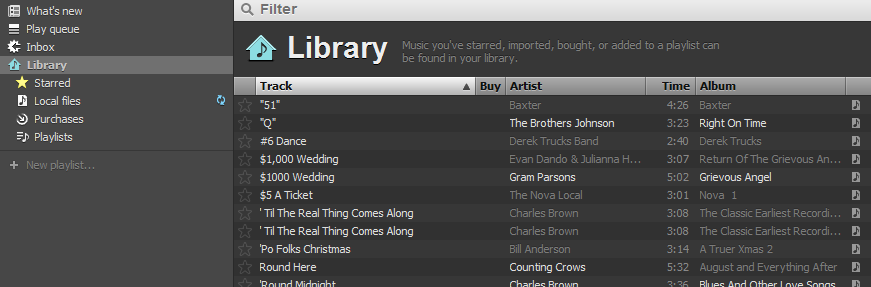
After registering and downloading the Spotify music player app, you land at the Library page.
Click for larger size
When you click the “Start using Library” button, Spotify quickly scans your computer, imports your local music, and adds it to the “Local files” folder. I didn’t know this was going to happen, but OK.
Click for larger size
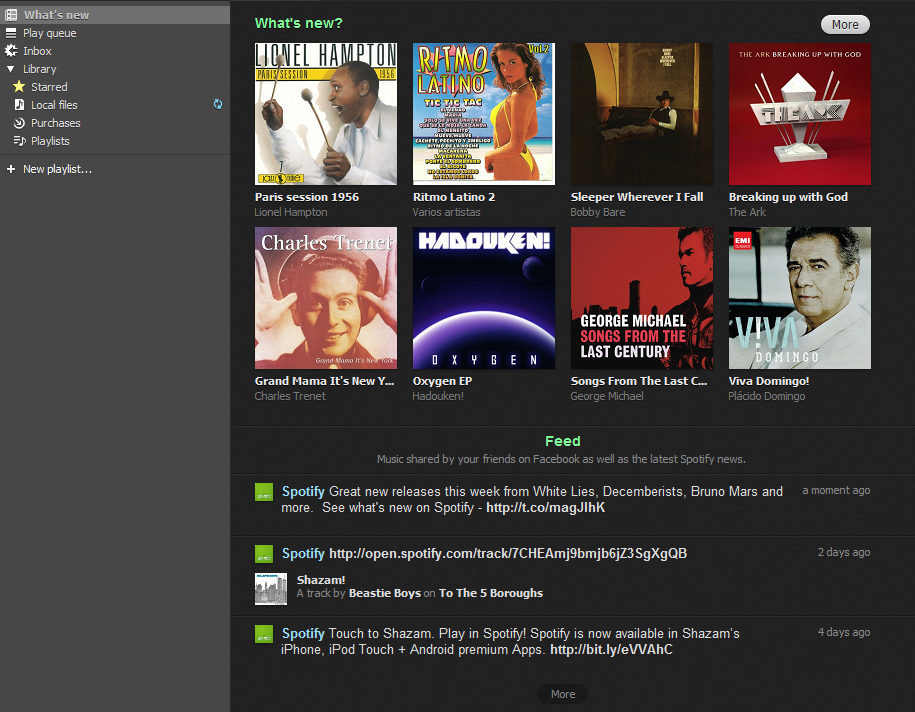
There’s a “What’s new” link at the top of the navigation column, that clearly doesn’t yet know my musical tastes, though it knows my taste in bathing suits.
Click for larger size
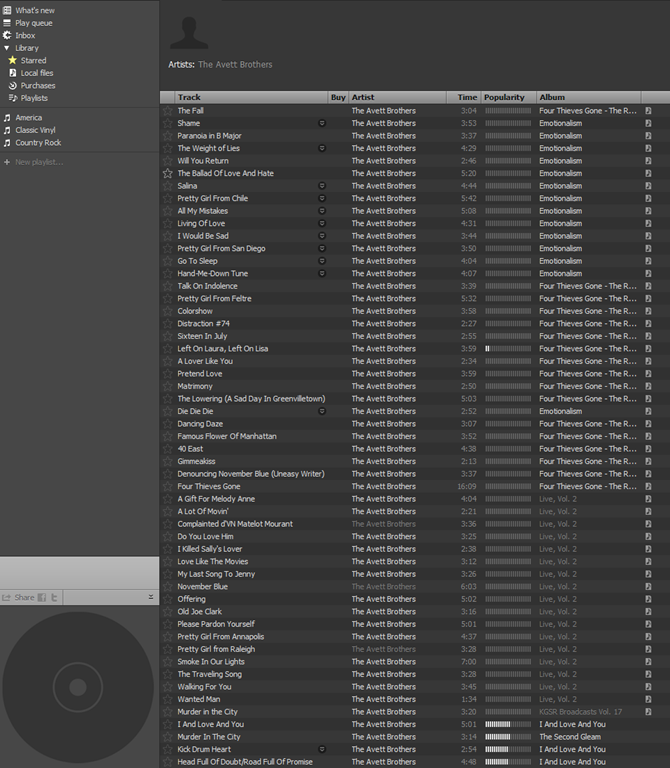
Via the navigation column, you can create Playlists, and view and download to your computer the songs you purchase via Spotify.
Tons of available songs. Local files are marked with a little icon on the right hand side.
Click for larger size
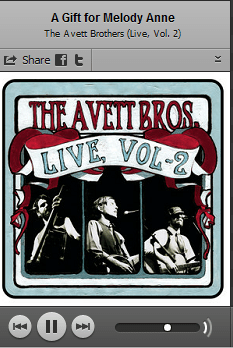
I decided to listen to one of my favorites, A Gift for Melody Anne. Plays immediately, via my Local files library. That’s pretty nifty, to automatically use the local file when available. The integration between local files and streamed content looks pretty seamless.
Right click on the song in the main window and you can add it to your play queue and/or star it as a favorite.
Now let’s try one that’s not local. When I Drink. No problem.
Let’s see if I can share this via the little Facebook link. That will surprise some people. Worked like a charm.
Click for larger size
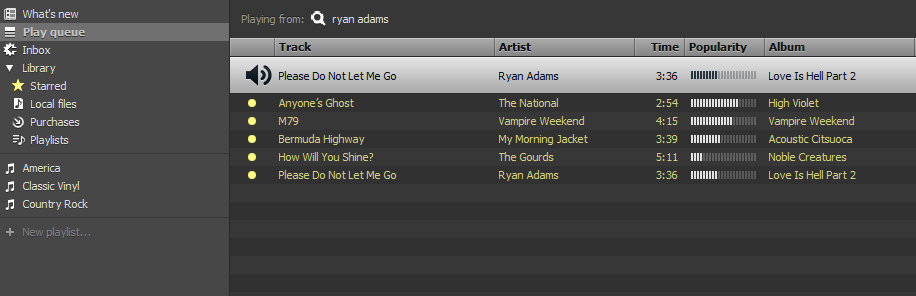
Let’s queue up some music, with some stuff that I know isn’t local. Easy as pie. There are some ads in the stream, but that’s to be expected with the free version.
Click for larger size
I really like that acoustic version of Bermuda Highway by My Morning Jacket. I think I’ll try to buy the record. I clicked on the name of the record and landed on the album page, with a handy “Buy Album” button.
The 5 song EP was $2.85 (converted). No Paypal option, though. Had there been, I would have bought it on the spot (pun intended).
Being a faithful music fan, I went to Amazon and bought the record. For $8.32! It wasn’t available in MP3 format.
So, the questions.
Would I use it? Probably so. I’d at least give it a try.
Would I pay $8.00 a month (this is the UK converted price; if it ever comes to the U.S., it might cost more) for an Unlimited subscription, to lose the 20 hours a month time limit and the ads? Probably, but that would mean that I would pay for three premium music services. Spotify, Pandora and Slacker Radio. The on-demand nature of Spotify’s service would be a distinguishing factor that could very lead me to subscribe, assuming the cost was reasonably equivalent.
How about $16.00 a month (this is the UK converted price; if it ever comes to the U.S., it might cost more) for all of that plus better sound quality, offline mode and full mobile access? I’m not sure. Maybe. It would depend on the iPhone app.
My hunch is that it would be hard for Spotify to supplant Pandora and Slacker as my mobile music source. But you never know.
The biggest problem I see right now is the jump from the $8.00 plan to the $16.00 plan (and again, it may be more in the U.S.) that is required to get offline (cached) access and mobile access. Slacker Radio gives you all of that right now for $48.00 a year.
But in spite of that, I can’t deny that I find Spotify pretty appealing. Even if it’s only a mirage on the horizon at this point.
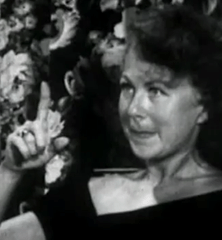
So it’s 1956 and a seemingly average housewife from Los Angeles drops acid for the first time as a part of the Sidney Cohen experiments, and we get to watch. This is all kinds of interesting.
There’s some lame ad for some book at the very end. I skipped that.
Luke turned 5 on January 4. He had his birthday party yesterday. Big fun was had by all.
I used the occasion to test out 8mm Vintage Camera, one of my favorite new iPhone apps. It’s a neat little video camera app, with several film styles from years gone by.
Best of all, unlike Hipstamatic, with which I eventually threw my hands up in frustration and gave up, the options and controls are very intuitive.
I shot this clip on my iPhone, uploaded it to YouTube right from the app, and then changed the audio track to a song from YouTube’s library via YouTube’s AudioSwap feature.
I’m not going to try to summarize years of my posts and podcast rants, so let me just say for any new readers that I long held, and argued with anyone who would read or listen, that identical position. I called Facebook the new AOL more than a few times (for the record, MySpace, not Facebook, is the new Geocities). I protested over the walls. I proclaimed that I would always keep my content out here, free, accessible and controlled by me on the wide open web.
Then I realized something important. Facebook and web sites are not an either/or equation. Just because you use Facebook doesn’t mean you have to let your blog lie fallow. Most of my content originates and lives here. Some of it, I push to Facebook or Twitter (though I do not push my Twitter posts to Facebook and generally filter those who do).
But I have found Facebook to be a very fun and useful supplement to this blog, for two reasons. It’s easy, and popular.
Easy, because it lets me post short thoughts and share items that don’t warrant a full blog post here.
Popular, because that’s where the people are. There are tons of people on Facebook that would rarely if ever come here and leave a comment. Many of them are not tech savvy. Others are not particularly interested in the subjects I focus on here.
By using Facebook the right way, I can expand my interaction to another group of people, many of whom are real world friends of mine. I can actually drive some traffic here, by sharing some of my posts here on Facebook. And I can have more regular interaction with people.
John should give it a try. If I can learn to like Facebook, anyone can.
Since I tend to use my Google Apps Gmail page as mission control for scheduling, organization and communication, I was very happy to read that Google is going to (finally) make some much needed improvements to Google Tasks. I like the way Tasks are integrated into Gmail, and I generally keep my Tasks open at the bottom of my Gmail page.
I agree with Mashable that these five improvements will vastly improve Tasks. I was already using Tasks, having moved away from RTM and other third party options, and most of the things I miss are covered in Google’s recently announced Task task list:
1. A Tasks API and synchronization 2. Reminders and notifications 3. Recurring tasks 4. Shareable task lists 5. Visual distinction for overdue tasks
So, good job Google.
Now, what about Google Contacts? Can we please fix them too? Gmail is beautiful. Google Calendar is powerful and elegant. Google Contacts sort of sucks. But we can fix it, and I’ll help by giving you the list- right now. Together we can make Google Contacts awesome.
1. Make the Contacts Page Simpler and More Useful
The page looks, well ugly. Compare it to Calendar and you’ll see what I mean. Google can create the new design, but here are a few ideas. We simply must have alphabetical links at the top somewhere, at least as an option. No one wants to have to search just to get to the S’s. Please lose the “All Contacts” list. I don’t know what that is. I want the people I add to my Contacts to be in here. Not people I may have at one point emailed or chatted with. Or yelled at to stop spamming me.
Again, this can be an option, if Google believes there is value to auto-adding contacts.
Let’s add a tag for “Favorites” and have that list appear in a separate column on the landing page. There’s plenty of room. I know there is a “Most Contacted” list, but I want more control over this, and I want the list to appear all the time.
Finally, let’s move the Contacts link from the left column up to the top, beside Mail, Calendar, Documents, etc. and have it appear on all of the app pages, just like the others.
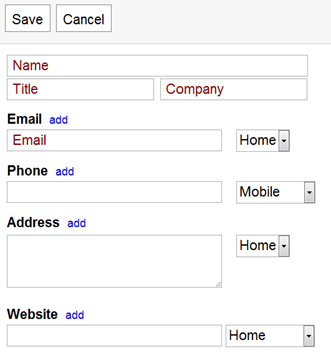
2. Let Us Choose to Default to Home or Work
If we only get one wish, this would clearly be mine.
I can’t tell you how many of my contacts have their work information stored under “Home,” because that’s the way the entry form defaults. See?
This one simple improvement would save me a ton of time.
3. Auto-convert Phone Numbers and States to Designated Format
I’ll admit I’m a little anal about this stuff, but I hate to have some phone numbers with periods and some with dashes. And I want all of my states to be abbreviated. Outlook has done this with phone numbers for years, so we know it can be done.
4. Let Us Create Custom Fields
I love the fact that the default form has a blank for birthdays, but I want the ability to add other information. For example, I might want a field for Facebook Page, Twitter Name, etc. I know you can add multiple “Websites” now, but I want total control over the info I add, and the way it appears.
5. Better Google Maps Integration
When I display a contact, a Google Map should appear somewhere on the page showing me his or her address, and offering to give me directions there. A link that would let me email the address and directions to someone would also be nice. I know I can click "Map” under the address and get a map, but that requires me to leave the Contacts page. I want all of this to be integrated and embedded.
And Two Wishful Bonuses
The last two might be a stretch, but it would be awesome to have the ability to email a photo of a business card to a designated email address, and have that card converted into a Contact entry. It would need to go into a special list, perhaps “Scanned,” so we could check it for accuracy and then add it to our main Contacts list.
It would also be awesome to have a box beneath the Contact entry with customizable search results for the name of the Contact and/or his or her company. We should be able to configure the search results as we like: web, news, blogs, social networks or any combination thereof.
Add Your Wish list
Add your wish list in the Comments and I’ll compile a list and send it to one of my Google contacts for consideration.






 I’ve read some of the brouhaha over this so-called




 Now, what about Google Contacts? Can we please fix them too? Gmail is beautiful. Google Calendar is powerful and elegant. Google Contacts sort of sucks. But we can fix it, and I’ll help by giving you the list- right now. Together we can make Google Contacts awesome.
 Newsome.Org