Poll Validation

validatedSince the day I started blogging about technology for grown-ups I have said over and over that if you want people to embrace technology, you have to make it easy for them.

Now the Wall Street Journal has published the results of a poll (no link because the WSJ site is, in true dinosaur smoking-a-cigarette hail to the Farside fashion, a pay site) which shows that when adults buy technology the most important thing they look for is:

61% – Ease of use
58% – Customer service
57% – No-hassle installation

And when you think about it, those are three ways of saying the same thing. It has to be easy to install, easy to use and easy to get help for when you need it.

If you want a niche product that geeks will love (think Linux), it can be as hard to install and use as, say, Linux. But if you want a lot of people to use a product and keep using it (read buy upgrades), it needs to be easy. Easy’s the main thing.

A lot of hardware and software makers still don’t get it.

Technorati Tags:

Rethinking Firefox

firefoxI’ve said a few times that I wasn’t all that impressed with Firefox. That was true at the time and it’s mostly true now. But here’s a confession: I’ve been using Firefox as my primary browser for the past few months.

It comes down to two things: tabbed browsing and, more importantly, the many extensions (a nerd word for add-ons) that are available for Firefox.

I have done the following to my initial installation of Firefox:

1) Added the Google Toolbar. Some Firefox purists argue that Google is “bad like Microsoft” and you don’t need the Google Toolbar. That’s hogwash. The Google Toolbar is a great add-on to any browser.

2) Performed the speed tweaks outlined here. Some comment that some or all of them are unnecessary, but things seem to go faster after the tweak. It may be the placebo effect, but it feels good.

3) Added the Bugmenot extension. I hate having to register to read free sites, with this add-on I don’t have to.

4) Added the extension that makes Blogger (the front-end I use to create, but not host, this site) always use the current date. Otherwise it uses the date and time a post was initially created and I often save posts as drafts for days or even weeks before I post them. This add-on saves me a lot of headaches.

5) Added the Onfolio Firefox extension. This allows me to use my beloved Onfolio in Firefox.

There are hundreds of other extensions, but these are the ones that I use everyday. Once Internet Explorer adds tabbed browsing (scheduled to be included in the upcoming new version), I always figured I’d switch back to it. But with all of these extra features to choose from I may not.

Who’d of thunk it?

Two cautionary notes:

a) It takes a little work to get the hang of finding and installing these extensions, but once you do it once you can do it again and it’s very worth it.

b) I just installed the newest version of Firefox (RC 1.5) and that broke all of my extensions. Some of them are available for this new version. Others, like the Onfolio one, don’t yet work in this version. Google Toolbar says is does, but it doesn’t. I suspect this will all get fixed before too long.

Technorati Tags:

More on Firefox

Adrian Kingsley-Hughes (the PC Doctor) has completed his week-long experiment with Firefox. His conclusions: he liked some things about it, did not find it to be more secure than Internet Explorer and will not make it his default browser.

firefox

I had much the same experience with Firefox when I tried it. Having said that, I have continued to use it about half the time. I did get that Flash plugin installed, though someone not a computer geek would have given up in frustration.

I really like the tabbed browsing. I haven’t seen that many pages that won’t display properly in Firefox. My conclusions remain mostly the same: take away tabbed browsing (or add it to Internet Explorer) and I see no compelling reason to use Firefox over Internet Explorer.

But as I said before, a two horse race is a win for consumers, so I am pulling for Firefox to gain and keep market share.

Technorati Tags:
,

Screen Captures Made Easy

One of the most useful software accessories you can install on your computer is a good, reliable screen capture utility. Screen capture utilities let you grab a portion of whatevet’s on your computer screen. They are helpful for storing snippets of information in Onfolio, grabbing a portion of your computer screen to email error messages to the appropriate technical support address, and capturing content to redisplay it (as I did with my Firefox problem).

My favorite screen capture utility is Snag-It. It’s easy to buy online, easy to install and easy to use.

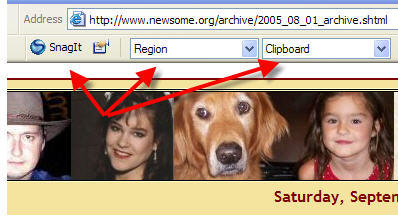
snagit-765032

It integrates seamlessly with Internet Explorer and places these buttons at the top of Internet Explorer that allows you to instantly grab all or part of a screen (this image was captured with Snag-It). You can configure how much of the screen to capture (I use the “Region” setting which allows me to draw a box with my mouse and capture everything in the box) and how to output the image (I output to my Windows clipboard so I can paste the image wherever I want it).

It is also a stand alone program, accessible from the Start Menu, that allows you to capture any desktop content, whether internet content or otherwise.

My only mild complaint about Snag-It is that the developer updates it very often and you have to pay for significant upgrades (“maintenance upgrades” are free). It seems like I get an email every month or so offering me an updated version for a price. It’s a great program, so I pay to upgrade to every other version or so.

Snag-It is $40 for new users. Upgrades are cheaper.

Technorati Tags:
,

The Big Deal About Firefox

firefoxA lot of smart guys I know tell me that I should be browsing the net with Firefox, instead of Microsoft’s Internet Explorer. I attribute some of this to a counterculture, anti-Microsoft philosophy, but enough people whose opinions I respect have sung the praises of Firefox that I decided to give it a try.

Warning: I’m fixing to aggravate a lot of other geeks.

So I went to the Firefox download page and installed it. The program installed easily. The first time I opened it, Firefox offered to import a lot of my settings from Internet Explorer. The settings were quickly imported (other than, curiously, my Home Page setting). So far, so good.

I decided to surf around with Firefox a little to see how it works, and to make sure the Newsome.Org pages display correctly in Firefox (they do). All was well, and I admit that I really like the tabbed browsing feature.

Then a problem. I went to The Home Place, which has a flash-based Flickr badge. A helpful message at the top of the Firefox window informed me that “Additional plugins are needed to display all of the media on this page.” To the right was a promising button inviting me to “Install Missing Plugins.” So I clicked it. A box popped up telling me that a Flash Player 7.0 plugin was available- just what I needed. I selected it and clicked the Next button. A license screen popped up and I agreed to the user license and clicked the Next button again. Nothing. Nada. Only this, for a long, long time:

error-705398

I tried many times. I rebooted and tried many more times. I tried a manual install. I googled the problem and found quite a few links. This one looked promising, but didn’t work for me.

Could I get this plugin installed? Almost certainly. I am a geek, myself. But a whole lot of potential users don’t have the time, inclination and ability to do so (all 3 are required). So I run straight back to my soapbox and once again shout my mantra: if you want people to adopt something that is (supposedly) only incrimentally better that something they already have, make it easy. Make it painless. Otherwise, you have something created by geeks only for geeks. As I said, I’m a geek, so I’ll use it (along with Internet Explorer, but not as my default browser). But I’ll never get my wife, family or friends to do it.

We’re all better off with 2 significant options (think what satellite TV has done for cable users). I want Firefox to put some competitive pressure on Microsoft. In order to do that, it has to become the browser of choice for geeks and non-geeks alike.

Bottom Line: The basic software (as opposed to the plugins) was easy to install. It didn’t seem any faster than Internet Explorer. I like the tabbed browsing, and I’m sure (because I’ve read it so many times) that it’s more secure. Otherwise, it seems a lot like Internet Explorer, only without the Flickr badges.

Bonus thought: If I liked it better, would they use my song by a similar name in a commercial?

Technorati Tags:

Friday’s Link: GUI Gallery

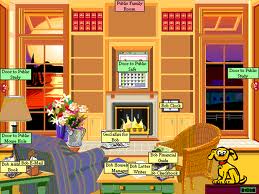
msbob

Friday’s Link for this week is the Graphical User Interface Gallery. This interesting site has descriptions and screen shots of many old and nearly forgotten GUIs and operating systems.

There are pages with descriptions and screen shots of Apple Lisa, At Ease (alternate Mac desktop), Amiga, OS/2, all versions of Windows, Norton Desktop for Windows, and my favorite, Microsoft Bob. I remember having a copy of Bob in my hands back in 1995 and wondering if I should buy it. I didn’t and, but for this web site, I would never have had the pleasure of seeing Bob and the original Rover (who is still running around in the seach boxes in Windows XP).

The GUI Gallery is a neat trip down memory lane for anyone who has used computers for any length of time. Seeing the Apple II desktop again reminded me of the many hours I spent back in the mid-eighties playing Island Apventure, a game my brother in law had on his Apple II.

Island Apventure was the first of 4 computer games that have captivated me over the years. The others are Starflight (still my all time favorite game), Sim City and Civilization. Civ IV is coming out soon and I am trying to decide if I am too old to play computer games. I hope not, because there’s no way I will be able to resist buying it.

Technorati Tags:

More on Google Talk and IM

googletalk

Business Week is reporting that Google is reaching out to the other IM players in an effort to provide interconnectivity:

“Georges Harik, Google’s director of product management, says the company has opened communications with AOL and Yahoo, offering them interoperability on the Google Talk network free, and it will soon contact Microsoft.”

For the reasons I described last night, AOL, Yahoo and Microsoft don’t want interconnectivity. This is another brilliant move by Google. One of two things will happen:

(1) these companies will begrudgingly agree to interconnect, fearing the bad press they will get if they say no. In the scenario, Google wins because it seems, based on early reviews, to have a clutter and ad-free interface that people will like.

(2) these companies will say no and continue the battle for the user base. In this scenario, Google wins because there will be a lot of bad press painting the other companies as bad citizens and Google as the great uniter.

Either way Google wins.

Bonus thought: Google would own the internet now if it had bought Flickr before Yahoo did.

Technorati Tags:,

KN on IM

The web is in a tither about the pending release of Google Talk, an IM program by everyone’s favorite company. IM, or instant messaging, programs allow users to text message and share files over the internet more or less instantly. Increasingly, these programs are expanding their features to add audio chat, video chat and even VOIP telephone calls.

I’ve used IM programs a little. I started out with ICQ a few years ago, then migrated to AOL IM (or AIM for short), and ended up using Windows Messenger (now called MSN Messenger to fool the feds into thinking that it’s not embedded in Windows). Yahoo also has a widely used program. Now there’s a new player in the game, and anything by Google will quickly become a force to be reckoned with.

Why did I keep changing IM programs? It’s simple, I was chasing the user base. Since these programs do not communicate with each other, I kept changing programs based on which one I thought most people I wanted to communicate with were using. Let me be clear about this: generally speaking, these programs use proprietary protocols that only allow you to communicate with other users of the same program. If you’re using MSN Messenger, you can’t send an IM to someone who uses AIM, etc. This is why these programs have not and will not be widely accepted by adults and businesses. Some businesses use security risks as the reason not to implement IM, but companies said the same thing about email back in the day.

Why don’t they allow interconnectivity? Because they are competing based on user base and not on features and reliability. AIM has most of the AOL users (though you do not have to be an AOL customer to use it) and a large base of other users. Yahoo (the only company that can compete head to head with Google based on anything other than a large war chest of dollars) has a big user base. Microsoft has a program that is embedded into Windows, a large user base and a war chest of billions it can use to remain in the game. Each of these companies wants to win the user base war. Sharing protocols and allowing interconnectivity would turn IM programs into a commodity. These companies who are competing to become the one-stop internet shop for the masses do not want IM programs to become a commodity.

Kids are better at technology than adults and will go to great lengths to communicate away from the ears and eyes of adults. While this creates headaches for parents, it ensures a regular supply of users for all of the major IM programs. If a kid has to install 2 or 3 IM programs to communicate with her friends, she’ll do it. If the IT department at my firm has to do that, forget it. I’ll be told to use email and forget about the 2 minutes that I might save if I could use an IM program.

Then there’s the over-40 problem. For most people over 40 sending an email attachment or uploading a photo to Flickr is a major technological accomplishment. Trying to get these same people to understand and install an IM program and then to deal with it when they can’t communicate with Aunt Jane, who uses a different program? That’s a recipe for failure.

Until IM programs become like telephones, where the provider and the manufacturer of the telephone have nothing to do with who you can and can’t call, IM will simply not be adopted by grown-ups and businesses. At least not until today’s teenagers grow up and run companies or, more importantly, IT Departments.

So I may install Google Talk when it’s released tomorrow. But if I do, it’s only because I am curious. It won’t be because I think I’ll be able to communicate with anyone I know. To do that, I’ll have to use the telephone.

Dwight Silverman is blogging about Google Talk and Download Squad has a review and some screen shots.

Technorati Tags:,

Windows Vista

vista

I’m not all that excited about the (late next year) forthcoming new version of Windows (now called Vista, previously called Longhorn), mainly because it sounds like Microsoft has decided to leave a lot of the previously heralded features out and the end of next year is a long, long way away (plus the release date will undoubtedly move back several times).

However, Paul Thurrott (Windows guru) has an interesting review of the recently released beta version 1.

Installation seems to be easier. I’m dubious of the new desktop search, because it can’t be as good as, but may spell the end of, my beloved X-1. My Documents, which is somewhat of a nightmare now, especially in Windows 2000, seems to have miraculously become more confusing, which is not what most computer users need. The Parental Controls stuff sounds promising, since my kids will be well supervised computer-wise by the time Vista ships. Tabs in Internet Explorer 7 looks very useful and is, as Paul points out, very overdue. Microsoft still seems to be optomistically pushing voice recognition, but everybody knows that its no more than a neat toy that is utterly useless for increasing productivity for most users (though undoubtedly of great value for people with disabilities). Networking (perhaps the most important thing) looks spotty in this release, but will undoubtedly be fixed in future beta releases.

I was a beta tester for Windows 95 and it was sort of fun. But these days I just want my computer to work. I think I’ll wait until the end of 2006 or better yet, the middle of 2007.

Technorati Tags:

A Great Timesaver

One of the problems with having a web site is that what looks good today looks awful tomorrow, as tastes and technology change. There is nothing more depressing than knowing that you want to change the look of your site, but also knowing that you have hundreds of pages that will have to be changed individually to facilitate the new look. Yes, CSS (which I now use religiously) can help a lot in this regard. But many older pages, including until last month all of mine, either don’t use styles at all or have the styles embedded in the page itself (talk about defeating the purpose).

So when I decided to update the look of Newsome.Org, that was one thing, since it only has about 3 pages to worry about. But when I decided to update the look of the Err Bear Music page, that was another thing altogether. The EBM pages contain a main page, 5 index pages and literally hundreds of song pages, one for each of my songs. It would take days and days and days to reconfigure each page individually- I know this because I have done it twice in the past. This time I decided to see if technology could make it easier, and boy did it.

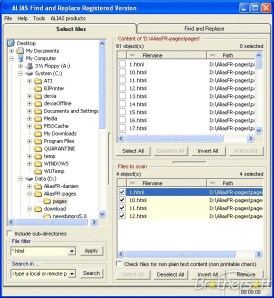
There are a number of search and replace programs that will work with html files. I tried several of them and found Alias Find and Replace to be the best. It made a 30 hour job a 2 hour job, and the only reason it wasn’t a 30 minute job is because I had to figure out what to tell the program to replace to get what I was after.

alias_find_and_replace

The hard part was the individual song pages. Those pages are identical except for the lyrics part in the middle. After a little trial and error, I changed hundreds of my song pages in a few minutes in 3 steps. First I used “Search & Replace Blocks” to remove all of the header tags and embedded styles in favor of a uniform header and a reference to a remote style sheet (which will now allow me to globally make any subsequent changes to all pages merely by modifying the style sheet). Second, I used “Search & Replace Blocks” again to replace everything in each page before the beginning of the lyrics with the new code from my new page template. Third, I again used “Search & Replace Blocks” to replace everything after the lyrics with the new code from my new page template. Worked like a charm.

Alias Find and Replace works with all kinds of files, so it’s not only a time saver for html files, but also any other files where you need to make the same change a lot of times.

It’s a great timesaver and I highly recommend it.