Net Neutrality and the Least Unacceptable Alternative

The internets (now apparently using the plural isn’t as cute and clever as it used to be) are abuzz (pun semi-intended) with talk over Google and Verizon’s Joint Proposal for an Open Internet.

I don’t profess to be an expert in Net Neutrality, other than a pretty strong feeling that I am for it, and that it is good for the consumer.  One thing I am an expert in, however, is negotiation.  I get invited all over the country to speak on negotiation strategy.

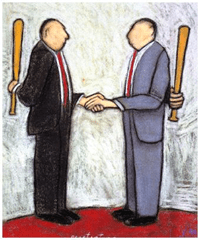
image In negotiation strategy, there is the concept of “least acceptable alternative.”  The idea is that if you know you aren’t going to get what you really want, you have to seek something you can live with.  For example, if I want to go to a ballgame, but it’s our anniversary and my wife wants to go to the ballet, I should reevaluate my goals and try to end up at a concert.  It’s not the ballgame, but it’s a hell of a lot better than the ballet.

When things are really stacked against you, the least acceptable alternative morphs into the least unacceptable alternative.  I hate all of the alternatives, but I hate this one less than the others.

The question we should be asking about this policy and the roadmap it contemplates is not if it is exactly what we, the consumers, want.  It’s clearly not.  The question is if the proposed plan is the least unacceptable alternative, and if not for whose advantage was the true least unacceptable alternative abandoned.

Figure that out, and we’ll know how all this is shaping up.

Is Google.Me Getting Cobbled Together via Acquisition?

cobbledAs those participating in the lively and interesting discussion in the comments, Google Reader comments and (maybe) Google Buzz surrounding my last Google-related post know, I am pulling for Google.Me.  I think it is facing a monumental task in trying to divert the flow of attention from Facebook, but I hope it succeeds.

But the more data points that trickle out about Google’s forthcoming Facebook killer, the more concerns I have.  A combination of one thing we think we know and one thing we know for sure is driving me crazy.  Conventional wisdom is that Google.Me will launch in the near future, perhaps even imminently.  We know that Google has been on a buying spree, most recently buying something called Jambool, for a measly (in this messed up industry) $70M.  Just the other day, Google bought something called Slide (at least it has a name that doesn’t make me want to club a kitten to death).  There have been others, and there will certainly be more.

How can you assimilate the mad buying spree and the pending launch and not be afraid that Google.Me is going to be another tossed-together mishmash?  Like Google Apps, except worse.  The biggest problem Google has across all of its non-search apps is inconsistent (in function and looks) design and an almost complete failure of consistency.

How can the same company create something as elegant as Google search and as inelegant as just about every other product?  I don’t get it.

TechCrunch leads the Jambool story with this sentence:

Google continues to gobble up companies that will form the backbone of its new social strategy and the upcoming war with Facebook.

It’s really, really (like almost impossible) hard for me to envision an elegant platform arising out of cobbled together parts.  I’m looking for Jessica Biel and they’re gearing up to give me Frankenstein.

Granted, Facebook is not the most well-put-together web site in the world.  But I want this to be a race for the top, not a race to avoid the bottom.  I’m just not sure buying a house room by room is the way to go, if you’re really striving to turn heads (and the herd).

I’m still hoping Google can pull it off.  But I’m getting a little concerned.

Aren’t you?

Apple: Don’t Make Me Choose Between You & Google

Other than Macs, which are too over-priced to be taken seriously, I have become pretty reliant on Apple technology.  In fact, I have become a card carrying, windshield decal rolling Apple evangelist to my real world friends.

I love my iPhone and my iPad.  I’m thrilled to see that the awesome but vastly under-marketed AppleTV may not be dead after all.  I don’t even care about the lack of Flash.

image But it would be a big mistake for Steve and Co. to force me to choose between Apple and Google, for one very simple and very important reason:

I shouldn’t have to.

Apple and Google is a combination that could and should be the tech equivalent of the Reese’s Cup.  If they could just get along, and stop using me as a rope in their little tug of war.

I wish there was a Google Latitude app, so I could let Dwight know where I am in redundant fashion.  It irritates me that there is no Google Voice app.  But it will enrage me if Apple tries to force me towards BingBing may be great.  It may be the hottest thing since Halle Berry.  But I should get to decide that.  Not Apple.

Don’t get me wrong.  It’s good to see Apple and Microsoft making nice.  It is in both of their interest- and mine- to get Microsoft Office somehow onto iPads.  Hell, I’d use the Yellow Pages for search if it would get me the ability to natively manipulate Word documents on my iPad.

But otherwise, it’s a dangerous gambit to keep making me a pawn in whatever war Apple thinks it is fighting with Google.  Because as much as I love Apple, I need Google.  Not just for the all-important search-related stuff, but for email.  For maps.  For Google Reader.  The list goes on and on.

I realize that Google is doing its part to escalate things.  But that’s because it knows it’s losing.  The person getting clobbered always runs its mouth, because that’s all it can do.  Apple should let its superior product do the talking, take as much of Google’s money as it can get, and give the customer the best of all worlds.

I want a world full of both Apple and Google.  I don’t want to choose.

So, Apple, don’t make me.  Because you might not like the choice.

A Good Day for the Folders

Yesterday was a great day for those of us who like to organize our content the sane, logical way- in folders.  I’ve never understood how anyone could argue while sober and somber that labels/tags are an acceptable alternative to folders.  In fact, the introduction of a folder-like archive management system is what initially made Better Gmail 2 the most important add-on since French fried potatoes.

image Now, the other features of Better Gmail 2 will have to carry the banner, as Google has introduced nested labels in Gmail.  Next to the fantastic spam filters, this may be the best feature in Gmail.  I can’t overstate how happy I am that Google has added this feature.

Thank you, Google.

Some will feel compelled to tell me how great labels and tags are.  I’ll respond the same way I always do- good, go make some labels and tags.  It doesn’t have to be an either/or proposition.  We should both have what we want.  Now we do.

On the same day, Apple gave the world a preview of the forthcoming iPhone OS 4.  There’s a lot to like about the new OS- the main thing being the ability to have more than one Microsoft Exchange email account.  Another excellent new feature is the ability to place your iPhone and iPad apps in folders.  This is excellent.

Folders.  As far as the eye can see.

Now, if Apple would just implement folders in iTunes, I could focus all of my attention on crapping all over the otherwise excellent Evernote for refusing to add folders (or subnotebooks) to its application.  Without folders, Evernote becomes unwieldy for power users.  I pay for a premium account, but I won’t renew it unless the developers implement some sort of folders option.

You win a few and you lose a few.  Yesterday we won.

Why Google’s Shot Across Twitter’s Bow Missed the Mark

Erick Schonfeld has three interesting theories as to why Google pushed Google Buzz out the door and into the email client of millions of users, before it was ready for prime time.

I’ve tried Google Buzz, and found it to be pretty uninspiring.  I’d been thinking that one of Erick’s theories might be at play.  A theory that, if true, is going to backfire on Google.  I also came up with a fourth theory that I think plays at least a part in this drama.

The Twitter Negotiating Power Theory

One of Erick’s theories is that Google really wants to buy Twitter, and launching Buzz was a shot across Twitter’s bow, indicating that if Twitter doesn’t come to the bargaining table, Google will use some of its war chest to do battle with Twitter on the micro-blogging front.  Certainly Gmail provides Google with a ready-made user base, and you would think that Google could easily be a force to be reckoned with.

The ability to put Buzz front and center in the Gmail email app gives Google a clear path to the stream.

Or does it?

image 
image via TechCrunch

If the Buzz as a negotiating tactic theory is even partially correct- and I’ve been thinking the same thing, it’s going to fail epicly.  I’m sure somewhere in the bowels of Twitter Control, the powers that be have been worrying about what Google might do to steal some of Twitter’s stream flow.  Google is the potential exit strategy and Death Star for most start-ups, so it gets complicated.  One way or another, anyone operating on the web has to keep a constant eye on Google, who could bring pleasure or pain at any moment.  If Google came out of the gate with a mature, elegant and at least evolutionary  micro-blogging alternative, it would combine naturally with Gmail’s massive user base, and it would be game on.

Which means that the swoosh sound you heard in the halls of Twitter Control on the night Buzz was heaped front and center onto the world’s email screen was a giant sigh of relief.

Other than infesting our inboxes with needless Buzz-related email, Buzz isn’t horrible.  But it’s not evolutionary either.  It’s just another Twitter clone.  If anyone other than Google had released Buzz, it would be almost universally referred to as Butt.  As in of jokes.

Stated simply- if this is how Google intends to scare Twitter back to the negotiating table, this effort won’t only fail.  It will actually increase Twitter’s bargaining power.

The Toss Apps Against the Wall Theory

I have another theory that I believe may also be at work here.

Google has done some great things, and is, for many, the backbone of the online experience.  It owns search, which was its lightning in a bottle beachhead in the battle for the ownership of the web.  Ads spring naturally from search and page views, and Google was able to leverage the first to dominate the second.

But after that, there is no denying that Google has had a decidedly mixed record with new projects and apps.  It got there with email, because of its search presence, and because Yahoo and Microsoft were asleep at the wheel.

But it has also had its share of failures.  Google puts on a brave front, but Google Docs is still, at best, a work in progress.  Google Apps looks and acts like a bunch of unrelated applications haphazardly tossed together.

And there have been plenty of others.  Remember Google Catalog?  That’s OK, neither does anyone else.  What about KnolLively?  Something called Orkut?   Dodgeball?  Shoot, even Wave, which came out to a parade of hype, seems to have already lost its mojo.

Google has a track record of tossing a lot of stuff against the wall, and waiting for something to stick.  Some things do, and some things don’t.  It’s too early to tell how Buzz will turn out, but I can say with confidence that it is not now- and is very unlikely to ever become- a threat to Twitter.

Has Google Reader Entered the Fast Lane?

And how you can benefit from it.

I noticed earlier today that, in a great improvement from days (and days) gone by, posts were showing up a lot more often in my Google Reader.  I marked it up to some hiccup in the pipeline.

Then I saw a post by Alex Wilhelm over at the Next Web speculating, with at least something approximating confirmation, that Google has widened the pipe, perhaps via PubSubHubBub.

Life in the Fast(er) Lane

If this is true, or even close to true, it is great, awesome news.  For one thing, I use Google Reader all the time, and my one complaint has been that it sometimes seems to be taking a leisurely drive, when I want an on-ramp to the information superhighway.

(numerous new items have populated my Google Reader in the time it took me to type that bad metaphor)

Enabling Your Blog

If you want to make your blog PubSubHubBub-ready, there are two ways to do that.

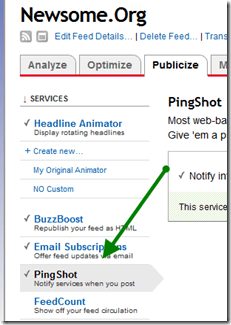
If you use Feedburner, enable PingShot:

image

If you use WordPress, grab a plugin.

Google Reader is truly my number one tool where online content is concerned.  I’m happy it has been speed-enhanced, however it was done.  And I’m happy Google is still improving it.  It would be a shame if Google lost focus on Google Reader.

I still miss Google Notebook.  But that’s a story for another day.  Right now, I’ve got a ton of new posts to read.  And more every minute.

How to Share Your Google Calendar

I’ve done a few hard things. Learned code. Built a computer from parts. Finished a Rubik’s Cube. Learned how to navigate around Facebook (sort of).  You get the picture.

But nothing prepared me for the chore that was configuring my Google Calendar to allow my secretary to see and add appointments.

So I thought I’d so a step by step to save someone a little agony.

I use Google Apps for my email and calendar, so there are a couple of extra steps that may not be required for regular Google Calendar users.

Step 1: Configure Sharing Rights (Google Apps Only)

This is where a lot of Google Apps users get tripped up.

To share your calendar with people outside your domain (in my case, those without @newsome.org email addresses), you must enable sharing with people outside your domain, within Google Apps.  From your Google Apps Dashboard, click on Calendar and then set the “Sharing options” for users "Outside this domain" to "Share all information, and outsiders can change calendars."  If you don’t do this, the person you are trying to share your calendar with will, at most, only be able to see if you are free or busy- no details and no ability to add items to your calendar.

image

Step 2: Wait a While (Google Apps Only)

Once you configure your Google Apps as described in Step 1, it takes a little while (maybe an hour) for your revised sharing settings to take effect.  This can be very frustrating to those who don’t know about this delay.

So be patient.  Go grab some lunch.

Step 3: Make Sure the Person Has a Google Account

In order to log-in and see your calendar, the person you want to share your calendar with must have a Google account.  This is not the same thing as a Gmail account.  Any email address can be used to create a Google account.  The sign up page is here.

Step 4: Grant Access via Your Calendar

Now go to your Google calendar.  Navigate to Settings>Calendars.  Look beside your calendar (the one you want to share, not someone else’s that is being shared with you) and click on "Shared: Edit Settings."  Add the person’s email address to the blank under “Share with specific people” and choose "Make changes to events."  Click on the "Add Person" button, and the entered email address should appear in the list below, with the correct sharing level.

image

If it still says "See only free/busy (hide details)," then you need to go back to Steps 1 and 2 above.  Probably it’s a matter of the delay described in Step 2.

Step 5: Log-in and Share Away

Then, once the person logs into his or her Google account, he or she will be able to access and add to your calendar.

That’s it.  Post any questions in the comments.

An Epidemic of Me-too-ism?

Back in the day, after I developed the original ACCBoards.Com (which later became a part of and was merged into what is now the Scout network of sports sites), saw my traffic shoot through the roof, partnered up with a TV network and a major cable company, and started getting some serious checks in the mail, I decided that I was an expert in all things communal.  And that I should expand my empire accordingly.

I started with SECForums.Com, an SEC sports site.  It never took off, and I don’t own that domain any longer.  Then I developed AVBoards.Com, for audio-video enthusiasts.  It started off strong, based almost solely on traffic diverted from ACCBoards.Com, then died almost as quickly.  I let that domain lapse last month.

Others followed, and while a few of them survived, none of them were a fraction as successful as ACCBoards.Com.  Why?  Because I didn’t have the passion, the industry connections or- most importantly- the timing that I had with ACCBoards.Com.

I was neither good nor lucky, and to be successful on the web, you have to be both.

Pretty quickly my little web empire became diluted, scattered and lost in a sea of existing, entrenched alternatives.  I stopped doing one thing well and started doing a lot of things poorly.

There was a lesson there, and it’s one I learned, albeit at some significant opportunity costs.

hatesharingIn light of all that, I was a little dismayed this week when I read that Facebook was launching a full-fledged email client, and it was soul-crushing to learn that Google is going to add Twitter-like social network features to Gmail.

A little dismayed over the Facebook thing, because I am a light user of Facebook, so nothing that happens over there is going to materially affect my life.

Completely bummed out by the Google thing, because I use Gmail every day, and whatever happens there definitely affects my life.

Here’s the thing. . .

image Facebook, you can’t invent Gmail because Gmail already exists.  Do what you do.  Let Gmail do what it does.

Google, you can’t invent Twitter because Twitter already exists.  Not to mention that there are a thousand better ways your development time and money could be spent.  Like improving the spotty integration of Google Apps, so they actually look and feel like a suite of apps, and not a bunch of unrelated products crammed ineffectively together.

Either make Google Apps a robust, business-ready tool, or make it an awesome toy.  Don’t create some crappy combination of both.

Google and Facebook, more than their peers, have a good track record of staying on course, even if that course isn’t readily apparent to the rest of us.  I’d like to believe there is a brilliant master plan in play here.

But I don’t.  I think it’s just a case of mass me-too-ism.

Google: Partially Cloudy by Design

Larry Dignan at ZDNet says that Google’s cloud storage price-break is a big missed opportunity, because Google “can’t figure out a lightweight desktop client that would back up your entire computer.”  I suspect that Google could- and probably secretly has- done that.  But by making the storage Gmail and Picasa only, Google stands to steal market share from its competitors.  Market share that lands on Gmail and Picasa pages where ads can be displayed.

image No one makes money hosting files in the cloud for free or close-to-free.  But force more of the herd to the application front-end, and you can serve more ads.  That’s where the money is.  Or, at least, that’s where Google and 99% of the rest of the internet believes the money is.

As I noted months ago, I think Google’s failure to dominate the cloud storage space is by design, not by inability.

Having said that, I’d love to be proven wrong.  But I’m not holding my breath for a full featured GDrive at these prices.

How to Make Everything Better: Google Edition

There are a lot of cool services and applications on the internet- no doubt about it.  I use a lot of them, and they make my life easier, more organized and more fun.  But they can be better.  And I’m going to tell you how.  Starting right now.

I’m going to improve the various services and applications I use, one or two at a time.  Starting at the top, with Google.

googleI have capitulated to Google and have moved a lot of my information and data to the various Google apps.  Most of them work very well, though it was a mistake to abandon Google Notes, since a full featured application suite needs a note taking app.  So Google improvement number one is to bring back Google Notebook with a commitment, or better yet buy Evernote.

Google Calendar is very elegant, and the sync app works well.  I have generally moved my personal calendar to Google Calendar.  I wish there was a better, more flexible way to sync multiple calendars, so I could sync my Outlook calendar at home and at work with Google Calendar.  Much of the business population that Google covets has this issue, and Google could make great inroads with that population by making it easier to sync multiple calendars, without the soul crushing multiple (upon multiple, in some cases) event problem that many of us have experienced.

While Google Calendar is elegant and works, Google Contacts is an absolute train wreck.  It looks like something that was tossed in as an afterthought.  But people need a central contacts application just as much as they need a calendar.  Google needs to put 10 or 20 of its best people in a room for a week (or however long it takes) and tell them to completely rewrite Google Contacts, including a way to sync contacts along with calendars.

Some will point to Google’s exchange-based sync option, which works reasonably well.  The fatal flaw in that approach is that the much-desired business population uses Exchange to access their work email and, as we all lament, you can only configure one Exchange sync.  So Google needs to create a way to do the same thing via desktop applications.  And while they’re at it, add the ability to sync email via the exchange-based sync.  Currently, only contacts and calendar are supported.

The easiest and perhaps most needed improvement is to make the various Google apps more integrated.  Google has made strides in this area, but too many of the apps still look and act like separate programs.  They should look, feel and act integrated.  One giant, easy step would be to give the user more control over the links at the top of the various Google app pages.  Why can’t I add Contacts, Google Voice, Google Maps, Tasks and even custom links to other sites (like Flickr) to this list?

image_3

Google needs to give the user more control to create a personal control center, from which the user can easily access the things the user needs- not just the stuff Google thinks we might need.

I’m slowly learning to like, if not yet love, Gmail, and I’m not going to preach again about Gmail folders, though folders should be implemented, at least as an option.  Another mandatory thing Gmail needs is a one click way to backup all of your Gmail on your hard drive or to the cloud location of your choice.  With the backed up data to be searchable, perhaps via Google desktop search.  Also, while the ability to use a third party mail server to avoid the annoying “on behalf of” confusion is wonderful, Google should not limit the ports you can use to do that.  For various reasons, some people have to use another port to access their mail server.  Google should accommodate this.
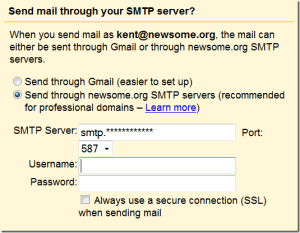
image_4

The port choices above are limited to 587, 465 and 25

I use Google Reader more than any other Google app.  It works great, with one small annoyance that, like dripping water, can drive you mad over time.  Google badly needs to figure out a way to speed up the process of marking a group of items as read.  There is a small but aggravating delay between clicking the “Mark all as read” button and the moment the applicable items disappear.  I don’t care how much of my computer resources it takes, I want that action to be instantaneous.  I’m talking speed of light fast.  That one little thing would vastly improve the quality of my online life.

image_5

Google Documents is very close to becoming a legitimate alternative to Microsoft Office.  I have migrated my wife and kids to Google Documents, and I’d like to migrate there too.  But for me- or any other corporate user- to have the option to use Google Documents full time, Google must implement a way to show document edits in a track changes compatible manner.  If someone sends me a document, I simply must have the ability to edit the document and send it back with my changes apparent.  Google Documents has a way to view versions and edits (Tools>Revision history), but the compare feature is not elegant and there’s no way to send a document with revisions marked that can then be accepted or rejected by the recipient.  Sure, it would be nice- for Google- if everyone collaborated online via Google Documents, but that is never going to happen.  If Google really wants business users, it is going to have to come up with a workable, emailable, track changes equivalent.

That’s enough to keep Google busy for a while.

Coming up next: Evernote