Thinkpad Tablet: On Closer Review

This is the fourth part of my Thinkpad Tablet PC adventure. Part 1 is here, part 2 is here and part 3 is here.

The good news is that I received a package from Lenovo. The bad news is that is wasn’t my Tablet PC. The worse news is that I have no idea when the PC will ship. Very frustrating.

The package contained only the copy of OneNote that is supposed to come with the PC. Of course since the PC doesn’t have a CD player, it will be a challenge to install it when the PC finally arrives. That’s not a big deal, though. What is a big deal is not knowing what year, much less what week or month the PC will be shipped.

Upon further (and much closer) review of the shipping email from Lenovo (see Part 3), it says that “part of my order” shipped and the part is this lonely copy of OneNote.

lenovo2-726064

To make matters even more frustrating, the Lenovo order status page helpfully reports that my order is in “Packing” and has been for days. Packing must take a long time since the same chart indicates an estimated shipping date of 11/8/05. I conclude from all of this that none of these dates or status designations mean anything. The PC will show up at some unknown future date. Unless I want to call Lenovo again and try to get someone on the phone with whom I can successfully converse, that’s all the information I can count on.

The verdict: My once great desire for this computer continues to diminish. If I had a shipping date I could count on, that would help- even if it was a month or two away. The uncertainty is highly frustrating. The new Gateway tablet continues to call my name.

Technorati Tags:
,

Thinkpad Tablet: Shipping Surprise

This is the third part of my Thinkpad Tablet PC adventure. Part 1 is here and part 2 is here.

x411012-725491

When I got home tonight I had an email from Lenovo telling me that “all or part” of my order has shipped. When I went to the Thinkpad web site and checked my order, the information page reported that the computer has shipped. The extra battery is treated as a “related order” and still has the very confusing dual notation of “2 weeks” and 11/9/05 (more than 2 weeks). This is no biggie, as the computer is the main thing I want, and I can wait a week or two for the extra battery.

I should have the computer on Thursday. In sum, Lenovo’s web site is a little confusing and the order status page isn’t terribly accurate, but the computer shipped 22 days after I ordered it and, given the demand and the estimated shipping dates, that is pretty good.

I’m satisfied with the time to ship. After Thursday, we’ll see how I like the computer.

Technorati Tags:
,

Thinkpad Tablet: Waiting in Vain

This is the second part in my Thinkpad Tablet PC adventure. Part 1 is here.

x411012-725491

I checked my order status last night (using Internet Explorer, of course, since Lenovo’s order status page won’t work in Firefox).

From the first time I checked my order status until last night, the information page has always stated that my computer was back ordered for “2-4 weeks.” I was hoping we were getting closer to 2, since I ordered the computer nearly 3 weeks ago. Alas, such is not the case.

tp0907-711544

Last night, the information page reported only that my computer was “back ordered” and suggested that I call for further information. The “Estimated Ship Date” column, however, has an estimated ship date of 11/8/05 for the computer and, oddly, 11/9/05 for the extra battery. A little more than a month away, assuming (which I do not) that this date is accurate.

I really want this computer, but my zeal is beginning to fade. Now that Gateway has released its new Tablet PC (heavier, but with more stuff on it), I am rethinking my commitment to the Thinkpad.

The verdict: I still slightly prefer the Thinkpad because this will be a travel computer and it is lighter. But I am not so committed to it that I will wait and wait and wait. I’ll give it another week and see where we are.

Technorati Tags:
,

Thinkpad Tablet: Ordering & Emailing

ibmx41-700473

Over the past couple of years, I have become very impressed with Tablet PCs– not only the hardware, but also Windows XP Tablet PC Edition. The tablets are smaller, very easy to use on airplanes and in hotel rooms and generally better suited for travelling than my office laptop and all of the required cables and accessories that I have to lug around with it.

The one problem is that I have been using a Fujitsu Stylistic tablet which has no keyboard. This tablet is fantastic for reading emails and viewing web pages, but it is hard to tap or write out long emails. I intend to keep and use the Fujitsu for web surfing and email checking around the house, but I needed something else to take on business trips.

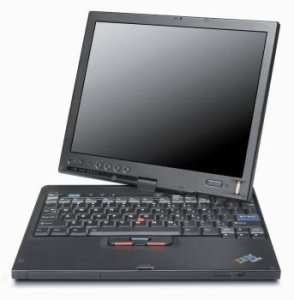
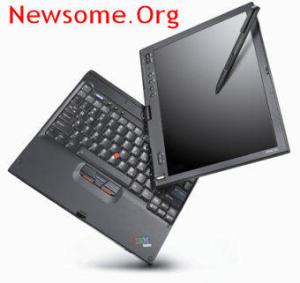
So I bought an IBM ThinkPad X41 tablet PC. These tablets are new and much heralded by laptop and tablet enthusiasts, so I figured I would have to wait a bit to get mine.

Here’s the story so far. Once my tablet arrives, I’ll post photos and a detailed review.

I knew that IBM’s computer division had been purchased by Lenovo, a Chinese PC manufacturer, but I’ve read enough about the deal and the transition that I felt comfortable buying a Thinkpad- long considered one of the best lines of laptop computers.

I went to the Thinkpad web site and placed an order a couple of weeks ago. There aren’t many customization options, so I picked the X-41 with a 60 GB hard drive and an extra battery and submitted my order. The first minor problem was that, contrary to the message you get during checkout, I never received any email confirmation of my order. No big deal. I wrote Lenovo on 9/24/05 and inquired about my order. On 9/26/05 I received an email reply giving me my order number and telling me that my computer was on backorder with an estimated ship date of 3-4 weeks. That was about what I expected, so no problem. The tag line on the email, We are the new. We are the future. We are Lenovo. Think Lenovo!, was a little too “all your base are belong to us,” but no biggie. Make me a great computer and you can say anything you want in your email.

When I went back to the Thinkpad web site to track my order online, two odd things happened. First, the page wouldn’t display (at least in Firefox) for several refresh attempts and then, once it did, I was asked for my customer number in addition to my order number if I wanted to track my order status online. So I wrote another email a week ago asking for my customer number. On Friday, I received a response with my customer number. I can now check my order online. It says 2-4 weeks, with a link for “more information.” That link leads to a pop-up suggesting that you call Lenovo for further information. That’s not much in the way of order tracking. Lenovo should take a look at the way Dell does online tracking.

So far this has been a slightly bumpy road, but nothing I can’t handle. The story will be told both figuratively and here over the next few weeks.

Technorati Tags:
,

Tech Tips for Tweeners: Computer Security

babycomputer

One of the primary purposes of Newsome.Org is to introduce and explain computer-related programs and features to other in-betweeners like me- people who are the parents of the youngsters to whom computers and the internet are as integral as the telephone and the children of our parents who have no intention of ever embracing computers.

As the neighborhood computer geek, I get a lot of calls for help with computer-related problems. Without a doubt, the large majority of those problems are related to computer security, or the lack thereof.

There are 3 things that everyone must do to protect their computer and the data thereon. If you don’t do them, you will eventually encounter a problem. The only question is whether it will be a minor problem (such as a hijacked internet home page) or a big problem (like the loss of data or the theft of personal information).

Having said that, don’t avoid the internet like an unsafe neighborhood. The convenience and benefits are too great for that. We don’t give up driving just because there are bad drivers and potential carjackers out there. We simply wear our seatbelts, lock the doors and watch where we are going. There are a few simple things you can do to increase your computer safety and manage the risk.

One: Install a Firewall

A firewall monitors your incoming and outgoing internet (and other network) traffic and helps prevent traffic (e.g., connections) you don’t want from doing something bad to your computer. There are two kinds of firewalls: hardware and software. We are talking about the software kind.

Even if you connect through a router, you still need a software firewall.

There are a lot of choices out there, and I’ll recommend two. If you want to make things as simple as possible, use Windows’ built in firewall. You need to have Windows XP with Service Pack 2 installed in order to use Windows firewall, but (and this is very important) you need XP and SP2 installed for many other reasons. If you have an older version of Windows, upgrade. If you have XP make sure SP2 is installed. If your computer is too old to run XP and you are determined not to buy a new one, check out Zone Alarm (see below).

If you can’t or won’t use Windows’ built in firewall or if you want a little more protection, check out ZoneAlarm. There is a free version and a more robust ZoneAlarm Pro version, which is what I use. Both are easy to install and configure. $50 a year is not much money to protect your computer, so I suggest shelling out the dough. Also, unlike Windows firewall, ZoneAlarm works on Windows 98 (Second Edition) and later. If you have an earlier version of Windows, it is seriously time to junk it and get a new computer with a new OS (like Windows XP).

Two: Install Antivirus Software

After you get your firewall up and running, buy and install an antivirus program. Antivirus programs attempt to identify and eliminate computer viruses before they infect your computer. Unlike a firewall, which stops unwanted connections (where another computer “talks” to yours), antivirus software stops a usually hidden or disguised computer program from making changes to your computer.

Windows does not yet have an integrated antivirus program, although Microsoft is working on one. I’ll make two recommendations. One, which I use, is Norton Antivirus. You can buy it online, download it and install it right away. One note: resist buying the once indispensable Norton Utilities, which bundles other programs with an antivirus program. These once great programs have been largely rendered unnecessary by Windows XP and now serve mainly to cause unnecessary programs to run in the background, possibly slowing your computer down. The program costs another $50 per year, but is worth it.

The other program that I like, though less than Norton Antivirus, is McAfee Antivirus. Again, avoid buying a bundle of software. Buy only the antivirus program.

Important Note: No matter which program you buy, it is critical that you run regular updates, which can be automated if you like. The developers post regular updates that identify new viruses. If you don’t update the software regularly (at least once a week), you will not have adequate protection. Finally, make sure you have enabled email scanning, which allows the program to automatically scan every incoming and outgoing email for viruses. Most computer viruses are delivered via email, some of which may be disguised as emails from someone you know (once a virus infects a computer, it will often access the computer’s address book and email itself to the contacts therein- the idea being that people are more likely to open an email from someone they know).

Three: Install an Anti-Spyware Program

Firewalls keep hackers from communicating with your computer. Antivirus programs keep virus files from changing your computer, but there is still spyware. Spyware is malicious software intended to take partial control of a computer’s operation without the owner’s consent. Spyware differs from viruses in that it does not usually self-replicate (e.g., email itself via your address book). Like many recent viruses, spyware is primarily designed to exploit infected computers for commercial gain. I would also add that spyware is generally less damaging than a virus and is much more common on even a careful user’s computer. My unfortunate experience has been that spyware, particularly the tracking kind (that allows some program you have installed or some website you have visited to track where you go on the web), is virtually inevitable. The goal is to regularly scan for it and delete it.

Microsoft is also working on an integrated anti-spyware program and there is a beta version available for free. I haven’t used it, so I can’t comment other than to say that this will, like Windows firewall, become the easy choice in future versions of Windows. In the meantime, I’ll make two recommendations. First, Ad-Aware, the program I use. Like ZoneAlarm, there is a free version and an Ad-Aware Plus version for $40). I use the free version and it has always worked well for you. One note: the pay versions claim to prevent spyware before it infects your computer (and perhaps making spyware less inevitable). I haven’t used them, so I don’t know how well the prevention works. If anyone has any thoughts, please post a comment.

Another good program is Spyware Doctor. I have only used it a little, but it got a great review from PC Magazine. I stay with Ad-Aware, because I have used it for years. If I were starting anew, I’d shell out the $30 for Spyware Doctor.

Conclusion

I don’t want to overstate my point and cause undue concern about computer security. I use the internet for everything from banking to shopping to data storage and I have never suffered a serious security problem. The reason I am so comfortable using the internet so extensively is because I understand the risks and take these steps to manage them. It will take a couple of hours to buy and install these programs, but if you install them and keep them updated, you will protect yourself against some very real but manageable problems. Get to work and happy surfing!

Technorati Tags:
,

TIVO, HDTV, Media PC = SOL

I continue to read with interest (both the curiosity and vested kind) the discussions and debate regarding the future of PVRs and Media PCs, especially as it relates the the delivery of HDTV.

Here’s where we are to date:

1) TIVO, which I have used for years but is dying on the vine due to its break with DirecTV, has a great interface and, for a few more months until the HDTV models become incompatible with the DirecTV stream, delivers HDTV, both via satellite and over the air antenna. This is good, but DirecTV is about to switch over to MPEG4, which the current HD TIVOs cannot decode- thus they will become $1000 paperweights.

2) DirectTV has abandoned TIVO in favor of its forthcoming DirectTV branded HDTV compatible PVRs. TIVO is not a medium or long term solution for satellite owners.

3) Media PCs are nifty (sort of), but don’t truly support HDTV (over the air doesn’t really count because not many TIVO or Media PC owners get most of their programming over the air).

Now the current debate, led by two smart guys whose blogs I read literally every day.

The Thomas Hawk camp argues that Microsoft is catering to the Hollywood cartel by not leading the charge to make Media PCs HDTV friendly. I dislike the Hollywood cartel second only to the record label cartel, so this argument is appealing to me.

The Ed Bott Camp argues that unless the voices of reason, led by the EFF, get the DMCA overturned by the Supreme Court (which Ed implies is unlikely and I couldn’t agree more), Microsoft cannot bring HDTV to Media PCs because of the differential treatment of PVRs (closed box) versus Media PCs (open box) under the DMCA. Granted, I don’t practice in this area, but based on my reading of the DMCA, I believe Ed is correct.

The issue I have is not so much why Microsoft doesn’t turn its nose up at the Hollywood cartel and do it anyway – because the feds have a history of beating up Microsoft over alleged federal law violations, and all they need is an excuse and a bunch of compaign contributions to try it again. My question is why can’t Microsoft and everyone else with a brain cell to dangle and a dollar to be made line up against the Hollywood cartel and let it know that it needs movies distributed at least as badly as a Media PC needs HDTV. Tell them that they can be reasonable and play fair, or they can keep churning out copy-protected DVDs that can languish on the shelves of empty Blockbuster stores (though Netflix would stand to profit nicely from such an outcome).

One of the first rules of negotiation is that when you have no bargaining power in a certain situation, change the situation so hopefully the disparity in bargaining power will be lessened.

I say let’s make this issue not “how we will be forced to distribute your content” but instead “we are the gatekeepers to the new generation of viewers and if you want us to distribute your content, here’s how we will do it.” Yes, that would put Media PCs at a disadvantage over DVD Players and whatever replaces TIVO, but there is plenty of content that would readily be licensed and before long someone would break ranks with the cartel. Once that happens, momentum has shifted and truth and justice will prevail.

Technorati Tags:
, ,

Zip Drives Suck, Period

zip drive

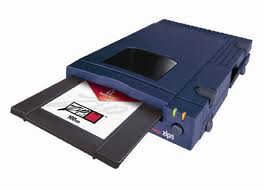
I have owned a lot of computers. I have built a lot of computers. Several of them had iomega Zip Drives in them, including the one I am using now (which I built).

At least half of the Zip Drives I have had just stop working at some point, either via the infamous “click of death” or via some mysterious and irritating failure to read any of the disks. Given that the whole idea behind these devices is to back-up data, I’d say that’s a pretty unacceptable failure rate.

The Zip Drive in my current computer suddenly can’t read any disk. And once one of these drives dies, you can no longer eject the disk without using the paper clip trick. If they are going to keep selling these crappy drives to the unsuspecting public, they should at least put a paper clip in the box.

So here’s my computer tip for today: never, ever, no matter what put a Zip Drive (or any iomega product for that matter) in any computer you build or buy. CD and DVD recorders are cheaper and more reliable and flash cards are smaller.

These sorry devices should have been recalled and destroyed years ago.