The Mac-age: I've Seen the Deal-Stopper, and Its Name is Video

It’s no secret that I have been considering going all-Apple, which at this point would only require that I dump my HP desktop for an iMac or more likely one of the forthcoming new Mac Pros.  All of my other important gear is already Apple.  Until last night, things were looking good.

I’ve concluded that routine computing (email, Google Reader, web browsing, Facebook, and word processing) works very well on a Mac.  In fact, in many ways I like the vibe and feel of OS X better than that of Windows 7.  I was surprised by how much I like Safari.  I still haven’t installed Firefox (fading) or Chrome (rising) on my Mac Mini.  Add the superior handling of audio-video content via Front Row and Plex, and it was starting to look like I might soon get my official Apple fan-boy card.

Prior to last night, the only things left to check out were video editing (which I do a fair amount of, for home movies and the occasional short film), and music creation (which I used to do all the time, haven’t done much lately, but may do more thanks to the reunion of my friend’s band (yes, that’s a hint of things to come)).  Given the conventional wisdom that Macs are so much better for creative work, I didn’t expect a problem.

Boy, was I wrong.

I bought Final Cut Express (called FCE by those in the know), and installed it on my Mac Mini.  The program has that odd Apple organizational structure all over it, but there’s no denying that it is a powerful tool.  So I concluded it would be just a matter of learning my way around it.  If I can figure out Photoshop, no software can defeat me.

And then I tried to import some AVCHD files.  You know, those HD files that just about every HD camera in the known universe uses.  No go.  Can’t do.

Seriously?  I thought Steve Jobs’ General Order #1 was to make things easy for the consumer?  Isn’t that why Apple keeps competing apps out of the App Store?

I understand and sometimes even agree with Apple’s app-control policies (for example, I’m glad Apple tries to keep certain family unfriendly content out of the App Store).  But Apple is simply not going to change the entire home video industry by limiting AVCHD compatibility.
Someone is going to tell me how you can import AVCHD files into FCE, if you do it directly from the camera or maybe if you copy over the entire file structure from the camera.  Well guess what?  That’s not how I do it.  I copy all of the video files into production folders on my network storage and then pick and choose from there.  This works just fine for Windows applications (though I remain worried that Corel is going to screw up Video Studio Editor, which is my Windows app of choice; and I have to point out that VSE doesn’t like QuickTime files either).  I don’t know the background of this frustrating incompatibility, but Corel and Apple need to face the fact that (a) most video cameras record in AVCHD and (b) all iPhones record in QuickTime (.mov).  All of these things need to play well together.

Someone else is going to tell me about these programs that will convert the AVCHD files to MP4, which FCE can import.  Why?  Why in the world should that be necessary?  Furthermore, I tried one.  It took forever to convert the files (remember my theme that time is a precious commodity), and the quality of the converted video was close to horrible and far from HD.

So, until further notice, my all-Apple plan is on hold.  I’m not going to pay a fortune for a Mac Pro only to make tasks harder.

What a shame.  I was looking forward to getting my fan-boy card.
The Mac-age: Could the New Mac Pro Cause Me to Go All-Apple?

image When I bought my first iPhone back in 2008, I was a dedicated Apple skeptic.  I hadn’t used a Mac since the Lisa 2 era, and had no plans of ever using one again (unless Apple were to issue a new version of my beloved Odyssey: The Compleat Apventure; I’ve always said I’d switch my entire computing universe to Macs, if I could play that game again).

Anyway, I now own an iPhone, an iPad, and two Mac Minis, which as I noted the other day are the best home media option.  I like Front Row and, thanks to a comment to my last post, I installed and really like Plex.

As a matter of fact, I am seriously considering dumping DirecTV (and the never-ending “Searching for signal in Satellite In 2” message that keeps denying me True Blood) in favor of some combination of an OTA antenna, Netflix, iTunes and, maybe Hulu Plus (I got my beta invite a couple of weeks ago, but haven’t checked it out yet).

My only holdout remains my desktop.  I use one of the Mac Minis on the desktop periodically, and have become very comfortable with OS X.  Some things, most notably web browsing, just seem to look better in OS X.  I recently bought and really, really like dual Dell UltraSharp U2711 monitors (these beauties are so bright and vibrant that I feel like I need shades to use them; and I mean that in a good way), so an iMac in not an option for me.  It might be an option for my wife, who seems to destroy any electronic device she uses semi-regularly.  I genuinely think she has some electro-magnetic aura that kills electronics.  It would make a great X-Files episode.

Neither she nor I are computer gamers (again, in my case, pending the return of OIdyssey), which may be a good thing if either of us ends up with an iMac and a Magic Mouse.  Here’s the quote of the year so far in an otherwise positive Engadget review of the new iMacs:

[W]e don’t think hardcore gamers are going to flock to the Mac at these numbers, but you’re not going to be unhappy if you’re just looking to have some fun. (Playing any of these games with the Magic Mouse will make you tear your hair out and light your skull on fire, however, but that’s a different story.)

This leaves the forthcoming Mac Pro, as the only carrot that could draw me across the all-Mac line.  I still think they are too expensive.  However, the beautifully designed and easily upgradable case is very appealing to me.  I have even convinced myself that I don’t need Blu-ray on my desktop (though it is irritating that Mac Minis don’t have Blu-ray, as that requires me to keep a stand-alone DVD player).  What it comes down to is noise.  Or the lack of it.

As anyone who knows me (for example, my neighbors with the barking dog) will confirm, I am very sensitive to noise.  I’m a super-light sleeper, and anything more than a pin drop will wake me up, and keep me awake.  My current HP desktop isn’t loud, but it isn’t quiet either.  I’d probably pay a premium for a Mac Pro- if it were really quiet.  I’m betting it’s not, but I’ll certainly inquire once the new models hit the street.  A rocking new Mac Pro, with my current monitors and Parallels installed in the name of Live Writer would work nicely.  Very nicely.

In the meantime, here’s some bonus video of yours truly playing Odyssey: The Compleat Apventure in 1985.  I really loved that game.

Why doesn’t someone port this game to the iPhone/iPad?  I’d buy many copies, just to show my thanks.

Bonus tech support for Google searchers who will have this problem: if you buy a Dell UltraSharp U2711 monitor and have a bad picture, be sure you are using dual-link DVI cables (one came in the box with the monitor).  They look similar to, but are not the same as, older DVI cables.  You can’t use your existing standard DVI cables.  Trust me.  It took me about a half hour to figure this out.

Why a Mac Mini is the Best Home Media Option

Like a lot of techophiles, I have struggled mightily with bringing computer apps and internet content to my home theater set up.  I’ve tried full size computers, small computers, various streaming solutions and all sorts of other equipment, all in the name of television and internet convergence.

Everything works a little and it seems like nothing works really well.

image This weekend, I found my answer.  A Mac Mini.  It’s not perfect, but it’s the best solution I have found so far.

By a wide margin.

Sure, I tried a Mac Mini before.  But it died a premature death so I took a while to try again.

I also recently tried a Dell Inspiron Zino. These are nifty little computers, and its small footprint will find it a place in the house, likely as a replacement for my kids’ older and bigger shared computer.  Plus, it has a Blu-ray drive, which the Mac Mini stubbornly lacks (thereby prolonging the need for a stand alone DVD player).  But the Windows big screen media experience is just not satisfying.  I don’t like things to be too simple in a desktop environment, but when you’re on the couch chilling, simple is good.

And for better or worse, Apple tries to make the media process pretty simple.

I also tried- and loved- Apple TV.  But three things make the Mac Mini a better choice.

1. It does what the Apple TV does, plus the entire range of other computer and internet functions.

2. I don’t know what Apple has in store for the Apple TV, but the two most likely things are massive changes or death.

3. Parallels.

image

Parallels is a pretty nifty program that lets you run Windows 7 and Windows apps inside of and along with OS X.  So I can have the best of both worlds.  As we speak, I am installing Windows Live Writer on my Mac.

Scary thought: if I find little or no performance degradation when running Windows apps on a Mac via Parallels, it could lead me to make my next desktop a Mac.  I just need to find an extra $10K or so to recreate the dual monitor Windows setup I have now.  People try to tell me that Macs are not overpriced, but one trip to the Apple store to configure a Mac Pro with lots of storage and two monitors proves otherwise.

Front Row is a beautiful app for viewing photos and videos and for listening to music.  I just wish it had iTunes store integration so I could buy movies from within the app (and completely avoid that blight that is the iTunes app).  The inability to purchase media within Front Row and the need to suffer iTunes  is, by far, the biggest feature deficiency in the Mac Mini as home theater experience.

But it’s still the best option out there.

At the end of the process, I’ll probably have two Mac Minis in operation.  One in my study (where the current one resides) and one in the theater room, so my wife and kids can access our music, photos and home movies.

It’s hard to believe how far I have come in my Apple journey.

Why You Should Dump Your iPad

And why I’m not.

Vivek Wadhwa at TechCrunch sets forth the best argument I’ve ever read for dumping your iPad.  He sets forth various reasons, but it really comes down to three.  No useful way to use Microsoft Office, reliance on the outdated, ugly and unnecessary iTunes, and the lack of a camera.

As it turns out, I just returned from vacation.  10 days in God’s country (that would be South Carolina for you geographic heathens).  My job requires that I be generally accessible and have the capability to review and approve Word documents (for those who haven’t read Newsome.Org in a few days, no one in corporate America uses or in my lifetime will use any of the so-called Office alternatives, and any argument to the contrary is naive).

All of this left me with a packing dilemma.  I love my iPad and use it all the time.  I haven’t carried a laptop since I bought my iPad, and I haven’t needed one.  But I also hadn’t been away from home and the office for 10 straight days.

So I got nervous, pussed out and, along with my iPad, toted a laptop and all the related gear all the way to Pawley’s Island.  I felt more comfortable knowing that I could review and revise Word documents from the beach.

The thing is, I never used it.

image Sure, I was in contact with my office and clients every day.  But I did it all via email, on my iPad.  While the lack of Office is a big issue for iPads, there’s no denying that you can easily read Word documents.  It’s only when you want to revise or create one that the frustration level skyrockets.

And the fact is that at this point in my career, I’m much more likely to be reading, commenting on and approving Word documents than writing them from whole cloth.  And I found it to be easy enough (enough being the operative word) to copy and past portions of a document into an email, then paste such portion again below and revise it the way I wanted.

At the end of the day, many of my vacation emails read something like this:

“Change this part:

‘The problem with the iPhone 4 antenna is massive and should be the subject of a massive recall.’

to this:

“‘The problem with the iPhone 4 antenna is a partially a common cell phone issue exacerbated by an Apple design choice and largely bad editorial choices by lazy media.’

It’s not perfect, but it worked well enough for me.

So while the iPad most certainly needs a better way to work with Office documents (Microsoft being the only solution), and a camera or two and while iTunes is perhaps the worst application ever, I’m keeping my iPad.

But you’ll probably see my laptops on Craigslist before long.

Compression Depression & the iPhone 4 (Updated)

Yes, I stood in line for hours.  Yes, I’m a nerd.  And yes, the new iPhone is awesome.

One of the biggest reasons I was willing to get up at 5:00 a.m. and trek off to the dreaded mall is the new camera features.  Front and back, flash and high definition.

Which is all great.  In theory.  Unfortunately, I have run into two hurdles that are all but killing my iPhone video buzz.

Buzz Kill 1: Too Much Compression.

Videos shot on the new  iPhone look great, on the iPhone.  And it simply could not be easier to upload video from the iPhone to YouTube.  The big, massive, honking problem is that somewhere between the iPhone and YouTube the video is compressed so much, it looks like something from the nineties.  As in the 1890’s.

Here’s the way my test clip looks on YouTube.


Now on Vimeo

That’s a lot better, although it still looks a little grainy when you view it full screen (see the little icon with four arrows).  Why in this age of infinite cloud storage and broadband do we compress video at all?

There’s no excuse for over-compressing it the way the YouTube process does.  In a few years we’re all going to have the same dilemma we faced after initially ripping our CDs at 128 Kbps.  Those who forget history, and all that.

All of this makes the iPhone largely unworkable as a camcorder substitute, particularly if you aren’t near your computer, because. . .

Buzz Kill 2: No Easy Way to Move Videos

Even if I was willing to forego the convenience of an immediate upload and work with the native video files, there is no way to easily move video files off of the iPhone when you aren’t in front of your computer.  Sure, Dropbox lets you upload video files easily, but they are over-compressed before they are uploaded, even if you select the highest quality in the app settings.

32GB is a lot of space when you’re near home, but not when you go on a vacation.  And plan to take your iPad in lieu of a laptop.

There may be a workaround for this series of problems, but I haven’t found it yet.

I’m still mourning my buzz.

Update:

It looks like the inability to upload videos in HD over the air is a known and much bemoaned feature deficit with the new iPhones.  The man himself says we’ll be able to upload in HD “in the future.”

A commenter on the post above says that the Pixelpipe app will upload HD video to YouTube now, but I don’t have that app so I can’t verify it.

Apple: Don’t Make Me Choose Between You & Google

Other than Macs, which are too over-priced to be taken seriously, I have become pretty reliant on Apple technology.  In fact, I have become a card carrying, windshield decal rolling Apple evangelist to my real world friends.

I love my iPhone and my iPad.  I’m thrilled to see that the awesome but vastly under-marketed AppleTV may not be dead after all.  I don’t even care about the lack of Flash.

image But it would be a big mistake for Steve and Co. to force me to choose between Apple and Google, for one very simple and very important reason:

I shouldn’t have to.

Apple and Google is a combination that could and should be the tech equivalent of the Reese’s Cup.  If they could just get along, and stop using me as a rope in their little tug of war.

I wish there was a Google Latitude app, so I could let Dwight know where I am in redundant fashion.  It irritates me that there is no Google Voice app.  But it will enrage me if Apple tries to force me towards BingBing may be great.  It may be the hottest thing since Halle Berry.  But I should get to decide that.  Not Apple.

Don’t get me wrong.  It’s good to see Apple and Microsoft making nice.  It is in both of their interest- and mine- to get Microsoft Office somehow onto iPads.  Hell, I’d use the Yellow Pages for search if it would get me the ability to natively manipulate Word documents on my iPad.

But otherwise, it’s a dangerous gambit to keep making me a pawn in whatever war Apple thinks it is fighting with Google.  Because as much as I love Apple, I need Google.  Not just for the all-important search-related stuff, but for email.  For maps.  For Google Reader.  The list goes on and on.

I realize that Google is doing its part to escalate things.  But that’s because it knows it’s losing.  The person getting clobbered always runs its mouth, because that’s all it can do.  Apple should let its superior product do the talking, take as much of Google’s money as it can get, and give the customer the best of all worlds.

I want a world full of both Apple and Google.  I don’t want to choose.

So, Apple, don’t make me.  Because you might not like the choice.

5 Features that Would Make the iPad Perfect

I’m now over a week into the iPad era, and I’ve figured out how to implement it into my work flow, which, as elegant as the iPad is, takes a little work.

But I’ve made a lot of progress.  My current mobile toolbox consists of my iPad, an Incase iPad Travel Kit Plus, my iPhone,  a small legal pad, one ink pen, some sticky notes and some business cards.

image

Overall, I think it is reasonable to believe that Apple has changed the portable computer game, the way it changed the mobile phone game.  For the better, and forever.

But It Can Get Better

Much like the iPhone, we can expect the iPad to get even better over time.

Here are 5 things Apple could do that would make the iPad absolutely perfect.  If these things were to happen, I would almost certainly never buy another laptop.  I may not anyway, but here’s how Apple can seal the deal.

1. Add a Phone

You read that right, and I am serious.  Now that I’m used to the iPad, working with my iPhone is very unfulfilling.  In fact, other than making and taking calls, I hardly ever do it.  Why not add a phone, at least as an option, so I could pair a bluetooth headset, and not have to tote my “iPad mini” around with me?

I would happily use my iPad as a phone.  I take it with me most of the time anyway.

In the absence of this feature, we can take another route, via VOIP, once the 3G iPads come out later this month.  And assuming Skype eventually assembles its widely disbursed ducks, takes advantage of the gift given by ATT and allows for calls over 3G.

2. Add Two Cameras

One on the back for photo taking, and one on the front for video chat.

I think this will happen, probably in the next iPad model (not counting the forthcoming 3G version).  The need for two giant batteries to ensure the all-day battery life is an obstacle to new hardware features, but technology will make all of this possible.

In the absence of this feature, developers can create workarounds.  I think Camera A&B is a neat idea, but if I have to do it the hard way, I’d actually prefer a bluetooth enabled hardware solution, that lets you take higher resolution photos and videos that get wirelessly transmitted to the iPad.

Paging Eye-Fi, maybe?

3. Add an Accessible File System

The biggest hassle with the iPad is the inability to move items to and from the hard drive, and to access, manipulate and save documents.  This is a massive impediment to Apple’s enterprise aspirations.  iPads need a better file system.

iPads, particularly my 64 GB model, have plenty of space for document management.  With the emergence of the cloud, there’s no reason iPads can’t be document masters.  Heck, I can already see anything I need via the most excellent SugarSync (sign up for an account through this link and I get some additional storage space).  I just can’t easily manage documents.

This is a software issue that needs to be addressed in the OS.  I don’t know if Apple has plans to do so, but it should be job number 1.

In the inexplicable absence of this feature, we’ll have to hope Google Docs continues to improve, and eventually gives us the ability to edit files from the iPad.  Why hasn’t this already happened?

4. Add Three More Speakers

musicnoteI almost never use headphones, but I love music.  Which means I need two speakers on two sides of my iPad, so I can have stereo in both landscape and portrait modes.  The sound and volume are acceptable now, so all we need is to make it come from more places.

Space, weight and price may be perceived as a problem, but some combination of technology and engineering should make this possible.

I’d pay double the current price for a more robust iPad.  And it’s not like Apple is afraid to charge a lot for its hardware, right?

5.  Add an SD Card Slot

I have decided I can live without a USB port, but I really want an SD card slot, to give me more storage space, and to help move documents back and forth.  Of course, this requires a better file system, which may be why we don’t have it now.

Bonus Dream

And now for fantasy moment.  How about tethering?

It doesn’t look like ATT is ever going to enable tethering via the iPhone (which is absurd on its face), so let’s go at it from the other direction.  Apple should require that all carriers who want to sell 3G service for iPads throw tethering in the mix.  Imagine an iPad with the five features described above, plus the ability to serve as a wireless hotspot for those instances where you have to use a laptop.

Five little things.  Maybe six.  That’s all I want.

A Good Day for the Folders

Yesterday was a great day for those of us who like to organize our content the sane, logical way- in folders.  I’ve never understood how anyone could argue while sober and somber that labels/tags are an acceptable alternative to folders.  In fact, the introduction of a folder-like archive management system is what initially made Better Gmail 2 the most important add-on since French fried potatoes.

image Now, the other features of Better Gmail 2 will have to carry the banner, as Google has introduced nested labels in Gmail.  Next to the fantastic spam filters, this may be the best feature in Gmail.  I can’t overstate how happy I am that Google has added this feature.

Thank you, Google.

Some will feel compelled to tell me how great labels and tags are.  I’ll respond the same way I always do- good, go make some labels and tags.  It doesn’t have to be an either/or proposition.  We should both have what we want.  Now we do.

On the same day, Apple gave the world a preview of the forthcoming iPhone OS 4.  There’s a lot to like about the new OS- the main thing being the ability to have more than one Microsoft Exchange email account.  Another excellent new feature is the ability to place your iPhone and iPad apps in folders.  This is excellent.

Folders.  As far as the eye can see.

Now, if Apple would just implement folders in iTunes, I could focus all of my attention on crapping all over the otherwise excellent Evernote for refusing to add folders (or subnotebooks) to its application.  Without folders, Evernote becomes unwieldy for power users.  I pay for a premium account, but I won’t renew it unless the developers implement some sort of folders option.

You win a few and you lose a few.  Yesterday we won.

Why Does My iPad Suddenly Take Forever to Sync?

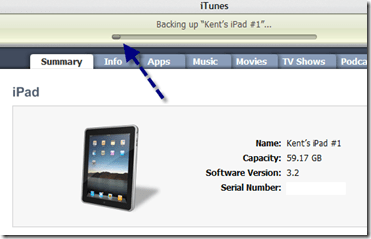
When I set up my iPad, I was pleasantly surprised at how quickly it synced with iTunes, even though I had already purchased quite a few apps.  For the next few days, synching was fast and easy, taking only a few minutes each time.

Then, suddenly and for no apparent reason, syncing started taking forever.  By that I mean forever.  Hours.

image

This is where my iPad now lives.  After this message appears for 30 minutes or so, it will very slowly begin the backup process, after which things will move along at the pace of frozen molasses.

image 
It takes hours for the backup process to be completed,
once it finally starts.

Why?  Why, I say!  I can think of no reason why it suddenly takes hours to sync my iPad.

Very frustrating.

A Business User’s Toolbox for the iPad

This is Part 1 of a continuing series.

image As I noted on iPaday, one of the things I am focusing on is the best and most efficient way to insert my iPad into my work flow.  As a full fledged member of the rat race, who works in a corporate environment run on Microsoft Office and Exchange, this is not the easiest thing to do.

A Brief Rant

Let me get a major gripe out of the way and then we’ll move on.  Apple, seriously, there’s no good reason why our documents have to be kidnapped from the bowels of our iPads by third party apps.  The iPad is plenty powerful enough to support some sort of file system that allows us to access, manipulate and save documents directly.  If for some incomprehensible reason this is not the case, then give me 8 hours of battery life instead on 10.  Or 6.  The other 2-4 hours are wasted trying to get around these needless limitations anyway.

iPads need a vastly improved system for  managing documents.

Apple claims to seek acceptance in the corporate arena, but unless document management becomes a lot easier, it simply will not happen.  This, along with the absence of a camera or two, is the best hope for the forthcoming HP Slate.

But since Apple makes it hard, let’s do it the hard way.

Email

Email via Exchange works great on the iPad, right out of the box.  I, for one, am really glad Apple did not implement the universal inbox.  Those of us with real jobs don’t want to blend our work and personal email.  If Apple does implement a universal inbox, I deeply hope it does so as an option only.

Receiving corporate email on an iPad, even with attachments,  is easy and pleasing.  Sending email with attachments is needlessly burdensome, however, since there is no way to attach a document from within the email application.  You have to start from within Pages or whatever app holds the attachment you want to send.  Again, why?

Document Management

Once you get an email with a Word document attached, it’s a little awkward, but manageable, to open the attachment in Pages, edit it, and then export it as a Word document and email it back.  Tracked changes do not appear on the imported document, and there is no similar feature in Pages.  Apple really needs to figure out a way to view and create tracked changes (or the equivalent) in order to ensure that corporate users think of the iPad as more Word-like and less Google Docs (ugh) like.

Accessing documents is a common annoyance on the iPad.  There is no sane way to move documents to and from your iPad, so you have to patch together a group of apps to end-run around Apple’s insanity.

Here are the ones I’m using, which taken together, work pretty well.

Windows on an iPad?

The first app in my arsenal is Desktop Connect.  It is an elegant and easy to configure app that allows you to access and use your Windows desktop via your iPad.

image
See Live Writer, right there on my iPad.  Cool, huh?

Desktop Connect is surprisingly snappy and very useable.  One way I have used it is to view Word documents with tracked changes, by opening Word and then the document I want to review.

Seeding and Seeing the Cloud

While Desktop Connect is handy for running desktop apps and viewing documents that reside on your desktop, it it not a solution for moving documents between your desktop, the cloud and your iPad.

The next app I rely on, for both document access and general backup, is SugarSync.  I’ve been pretty carefree about backing up my data, and so I decided to solve two problems with one good app.  I now have most of my documents, photos and MP3s backed up to SugarSync, which seems to have the best price ($150 a year for 100 GB; $250 a year for 250 GB) and the best iPad app.

Via the SugarSync iPad app, I can access, view and manage my files on my iPad.  The access part works perfectly.  To get a document from SugarSync onto your  iPad requires that you email it to yourself (again there is no reason it has to be that hard).  You can email documents natively from within the SugarSync app, however, so this is not quite as burdensome as it sounds.

image
Here’s the way a folder looks in the SugarSync app.  Very nicely done

Document Retrieval

For retrieving documents from my email accounts and my Dropbox and Google Docs accounts, I use GoodReader, which is a very useful app and one of the few, at a very reasonable 99 cents, that isn’t overpriced.

You can easily configure GoodReader to connect to your various accounts, as well as to your desktop via WiFi, after which it is simple to move documents to your iPad, as needed.  Getting them back is another unnecessarily roundabout journey.  Essentially you have to email the revised document to yourself and then get it back to its original location from there.

image
See how nicely GoodReader shows the attachments to emails in my Gmail inbox?  Downloading them to my iPad is a one-click process.

Paging all Tech Gurus

GoodReader is preconfigured to work with many email and cloud services, including Dropbox, Mobile.me and Box.net.  I have not yet figured out, but badly need to know, how to configure GoodReader to connect with and access my SugarSync files.  Anybody want to help a brother with this?

Virtual Flash Drive

Finally, I use Air Sharing HD as a alternate way to move files to and from my desktop.  Ultimately, I may resort to a single app for this and cloud access, but for now I’m still experimenting like a Freshman at college.


Here’s the way my iPad looks in Windows Explorer via Air Sharing HD.  It’s simple to drag files back and forth.

Conclusion

It’s a patchwork solution to a problem that, frankly, shouldn’t exist.  But these are some well designed apps, that make the iPad much more useful in a business environment.

I’ll have more later.  In the meantime, what other apps and advice do you have for the business user?