Tech Tips for Tweeners: News, Newsgroups and Newsreaders

babycomputer

One of the primary purposes of Newsome.Org is to introduce and explain computer-related programs and features to other in-betweeners like me- people who are the parents of the youngsters to whom computers and the internet are as integral as the telephone and the children of our parents who have no intention of ever embracing computers.

People in this 35-60 group are in an odd situation. Most have, perhaps begrudgingly, accepted computers as a tool to help them work- at least as far as emails and light word processing goes. But to many, anything beyond that is unfamiliar and confusing. Because I am the neighborhood computer geek, I get a lot of questions about technology. Over the years, two things have become clear. One, many in-betweeners view computers as a chore themselves as opposed to a method to make chores easier. Two, with a little work these same people can and will learn how to make computers work for them. There is always an initial hesitation (“I don’t understand all of that,” “If I give a web site my personal information, my identity will be stolen immediately, etc.”), but these folks have been around technology long enough to pick up more than they think via osmosis and to become comfortable around technology. That’s a valuable head start that will significantly lower the learning curve.

So let’s talk about one way we can make computers work for us. Anyone reading this knows how to send email, so we’ll skip that. Let’s talk about the second most commonly used benefit of computers and the internet: information gathering.

Any information gathering process starts with Google‘s web search. But there are other ways to get even more specific information. Let’s talk about newsgroups.

First, let’s address some terms, that may sound alike, but are not the same thing:

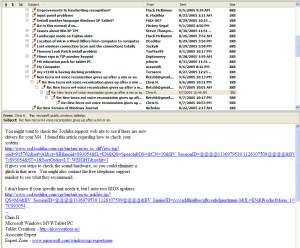
Newsgroups. A newsgroup (focus on the group half, not the news half) is a central list of messages, organized by topic, posted by many users at different locations. Stated another way, newsgroups are discussion groups where people discuss, teach, inquire about, etc. a topic of presumed common interest. For example, there are newsgroups about fishing, hunting, quilting- just about everything. A newsgroup looks similar to the list of email in your inbox, the difference being that the messages are composed by a large group of people from all over the world. From a technical perspective newsgroups are different from web-based message boards, like Songwriting.Org, but from an end user and experience perspective, they are similar. There are two ways to read newsgroups: via a newsgroup reader, such as Outlook Express (which is almost certainly already installed on your computer) or via the web through everyone’s favorite web site, Google. Newsgroup readers have to be configured, which, while not terribly hard to do, is more than a lot of people want to do (recall my mantra- if you want people to use technology, make technology easy to use). Reading newsgroups via Google is much easier. You can find groups you’re interested in via the search box, click on the link to read the messages and “subscribe” or bookmark the group by clicking on the link at the top of the list of messages. Here is a screenshot showing what a typical newsgroup looks like in Outlook Express:
outlooknews

and here is what one looks like via Google.

So why in the world would anyone want to read newsgroups? Simple, to get answers to questions. When I am trying to fix a computer problem, a broken toilet or almost any other problem, I start by searching the newsgroups, via Google. Very few problems haven’t already been solved by someone else and most of those solutions are readily accessible via newsgroups. Most of the hard computer or software problems I have encountered were solved via suggestions I read on newsgroups. And most of the time, you don’t even have to post a question to get the answer. Just search for the problem and you’ll generally find that someone else has already asked it and received an answer.

News Readers and RSS. For some strange reason, the programs that read RSS, which is a relatively new method of distribtuing web site content (like the content on this page) are confusingly called news readers (focus on the readers half, not the news half). They are also called RSS readers, feed readers and feed aggregators. The content displayed by these programs is repackaged web site content, not newsgroups. It’s confusing, but think of it as newsgroups (Google just calls them groups) where a group of people post messages and news readers that allow you to read news (and other content) posted by people like me on their web sites.

News: Don’t get traditional news sites, such as CNN or Google News confused with the stuff we talked about above. Those are traditional news sites, with traditional news. You can usually read that content through a newsreader (look for the RSS link), but that’s the only connection between those sites and newsgroups and newsreaders.

So what do I use for all this? There are many good programs. Here’s what I use:

Reading Newsgroups: Outlook Express, more than likely the program you use to send email from home. I use Outlook (a more robust program with a similar name) for email, but I use Outlook Express to read newsgroups.

Searching Newsgroups: Google. There is no substitute. If I find a group I like, I’ll subscribe to it via Outlook Express, but as mentioned above, you can easily read and post directly from Google.

Newsreader: Onfolio, which has many great features. There are also web based newsreaders. Of the ones on that list, I have tried and liked Newsgator and Bloglines. Both are free.

Once you go to the effort to set these programs up, they make it easy to find, collect and store information. It’s a little learning time now that is repaid with interest when you need information fast.

Technorati Tags:
, ,

The TIVO Deathmarch Continues

nailcoffinHD Beat is reporting on a “reliable” rumor that, as I predicted, DirecTV will switch out at no cost to the customer the soon to be obsolete $1000 door stops previously known as the TIVO HR10-250 in exchange for a new one or two year satellite service commitment.

HD Beat and the quoted article actually say that the DirecTV representative did not give any details about the timing of the switch out or whether a new contract would be required. Logic tells me, however, that a contract will be required as a way to boost customer retention and allocate the cost of the new boxes. I wouldn’t mind having to sign a 1 or 2 year contract if I could be assured of good service, a good box (like, for example, the TIVO box that DirecTV is dumping), and lots of new HDTV channels (not just satellite streams of the local channels that I already get over the air). I don’t see how I can get those assurances so the prospect of a long term satellite contract isn’t very appealing to me.

Big Loser: TIVO (great box; but dying on the vine thanks to DirecTV)
Jury’s Out: DirecTV (if the box is good and free, minimal damage)
Big Winner: Cable TV (angry DirecTV subscribers may go back to cable)

Technorati Tags:
,

Digital Music Update

The other day, when I was discussing the vast and unnecessary limitations that online music sellers place on downloaded music files via DRM, I decided to cancel my Rhapsody subscription because (a) Rhapsody is now owned by RealNetworks, maker of Real Player, that bloated and computer hogging software that I detest, and (b) there is a new version of Rhapsody that allows you to buy DRM infested downloadable music files. Previously, Rhapsody was a burn to CD only service (you ended up with CDs and not DRM infested music files).

Well, when I logged onto Rhapsody to cancel, I was quickly reminded of why I avoid RealNetworks software like the plague. When I finally found the page describing how to cancel your account, I found this little jewel:

rhapbs-744163

So, even though you can sign up, upgrade and buy music online, to cancel you are forced to call a telephone number and speak to someone. And of course the telephone number only works during business hours. I remember having the exact same problem in the past when trying to cancel RealNetworks services.

I’ll call on Tuesday. And I’ll vote with my keyboard and my wallet. No RealNetwork products. Not now, not ever.

Technorati Tags:
,

One More Thing About RSS

Fred Wilson has a recent post about his reluctance to use RSS Readers to read blogs. I have said similar things here. Recently, I finally figured out the biggest problem with RSS- it’s the partial feeds.

Because I like Onfolio so much, I added feeds for all of the blogs I read regularly into its RSS reader (Onfolio has many useful functions, including as an RSS reader). I hoped that reading those blogs in Onfolio would be faster and more centralized. It didn’t work out that way.

There are certainly benefits: the RSS reader alerts you when there is a new post on one of the blogs you read and, with one near-fatal exception, it is faster to read blogs from a central location.

rsslogoThe exception is that many blogs only syndicate (i.e., make available as an RSS feed) a headline or the first few words of a post. This means that if you want to read the entire post, you still have to click through to the blog itself. You can do this through the RSS reader, but it still takes a long time and is decidedly unsatisfying to me. If I have to click through to the blog for every post I want to read, I’d rather just go to the blog initially, where all of the recent posts are available in their entirely on a single page.

I understand why bloggers are hesitant to syndicate their entire posts. Mainly, it’s because they want to drive traffic to their website. Sometimes, it’s for content control reasons. More often it’s for ad serving reasons.

Dwight Silverman (who hasn’t put Newsome.Org in his blogroll even though we live in the same city and I link to his blog all the time- but who’s keeping track of that sort of thing) discusses the full text dilemma in this post. While I read Dwight’s blog daily, if he kills the full text feed, I’ll go back to reading his blog at his blog instead of via an RSS reader. I guess I’m a full-feed snob.

Technorati Tags:

Comments: Have Your Say

One of the things we did successfully with a number of the websites I have developed is create a sense of community. With websites, community means that communication is a two (or multi-way) way process, with more than one party providing input, expressing opinions, etc. That’s easier to do with message board sites like ACCBoards.Com and The Cat’s Domain. It’s harder to do with other sorts of websites, including blogs. But it’s just as important.

One reason I changed Newsome.Org from a traditional website, which looked and worked something like a newspaper- content was here, but it flowed one way, to the current blog format is because the new format makes it easier to create conversations and connections. Conversations via the Comments feature and connections via links I include in my posts and the Trackback feature.

Another reason I made those changes is to reconnect with old friends and meet new friends. Over the past few years a lot of people have told me that they visit Newsome.Org from time to time. Many of these people know each other. Until now, there was no way other than email for these people to communicate with me and no way at all for them to communicate with each other.

I know from my stats reports that there is a good amount of traffic here, and I know from my age and that of most of my friends that the internet as a two way proposition and blogs in particular are relatively new concepts. So here’s a short primer on how these features work.

Most posts have several links at the bottom, and here’s what those links do. The “Permalink” is a link to a separate page (called a “post page”) that contains only the post in question. This allows people to link to a particular post as opposed to the main Newsome.Org page, where the posts that are here today will be pushed to the Archives pages (see the list in the left hand column) by new posts. A few posts which are mainly family news and photo items don’t provide for comments, but that is the exception

The “Post a Comment” link is a way for visitors to respond to, comment on, agree with or disagree with anything in a topic or post. When you click on that link, a box pops up where you can type a comment, opinion, etc. and have that comment added to the bottom of the post. One thing to remember: the text of the comments appears only on the post pages. On the main Newsome.Org page, you’ll merely see the number of comments made at the very bottom where it says:

X Comments
Y Trackbacks.

There are three ways to access the post page, and the full text of all comments. Click on the title of a post, click on the Permalink or click on the “X Comments” link. Each of these links leads to the same place- the post page containing only the post and the full text of the comments.

The Del.icio.us and Furl links allow visitors to easily bookmark the post on one of those social bookmarking sites. If you don’t already use those sites, you can ignore those links for now, but I would suggest you check them out. Those sites are great ways to share links and find other interesting pages, posts, etc.

The Trackback feature allows visitors who have blogs themselves to link back to a post on their site that refers to the post. For example, if I post about my problems with Technorati, a visitor who has similar problems may want to post a topic on his or her website and link to it from here via a Trackback. It’s a way to create natural connections about related content over multiple websites.

That’s about the sum of it. If you’re here, have your say. It’s much more fun to discuss things that to read things. Don’t you agree?

Technorati Tags:

The Big Deal About Firefox

firefoxA lot of smart guys I know tell me that I should be browsing the net with Firefox, instead of Microsoft’s Internet Explorer. I attribute some of this to a counterculture, anti-Microsoft philosophy, but enough people whose opinions I respect have sung the praises of Firefox that I decided to give it a try.

Warning: I’m fixing to aggravate a lot of other geeks.

So I went to the Firefox download page and installed it. The program installed easily. The first time I opened it, Firefox offered to import a lot of my settings from Internet Explorer. The settings were quickly imported (other than, curiously, my Home Page setting). So far, so good.

I decided to surf around with Firefox a little to see how it works, and to make sure the Newsome.Org pages display correctly in Firefox (they do). All was well, and I admit that I really like the tabbed browsing feature.

Then a problem. I went to The Home Place, which has a flash-based Flickr badge. A helpful message at the top of the Firefox window informed me that “Additional plugins are needed to display all of the media on this page.” To the right was a promising button inviting me to “Install Missing Plugins.” So I clicked it. A box popped up telling me that a Flash Player 7.0 plugin was available- just what I needed. I selected it and clicked the Next button. A license screen popped up and I agreed to the user license and clicked the Next button again. Nothing. Nada. Only this, for a long, long time:

error-705398

I tried many times. I rebooted and tried many more times. I tried a manual install. I googled the problem and found quite a few links. This one looked promising, but didn’t work for me.

Could I get this plugin installed? Almost certainly. I am a geek, myself. But a whole lot of potential users don’t have the time, inclination and ability to do so (all 3 are required). So I run straight back to my soapbox and once again shout my mantra: if you want people to adopt something that is (supposedly) only incrimentally better that something they already have, make it easy. Make it painless. Otherwise, you have something created by geeks only for geeks. As I said, I’m a geek, so I’ll use it (along with Internet Explorer, but not as my default browser). But I’ll never get my wife, family or friends to do it.

We’re all better off with 2 significant options (think what satellite TV has done for cable users). I want Firefox to put some competitive pressure on Microsoft. In order to do that, it has to become the browser of choice for geeks and non-geeks alike.

Bottom Line: The basic software (as opposed to the plugins) was easy to install. It didn’t seem any faster than Internet Explorer. I like the tabbed browsing, and I’m sure (because I’ve read it so many times) that it’s more secure. Otherwise, it seems a lot like Internet Explorer, only without the Flickr badges.

Bonus thought: If I liked it better, would they use my song by a similar name in a commercial?

Technorati Tags:

Friday’s Link: GUI Gallery

msbob

Friday’s Link for this week is the Graphical User Interface Gallery. This interesting site has descriptions and screen shots of many old and nearly forgotten GUIs and operating systems.

There are pages with descriptions and screen shots of Apple Lisa, At Ease (alternate Mac desktop), Amiga, OS/2, all versions of Windows, Norton Desktop for Windows, and my favorite, Microsoft Bob. I remember having a copy of Bob in my hands back in 1995 and wondering if I should buy it. I didn’t and, but for this web site, I would never have had the pleasure of seeing Bob and the original Rover (who is still running around in the seach boxes in Windows XP).

The GUI Gallery is a neat trip down memory lane for anyone who has used computers for any length of time. Seeing the Apple II desktop again reminded me of the many hours I spent back in the mid-eighties playing Island Apventure, a game my brother in law had on his Apple II.

Island Apventure was the first of 4 computer games that have captivated me over the years. The others are Starflight (still my all time favorite game), Sim City and Civilization. Civ IV is coming out soon and I am trying to decide if I am too old to play computer games. I hope not, because there’s no way I will be able to resist buying it.

Technorati Tags:

Extreme Website Makeover (Part 2)

This is the second in a two part series. Part 1 is here.

In Part 1 I talked about redesigning Newsome.Org and shared some things I learned in the process.

paint

Here, also in no particular order, are some other things I have learned.

5) While a nice, functional design is important (for example, I love to read John Dvorak’s blog, but I find the layout and design, particularly the middle part where the primary content is, to be distracting), content is king. Content can be many things: new or helpful information, humor, or just your thoughts on the latest episode of Lost. In fact, several of the blogs I read regularly are primarily online diaries where the blogger discusses whatever happened that day. I used to have a friend (where are you Steve Garner?) who could tell a story about taking out the trash and keep the whole room enrapt. If you provide useful and interesting content, you will eventually get readers. Granted, it’s hard to think of something useful to say every day (much less several times a day), and post shrinkage is a common traffic killer. The saving grace is that every post does not have to be a full length article. People like to connect and maintain a connection. Even a short comment or interesting link will keep me coming back to the blogs I read.

6) Make it a 2-way street. I learned when developing ACCBoards.Com that you can get a click or two pretty easily. The trick is to create and encourage conversations. Once people start conversing, a community begins to form and people will spend more than a few seconds on the site. The so called “A-List” bloggers understand this, and they often carry on discussions about common topics spread over their sites. Once you get used to “talking” via trackbacks, comments and common topics, other people will join in. People turn into a group which turns into a crowd, etc.

7) Use media to enhance what you’re saying and doing. Castpost is an excellent site that will host video, currently for free. I have posted one old and one new video project here via Castpost and will post more shortly. Radio Blog is a free program that allows you to post audio files on your site.

8) Get indexed by Technorati even if its hard to get set up. If you keep trying, it will happen. Other sites like del.icio.us , PubSub and Bloglines can help add features and spread the word about your site.

9) Give love to get love. I always link back to sites that inspire me to write about a topic. I always link in my post to a site that I trackback to. If people comment on my posts, I try to comment on their site when I have something to add. Over time, other bloggers will come to recognize your name and be more likely to give you a link or two in return.

10) Have fun and don’t take yourself too seriously. Nothing turns me off more than someone who feels the need to tell me how smart or clever they are. Just be yourself and write about something you find interesting- if you’re smart and clever people will figure that out on their own. Few of us get paid for writing these blogs, so it needs to be fun or it’s a misuse of our precious free time.

Technorati Tags:,

A Second Opinion

Adrian Kingsley-Hughes, the PC Doctor, agrees with me that RSS is fighting an uphill battle for acceptance by the masses.

He cites this survey by Nielson/Netratings that found that most blog readers have no idea what RSS is. If blog readers don’t know what it is, imagine how few occasional internet surfers know. Adrian talks a little about the “chrome” and how the users are hooked on the “shiny stuff.” I think there’s a lot of truth to that, but my take on RSS is that it has two things working against it: that most non-geeks don’t know what it is, much less how to use it (a position supported by the survey), and that a lot of the ancillary content on a web site is left out of the RSS feeds. Many of the hacks on Tom Evslin’s excellent site are designed to address this problem by bringing this extra content into RSS feeds.

One we get the extra content into the feeds, then we have to educate the world about RSS (or whatever we ultimately decide to call it), then we have to teach the average web surfer how to use an aggregator, then we have to…. You get the picture.

Technorati Tags: