Reducing Spam – Opting Out?

I was planning to write a Tech Tips for Tweeners piece on spam, including when to try the “opt out” approach, but Ed Bott just did an excellent piece on it.

nospamOne thing I would add: with practice, you can tell which opt out links are more likely legitimate and which ones are totally bogus. As a general rule, an opt out link that merely sends an email to a free email address (Yahoo, Hotmail, etc.) is totally bogus and, as Ed says, will get you nowhere. A form at some offshore web site will likely not reduce your spam and may increase it. A form at a .com web site, and particularly one that seems, upon a review of the web site, to be a legitimate mailing list server is the best (but not guaranteed) bet.


One of the head IT guys at my firm did an experiment. He tried to opt out of every piece of spam he received over an extended period of time. The result: he says he got less and less spam over time. The “never reply to spammers” approach should be canned in favor of the “judiciously respond to spammers” approach.

One final tip. The best thing to happen to spam prevention in a long time is the new version of Outlook (Outlook 2003). It has a very effective spam filter that will eliminate a lot of spam. Be sure to keep the spam filter updated, either automatically via Windows Update or via the Help/Check for Updates menu. There is a new service pack update that adds additional spam protection.

And as Ed reminds us: never, ever, ever buy anything from a spammer.

Technorati Tags:

The Ultimate Web Based Email?

When Gmail first came out, there was quite the buzz. People begged for and even bought beta invitations. I have used Gmail (though not as my default email program) for months and I think it is a very good email solution (2.5 gigabytes of storage can’t be a bad thing, right?). But it still looks looks like a web based email application. In other words, it looks like another, better version of Hotmail or the current Yahoo email. The search for the perfect web based email application continues.

Yahoo may be about to change that. Yahoo bought Oddpost, a well liked web based email application, last year. Now it seems that Yahoo is about to combine its existing email application with Oddpost technology into a revolutionary new version of Yahoo email.

I haven’t yet scored an invitation to beta test the new Yahoo mail, but based on the reviews and screenshots I have seen, it looks like a significant improvement over everything that’s out there currently.

TheUnofficialYahooWeblog has a good review of the application, along with some screenshots. Improvements in the new application include:

1) 3 pane view, with folders, inbox and message preview available on one screen. This makes Yahoo email look and feel more like Outlook and other traditional email programs than any other web based service. It works with Firefox as well as Internet Explorer.

2) A tabbed interface that lets you line up several messages for later review, reply, etc. This feature is similar to Firefox’s much heralded (including by me) tabbed browsing.

3) Lots of formatting options for email composition. I am very strictly a plain text email person, but lots of people aren’t and if you want to make your email pretty or annoying (depending on your perspective) the new Yahoo email will give you lots of ways to do so.

4) The new Yahoo email application doesn’t target advertising based on the content of your emails the way Gmail does. This is not a big deal to me, but it will make the privacy crowd happy.

As more people move towards web based applications, which allow you to access them from any computer, not just your own computer, web based email will almost certainly see wider acceptance. By making the experience similar to what people already use, Yahoo is positioning itself perfectly to take advantage of that growth.

If I can get a beta invitation, I’ll take the new application for a spin and post more notes and updates.

Technorati Tags:
,

TIVO Like a Cell Phone

So now after adding DRM restrictions (or, at a minimum the capability to add them) TIVO has decided that if you cancel your subscription within the first 12 months, you have to pay a $150 early termination fee. The PVRblog tries to take the glass half full approach and hope that this is the end of the rebate approach. Perhaps that will be one good side effect, but mainly this is another attempt by TIVO to recreate itself in a market stacked against it.

TIVO was the great liberator as far as recording and time shifting programming. DirecTV blows it off, so now it’s trying to marry the cable companies, flirt with the Hollywood cartel and dress up like the only thing people hate more than their cable company- their cell phone company.

I don’t buy it. One of the greatest technologies ever is reduced to this. Pity.

Technorati Tags:

More on Firefox

Adrian Kingsley-Hughes (the PC Doctor) has completed his week-long experiment with Firefox. His conclusions: he liked some things about it, did not find it to be more secure than Internet Explorer and will not make it his default browser.

firefox

I had much the same experience with Firefox when I tried it. Having said that, I have continued to use it about half the time. I did get that Flash plugin installed, though someone not a computer geek would have given up in frustration.

I really like the tabbed browsing. I haven’t seen that many pages that won’t display properly in Firefox. My conclusions remain mostly the same: take away tabbed browsing (or add it to Internet Explorer) and I see no compelling reason to use Firefox over Internet Explorer.

But as I said before, a two horse race is a win for consumers, so I am pulling for Firefox to gain and keep market share.

Technorati Tags:
,

Friday's Link: Freshblog

The fact that I have the time to pick Friday’s Link tonight and electricity and an internet connection to post it speaks volumes to how kind Hurricane Rita has been to us so far.

Freshblog is one of my favorite blogs. It regularly provides good tips about creating and customizing blogs as well as good takes on technology in general. I have used several tips I read on Freshblog to improve the Newsome.Org pages, but you don’t need to have a blog to enjoy Freshblog. All it takes is a desire to learn about how people are using the internet to create and distribute content- blogs and otherwise.

Technorati Tags:

Update: More on TIVO DRM

Engadget is reporting that the previously mentioned evidence of TIVO’s implementation of DRM continues to mount. My favorite part of that post is this comment by a reader:

What is the point of a TiVo then? They’re crippling themselves, and even though I don’t own one, it pisses me off.

I couldn’t agree more. The problem for TIVO is that it is caught between a rock (DirecTV non-support) and a hard place (Hollywood). It’s trying to recreate itself in a hostile environment. As a result, TIVO’s death throes are getting more and more hard to watch.

I’ll continue to hope that TIVO can beat the odds and remain a relevant and useful technology, as least until I conclude that TIVO is not telling the truth about this DRM business.

Note to TIVO: the best way to lose the last remaining part of your once large and loyal subscriber base would be to be less than forthcoming about this DRM business. DRM is a hot button for most of your subscribers, so the best way to address this mess is to play the “I have to do this to get the content you want” card. Blame it on the Hollywood cartel. No one likes them anyway.

Technorati Tags:
,

Tech Tips for Tweeners: Computer Security

babycomputer

One of the primary purposes of Newsome.Org is to introduce and explain computer-related programs and features to other in-betweeners like me- people who are the parents of the youngsters to whom computers and the internet are as integral as the telephone and the children of our parents who have no intention of ever embracing computers.

As the neighborhood computer geek, I get a lot of calls for help with computer-related problems. Without a doubt, the large majority of those problems are related to computer security, or the lack thereof.

There are 3 things that everyone must do to protect their computer and the data thereon. If you don’t do them, you will eventually encounter a problem. The only question is whether it will be a minor problem (such as a hijacked internet home page) or a big problem (like the loss of data or the theft of personal information).

Having said that, don’t avoid the internet like an unsafe neighborhood. The convenience and benefits are too great for that. We don’t give up driving just because there are bad drivers and potential carjackers out there. We simply wear our seatbelts, lock the doors and watch where we are going. There are a few simple things you can do to increase your computer safety and manage the risk.

One: Install a Firewall

A firewall monitors your incoming and outgoing internet (and other network) traffic and helps prevent traffic (e.g., connections) you don’t want from doing something bad to your computer. There are two kinds of firewalls: hardware and software. We are talking about the software kind.

Even if you connect through a router, you still need a software firewall.

There are a lot of choices out there, and I’ll recommend two. If you want to make things as simple as possible, use Windows’ built in firewall. You need to have Windows XP with Service Pack 2 installed in order to use Windows firewall, but (and this is very important) you need XP and SP2 installed for many other reasons. If you have an older version of Windows, upgrade. If you have XP make sure SP2 is installed. If your computer is too old to run XP and you are determined not to buy a new one, check out Zone Alarm (see below).

If you can’t or won’t use Windows’ built in firewall or if you want a little more protection, check out ZoneAlarm. There is a free version and a more robust ZoneAlarm Pro version, which is what I use. Both are easy to install and configure. $50 a year is not much money to protect your computer, so I suggest shelling out the dough. Also, unlike Windows firewall, ZoneAlarm works on Windows 98 (Second Edition) and later. If you have an earlier version of Windows, it is seriously time to junk it and get a new computer with a new OS (like Windows XP).

Two: Install Antivirus Software

After you get your firewall up and running, buy and install an antivirus program. Antivirus programs attempt to identify and eliminate computer viruses before they infect your computer. Unlike a firewall, which stops unwanted connections (where another computer “talks” to yours), antivirus software stops a usually hidden or disguised computer program from making changes to your computer.

Windows does not yet have an integrated antivirus program, although Microsoft is working on one. I’ll make two recommendations. One, which I use, is Norton Antivirus. You can buy it online, download it and install it right away. One note: resist buying the once indispensable Norton Utilities, which bundles other programs with an antivirus program. These once great programs have been largely rendered unnecessary by Windows XP and now serve mainly to cause unnecessary programs to run in the background, possibly slowing your computer down. The program costs another $50 per year, but is worth it.

The other program that I like, though less than Norton Antivirus, is McAfee Antivirus. Again, avoid buying a bundle of software. Buy only the antivirus program.

Important Note: No matter which program you buy, it is critical that you run regular updates, which can be automated if you like. The developers post regular updates that identify new viruses. If you don’t update the software regularly (at least once a week), you will not have adequate protection. Finally, make sure you have enabled email scanning, which allows the program to automatically scan every incoming and outgoing email for viruses. Most computer viruses are delivered via email, some of which may be disguised as emails from someone you know (once a virus infects a computer, it will often access the computer’s address book and email itself to the contacts therein- the idea being that people are more likely to open an email from someone they know).

Three: Install an Anti-Spyware Program

Firewalls keep hackers from communicating with your computer. Antivirus programs keep virus files from changing your computer, but there is still spyware. Spyware is malicious software intended to take partial control of a computer’s operation without the owner’s consent. Spyware differs from viruses in that it does not usually self-replicate (e.g., email itself via your address book). Like many recent viruses, spyware is primarily designed to exploit infected computers for commercial gain. I would also add that spyware is generally less damaging than a virus and is much more common on even a careful user’s computer. My unfortunate experience has been that spyware, particularly the tracking kind (that allows some program you have installed or some website you have visited to track where you go on the web), is virtually inevitable. The goal is to regularly scan for it and delete it.

Microsoft is also working on an integrated anti-spyware program and there is a beta version available for free. I haven’t used it, so I can’t comment other than to say that this will, like Windows firewall, become the easy choice in future versions of Windows. In the meantime, I’ll make two recommendations. First, Ad-Aware, the program I use. Like ZoneAlarm, there is a free version and an Ad-Aware Plus version for $40). I use the free version and it has always worked well for you. One note: the pay versions claim to prevent spyware before it infects your computer (and perhaps making spyware less inevitable). I haven’t used them, so I don’t know how well the prevention works. If anyone has any thoughts, please post a comment.

Another good program is Spyware Doctor. I have only used it a little, but it got a great review from PC Magazine. I stay with Ad-Aware, because I have used it for years. If I were starting anew, I’d shell out the $30 for Spyware Doctor.

Conclusion

I don’t want to overstate my point and cause undue concern about computer security. I use the internet for everything from banking to shopping to data storage and I have never suffered a serious security problem. The reason I am so comfortable using the internet so extensively is because I understand the risks and take these steps to manage them. It will take a couple of hours to buy and install these programs, but if you install them and keep them updated, you will protect yourself against some very real but manageable problems. Get to work and happy surfing!

Technorati Tags:
,

Friday’s Link: Memorandum

techmeme

Memorandum is a very popular site that links to content from selected blogs. It’s a little hard to explain, but basically Memorandum contains links to blogger discussions on hot topics (meaning topics that a lot of people are talking about).

One problem I had with the original iteration of Memorandum was that the topics were too heavily weighted towards political discussion, and I don’t care a whit about politics. In fact, it bores me to tears.

Now, Memorandum has split into two sites: politics and tech. Personally, I don’t read the politics version, but the tech version is one of my every day reads. Politics or tech- either way you can find some good content fast via Memorandum.

Technorati Tags:

More Bad TIVO News

Apparently, TIVO is not satisfied dying on the vine thanks to its abandonment by DirecTV. Now comes news that the new TIVO operating system has the ability to place a bunch of DRM restrictions on the shows we record.

nailcoffinAccording to this post at PVRblog, the new DRM implementation allows TIVO to place limitations on how long certain shows can be saved (before now, one of the options was “Save Until I Delete”). Additionally, some shows cannot be copied using TIVO Togo (I wouldn’t know since my $1000 doorstops previously known as the TIVO HR210 never supported TIVO Togo).

A post on Tivo Community Forums, a very popular TIVO site that I visit regularly to talk about neat ways to use my $1000 doorstops, contains a bunch of screenshots (here, here, here and here) clearly showing the significant DRM restrictions.

PVRblog has an update that says the DRM on that old King of the Hill show was a mistake on the part of the TV station. Nevertheless, this little accident of grace shows that TIVO has implemented DRM and indicates that it may use it to prevent its (undoubtedly dwindling number of) loyal subscribers from doing what they have been allowed to do for a long time.

All in all, this is just one more reason why TIVO is dying on the vine. Whether TIVO is doing all of this stuff on its own (highly unlikely) or being required to do it by the TV network cartel (very likely), doesn’t matter. The result is the same: less appealing service that alienates its subscribers.

Bye Bye TIVO, it’s been nice knowing you.

Technorati Tags:
,

Screen Captures Made Easy

One of the most useful software accessories you can install on your computer is a good, reliable screen capture utility. Screen capture utilities let you grab a portion of whatevet’s on your computer screen. They are helpful for storing snippets of information in Onfolio, grabbing a portion of your computer screen to email error messages to the appropriate technical support address, and capturing content to redisplay it (as I did with my Firefox problem).

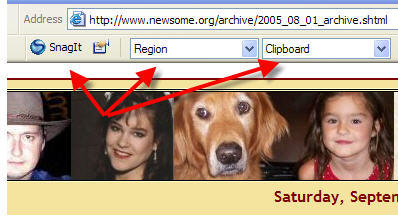
My favorite screen capture utility is Snag-It. It’s easy to buy online, easy to install and easy to use.

snagit-765032

It integrates seamlessly with Internet Explorer and places these buttons at the top of Internet Explorer that allows you to instantly grab all or part of a screen (this image was captured with Snag-It). You can configure how much of the screen to capture (I use the “Region” setting which allows me to draw a box with my mouse and capture everything in the box) and how to output the image (I output to my Windows clipboard so I can paste the image wherever I want it).

It is also a stand alone program, accessible from the Start Menu, that allows you to capture any desktop content, whether internet content or otherwise.

My only mild complaint about Snag-It is that the developer updates it very often and you have to pay for significant upgrades (“maintenance upgrades” are free). It seems like I get an email every month or so offering me an updated version for a price. It’s a great program, so I pay to upgrade to every other version or so.

Snag-It is $40 for new users. Upgrades are cheaper.

Technorati Tags:
,