Evening Reading: 2/1/10

In honor of the (mostly) success of my WordPress assault, I think it’s time for an Evening Reading post.

What Dwight Said: “In this battle between giants, readers will be collateral damage.” Amen.  Books are the new IM.  Everybody wanted to control the channel, and eventually people just gave up and moved on.

Meanwhile: Scoble displays his love (and hype-susceptibility) by burning his eBook in the name of Apple-love.

Forget Book Fights: JooJoo fights are where it’s at.  I want to interview someone who is buying a JooJoo, and ask one 3-letter question.

Speaking of Tablets:  Why do I have a lurking feeling that Dell is now working on a iPad competitor to be sold in third world countries?

WordPress Question:  I need an iPhone app.  What’s better WordPress or WordPress 2?

Speaking of IM:  Is there really a market for this?  Seriously, who really relies on IM?  I really want to know.

Lost Turkeys of the New World:  This almost makes me want to be in a band again, so I can name it that.

WordPress Tip:  Very timely advice.  I am fighting a losing battle trying to get my WP permalinks to be the same as my 1600 or so imported-from-Blogger ones.

Yes, But:  So do all ads.  I work hard to have an ad-free existence.  I record all my TV shows.  I listen to radio via XM (until I can get Pandora in my truck).  I have ad-blockers installed in Firefox.

The Deleted World: Here’s a site that helps delete social networking accounts.  It ought to have a function to search via email address, etc. so you can find ones you want to delete.

The Freed Feed: Here’s how to get your Facebook status updates into an RSS feed.

The Day the Music (Label) Died:  If this is right, there’s just depression and acceptance to go.  In 7 years, there will be no record labels, the way we currently think of record labels.  Not a moment too soon.

The WordPress Process, Part 5

The WordPress Process is a series of posts at Newsome.Org, documenting my forced march from the comfort of Blogger to the uncharted territories of WordPress.  Parts 1 & 2 are here, Part 3 is here, and Part 4 is here.

Wow, the support I received in response to my last post was amazing.  A million thanks!

The header is a work in progress, but I have fixed the page tabs.

I’ve fixed a lot of the embedded videos that got messed up on the import.  I’ll finish the rest as I work my way through the tagging and categorizing process.

I’ve already been though about a quarter of my old posts and added tags and categories.

Other than the header work, all I have left is to preserve permalinks (probably going to have to pay someone to do that for me) and figure out how to get Disqus comment and reaction numbers to show on the main WordPress pages.  Disqus is a great commenting platform, but this should be part of the plugin installation and/or options.

I have configured Live Writer to work with my WordPress installation, and this is a test post to see how it does.

Update 1: Pretty darn well.  I love the integrated Categories and Tags support.  Once again, I love Live Writer!

More as it develops

The WordPress Process, Part 4

This post comes with a bounty.  Design experts can make an easy $200 by fixing some annoying glitches I am struggling with (one payment per problem solved; email me first).

The WordPress Process is a series of posts at Newsome.Org, documenting my forced march from the comfort of Blogger to the uncharted territories of WordPress.  Parts 1 & 2 are here, and Part 3 is here.

I have all posts imported.  Except as noted below, I have a handle on modifying my theme to make things the way I want them.  I have my Twitter widget installed, and I have installed a Feedburner plugin and updated my Feedburner feed.

Here are my theme-related issues:

1. Why does my theme resize up my logo/graphic in the header?  I have looked everywhere for this code to fix it, and I can’t find it.

2. I need to fix the greenish background around the page tabs in the header.  Again, I can’t find this in the files.

Any WordPress designers want to make a quick $100 (via Paypal) by fixing these problems and generally improving my header?

3. I note that my YouTube embedded videos didn’t make the transition. That’s going to be a pain to fix by hand.

I also ran into trouble importing my Disqus comments.  I have Disqus set up for new comments (though I want the number of comments and reactions to show at the bottom of posts on all pages), but I can’t get my existing comments to show on my imported posts.  Another $100 (via Paypal) to anyone who can fix this.

I installed an AddtoAny plugin to allow items to be shared.  It seems to work pretty well, but I absolutely hate the fact that it appends a note to the end of shared Tweets.

I need to lose that somehow.  I tried to hack the php file, but didn’t see the code that adds this.

Overall, things are coming along.

The WordPress Process, Part 3

The WordPress Process is a series of posts at Newsome.Org, documenting my forced march from the comfort of Blogger to the uncharted territories of WordPress.  Parts 1 & 2 are here.

OK, I got tired of worrying about this WordPress migration, said screw it and moved my WP installation into my root directory. I think I have figured out a way to import my prior posts and save my permalinks, but at the moment I am held up by a maximum file size limitation in a PHP.ini file that I can’t find on my server. I have sent out an SOS to my web host, and hope to be either up and running or out of business shortly.

More as it develops.

Update 1:

I managed to overcome the maximum size limitation problem and import most of my posts.  Some didn’t make it, and I am working on that now.

Progress is being made.

Update 2:

I think I have all the posts imported.  Tomorrow I’ll fix the permalinks.

Not bad for a days work.

The WordPress Process: Parts 1 & 2

The WordPress Process is a series of posts at Newsome.Org, documenting my forced march from the comfort of Blogger to the uncharted territories of WordPress.

Recapping the latest developments:

1. FTP publishing via Blogger is dead, so I have to move Newsome.Org to either Blogger custom domain publishing or WordPress.

2. I moved Err Bear Music to a blogger custom domain, and the process was easy.

3. I still think WordPress may be a more robust platform, and have put out an RFP for someone to port Newsome.Org into WordPress.  I am close to a deal to get that done.

But I am also a coder and hacker, who would like to know the hows and whys of the process.  So last night I did a few things.

Installing WordPress

First, I installed a test version of WordPress on my server.  I started with the installation instructions, particularly the Famous 5-Minute Install walk-through.  Pair.Com hosts my server, so this post was also very helpful.  In sum, the process was pretty simple.  At the end of the process, I had a working version of WordPress installed.  It ain’t pretty, and God knows how I’ll import all of my blog posts.  But it’s installed.

Finding and Hacking a Theme

I briefly explored recreating my hand-made Blogger theme from whole cloth, but almost immediately that seemed like an insurmountable task.  I’m pretty good with code, and this is when I got my first inkling that maybe WordPress theme-hacking was going to be harder than it should be.

So I located a good 3-column theme, installed and activated it.  When I settle on a starting theme, I will be happy to pay for it (so I can hack it freely, delete the imagecredit links, etc.), but this free theme is a good place to start my WordPress learning experience.  Next, I wanted to modify the colors and content of the theme.  WordPress has a built-in theme editor, but at least initially, I am not impressed with it.  So I took the old-school approach and modified the files directly and uploaded them to my sever.

But, boy, are there a lot of them.  With Blogger, I have two files to be concerned with.  My template and my style sheet.  There are scads of files that affect the look and content of a WordPress blog.  That fact, and my general lack of experience with PHP, discourages me greatly at the moment.  I want the ability to manipulate the content, presentation and order of my blog, the way I can now via my Blogger template.  Perhaps you can in WordPress, but at this point it seems like it will be a chore.

So I did what any right-thinking person should do when faced with a confusing pile of code.  I went to bed.

Next Step

I’m going to need to spend a couple of hours learning the structure and purpose of these various files.  I hope and suspect that things will get easier with familiarity.  I sure hope so.

But at least I’ve taken the first step.

On to Part 2

OK, I now understand better the WordPress page and theme structure, and the editing capabilities are much better than I initially thought.  In fact, I got tired of worrying about all of this and did what I generally do when technologically uncertain: I said screw it and tried to import all of my existing posts to my WordPress blog. . .

Of course, it’s never that easy, even if you are willing to work without a net.

First of all, WordPress cannot directly import files from an FTP published Blogger blog.

image

Well isn’t that just great.

Never fear, I’ll just export my blog via the Blogger dashboard.

image

And run that file through the handy online converter, that will convert my exported file to a WordPress WXR file, that can be imported.

But NOOOOO. . .

Turns out that file is too big to be imported.

image

It just keeps getting better.  There is some discussion of modifying your php.ini file to allow larger uploads, the only problem being that I CAN’T FIND IT.  IT’S NOT IN THE DIRECTORY ON MY SERVER.

So here’s where we are at the moment.

image One, I believe I can hack together a WordPress theme that would serve my purposes.

Two, I’m willing to fly without a net and import my posts, and worry about the permalinks later.

Three, none of that frickin’ matters because I can’t import my blog posts thanks to some size limit I can’t find to fix.

At the end of the day, I could convert my blog to a blogspot hosted blog, and import it from there, but that just seems like too much brain damage.

So. . .

I’m going for a run.

Before the Rise and Fall: A Business Traveler’s Hope for the iPad

travelling

I’m on the road a fair amount for my job, and I’m a dedicated laptop power user during those trips.  For example, the last half of this week I was in San Antonio, chairing a conference.  Delaney didn’t have school today, so she took a couple of tests early, skipped school on Thursday and went with me.  Between checking my email, reviewing documents, visiting Webkinz, and looking in vain for a late night Avatar showing, we were constantly on my laptop.  In fact, this afternoon we pulled over on I-10, plugged in my wireless broadband card and found information on a for-sale farm in Flatonia, Texas I wanted to look at.

I use an Hp tx2525 tablet PC when I’m traveling.  It’s a good choice, but it could be better.  So I watched with great interest Steve Jobs’ iPad unveiling on Wednesday.  My Apple philosophy is very simple: I think the iPhone is probably the greatest technological advance of the past decade, and I think Macs are hard to use, software challenged and overpriced.  I have been waiting to see if the iPad was going to be a lite Mac or a supercharged iPhone.

In sum, it looks like it will be a little of both.

Could the iPad be Apple’s Alamo?

Since watching the unveiling, which was certainly impressive in a religion-of-Apple sort of way, the thing I continue to lament is the absence of a camera.  Religion or not, I cannot comprehend how you can release any manner of handheld device in 2010 and not include a camera.  I find the absence of native USB and SD card slots to be almost as annoying, but I could probably convince myself to live without those.  But no camera?

I’m not in the market for an addition to my mobile toolbox.  I’m in the market for the ultimate mobile toolbox.  For me to take the iPad plunge, I’ll have to conclude that it can replace my laptop. That may sound like a tall, perhaps unfair, order, but it’s not.  Most laptops have way more features and horsepower than I need.  I’m looking for an elegant device that doesn’t have a bunch of features I don’t need, but that has the ones I do.

So will I buy an iPad?  At first I thought so.  For sure.  The more I think about it, I’m not so sure.  I need to be convinced of a few things.

Like what?

First, I need to know that I can use an iPad view and edit Word documents.  I tried really hard to dump Microsoft Office, but it wasn’t possible for a document-intensive user like me.  Google Docs sucks, horribly.  Open Office will do in a pinch.  But the hard, cold fact is that corporate America operates via Word, and so far there are no legitimate alternatives.  I don’t know squat about iWork, but I doubt the Word experience within iWork is seamless.  Is it acceptable?  I don’t know, but it will have to be to get me to dump my laptop for an iPad.  I suspect this will be the deal-stopper for me.  But I can hope, and I do.  Desperately.

In that regard, let me make one ancillary point.  If Apple truly designed the iPad as an intermediate device to fill the microscopic space between a Mac and a smart phone, it will fail miserably.  Netbooks never took off, and everybody uses PCs. The market for a Mac netbook is about on par with the market for teal ketchup.

Second, I need to get comfortable that I can use Safari for real web browsing.  Candidly, I find surfing the net on an iPhone about as fun as going to the Opera.  So I rarely do it, and when I do, the experience is so agonizing that I don’t even notice the browser.  As long as Outlook web access, Gmail and Google Reader look and work well in Safari, I can probably get past this.

Third, I need the virtual keyboard to work really well.  Better than that train wreck I tried to use and quickly abandoned on my tablet PC.  It needs to approximate the normal keyboard experience.  The virtual keyboard on the iPhone is infinitely better than any Blackberry keyboard, so there is hope here.

Fourth, my annoyance level over the lack of Flash on these products continues to rise.  Flash is, for better or worse, the de facto standard on the internet.  It is arrogant and customer-unfriendly for Apple not to capitulate to this.  I’ll somehow have to conclude that this gaping hole in the specs won’t be the problem I think it will be.

Fifth, I’ll have to get over the fact that it is not widescreen.  A 4:3 aspect ratio is a gigantic leap backwards (see the next paragraph).

Finally and most importantly, I’ll have conclude that, contrary to the way it seems, this device was not hurried to market in an unfinished state, only to be obsoleted in a few months by a device that plugs some of these giant holes.  This is the thing that really weighs on my mind.  I already have a Kindle 1.  I don’t want to collect obsolete and under-performing hardware.

I’m holding out hope.  But if I had to put money on this race today, I’d bet against the first generation iPad.

Now the iPad 2.0. . . that’s a horse of a different color.

How to Move From FTP Published Blogger to a Blogger Custom Domain

The backstory is here.

I decided to move Errbear.Com, my music publishing company’s web site, from FTP published Blogger to a Blogger Custom Domain.  Here’s how I did it, and my initial thoughts.  I’ll update this post as the process continues.

After getting encouragement from my friends Rick and Louis, I started out at the Blogger Custom Domain instruction page.

Step 1: Converting to a Blogspot.com address

From the Blogger Dashboard, select Publishing and click on “Switch to blogspot.com.”  You will be sent to a form to pick  blog name.

I picked errbear.blogspot.com, which thankfully was available.  This step was very easy and took about 5 seconds.

Step 2: Configuring Your Custom Domain Settings

Again, from the Blogger Dashboard, select Publishing and click on “Switch to Custom Domain.”  Then, since you already own your domain, click on Advanced Settings.

I want to direct the entire errbear.com address to my Custom Domain-managed blog, so I selected www before errbear.com.  This step was also fast and easy.

Step 3: Make the CName and A Record Changes

This part is done via your domain registrar’s web site.  And things get a little more complicated, but fear not, we’ll walk through it.

First, the CName change.  I use Network Solutions, but the process is very similar everywhere.

From your domain management page, select the domain you want to use for your Custom Domain and then click the button or link to edit the domain’s DNS.  Depending on your registrar, you may need to then click on Advanced Settings (or some similar phrase).

Create a CName Record for your Custom Domain that points to ghs.google.com.  Again, because I want to direct the entire errbear.com address to my Custom Domain-managed blog, so I used www before errbear.com.

Next, the A Records.

I was confused by this passage in the Blogger instructions:

I didn’t know you could point a domain to “each” of four separate IP addresses.  So I did what any good nerd should do and consulted Twitter:

And got a quick answer, that made me (a) like Twitter a little more, and (b) feel a little like a dumbass.

image

So I added the A Record three more times.  Duh.  At the end of the process, I have four A Records each for @ and * (nothing and everything other than www, respectively), one pointing to each of the IP addresses listed above and on the Blogger Custom Domain instruction page.

And immediately, the previous error message took a happier tone.

But all was not well, yet.  When I republished my test post, that I did after moving to errbear.blogspot.com, the post was not there:

image

Don’t panic.  This is normal.  It takes a little while for the DNS changes to make their way across the internet.  A little while later, all was well.

Almost.

Step 4: Getting Rid of the NavBar

There was this horrifying Blogger NavBar at the top of my blog:

image

This is not going to work.  To fix this you have to add

#navbar-iframe { display: none; }

to your style sheet, if you use one, or above the </style> line in your blog template, if you don’t use a style sheet.

More good information about ridding yourself of the NavBar can be found here.

Step 5: Changing Your Template (Optional)

I have been using a custom template for years.  But a lot of the new and promised features at Blogger don’t work well with custom templates, so I thought I’d experiment a little with some new templates.

Important: If you decide to do this, back-up your current template by copying it from your Template>Edit HTML page and pasting it into a text document.  This is as important as not forgetting your parachute when sky-diving.

I put on my parachute and jumped.  From my old template
OldEBM

to the current one.

Immediately, I got the opportunity to make some customizations that were not possible with a custom template.
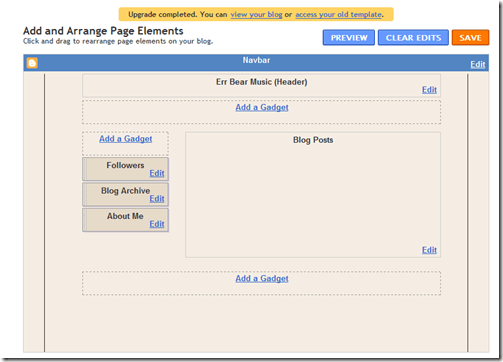
image

Looks promising.  Having said that, I hate reading a little narrow box of content on a big computer screen.  It’s such a waste of screen space.  Maybe I’ll work on some CSS to fix that.

But first there are a couple of pressing modifications that must be done.  First, I need to add the Yahoo Music Player code, for the embedded music player.  To do so, all you have to do is add this before the </head> tag:

<!– Begin Yahoo Player Header–>
// <!–[CDATA[
javascript” src=”http://mediaplayer.yahoo.com/js”&gt;
// ]]>
<!– End Yahoo Player Header–>

And I need to, once again, get rid of the NavBar, this time by adding this before the line that begins with ]]>:

 #navbar-iframe { display: none !important; }

After this, you can add features and customize your template as you see fit.

Update 1:  I’ve now experimented with Blogger Custom Domains and the newer features enough to confidently report that publishing via Custom Domains is a reasonably powerful platform.  The inclusion of static pages (via the Blogger in Draft beta page) adds the much needed ability to include ancillary pages.  See the index pages I added to Errbear.Com for an example of how to implement static pages.  I also found it reasonably easy to modify the new template, as you will see.  It’s early, but so far I’m pretty impressed.

Conclusion

Overall, this was a pretty easy process.  I don’t know if I the additional Blogger features that weren’t available with a custom template will outweigh the limitations of a canned template, but I can tell you that the process of moving to a Blogger Custom Domain was pretty easy.

I’ll try to address any questions or problems you face in the comments.

RFP: WordPress Template, Installation and Importation

image


Come and listen to a story about a man named Kent
A poor tech writer, so to Blogger his blog went,
Then one day he was readin’ at some feeds,
And up through Rick’s blog came a troubling need.

No more FTP that is, SOL, up the creek.

Well the first thing you know Kent’s blog needs a new home,
Louis says “custom domain,” but Kent wants to go alone
Thinks WordPress is the place he ought to be
So he wants you to move Newsome.Org to WP.

WordPress that is, on his server, custom template.

I’ve been using Blogger, via FTP publishing, in combination with my beloved Live Writer, to manage my blog since 2004.  There have been challenges along the way, but over the years the experience has been very positive.  Rick Klau is great, and has been extremely helpful when issues aroseMatt Cutts was also helpful, when I reached out to him once in the midst of a particularly frustrating problem.  In other words, I have nothing but great things to say about the Blogger/Google folks.

But I was a little bummed, even if not surprised, when Blogger announced yesterday that FTP publishing was going to be discontinued.  Rick has a post about it here, including a discussion we’re having in the comments about Blogger custom domains as an option.  My friend Louis Gray moved from FTP publishing to a Blogger custom domain last year and says the experience has been positive.  He discusses the situation in a blog post today.

I use the custom domain approach for GoodSongs.Com,  my music recommendation site, via Tumblr, and it works pretty well (though I am very aware of the risk that Tumblr eventually goes the way of Geocities).  Since I have a server and all of my blog content is already on it, I think I want to keep my content on my server and use WordPress to manage it.  I’m not completely bound to that decision, but that’s what I’m thinking at the moment.  I will probably experiment with Blogger’s custom domains with Err Bear Music, my publishing company.  We’ll see how it goes.

But for now, I need to move Newsome.Org, in-tact, to WordPress.  And I’m willing to pay to have it done right.

Which means I need to hire an experienced, qualified WordPress expert to install WordPress (and any necessary plug-ins) on my server, create a custom template, and import all of my blog posts, with the page links in-tact.  I don’t want to break any inbound links, etc.

I am soliciting proposals from WordPress experts who meet the above criteria and are interested in performing the above services.

First, some info.

1) I use Blogger to manage my content, but the content is hosted on my dedicated server.
2) My index and post pages are .shtml pages.  I’m not concerned about that going forward, but preserving existing page links (e.g., permalinks) is critical.

Now, the job at hand.

1) Setting up WordPress (and any necessary plug-ins) on my server.
2) Moving all of my content over to WordPress (approximately 1600 posts) while preserving the permalinks.  I don’t want duplicate post pages.
3) Creating a WordPress template reasonably close to the one I use here.  I have the CSS, etc. that I can provide.  See 4 below.
4) While I want to maintain enough of the look and feel to preserve branding, I am willing to consider alternative designs.  The thing I like the most about the current design is the way it sizes itself based on the reader’s screen.  I hate reading a narrow box of content on a big computer screen.

Please ask any project-related questions in the comments, so I only have to answer once.  Proposals, schedules and prices should be delivered via email.  I will keep the terms of all proposals confidential.  Please include references and/or summaries of other similar jobs you have done.

If you haven’t done this before, don’t learn on me.  I need this done right.

I’ll write new posts as I navigate through this process.  In the meantime, Blogger has set up a dedicated blog to assist refugees.  I hear Bono is planning a benefit concert.

More as it develops.

Good Music: (I’m Hungover In) The Walmart Breakroom

First of all, the best music blog in all of the universes, known or unknown, express or implied, is A Truer Sound.

Now that we have that settled, let me give you an example of why.  I know a lot about music.  Really, I do.  So when I first hear a band that blows me away, that’s a rare and special thing.  Well, guess what showed up in my feed reader tonight?  This absolutely excellent, hilarious and highly recommended video by a band called D. Striker.

Not only am I considering basing the rest of my life (or at least the rest of my night) on this excellent video (which supplanted Four Wal-Marts by my buddy Baker Maultsby as my all-time favorite Walmart song)

I can also report that you can download an entire album of wonderfully named songs via D. Striker’s web site, on a name your own price basis (Not Funny Anymore, Last Resort, Broken Strings Again and Comfort Inn being excellent songs). I’m too currency-challenged to pay much, but to make amends for my economic shortcomings, I’m going to Tweet my new Twitter pal Bill and ask him to buy a copy for a million or two bucks (preferably a million). I say a computer on every desk and D. Striker on every Zune. Wait a minute. . . does Steve Jobs use Twitter? Just kidding Bill. We love our Zunes. All ten of us do.

D. Striker is absolutely worth a listen or ten.  For their next record, I’d love to hear them rock-up a cover of Sandra Lynn’s Blues by South Filthy (hint, hint).

You can follow D. Striker at Twitter.  And you should.