Making the iPhone Engine Run Smoothly

iphone1

One of the other reasons I waited so long to get an iPhone is the fact that it cannot, yet, serve as a tethered wireless broadband modem for my laptop.  For an extra $15 a month, my recent Blackberries could link up via Bluetooth with my laptop or Samsung UMPC and serve as a broadband modem.  This was handy in airports and in hotels that offered no or ridiculously expensive internet access.  In fact, as long as my phone was in the room or car, my other devices would link up automatically and have instant reasonably fast access.  For two weeks after Hurricane Ike, I ran my home network off of my Blackberry.  It was slow, but the jump from none to slow is more significant than the one from slow to fast.

The iPhone doesn’t tether, yet.  Apparently, there was a third party app that allowed tethering, but Apple squashed it.  Sure, I could jailbreak my phone and find a way to tether.  But the iPhone is about seamless convenience and constant jailbreaking would be seamful and inconvenient.

But I think it’s OK.

The reality is that there is very little I need to do in airports and on the road generally that I can’t do directly via the iPhone.  Sure, I can’t easily create or materially edit documents, but I don’t do that in airports and in transit anyway.  I do that in my hotel room or between speeches at a conference- in places that almost always have internet access.  Plus, while I haven’t tried it yet, iPhone users can access ATT’s wi-fi hotspots at no additional charge.

And there may be other issues at work here.  I suspect that Apple’s agreement with ATT prohibits tethering.  Both as a way to conserve bandwidth and to force customers to buy ATT’s existing wireless cards or the rumored account add-on that may add the ability to tether- at an additional cost.  Add free tethering without a bigger pipe (or additional money to build one) and the demand on the bandwidth will increase materially, likely lessening the experience for existing- and future- iPhoners.  Keeping the bandwidth-hogging geeks from linking up all their gear to their iPhones is, at least for the moment, the governor that makes the iPhone engine run smoothly.

I’d rather do it this way than end up throttled or charged more for someone’s idea of excessive bandwidth use.  The iPhone has clearly crossed the mainstream into the non-geek population.  Many iPhone users are happy to make calls, text their friends and check the weather every now and then, none of which is bandwidth intensive.  If I can ride along with the herd and do what I need directly via the iPhone, with no limits or additional charges, that’s great.  If it turns out I can’t live without tethering and I have the opportunity to add (and pay for) that feature, that’s good too.

Technorati Tags:

Dr. iPhone or: How I Learned to Stop Blackberring and Love the App Store

As one of the rats in the great corporate email race dominated by Microsoft Exchange Servers and Blackberry Enterprise Servers, I have used a Blackberry for many years.  From the first little pager-looking 850 to the Pearl 8130, and several points in between.  While thumb-typing away on my Blackberry, I have suffered from recurring bouts of iPhone lust, having seen my wife and many of our friends fall in love with their iPhones.  For a long time, however, my concerns over the handling of corporate email kept me glued to the Blackberry alter.

Until last week.  Here’s how Verizon tried to hose me and led me to the most eloquent device I have ever used.

verizon

I am sold on the touch screen concept, and was eagerly awaiting the arrival of the great iPhone slayer- the Blackberry Storm.  I stopped by the local Verizon store just before 9:00 a.m. on November 21- the day the Storm was released.  The store wasn’t open yet, but there were a dozen or so people inside.  A Verizon employee quickly unlocked the door for me.  She asked if I had an appointment, noting that the other people in the store had booked an appointment in advance.  When I told her I didn’t have an appointment, but was a Verizon customer who wanted to upgrade to a Storm, she happily exclaimed that “we can get you in and out of here in no time,” and directed me to the customer service window.  There were two Verizon employees helping customers at the window, and I was second in line.  30 minutes later I was still second in line.  One of the employees at the window told me Verizon’s computers were overwhelmed and it was taking a long time to process the upgrades.  No problem- that was to be expected on the morning of the release.  The first problem occurred a few minutes later when another line dweller told me Verizon was sold out of Storm handsets and that I was waiting in line to order one that would be mailed to me.  A Verizon employee confirmed that and told me I could order the phone faster over the internet.  So I left the store, went to the office and logged into my Verizon account.

Here’s where things started to fall into place.

iphoneMuch to my surprise, my quoted price was not $200, as widely advertised, but $500.  I called customer service and was told that my contract was too recent to permit an upgrade and that I would, in fact, have to pay $500 if I wanted a Storm.  I didn’t like this, but contracts are contracts, so I asked how much it would cost to terminate my contract early (by about a year and a half).  $125 was the answer.  So, I asked, “you’ll sell this phone to a stranger for $200, but an existing customer has to pay $500?”  I was told that was the case.  Again, not good news, but I understand the math so far.  I had one more question: “But if I wanted to, I could pay $125 to terminate my contract today, come back tomorrow and pay $200, thereby achieving an actual price of $325?” I could tell the phone rep was uncomfortable, but ultimately she agreed that I could do that.  “But you won’t sell me the phone for $325 without having to go through all of that?”  She said she couldn’t.  The cost was understandable, even if a little frustrating, but the unnecessary hoops were more than I could handle.  So a wonderful thing happened.

I canceled my Verizon account, drove to the local ATT store, bought a 16G 3G iPhone and had my number ported over.  At the end of the day, I have a much better phone at a lower cost.  $125 is a lot of money, but amortized over the remaining 18 or so months of my Verizon contract, I’m more than happy to pay an extra $7 a month for the iPhone experience.

I am a technophile and somewhat of a gadget freak.  I have used lots of gadgets.  The iPhone is quite simply the most well-designed and useful device I have ever used.  Plus, it’s a load of fun!

The phone comes with just about everything you need, right out of the box.  But the real fun begins when you explore the App Store.  So far, I have added the following apps, which give me a device that does just about anything I might ever need it to do.

AOL Radio: an amazing selection of great sounding music stations.
Pandora Radio: the best music on the net.
AroundMe: uses GPS to find local restaurants and other points of interest.
Mobile Fotos: my favorite app- a must for Flickr users.
Camera Bag: auto-edits iPhone photos
Google Mobile Apps: brings all of Google’s apps to an iPhone interface.
iTalk Recorder: record voice notes.
Note2Self: record voice notes and email them.
Remember the Milk: the best to-do list and reminder service.
Sportacular: quick sports schedules and scores.

(You can search for these great apps and others from within the iTunes store.  Many of them are free and all of them are cheap.)

Those of you who are on corporate email platforms will wonder how I feel about the iPhone/Microsoft Exchange implementation.  I think it works perfectly.  The emails are much easier to read and flicking is much easier than scrolling with that irritating wheel (which was very hard to do with my Pearl).  When I delete an email on my computer or my iPhone, it is automatically deleted on the other device.  I didn’t have my Blackberry configured that way, but after a few days, this approach seems more logical to me.

When I experimented with my wife’s iPhone, I found typing to be difficult, often hitting the wrong letter (particularly P when I was aiming for O).  But after a little practice, you find that your typing improves and you rarely hit the wrong letter.  My friend Marvin says it’s a confidence thing- I think that’s a good description.  I find myself typing faster on the iPhone than I did on the Blackberry.

I wish the camera had a flash, and you do have to recharge the iPhone more often than the Blackberry- because the iPhone is so fun to use, you use it more (and there are solutions to that problem).  But those are minor issues that are more than outweighed by the many additional benefits of the iPhone.

I’m sold.  Thanks Verizon!

Technorati Tags:

The (Evolving) State of Houston News Feeds

news Now that I have fallen under the spell of Google Reader, I’ve been spending some time organizing my news feeds and other reading.  As a part of that process, I have set up my local news, which I used to access via My Yahoo, in a dedicated Google Reader folder.  I suspect I am but one of many who are migrating our news from yesterday’s paper to today’s web site to tomorrow’s news reader.  In fact, I believe with the growing use of feed readers and mobile content, the news-related web sites we visit today will eventually become primarily billboards for the various RSS feeds available there.  The biggest reason this hasn’t already happened is that content producers and advertisers haven’t figured out how to sell and serve advertising in feeds.  When that happens, and it is inevitable, we’ll see an accelerated migration towards RSS distribution- both paid and ad-supported.

As a part of my migration to RSS, I have looked at a lot of local news feeds.  Some are good.  Some are horrible.  And many are somewhere in between.

Here’s the current state and status of Houston English language news feeds.  As they change, so will this page.  Maybe we can generate some discussion here that will be helpful to readers and content producers alike.  Discussion that will hopefully lead to better feeds.

This survey is limited solely to English language news feeds offered by local news providers.  If there is a feed I haven’t covered, let me know in the Comments and I’ll add it.

Newspapers

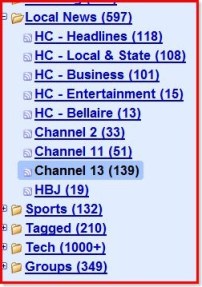
Let’s start with the best.  The Houston Chronicle currently offers 170 RSS feeds, covering categories from news to business to sports to neighborhood sports.  I subscribe to the following Chronicle feeds: Top Headlines, Houston & Texas, Business, Bellaire/West U/River Oaks (I wish they wouldn’t lump us working folks in Bellaire with the yuppies and rich people, but at least a neighborhood news feed is available), Sports and Entertainment.  I also subscribe to Dwight Silverman‘s and Jeff Balke‘s Chronicle blogs, but not as a part of my news folder.  Like almost all papers, the Chronicle does not use full feeds, undoubtedly because it wants to draw readers back to its site where the ads reside.  It does give you enough of a summary to allow you to make a reasonably informed decision about reading more (via a click-through to the Chronicle site) or moving on.  While it would be a lot better if the Chronicle provided full feeds, even with ads, the summaries are pretty good.  Plus the feeds allow you to click past the Chronicle’s online front page, which leaves much to be desired.

Speaking of horrible web design, there’s the Houston Press.  I used to read the Press online every week until they destroyed their web site with a redesign a few years ago.  Sadly, their RSS feeds don’t really help (I had to dissect an RSS feed just to find that page, and all of those feeds are outdated).   The Press web site promotes individual feeds for a lot of the collateral (at least to me) content and a default feed which seems to lump all the content into one feed, with marginally helpful summaries consisting of the first 50 or so words of the article.  The combined feed contains way too much stuff I am not interested in.  By reverse engineering the default feed URL I was able to decipher the feed URL for the featured stories, again with a first 50 words or so partial feed.  The Press’s featured stories are generally interesting, but they are wrapped up in bad web design and served in unsatisfactory feeds.  The Press should either use full feeds (the best answer) or at least specially written summaries (the least that I’d find acceptable).  Until today, I didn’t subscribe to any Press feeds because I couldn’t find them.  I have now subscribed to the featured news feed, but the short feeds and non-summaries are not likely to draw me to the site very often.

The Houston Business Journal has a feed that, like the Chronicle feeds, is a partial feed with short but reasonably descriptive summaries.  You can also find feeds to its sister publications in other cities as well as regional feeds and industry-specific national feeds.  I subscribe to the HBJ feed and to the commercial real estate industry feed.  Again, I look forward to the day full feeds are the rule and not the rare exception for news-related feeds, but as things go today, the HBJ’s feeds are reasonably good.  (Disclaimer:  I have written articles for the HBJ and some of its sister publications in the past and will probably do so in the future).

TV Stations

Channel 2 (NBC) offers 11 feeds.  No full feeds, of course, but the feeds do contain generally descriptive summaries.  Even this one sentence summary- “A party boat slams into the Kemah Boardwalk, KPRC Local 2 reports,” is more useful that merely stuffing the first few words of an article into a partial feed.  On the other hand, you have to look closely (left hand column under “Site Tools”) to find the RSS feed on Channel 2’s less than stellar web site.  Unlike blogs, where the RSS feed should always be obvious and near the top of the page, many TV stations aren’t sure what they really think about feeds, so they are displayed with less gusto.  I subscribe to the main Channel 2 feed, but none of the others.

Channel 11 (CBS) has a web site that makes Channel 2’s look like Earl’s page (the best blog template I’ve ever seen), but at least it has its RSS feed icon above the fold and somewhat prominently displayed.  Channel 11 offers 23 feeds.  Like Channel 2, there are no full feeds, but there are generally descriptive summaries.  Unfortunately, some of those 23 feeds are stale.  The latest post in the movies feed, for example, is from August 27, 2007.  Same for the music feed.  I subscribe to the Channel 11 Top Stories feed, but none of the others.  Channel 13 (ABC) has its feeds link at the bottom of its web page, where you find 32 available feeds.  A few of the feeds have either older content or none at all.  A lot of the TV stations’ sub-feeds seem thrown together.  They could all do with less quantity and more quality.  Like its competitors, Channel 13 uses partial feeds with summaries.  Channel 13’s summaries seem shorter than the others, but maybe that’s because they don’t have periods at the end.  I subscribe to the Channel 13 Top Stories feed, but none of the others.

If Channel 26 (FOX) has RSS feeds, it’s not very proud of them.  No mention of them at all on the front web page.  A search for RSS leads to something called myFOXhouston news which promises, but does not seem to deliver, RSS feeds.  The first rule of anything is that if you make it hard, people won’t do it.  They did, and so I didn’t.  I don’t subscribe to any Channel 26 feeds, in part because I couldn’t find any.

Channel 39 (CW) has no RSS feeds.

Channel 51 committed the unpardonable sin of auto-starting a video (with loud audio and no pause or mute button) when you visit its web site, so I was tempted to click away and leave it at that, but a desire for completeness led me to a brief but unsuccessful search for RSS feeds.  I thought Channel 51 was a news station, but it’s not- at least not anymore.

Radio Stations

I couldn’t find any RSS news feeds by any of the Houston radio stations.  Some of them have podcasts.  Here’s the rundown, though I don’t subscribe to any of these at the moment.

610 KILT has no RSS news feeds, but it does have RSS feeds for some podcasts.  I couldn’t find a page with a list of the RSS feeds, but through the magic of Google, here are some of them.

KIKK 650 has no RSS feeds and no local podcasts.  It does have links to some CBS podcasts.

700 KSEV has no RSS feeds and no podcasts.

740 KTRH has no RSS feeds, but a lot of podcasts.

790 KMBE has no RSS news feeds, but it does have some podcasts.

950 KPRC has no RSS news feeds, but it does have some podcasts.

1070 KNTH has no RSS news feeds, but it does have some podcasts.

1430 KCOH has no RSS news feeds and no podcasts.  They should podcast Ralph Cooper’s show.  He’s the best sports guy in Houston, and has been for a long time.

1590 KMIC (Radio Disney) has a podcast (my kids would call me an even bigger nerd if I didn’t mention their favorite station).

Conclusion (1/28/08)

Thanks to the Chronicle, Houston is in pretty good shape RSS-wise.  We need full feeds and better summaries for the partial feeds.  The TV stations are behind the newspaper, as you would expect, and ahead of the radio stations, as you would also expect.

What do you think of the local new feeds?

Technorati Tags: ,

Phone Choices and the Doggone Password Problem

passwords

I need some help.

I have been using a Blackberry 7130e for the past 2 years.  It’s been a good phone, but it’s getting a little long in the tooth.  It does media only slightly better than 2 cans and some string.  I need a new phone.  Fortunately, I am out of contract with Verizon, my current provider, so I am free to pick any phone and any provider I want.  Sort of.

There are issues to be dealt with…

Like most big companies, my firm uses Microsoft Exchange Servers and BlackBerry Enterprise Servers.  Like many big companies, my firm does not use IMAP, I assume because the decision makers do not believe it is secure enough.  Which means that, as much as I dig my wife’s iPhone, if I ponied up and bought one, I could not access my work email, contacts, etc. with it.  This is a problem.  Ideally, I want to carry one device to get all my mail and to serve as my phone.  Carrying a phone and a separate Blackberry for work is inefficient and is not my preference.

Plus, as much as I like the iPhone, it is not without other drawbacks.  It’s not 3G compatible, the camera does not have a flash, there is no voice dialing and some of its features require a Wi-Fi connection.  And, as I have said before, I don’t want to be tied to iTunes to synch my data or to manage my music.

As I mentioned the other day, in an effort to keep me as a customer, Verizon sent me a Blackberry Pearl 8130 for $50.  I thought, incorrectly, that no contract extension was required.  I learned today that a 2 year extension is required, but that I can return the new phone and be free of the contract extension.  The fact is, however, that I really like the 8130.  It’s fast, it has a camera with a flash, it does voice dialing, works with Google maps (with GPS), and it is set up to receive my work and my personal email seamlessly.  In fact, I would strongly consider extending my Verizon contract, keeping the 8130 and waiting for the Blackberry 9000 to hopefully rock my world, but for one little complication…

After I activated my old phone, but before I got the 8130, my firm decided that everyone’s Blackberry should have a forced password on it.  This means that after 30 minutes of inactivity, my phone locks, and I have to enter a password on that little Suretype keyboard before I can access my email, contacts, camera and other applications.  This is not a huge problem for most people at my firm, because they do not use their firm-issued Blackberries as their phones.  On the other hand, I use my Kent-purchased Blackberry as my phone, for my personal email, etc.  Plus, I do a lot of calls while driving, and having to enter that password every 30 minutes is, practically and psychologically, unappealing.  In sum, the password thing is close to a deal stopper for me as far as the phone and personal stuff goes.

So I see my choices as:

1. Getting an iPhone for my personal stuff and carrying a firm-issued, password enforced and likely rarely used Blackberry for my work stuff.  This seems really inefficient and unnecessary to me.  I don’t want to lug two devices around.  On the other hand, I would be able to quench my iPhone-lust.  But if I can’t get my work contacts, calendar and email on it, it’s not really serving its intended purpose.

2. Keeping the 8130 and living with the forced password.  I can’t adequately describe how intrusive I find the password thing.  I wish I could learn to live with it, but I don’t think I can.  On the other hand, if I could somehow come to terms with it, I could be happy with the 8130, and potentially thrilled with a subsequent 9000.

3. Returning the 8130, reactivating my old 7130e and waiting to see how the 9000 shakes out.  Unfortunately, because of account deletions and creations with the new phone, even if I go back to my old phone, I will have the forced password problem.  The only way this makes sense is if the iPhone will be able to pull email from Blackberry Enterprise servers within the foreseeable future.  And nothing I have read gives me any reason to believe that’s going to happen.

I end up caught between two less than satisfactory choices.  One, if I want an iPhone, I have to lug two devices around.  Two, if I want to have one device for everything, I have to live with a forced password.  Honestly, I find neither choice acceptable.

What should I do?

Evening Reading: 1/29/08

Randy Morin with a lesson on how not to treat your customers.  Reminds me of the time I got completely blown out by this hag at the airport because I tried to pay for a water bottle at the wrong cash register.

MG Seigler brings truth to the Continental free not-Wi-Fi story.  Yahoo Mail, Yahoo Messenger and the Blackberry network?  Obviously, Yahoo is paying Continental some money to force people to its network, at the expense of everything we really need.  This is bad news getting spun as good news.

Stereogum points to some new Sun Kil Moon.  Here’s where you can listen to it.  Glen Tipton was my favorite song of 2007.  On the retro hand, Stereogum also has some vintage Hall and Oats, complete with bad hair and intermittent lip synching.

After all the (very tasty) deer I ate this past week, it was troubling to learn that vegetarians are healthier, smarter and richer.  Maybe, but that deer was a vegetarian and he got eaten.  That’s not so smart now, is it?

So 80 people go to Chuck E Cheese, get in a brawl and end up getting pepper sprayed.  The next day it almost happens again.

I really enjoy Survivor and the Amazing Race.  But a show about Michael Vick’s dogs is absurd.  I wonder if they go visit him now that he’s in the pound?  I hope I don’t accidentally record every episode and watch it.

Here are some cool photos of a diamond rush ghost town in Namibia.  Here’s more about the town’s history.

Thomas Hawk on Barack Obama, Dave Winer and pot.  We have a good friend who is very interested in politics.  She’s always putting signs for all the wrong people in her yard.  I told my kids they don’t have to study up on elections- that all they have to do is drive by Sharon’s house, write down every name on the signs there, and vote for the other person.  I’m pretty sure that I would take the same approach with signs in Dave’s yard.  Or on his blog.

Here’s reason number 112 why I say no when my kids ask if they can play with their turtle.  Reason number 1 is because if he bites you, he won’t let go until it thunders.

Good advice for living a happy life.

It was bad enough when he didn’t see the first one coming.  Then there was the second one.

PDFTextOnline converts PDF files to text, for free.  Oh yeah, and online.  Text…PDF.  It didn’t work all that well for me based on a couple of test documents, but it’s a cool idea.

Technorati Tags: