Annoying Windows Vista Problem Solved

Ever since I installed Vista on KN-1, my home built computer, I have had one extremely annoying problem.  After my computer runs for a while, the toolbar gets all out of whack.  Like this:

mess 2

The buttons get all jumbled up and stop responding.  It is very, very annoying.

The only solution I could come up with was to reboot, which was very disruptive to whatever task I was working on.  The problem was even more irritating because when this happens, the restart button stops responding, and I have to do the control-alt-delete thing just to restart.  This mess has been a major drain on my efficiency and I had even begun to consider trashing my computer and starting over- in a desperate attempt to solve this problem.

Weekends in the Houston language translates to “rains all day.”  So I decided to use my forced indoor time today to see if I could find a solution to this problem.  Of course, I started with the answer machine- Google.  After running down a few wrong trails, I came across this inviting Microsoft Knowledge Base page.  I first tried the work around:

1. Press CTRL+ALT+DEL.
2. Click Task Manager.
3. Click the Processes tab.
4. Click the explorer.exe process.
5. Click End Process, and then click End process.
6. Click the Applications tab.
7. Click New Task.
8. Type explorer in the Open box, and then click OK.

Lo and behold, that fixed the problem.  At least now I wouldn’t have to control-alt-delete and restart every hour or so.

Next I installed the hotfix from that page.  It installed.  I was hopeful.  I rebooted, even though I wasn’t prompted to.

Four hours later, I am still working and my toolbar looks normal.  And the buttons work.

I can’t adequately explain how happy I am to (cross my fingers) have this problem solved.

If this post can help one other person solve this problem, it will be worth it.

Not Slow, But Not Revolutionary Either

vista

Ed Bott posts a defense of claims that Vista is slow.  He cites another post by Carl Campos, summarizing his 10 weeks with Vista.  I agree that Carl’s post is a good overview of what’s right and what’s wrong with Vista.

I installed Vista on the day it was released and have been running it on 2 desktops and 2 laptops ever since.  Leaving aside my horrible experience with the 64 bit version, my experience has been mostly positive.  The question is whether it has been positive enough to recommend people upgrade from XP.

Here are my thoughts after a couple of months with Vista.

First, User Account Control is still extremely annoying.  I disabled it on all of my computers.  That helps, but disabling it causes problems to pop up elsewhere from time to time, particularly when you try to delete certain files.  The only fix I have found for that is to re-enable User Account Control temporarily, delete the file and then disable it again.

Since I have a Radeon X800 video card, I had to wait for new drivers before I could run certain programs, such as Second Life (where I still have a ton of visitors and no way to monetize them, sort of like most Web 2.0 applications).  Once the updated drivers were released, I was able to log back into my Second Life account and reset my dance pads, so I could give away more Linden Dollars.  Need some Linden Dollars?  Come see me at Sibine 03 (106,33).

The biggest annoyance is that when I bring Windows back up after the screensaver has been active for a few hours, my taskbar looks weird and mouse clicks, including the one to Restart, are non-responsive.  I have to Control-Alt-Delete and then Restart from that screen, where the mouse once again works correctly.  I reconfigured my power options so that neither the monitor nor the computer would be shut down or “put to sleep.”  No help.  I hoped the new video card drivers would fix this, but they didn’t.  Ed, any thoughts?

Vista certainly doesn’t seem any slower than XP.  It may be faster, but if it is, it’s not significant enough that I notice it.  Other than one scary RAID corruption (which may not have been Vista’s fault), Vista has been pretty stable for me- again, other than the annoying mouse/taskbar problem mentioned above.

Like Carl, I’m not crazy about the new Start menu layout.  You can arrange your application the way you want, but it takes some effort.

Search is much better.  Still not as good as X1, but Microsoft is closing the gap.

One of the new features I like the best is the Folder (named after the account- mine is “Kent”) where all of your downloads, documents, contacts, etc. are easily accessible.

Vista is a step forward, for sure.  But unless you are a computer expert or are having problems with XP, I’d probably wait until your next computer to upgrade.

Technorati tags:

Windows Live + Mobile Technology = More Confusion

Microsoft continues to work hard to become relevant in an online world dominated by Google, Yahoo, YouTube, MySpace and others.  The latest effort involves yet another confusing branding campaign, this time under the Windows Live flag, and a series of confusing application launches.

The latest applications are category based local search, maps and directions and traffic data for mobile devices.

I’m sure some of these applications are great, but most geeks and all non-geeks will never know, because they are released in a confusing, disjointed manner into the already confusing and disjointed mobile technology arena.

Here’s the thing: people want products and applications to be easy to find, easy to understand and easy to use.  Otherwise, they’ll just continue to use 411 and Google Maps- because they are all of those things.  The increase in efficiency realized from having onboard maps and traffic data is not great enough to warrant a ton of effort to find these applications, see of they will work with your cell phone, install them and learn to use them.

That sounds hard.  411 is easy.  Turning on the radio is easy.

Sure, these applications may come pre-installed on 3 or 4 new handheld models- if you happen to have the right network provider and if you happen to be in the market for a new phone at the right time.

The chaos surrounding what mobile phones are available from what network and what applications work with what devices makes for a ball of confusion for anyone other than those of us who use Blackberries.  We know that none of the new applications we read about will work on them.

In sum, it’s a mess.

Microsoft can help by telling us, in plain English, what these applications do, how they are better than what we currently use, where we can get them, and how to use them.  And by creating products that make us more efficient without trying to take over our online lives by pushing us towards other Microsoft products.  And finally and most importantly, by creating products that work with as many of our mobile devices as possible.

What Microsoft cannot do is impose any logic on the mobile technology situation.  Network providers obviously think that they can attract users by having the exclusive rights to some new device for a period of time.  Of course, next week some other provider will have exclusive rights to some even newer device.  It’s a confusing cycle that doesn’t change the fact that mobile phones, like their wired forefathers, are a commodity.  Trying to pretend otherwise just makes it confusing and frustrating for everyone.

Handheld manufacturers propagate this confusing situation, of course, by making a separate device for each network.  There are more Blackberry versions than there are people to carry them.  Until the network providers decide to cowboy up and compete on price, coverage and service like a good commodity- and not on the illusory benefits of a temporary exclusive on new hardware- there will be no end to this cycle of confusion.

So all these new applications might be really useful.

Too bad most of us will never use them.

Tags: ,

Microsoft’s Vista Killer

Do you hate Vista?  Do the vague transparencies of Aero Glass drive you mad?  Does the flashing irritation of User Account Control give you a migraine?  Do you want to crush Vista the way Mirko “Cro Cop” Filipovic crushes his UFC opponents?

Thanks to an ingenious new product by Microsoft, you can.  That’s right, you can sit back and watch Vista crash like a bad party.  Revel in spontaneous reboots.  Taunt Vista as it gets ripped apart by an unstoppable destructive force.

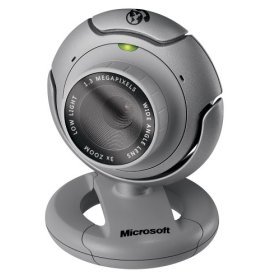
ms-lifecam-vx6000The code name for Microsoft’s Vista killer is LifeCam VX-6000.  It’s an amazing piece of technology, and it has to be.  Whipping Vista is no easy task.  When the VX-6000 takes its first shot at Vista, it gets rebuffed by a message stating that the software on the CD is not compatible with Vista.  Feeling confident, even cocky, Vista points the way to the newer, Vista compatible software.  But like Cro Cop’s feet, the VX-6000 is just waiting for an opening.  As soon as Vista allows you to install the allegedly updated software, the fight is lost.

Once the VX-6000 is connected to a USB port, Vista realizes it has made a serious tactical error.  Reeling from the blows, Vista first tries to rope-a-dope by freezing up, hoping to fend off the VX-6000’s fury.  It’s only a matter of a few clicks to the head, however, before Vista crashes to the mat in a flurry of spontaneous reboots.

At a recent gathering of Vista haters, some of the attendees did series of skits about their experience trying to install a VX-6000 on a Vista machine.  It won’t be hard to tell who’s playing the VX-6000 and who’s playing the computer.

So if you want to teach Vista a lesson, Microsoft has a cold and unforgiving teacher.  The LifeCam VX-6000- available at military surplus stores everywhere.

Technorati tags: , ,

My Adventures in Vista

vista

Over the past week or so, I have installed Vista (Ultimate Edition) on three computers, with mostly positive results.

Computer One: The Mothership; RAID 0

First, I did a clean install on my primary computer, which I built myself a couple of years ago.  It has a RAID 0 set, as well as 3 other drives for music and video creation and storage.  I was a little nervous about installing Vista on my existing RAID set.  While I have an 80G partition solely for the OS, I did not want to lose all the music and video files on the two other partitions.  I know from prior experience that you have to load the RAID drivers in order for Windows to see the RAID disk configuration, but since I was dealing with a RAID set that contains a lot of huge, not all the way backed up, music and video files, I was concerned that I might accidentally send my RAID set into the ether, with all of the songs I have written and recorded and all the videos I have made along for the ride.  My worry was for naught, as Vista immediately prompted me to install the RAID drivers from a floppy or CD and as soon as I did, it notified me that it could see and install onto my C drive.  Installation was pretty quick and it wasn’t long before I was running Vista on a clean C partition and able to access my music and video files on the D and E partition.

Vista even stores your XP user data in a backup file on the C drive.  Once I knew that I was up and running, I deleted the old data to save space.

My Vista user experience has been mostly positive, after I disabled the unbelievably annoying User Account Control.  I don’t find Vista to be a revolutionary change from XP, but the more I use it, the more intuitive it seems.  The only problem that persists is that when I bring Windows back up after the screensaver has been active for a few hours, my Taskbar looks weird and mouse clicks, including the one to Restart, are non-responsive.  I have to Control-Alt-Delete and then Restart from that screen, where the mouse once again works correctly.  Annoying, but not the end of the world.

Computer Two: The Backup Server

Next, I did a clean install on a relatively new HP Media Center computer that I bought a few months ago after the power supplies on the Mothership exploded (literally) twice in a three day period.  This computer now serves as a backup server for our home network (for which I use and recommend Fileback PC).  The install worked like a charm and, perhaps because this computer is newer, I have had no problems whatsover, including no Taskbar issues like I described above.

A happy by-product of this upgrade was the extermination of all the bloatware and upsell pitches that HP puts on these otherwise very nice computers.

Computer Three: The X41 Tablet

Having had two pleasant upgrade experiences, I decided to push the envelope a little by doing a clean install on my trusty Thinkpad X41 Tablet.  Since the X41 does not have an internal CD or DVD drive, I had to dig up an external DVD drive.  This computer has a 1.5 GHz Pentium M chip and only 512 MB of RAM- paltry by today’s Vista standards.  Installation took longer, but it worked and so far I see no sluggishness.  Vista did not intall drivers for the thumbprint reader, but the first time I booted up, Vista prompted me to visit the manufacturer’s web site (via a supplied link) and download the new drivers.  That’s a very handy feature that saves a lot of time.

Conclusions:

Microsoft has clearly worked hard to make the installation process easier and faster.  Only time will tell how much better Vista is than XP, but so far I’m pretty impressed.

Technorati tags:

Windows Update Problems

Ed Bott, writing at ZDNet, posts about problems he has been having with Windows Update.

Me too.

It’s bad enough that you can’t use Windows Update manually via Firefox. And it’s bad enough that both Zone Alarm and Norton Antivirus (last year’s model for the reasons stated here, which is soon to be uninstalled forever as I move to the stupidly named but generally well received Windows Live OneCare) can trip up the Windows installer program and make it hard to install updates.

But now it seems the Windows Update servers are having problems of their own. I have had a constant yellow updates available icon in my system tray for the past week- and updates often either don’t work or seem to work, only to be followed by the immediate reappearance of the yellow update icon.

This problem, while a mild annoyance for desktops that are always connected to the internet, is a royal pain for laptops that are updated periodically. I haven’t been able to successfully install any updates on my Thinkpad in over a week.

I hope this causes Microsoft to rethink its decision to semi-push installs of Internet Explorer 7. My hunch is that Microsoft will still want to get IE 7 out there to stem the flow to the superior Firefox.

One of the many ways Firefox is eating IE 7’s lunch is in update ease. It’s simple as pie in Firefox.

Not so for IE 7- at least not at the moment.

Google and Firefox Go to the Dark Side

Google, looking for the its first hit in a decade and hoping to avoid the oldies tour, and Firefox, perhaps wanting to ratchet down all the love it has been receiving, have joined the Bloatware 2006 Tour, headlined by none other than Real Player.

The only reason I can think of why Google and Firefox would agree to partner up with Real Networks is because Real Networks isn’t Microsoft.

Note to Google and Firefox: Sometimes the enemy of your enemy is NOT your friend.

As of now, all of the comments to the Download Squad post linked above agree that this is a bad move for Google and Firefox. And all agree that Real Alternative should be used in lieu of Real Player.

I’ve long been on record as far as my opinion of Real Player goes.

More Hotmail Spam?

Am I the only one who has noticed a marked increase in the amount of spam getting through the Hotmail spam filters?

It was almost non-existant until a week or so ago, now I have 10-15 spams getting through every day.

Tags: ,

Will Zune Stumble and Fall Like Origami?

zuneWord about Microsoft’s upcoming media player continues to crawl around the blogosphere, with Engadget reporting today that the device, currently dubbed Zune, will support wireless song transfers. I’m sure that will either require a potload of DRM or invoke the wrath of the priority-challenged RIAA.

Anyway, Gizmodo reports that the Zune device is the flagship product of a new line of portable devices. Everybody seems to have a plan to dethrone the iPod. Here is Microsoft’s:

“Microsoft’s concentrating on features the iPod doesn’t have, instead of trying to beat Apple at their own game. The tipmeister reiterates that ad-hoc networking feature will be there, as well as a possible buffered internet radio streaming feature. If you’re within range of a WiFi signal and you’re listening to a station, the device will snatch as much of the feed as it can so when you wander out of WiFi signal, it’ll keep playing the stream as if you were in range. This might not make its way into the final product, so don’t get your hopes up too high.”

I’m guessing once the RIAA gets wind of this most excellent and logical feature, it will let slip the lawyers of war and yet another great idea will be canned in the name of preserving a dying business model.

What I am more interested in, however, is Microsoft’s marketing, or lack thereof, with respect to new products. Microsoft doesn’t seem to know how to manage a proper build up to release- particularly with hardware.

Recall the great buzz that was generated prior to the release of Origami, now renamed a buzz-killing UMPC. I wondered at the time whether Microsoft would walk the walk or toss the product out there and let it twist in the wind.

Well, I have read many reviews of UMPCs, and most of them have been negative. My blogging pal James Kendrick believes the bad reviews are a result of a misunderstanding of the UMPC’s purpose and features. While I have never held a UMPC, I tend to agree with James (I would love to have a UMPC to read news, etc. around the house and on trips). But in the face of a lot of negative press, Microsoft seems to have moved on to phones and iPod killers, etc.

Robert Scoble used to try as hard as he could to manage the build-up to release of new products. But Robert has left Microsoft and there’s no one left with the mindshare to try to point bloggers, and the three non-bloggers who read blogs, in the right direction. Sometimes, how people feel about something depends more on their expectations than the actual thing itself. Einstein, relativity and all that.

Get enough press, real and citizen, to understand a product and write about it from a place of understanding and you’ll go a long way towards ensuring a successful release. Let people speculate wildly, toss something out and forget about it and you’ve ensured the opposite.

Someone needs to step up for Microsoft and help inform, direct and manage expectations.

Otherwise, I predict another stumble out of the gate for Zune.

What’s Old is New: Microsoft Phones

According to the New York Times, Microsoft has plans to change the telecommunications world the way it changed the computing world in the 1980’s. And, I suppose, the way it tried and failed to change the telecommunications world the last time it made a newer, better phone- back in the nineties.

The trick seems to be that this time, instead of just linking your phone and your computer, Microsoft is going to link your phone, your computer AND your cell phone.

Wow.

John Markoff wrote the very thought that came to mind when I saw the headline:

“Microsoft’s challenge is to convince corporate clients that they need to adopt a growing suite of the company’s desktop and server-based software at a time when inexpensive and modular Web services are becoming increasingly popular.”

It’s not only that they are cheap, it’s that most companies already have newish phones and big companies don’t like to change their phone systems because they have to buy and install new equipment and, perhaps more importantly, retrain all of the end users.

The idea of putting another Microsoft (phone, this time) on every desktop will require people who are not risk takers to overcome their risk aversion. This is something that Scoble and I talked about earlier this year, and it is as big a hurdle as ever to making inroads into corporate IT departments.

Microsoft is touting the fact that their system will allow email to be read by the telephone. Why? Everyone and their cat have Blackberries, etc. and can get their mail anywhere. It’s better to go the other way and have voicemail delivered via email- which I have been doing for many years via my firm’s existing telephone system.

Not that there isn’t room for vast improvement in office telecommunications.

Am I the only person who can’t believe that in 2006 we still can’t dial an office phone from within Outlook by clicking a button? That fact blows my mind almost as much as the fact that Hillary Clinton might be our next President.

Give me dialing from Outlook. Not all the other bells and whistles that no one will use.

Alec Saunders talks about Microsoft’s 10-year plan for phones. Is it a 10-year plan or an every 10 year plan? What’s different about this decade that gives Microsoft a better chance of success. Going for the corporate user? Maybe, but that seems like a tougher sell to me than the phone-hungry consumer browsing Circuit City.

As a gadget hound, I am intrigued by the prospect of a nifty new Microsoft phone. The chances of our IT department ever putting one on my desk, however, is between slim and none.

And slim just left the building.