When I’m 64

64

I might be happy using a 64 bit OS.

But for now, I have punted.  I wiped my new laptop and installed a good ‘ol 32 bit version of Vista.

Now, I can pull my POP email (couldn’t before).

Now, I can access my office email with Outlook web access (couldn’t before).

Now, I can access my office via its portal (couldn’t before).

Now I can use Rhapsody (couldn’t before).

Now my built-in web cam sort of works (didn’t before).

Granted, I knew when I bought a 64 bit system that a lot of stuff wouldn’t work.  But I was surprised at how much didn’t work.

Maybe I’ll reinstall the 64 bit OS in a few months, if more applications are compatible.  In the meantime, I have happy to have my old, slow, insecure 32 bit OS that runs the applications I need.

Technorati tags: ,

Windows Live + Mobile Technology = More Confusion

Microsoft continues to work hard to become relevant in an online world dominated by Google, Yahoo, YouTube, MySpace and others.  The latest effort involves yet another confusing branding campaign, this time under the Windows Live flag, and a series of confusing application launches.

The latest applications are category based local search, maps and directions and traffic data for mobile devices.

I’m sure some of these applications are great, but most geeks and all non-geeks will never know, because they are released in a confusing, disjointed manner into the already confusing and disjointed mobile technology arena.

Here’s the thing: people want products and applications to be easy to find, easy to understand and easy to use.  Otherwise, they’ll just continue to use 411 and Google Maps- because they are all of those things.  The increase in efficiency realized from having onboard maps and traffic data is not great enough to warrant a ton of effort to find these applications, see of they will work with your cell phone, install them and learn to use them.

That sounds hard.  411 is easy.  Turning on the radio is easy.

Sure, these applications may come pre-installed on 3 or 4 new handheld models- if you happen to have the right network provider and if you happen to be in the market for a new phone at the right time.

The chaos surrounding what mobile phones are available from what network and what applications work with what devices makes for a ball of confusion for anyone other than those of us who use Blackberries.  We know that none of the new applications we read about will work on them.

In sum, it’s a mess.

Microsoft can help by telling us, in plain English, what these applications do, how they are better than what we currently use, where we can get them, and how to use them.  And by creating products that make us more efficient without trying to take over our online lives by pushing us towards other Microsoft products.  And finally and most importantly, by creating products that work with as many of our mobile devices as possible.

What Microsoft cannot do is impose any logic on the mobile technology situation.  Network providers obviously think that they can attract users by having the exclusive rights to some new device for a period of time.  Of course, next week some other provider will have exclusive rights to some even newer device.  It’s a confusing cycle that doesn’t change the fact that mobile phones, like their wired forefathers, are a commodity.  Trying to pretend otherwise just makes it confusing and frustrating for everyone.

Handheld manufacturers propagate this confusing situation, of course, by making a separate device for each network.  There are more Blackberry versions than there are people to carry them.  Until the network providers decide to cowboy up and compete on price, coverage and service like a good commodity- and not on the illusory benefits of a temporary exclusive on new hardware- there will be no end to this cycle of confusion.

So all these new applications might be really useful.

Too bad most of us will never use them.

Tags: ,

Microsoft’s Vista Killer

Do you hate Vista?  Do the vague transparencies of Aero Glass drive you mad?  Does the flashing irritation of User Account Control give you a migraine?  Do you want to crush Vista the way Mirko “Cro Cop” Filipovic crushes his UFC opponents?

Thanks to an ingenious new product by Microsoft, you can.  That’s right, you can sit back and watch Vista crash like a bad party.  Revel in spontaneous reboots.  Taunt Vista as it gets ripped apart by an unstoppable destructive force.

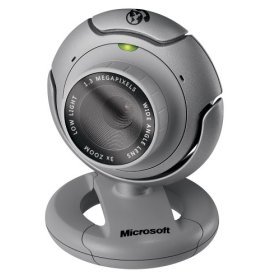
ms-lifecam-vx6000The code name for Microsoft’s Vista killer is LifeCam VX-6000.  It’s an amazing piece of technology, and it has to be.  Whipping Vista is no easy task.  When the VX-6000 takes its first shot at Vista, it gets rebuffed by a message stating that the software on the CD is not compatible with Vista.  Feeling confident, even cocky, Vista points the way to the newer, Vista compatible software.  But like Cro Cop’s feet, the VX-6000 is just waiting for an opening.  As soon as Vista allows you to install the allegedly updated software, the fight is lost.

Once the VX-6000 is connected to a USB port, Vista realizes it has made a serious tactical error.  Reeling from the blows, Vista first tries to rope-a-dope by freezing up, hoping to fend off the VX-6000’s fury.  It’s only a matter of a few clicks to the head, however, before Vista crashes to the mat in a flurry of spontaneous reboots.

At a recent gathering of Vista haters, some of the attendees did series of skits about their experience trying to install a VX-6000 on a Vista machine.  It won’t be hard to tell who’s playing the VX-6000 and who’s playing the computer.

So if you want to teach Vista a lesson, Microsoft has a cold and unforgiving teacher.  The LifeCam VX-6000- available at military surplus stores everywhere.

Technorati tags: , ,

Why HP is Kicking Dell’s Ass

dellhp

I’ve been a Dell guy for a long time.  Until I started building my own desktops, I bought a series of Dell desktops for me and my wife.  My first three laptops were Dells.  We used to have Dell desktops and laptops in my office.  I recommended Dells to teens of people who came to me for computer advice.  I am a long time Dell shareholder.

But the fact is that HP is kicking Dell’s ass.  Here’s why.

My office (which has thousands of computers) switched from Dells to HPs a year or so ago.  I have asked several of my friends who work for other big companies about their experience and, while Dell still holds a lot of market share, it is clear to me that HP is gaining share.  HP has the momentum for business users from what I see and hear.

When the power supplies started exploding on my self-built primary computer, I decided to buy a second computer to use as a backup- for both data and use when my primary computer is doing its fireplace imitation.  I went to Micro Center and looked around.  It was all about HP there.  I looked at a nicely priced HP Media Center computer and then came home to buy a Dell online.  I couldn’t find one I liked as well as the HP for the same or a better price.  I went back to the store and bought the HP.  It has worked like a charm, even through a Vista upgrade– and I didn’t have to wait for it to be manufactured and delivered.

HP has a virtual lock on retail shelf space as far as I can tell.  If he wants an HP,  Average Joe has to pull into the first computer store he sees.  If he wants a Dell, he has to go online, build it, send his credit card information into the big, scary internet…and wait.  Traditionally, Joe might be willing to do this, because he got a better bang for his buck and better technical support.  Dell seems to have squandered that giant advantage.

Next, my wife wanted a new computer for her birthday.  She uses computers for email, Photoshop and light word processing.  She told me what features she wanted.  I found another HP desktop that had exactly what she was looking for.  The price was right, and again I could buy it and bring it home right away.  Suddenly I had more HPs than any other brand of computer in my house- that was a weird feeling.

Finally, I decided I needed an alternate to my trusty Thinkpad X41 Tablet to take on business trips when I need a CD/DVD player and a little more H(orse)P(ower).  I looked at Dells, but the ones I liked cost more than I wanted to spend.  So one day I’m walking into a CompUSA to buy a useless Windows LifeCam (which managed to crash Vista and never worked once- more on that later) and I see this huge, 17 inch widescreen HP Pavilion laptop (model no. dv9225us).  Vista Ultimate, 64 bit, 2G of RAM, built in webcam, very nice speakers, HDMI output, etc.  For less than $1500.  Other than the unavoidable 64 bit compatibility problems (some applications aren’t compatible with the 64 bit version of Vista), this is one heck of a laptop for the money.

In sum, it looks to me like HP has the momentum across a very wide spectrum and in a very big way.

Momentum that changed me from a guy with a house and office full of Dells to a guy with a house and office full of HPs.  Sure, I feel a little disloyal, but other than that, it was a no-brainer.

And, yes, I bought that laptop.

Technorati tags: ,

My Adventures in Vista

vista

Over the past week or so, I have installed Vista (Ultimate Edition) on three computers, with mostly positive results.

Computer One: The Mothership; RAID 0

First, I did a clean install on my primary computer, which I built myself a couple of years ago.  It has a RAID 0 set, as well as 3 other drives for music and video creation and storage.  I was a little nervous about installing Vista on my existing RAID set.  While I have an 80G partition solely for the OS, I did not want to lose all the music and video files on the two other partitions.  I know from prior experience that you have to load the RAID drivers in order for Windows to see the RAID disk configuration, but since I was dealing with a RAID set that contains a lot of huge, not all the way backed up, music and video files, I was concerned that I might accidentally send my RAID set into the ether, with all of the songs I have written and recorded and all the videos I have made along for the ride.  My worry was for naught, as Vista immediately prompted me to install the RAID drivers from a floppy or CD and as soon as I did, it notified me that it could see and install onto my C drive.  Installation was pretty quick and it wasn’t long before I was running Vista on a clean C partition and able to access my music and video files on the D and E partition.

Vista even stores your XP user data in a backup file on the C drive.  Once I knew that I was up and running, I deleted the old data to save space.

My Vista user experience has been mostly positive, after I disabled the unbelievably annoying User Account Control.  I don’t find Vista to be a revolutionary change from XP, but the more I use it, the more intuitive it seems.  The only problem that persists is that when I bring Windows back up after the screensaver has been active for a few hours, my Taskbar looks weird and mouse clicks, including the one to Restart, are non-responsive.  I have to Control-Alt-Delete and then Restart from that screen, where the mouse once again works correctly.  Annoying, but not the end of the world.

Computer Two: The Backup Server

Next, I did a clean install on a relatively new HP Media Center computer that I bought a few months ago after the power supplies on the Mothership exploded (literally) twice in a three day period.  This computer now serves as a backup server for our home network (for which I use and recommend Fileback PC).  The install worked like a charm and, perhaps because this computer is newer, I have had no problems whatsover, including no Taskbar issues like I described above.

A happy by-product of this upgrade was the extermination of all the bloatware and upsell pitches that HP puts on these otherwise very nice computers.

Computer Three: The X41 Tablet

Having had two pleasant upgrade experiences, I decided to push the envelope a little by doing a clean install on my trusty Thinkpad X41 Tablet.  Since the X41 does not have an internal CD or DVD drive, I had to dig up an external DVD drive.  This computer has a 1.5 GHz Pentium M chip and only 512 MB of RAM- paltry by today’s Vista standards.  Installation took longer, but it worked and so far I see no sluggishness.  Vista did not intall drivers for the thumbprint reader, but the first time I booted up, Vista prompted me to visit the manufacturer’s web site (via a supplied link) and download the new drivers.  That’s a very handy feature that saves a lot of time.

Conclusions:

Microsoft has clearly worked hard to make the installation process easier and faster.  Only time will tell how much better Vista is than XP, but so far I’m pretty impressed.

Technorati tags:

Top 10 Tech Stories of 2006

top10PC World has a list of what it considers the top 10 tech stories of 2006.  Here’s the list, with a little commentary.

1) HP Spy Scandal

Stories like this and the Wall Street bonuses we’ve been reading about drive home the increasing gulf between the haves and the have-nots in this country, and the rules that apply to each.  How much power and money is enough?  The haves who get caught up in something like the HP scandal seem to me like lambs sacrificial to the gods of extreme wealth.  My 1-5 rating of interestingness: 4

2) Microsoft – Novell

I am the most computer savvy person I know in the real world and: (a) I think Linux is about on the level of ham radios as far as widespread adoption and general utility goes, and (b) I didn’t know that Novell was still in business.  My 1-5 rating of interestingness: 1

3) Alcatel – Lucent & Merger Mania

I can say two good things about Lucent.  One, I use the Lucent Voice Player all day every day to get my voicemails over the computer.  I haven’t checked my office voicemail via phone in years.  Two, it is one of the few stocks I used to own that I sold before it fell off the cliff.  My 1-5 rating of interestingness: 2

4) Google – YouTube & Convergence

YouTube is more interesting than Google, so it may have been a good move for Google, notwithstanding the Bubble 1.0 variety purchase price.  Google wants to toss adds in our face via every available medium.  We don’t want adds tossed in our face.  At some point the people who buy all these online ads will figure that out.  My 1-5 rating of interestingness: 4

5) AOL Search Data Release & Privacy Debate

I spent an hour or so looking through that database.   It reminded me of the times I would pick up the phone when I was a kid and hear two strangers talking.  Somehow the lines would get crossed up and you would be added to some random conversation.  Mildly interesting for a little while.  More interesting is what this says about keeping our data out of the hands and databases of companies like AOL and Google who want to monetize it.  My 1-5 rating of interestingness: 3

6) The Great Battery Recall

A negative momentum play in the technosphere?  I have a Dell and an IBM laptop, and I haven’t even checked to see if my batteries are ticking time bombs.  My 1-5 rating of interestingness: 2

7) Macs using Intel Chips

I haven’t used an Apple computer since the glorious days of Island Apventure on an Apple II.  It must have worked for Apple, since sales are up.  I wandered into an Apple Store yesterday and it was 98% about iPods and 2% about computers.  Dell using AMD chips is a good thing, because it fosters competition, which is good for consumers.  My 1-5 rating of interestingness: 4

8) Blackberry Patent Wars

I use a Blackberry, but there are plenty of other devices that would work just as well.  In fact, if Blackberry went poof, I wonder if my firm would hand out Treos?  I still suffer from Treo-envy.  My 1-5 rating of interestingness: 1

9) Vista Launches

I didn’t know it has launched.  I certainly don’t know how to get a copy.  I think the fact that people are saying it has already launched is a bad, bad omen for the buzzability of the actual launch.  I’ll install Vista on my computer, but I highly doubt many non-power users of XP will.  I see a bad moon rising for Microsoft as far as Vista goes.  My 1-5 rating of interestingness: 4

10) Bill Gates Steps Back

Bill Gates says he will step out of his daily role in July 2008.  I don’t know what I’m going to have for lunch and it’s 11:33.  I think the Gates’ philanthropy is wonderful, but I am underwhelmed by an announcement 2 years in advance.  As a Microsoft shareholder, I think it’s smart to announce this way early so investors will be less likely to panic when it happens, but other than that, my response is a yawn.  My 1-5 rating of interestingness: 2

Technorati tags:

Adventures in Tabblo

I noticed that Tabblo is one of Techmeme‘s sponsors this month.  Tabblo has a blog where you can learn more about it.  Since I am an avid user of Techmeme, I want to support the service by checking out its sponsors from time to time.

So here goes, in real time.  I do real time reviews by writing them as I go.  If I miss something, it gets missed in the review just like it does when I’m using the product.

First, Tabblo has a Web 2.0 sounding name, which I don’t like.  But it’s “blo” name allows for less abuse than Weblo.  So it has that going for it.

Signup was as easy as possible.

Now I have to fully understand what Tabblo does.  From the FAQ:

A tabblo is a collection of photos and words brought together by a stylized template that can be customized to your heart’s content. A tabblo lives at a permanent URL and can be private, accessed by whoever you invite, or public for the whole world to see.

Tabblo doesn’t have ads, which is wonderful.  The FAQ says they make money by selling the posters and other stuff you can buy (more on that below), and that Tabblo will introduce premium services in the future.

We went to the Texas Renaissance Festival a few weeks ago, and I took a bunch of photos.  Sounds like a good subject for a tabblo.

There are a bunch of ways to upload your photos- browse (slow, as always), a Java uploader, a Flash uploader and, oh happy day, an integrated Flickr import.  I’ll eventually use the integrated Flickr tool the most, but let’s try the Java uploader.

The Java uploader seems pretty quick, but there’s no way to view your photos as thumbnails.  Let’s try the Flash uploader.

It seems ever faster, and it allows you to see the thumbnails.  The box is tiny on my computer which makes it hard to select the best photos, but it works well enough.  I wish you could drag and drop from Windows Explorer, but you can’t.  I uploaded 18 photos in about 23 minutes.  You can set the privacy levels and tags before you upload.

All in all, the uploading functions are pretty good.  Since I will likely use the Flickr import function more than the direct uploading, my uploading experience will probably get easier in the future.  I wish Tabblo had a Zooomer import feature.  Thomas Hawk had pretty good things to say about Tabblo.

Now to make my tabblo.

When your photos are uploaded, you are prompted to make a tabblo out of them.  I named mine “Texas Renaissance Festival.”  I had to log back in to see the results, but once I did, my photos showed up in the work space.  The first step is to pick the photos for the tabblo.  Since I did that after the upload, my photos were already in place.  You can drag the photos to reorder them.

Then, you click on “Make Tabblo” and are prompted to select a style.  There are several to choose from.  I chose Magnolia.

Next you get an opportunity to edit your tabblo.  You can add and edit captions.  I didn’t like the way they looked, so I chose not to show captions on my first tabblo.  I like the way it looks when you add text to a separate area better.

After all was said and done, here is my first tabblo.

Update:

tabblegone

After you make a tabblo, you can purchase posters, postcards and prints from Tabblo.

I configured a 16″ x 20″ poster for my tabblo, which I can buy for $19.95.  In the preview format, my text runs over into the photos below, likely because of the text size I use in Firefox, so this probably doesn’t occur on the final product.  The preview box says “posters have been scaled for viewing on this page,” but it was still a little disconcerting not to know for sure whether the text would display properly on the final product.  In the interest of fairness, many, many pages on the web display goofy when you increase the text size beyond a certain point.  I have a 24 inch monitor running at it’s native 1900 x 1200, so I use the excellent Text Size Toolbar extension to jack up the text size.  You can configure a poster of the photos only, which solves the problem, to the extent one exists.

I have ordered posters from QOOP, via Flickr, and have been very impressed with the quality.  If the Tabblo posters are of similar or better quality, then most buyers will be delighted.

My initial impressions are that Tabblo is a pretty cool application, that likely has more features than I have discovered so far.

I’ll play around with it some.  Will it become a regular tool for me?  It’s too early to tell.  But so far I like what I see.

Technorati tags: ,

Yahoo and My Second Life Problem

second life avatarThere’s an interesting article in today’s New York Times about Yahoo and its efforts to close the revenue gap between it and its arch-rival Google.

Among the financial numbers tossed around, including Yahoo’s ridiculous PE ratio of 34.1 and Google’s vintage Bubble 1.0 ratio of 63.3, is the fact that Google has found a way to better monetize its traffic.  Google generates 11 cents per domestic web search, while Yahoo generates only 4 cents.

The bull side of the Yahoo debate argues that since Yahoo has a ton of traffic, it only needs to better monetize it.  The argument is that it’s better to have a monetization problem than a traffic problem.  Hello, Web 2.0.

I can relate a little to Yahoo’s problem.  As I have mentioned before, I am generally a fan of Second Life as a business platform.  It has a business plan that doesn’t rely strictly on ads.  More and more businesses are looking to Second Life as a way to connect with their customers and potential customers.

But I have grown bored with my personal Second Life experience.  I’m not big on chatting with strangers, and there is no Second Life collective for tech bloggers- at least not one that I have been invited to participate in.  I have been thinking for months about canceling my account.

In the meantime, I decided to do an experiment.  I installed a music player and a bunch of dance pads (where visitors can get paid Linden dollars for dancing) in my Second Life home, configured the dance pads to pay out at a slightly better than market rate, and mostly stayed out of the way.

A funny thing happened.

Traffic to my parcel went off the charts.  I constantly have people hanging around my place, dancing for Linden dollars.  In fact, I have installed more dance pads, and have to rest them twice a week, after they pay out their maximum.

I initially thought that your Second Life stipend (the Linden dollars you get every week from Second Life) went up if you had a lot of traffic.  I checked last night and realized that I was mistaken about that.

So that leaves me with some land that has a ton of traffic, but no plan to turn that traffic into money.  In the meantime, my Linden dollar “burn rate” continues to accelerate.

What to do?

I don’t know, but I’m not sure all my traffic makes my parcel any more valuable than the empty land next door.  It costs a lot of Linden dollars to operate my parcel, and nothing to operate the empty land.  And our revenue (the Second Life stipend) is the same.

Without a viable monetization plan, I think Yahoo and I are screwed.  Fred Wilson seems to agree, though for a different reason.

Come visit my Second Life establishment at Sibine 03 (106,33).  Suggestions to turn my traffic into revenue would be welcomed.

Maybe Yahoo will buy me before Microsoft buys Yahoo.

Technorati tags: ,

Gillmor Gang/Fantasy Football Mashup

I’m listening to the “Video Gang” edition of the Gillmor Gang while I watch my fantasy football team continue its downward spiral.  It’s time for my first mashup.

Mark Benioff of Salesforce.com is the guest.  This part is sort of boring, although the net profit vs revenue analysis could, and should, be applied to many other companies.

Chad Johnson (Bengals), who used to be on my team, already has 10 points (fantasy football points are a combination of yards and TDs) in the first 5 minutes of the 1st quarter.  I should have protected him in the expansion draft.  I think he has lots more net profit than Salesforce.com.  But Mark sounds like a much nicer guy, although he is slamming Microsoft the way Chad slams other teams.

One problem with the Gillmor Gang is that I can’t always tell who’s talking.  Someone is asking Mark some good questions, but I don’t know who- maybe Dan Farber.

Chester Taylor (Vikings) just scored a TD for me.  I am getting really bored with all this Salesforce talk.  Drew Brees (Saints) just scored a TD for the other team.  I’m winning 23-9 early.

Steve Gillmor says that Microsoft Office is dead.  Mark thinks it is too.  One of the gang (again, I can’t tell who) put a bullet between the eyes of this argument by talking about the tremendous amount of revenue generated by Office compared to zero generated by the online office applications.

I think hell will freeze over before the majority of big non-tech business, accounting firms, law firms and hospitals move their data online.  Office could be a lot better, but it’s not dead.  Sorry guys.  In the alternate universe where I am a Gillmor Gang participant, we would be arguing about this issue right now.

The Ravens, my defense, just gave up a TD (which makes me lose some of my points).  My lead has shrunk to 15-9.  Not looking good.

I’ve heard all I want to hear about Salesforce.com.  Can we get back to the free-for-all Gillmor Gang please?  One gang member is asking some hard questions.  It sounds like several members are just listening.  Even Jason Calacanis is quiet.

Marc Bulger (Rams), my QB, has 0 points at the end of the 1st quarter.  He used to be good for 25-30 points a game.  I need him to get it together.  On the other hand, Lee Evans (Bills), who I dropped to the waiver wire, has 33 points in the 2nd quarter.  That’s never been done before.  He plays for the same guy who has Chad Johnson.  That pisses me off.

Finally, we’re done with Salesforce.com.  Looks like Jason hung up, because he didn’t answer the bell (he may have been writing his resignation letter to AOL).  It sounds like Lou Reed, who I sort of like, played a short set at the Web 2.0 conference, and got irritated that people were talking during the songs.

The gang talks about Bill Gates for a while and then it’s over.

It was not classic Gillmor Gang, but it was still fairly interesting.  I prefer the free-for-all segments where the guys toss out topics and then debate them.

I hope this wasn’t the last Gillmor Gang.

I also hope my team rallies.  I’m losing 26-19 at the moment.

Technorati tags: ,

The Inefficient Blogosphere

Shelley Powers has a thoughtful post in response to my question and other comments on her Techmeme post.

techmeme

She makes some good points, and I agree that popularity as a proxy for authority is flawed. The problem is that, at the moment, there is not a better mousetrap.

I would also note that the substitution of popularity for authority is not limited to the blogosphere. The number of celebrity endorsements in TV and print ads is evidence of that. More and more, we see the flaws and inefficiencies of society at large manifest themselves in the blogosphere.

While I look to Techmeme for the sort of blogosphere headlines that it generally delivers, the substitution of popularity for authority creates an inefficient blogosphere that is not conducive to conversational blogging.

Take the Technorati rankings for example. Your ranking depends on the number of distinct blogs that link to you in a rolling 6 month period. This rewards those who are popular (more people linking to them) over those who engage in regular cross-blog conversations with a regular group of people. For example, Newsome.Org has over 1,600 inbound links, yet it has links from only 275 distinct blogs in the past 6 months. To make matters worse, 6 month old links fall out of the equation every day, making the climb up the Technorati ladder seem more like an encounter with George Jetson’s Astro-treadmill. In other words, if you want to climb up the Technorati ladder, you must choose quantity of interaction over quality. That seems backwards.

And the Technorati ladder is only one of many aspects of the blogosphere that favors popularity over most other attributes.

This system leads to link baiting, manufactured blogospats and other engineered writing. And it discourages the sort of interaction that leads to interesting dialog and meaningful relationships. It also reinforces the artificial standing of popularity in the blogosphere- since a one-off link from a blogger with lots of readers is given greater currency than a series of links from a blogger with less traffic.

And all of this propagates the chasm between the so-called haves and the so-called have nots. It’s the wanting to be over there that keeps us over here. It’s hard to have a conversation with someone who constantly glances at the popular group across the room, hoping they’ll waive him over

That’s the ironic part. To an extent, we are held captive by our own weaknesses. If a group of bloggers with similar goals decided to band together and support each other, they could easily reach critical mass and almost float up blogger’s hill. But that takes commitment, hard work and discipline. It seems easier to keep linking to the popular bloggers and hope they will reach down, take you in their hands and hold you to their breasts. This, I think, is part of what Shelley is getting at. While I don’t direct this argument at Techmeme, I completely get it with respect to the larger blogosphere.

But I still believe you can get there through hard work and patience.

The blogosphere is an imperfect place, frustrating at times.

But it’s the only one we have, so far.

Technorati tags: , ,