Seesmic is Dead, Long Live Seesmic

So Twitter buys Tweetie, and some say this is another Apple-like maneuver designed to smack down third party developers and control the whole show.

Who knows what Twitter’s objective is.  I’m not entirely sure Twitter knows.  But I certainly don’t see this as the death knell of third party Twitter apps.

For one, choice is good.  For everyone.  Unless Twitter locks out third party developers, which simply will not happen, just because Twitter owns a desktop and/or mobile app doesn’t mean third party apps can’t thrive.  Hell, Twitter owns Twitter already, and the whole reason we need third party apps is because the native Twitter platform- and the unenhanced experience- is so lacking.

In other words, there are enough holes in the Twitter experience to keep third party pluggers busy for a long time.

Creating

I have Tweetie on my iPhone.  I used to use it, and thought it was a well made app.  But lately I create most of my Twitter content in third party apps (WordPress, Live Writer, Posterous, Foursquare, etc.) and push content from there to Twitter.  I can’t imagine that I’ll ever go back to creating whatever content I publish to Twitter on a dedicated Twitter web page or app.

Not to mention the very relevant fact that the Tweetie desktop app is Mac only.

Consuming

As far as reading Twitter goes, well where to start?  First of all, I don’t think there are that many people who do it.  What I mean by that is that tons of people cast their content onto Twitter, but other than hardcore geeks and people with skin in the game I don’t think anybody really consumes their online content at Twitter (not in the least because most information tossed into Twitter is in the form of links to content elsewhere).  I think Twitter is one giant California with millions of prospectors setting up camp there in hopes of finding gold.  If there is no gold, or when the gold is all taken, most of the herd will move on to the next land rush.

I’d really like to know the percentage of people who regularly read Twitter who do not regularly post to Twitter.  I bet it’s a relatively small number.

To the extent that people do read Twitter, a third party app is a necessity.  Multiple columns, better list handling, the list goes on and on.  Again, choice is good for everyone.  If Twitter is the big honking deal the Twitterati  is trying to convince us it is, how in the world can you say there isn’t room for a multitude of apps and options?

Do we all drive Fords?

image 
Seesmic Web is infinitely better than the native Twitter web site

Furthermore, many people- myself very much included- prefer web based apps.  If this is the year of the cloud, why would I download a desktop app to read Twitter?  This is the main reason why I prefer Seesmic.  The other being an elegant, but not overdone, feature set.  Very Apple like, in a good, non-evil, way.

So I’m not ready to morn Seesmic or any Twitter-dependant app.  I think they’ll do fine.

At least until the gold runs out.
Antisocial Networking, Foursquare & the Binary Filter

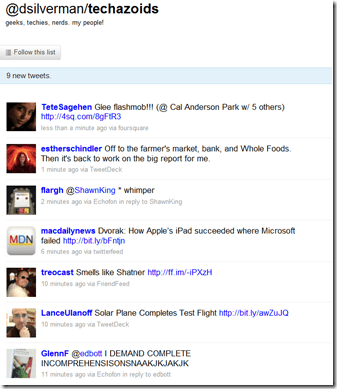
Fellow Houston tech blogger and Houston Chronicle writer Dwight Silverman told me today that he was unfollowing me on Twitter, because he finds my Foursquare Twitter updates irritating.

image

No worries, Dwight.  But as a student of human nature and social networking, I thought about this some while I was having lunch (after checking in on Foursquare of course).

First, some stats to put this in perspective.  I have checked-in with Foursquare exactly 35 times since February 12, when I joined.  That’s slightly more than once every other day.  I have become Mayor of 5 locations, for a total of 40 Foursquare-related Tweets.  Of my 2,871 Tweets, approximately one percent have been Foursquare related.  So while there are probably plenty of reasons not to follow me on Twitter, Foursquare is not one of them.

In fact, I think Foursquare is social networking at its finest.  Unlike Twitter, where people mostly toss links at each other, Foursquare actually provides the opportunity to truly network- as in see people in real life.  When you check-in at a location, you can see who is already there.  If that’s not networking, and this is, then I am seriously confused.

image 
I may be kicked off this list if I mention that
I’m on my way to the Galleria Apple Store.

Other than a passing thought that maybe the relatively few Houston tech bloggers with any sort of web presence ought to stick together, I don’t care whether Dwight, or anyone else, follows me or not.  By no means am I a committed Twitter writer or reader.  I’m not offended- just curious. 

I also understand the need to manage and filter your content stream.  Farmville single-handedly caused me to become an expert on Facebook filters (Facebook, unlike Twitter, is very interactive, once you filter out all the noise).

The obvious lesson here is that Twitter needs to implement key word filters.  I’m sure it will at some point.  In the meantime, we all develop our own binary filters, in or out.  I certainly don’t understand Dwight’s filter for Twitter streams, but that’s OK.  The great thing about these services is that we can all create our own recipe for consumption.  Dwight has his, I have mine, you have yours.

It’s all cool.

Not nearly as cool as becoming the Mayor of Skeeter’s, though.

image

Now I’m off to the Apple Store.  I need to buy a cable, and see if I can oust the Mayor.

Helpful Links:
Unfollow me on Twitter here (I can’t figure out a direct unfollow link).
Add me on Foursquare

A Good Day for the Folders

Yesterday was a great day for those of us who like to organize our content the sane, logical way- in folders.  I’ve never understood how anyone could argue while sober and somber that labels/tags are an acceptable alternative to folders.  In fact, the introduction of a folder-like archive management system is what initially made Better Gmail 2 the most important add-on since French fried potatoes.

image Now, the other features of Better Gmail 2 will have to carry the banner, as Google has introduced nested labels in Gmail.  Next to the fantastic spam filters, this may be the best feature in Gmail.  I can’t overstate how happy I am that Google has added this feature.

Thank you, Google.

Some will feel compelled to tell me how great labels and tags are.  I’ll respond the same way I always do- good, go make some labels and tags.  It doesn’t have to be an either/or proposition.  We should both have what we want.  Now we do.

On the same day, Apple gave the world a preview of the forthcoming iPhone OS 4.  There’s a lot to like about the new OS- the main thing being the ability to have more than one Microsoft Exchange email account.  Another excellent new feature is the ability to place your iPhone and iPad apps in folders.  This is excellent.

Folders.  As far as the eye can see.

Now, if Apple would just implement folders in iTunes, I could focus all of my attention on crapping all over the otherwise excellent Evernote for refusing to add folders (or subnotebooks) to its application.  Without folders, Evernote becomes unwieldy for power users.  I pay for a premium account, but I won’t renew it unless the developers implement some sort of folders option.

You win a few and you lose a few.  Yesterday we won.

Why Does My iPad Suddenly Take Forever to Sync?

When I set up my iPad, I was pleasantly surprised at how quickly it synced with iTunes, even though I had already purchased quite a few apps.  For the next few days, synching was fast and easy, taking only a few minutes each time.

Then, suddenly and for no apparent reason, syncing started taking forever.  By that I mean forever.  Hours.

image

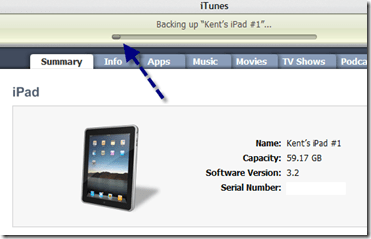
This is where my iPad now lives.  After this message appears for 30 minutes or so, it will very slowly begin the backup process, after which things will move along at the pace of frozen molasses.

image 
It takes hours for the backup process to be completed,
once it finally starts.

Why?  Why, I say!  I can think of no reason why it suddenly takes hours to sync my iPad.

Very frustrating.

A Business User’s Toolbox for the iPad

This is Part 1 of a continuing series.

image As I noted on iPaday, one of the things I am focusing on is the best and most efficient way to insert my iPad into my work flow.  As a full fledged member of the rat race, who works in a corporate environment run on Microsoft Office and Exchange, this is not the easiest thing to do.

A Brief Rant

Let me get a major gripe out of the way and then we’ll move on.  Apple, seriously, there’s no good reason why our documents have to be kidnapped from the bowels of our iPads by third party apps.  The iPad is plenty powerful enough to support some sort of file system that allows us to access, manipulate and save documents directly.  If for some incomprehensible reason this is not the case, then give me 8 hours of battery life instead on 10.  Or 6.  The other 2-4 hours are wasted trying to get around these needless limitations anyway.

iPads need a vastly improved system for  managing documents.

Apple claims to seek acceptance in the corporate arena, but unless document management becomes a lot easier, it simply will not happen.  This, along with the absence of a camera or two, is the best hope for the forthcoming HP Slate.

But since Apple makes it hard, let’s do it the hard way.

Email

Email via Exchange works great on the iPad, right out of the box.  I, for one, am really glad Apple did not implement the universal inbox.  Those of us with real jobs don’t want to blend our work and personal email.  If Apple does implement a universal inbox, I deeply hope it does so as an option only.

Receiving corporate email on an iPad, even with attachments,  is easy and pleasing.  Sending email with attachments is needlessly burdensome, however, since there is no way to attach a document from within the email application.  You have to start from within Pages or whatever app holds the attachment you want to send.  Again, why?

Document Management

Once you get an email with a Word document attached, it’s a little awkward, but manageable, to open the attachment in Pages, edit it, and then export it as a Word document and email it back.  Tracked changes do not appear on the imported document, and there is no similar feature in Pages.  Apple really needs to figure out a way to view and create tracked changes (or the equivalent) in order to ensure that corporate users think of the iPad as more Word-like and less Google Docs (ugh) like.

Accessing documents is a common annoyance on the iPad.  There is no sane way to move documents to and from your iPad, so you have to patch together a group of apps to end-run around Apple’s insanity.

Here are the ones I’m using, which taken together, work pretty well.

Windows on an iPad?

The first app in my arsenal is Desktop Connect.  It is an elegant and easy to configure app that allows you to access and use your Windows desktop via your iPad.

image
See Live Writer, right there on my iPad.  Cool, huh?

Desktop Connect is surprisingly snappy and very useable.  One way I have used it is to view Word documents with tracked changes, by opening Word and then the document I want to review.

Seeding and Seeing the Cloud

While Desktop Connect is handy for running desktop apps and viewing documents that reside on your desktop, it it not a solution for moving documents between your desktop, the cloud and your iPad.

The next app I rely on, for both document access and general backup, is SugarSync.  I’ve been pretty carefree about backing up my data, and so I decided to solve two problems with one good app.  I now have most of my documents, photos and MP3s backed up to SugarSync, which seems to have the best price ($150 a year for 100 GB; $250 a year for 250 GB) and the best iPad app.

Via the SugarSync iPad app, I can access, view and manage my files on my iPad.  The access part works perfectly.  To get a document from SugarSync onto your  iPad requires that you email it to yourself (again there is no reason it has to be that hard).  You can email documents natively from within the SugarSync app, however, so this is not quite as burdensome as it sounds.

image
Here’s the way a folder looks in the SugarSync app.  Very nicely done

Document Retrieval

For retrieving documents from my email accounts and my Dropbox and Google Docs accounts, I use GoodReader, which is a very useful app and one of the few, at a very reasonable 99 cents, that isn’t overpriced.

You can easily configure GoodReader to connect to your various accounts, as well as to your desktop via WiFi, after which it is simple to move documents to your iPad, as needed.  Getting them back is another unnecessarily roundabout journey.  Essentially you have to email the revised document to yourself and then get it back to its original location from there.

image
See how nicely GoodReader shows the attachments to emails in my Gmail inbox?  Downloading them to my iPad is a one-click process.

Paging all Tech Gurus

GoodReader is preconfigured to work with many email and cloud services, including Dropbox, Mobile.me and Box.net.  I have not yet figured out, but badly need to know, how to configure GoodReader to connect with and access my SugarSync files.  Anybody want to help a brother with this?

Virtual Flash Drive

Finally, I use Air Sharing HD as a alternate way to move files to and from my desktop.  Ultimately, I may resort to a single app for this and cloud access, but for now I’m still experimenting like a Freshman at college.


Here’s the way my iPad looks in Windows Explorer via Air Sharing HD.  It’s simple to drag files back and forth.

Conclusion

It’s a patchwork solution to a problem that, frankly, shouldn’t exist.  But these are some well designed apps, that make the iPad much more useful in a business environment.

I’ll have more later.  In the meantime, what other apps and advice do you have for the business user?

NetNewsWire: an iPad Savior?

I’m now well into my 3rd day as an active iPad user.  Overall, the experience has been very positive, but there have been a few challenges.

The first and most important has been finding a rock solid and reliable RSS feed reader.  I use and very much like Google Reader for my desktop RSS feed reader.  In fact, because the large, large majority of my online content is accessed and managed via my feed reader, it is fair to say that Google Reader is my online control center.

But I do not like the way Google Reader- the regular or the mobile version- works on the iPad.  I don’t know the cause (and I don’t really care), but the pages just don’t display and refresh as crisply as they do on a desktop.  All of this sent me into a state of panic, given that an iPad without an elegant RSS feed reader would be of very little use to me.

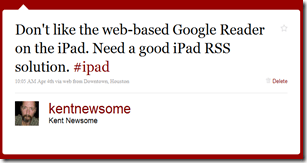
So I did what any good nerd should do- I sent out an SOS via Twitter.

image

Lots of my friends immediately suggested NetNewsWire.  I’ve been hearing my buddy Dave rave about this Mac-only program for a long time, so I decided to fork over $10 and give it a try.

It was instantaneously clear to me that NetNewsWire is a vast improvement over Google Reader on the iPad.  And since it (supposedly, but see below) syncs with Google Reader, it became not only my default RSS feed reader on my iPad, but also my most used app.

Here’s what I like about it, and some things that I really don’t like.

I Like:

1. The layout and feel of the app is superb.  I love the way my Google Reader folders appear and expand.  It just feels natural and intuitive.

image

2. I love the way I can click on a feed link and the web page loads right there in the app (this is the only thing keeping idiotic partial feeds in my reading list).  It’s a better implemented version of the “Preview” feature that Better GReader adds to Google Reader.  Why doesn’t Google add this stuff the the native app?  Thank goodness for Gina Trapani, but why does she have to come along and organize Google’s apps?

3. I like the way the app handles sharing. Click an icon and you can immediately email, send to Twitter or save to Instapaper (but see item D below).

I Want the Developer to Fix:

A. The Google Reader Sync doesn’t work very well.  I compared Google Reader on my desktop and NetNewsWire on my iPad, side by side.  The sync wasn’t just delayed, it seemed sort of random.  Refreshing the feeds didn’t help.  This needs to be fixed.

B. Why do read items and starred items appear in the list along with unread items?  I really, really don’t like this.  There should be an option to display only unread items.  For that matter, are there any options at all?  I couldn’t find a settings (or the equivalent) menu.

image 
The blue dots are the unread items.  Read and starred items are also displayed.  Why?

C.  I don’t like having to confirm that I want to mark an entire list as read.  Why isn’t there an option to mark items as read immediately, without the confirmation?  This isn’t a huge deal, but it would make my reading go faster, and fast is good.

image

D.  I wish the sharing feature allowed sharing at more locations.  Even more, I wish I could configure a standard intro before the shared item, the way I add “Interesting:” before items I share via Google Reader.

E. Finally, I wish I could select my URL shortener.  TinyURL works fine, but I use Bit.ly for everything else, and would rather be consistent.  I don’t live and die by Bit.ly’s stat tracking features, but I have gotten used to them.

Overall, I like NetNewsWire.  In fact, it largely saved the iPad experience for me.  It may even overtake Things as the Mac-only app I’d most like to use on my Windows computers.

But it could be better, and for $10 I expect the developers to get right on it.

WordPress & iPad: a Pretty Good Combo

One of the first iPad apps I downloaded was the new, iPad optimized version of WordPress.  While only time and blog posts will tell how often I do it, I can tell you that it is very easy to configure and use the WordPress app on an iPad.

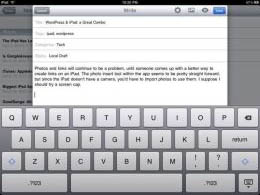
Photos and links will continue to be a problem, until someone comes up with a better way to create links on an iPad.  The photo insert tool within the app seems to be pretty straight forward, but since the iPad doesn’t have a camera, you’d have to import photos to use them.  I suppose I should try a screen cap.

I added a screen cap of the app interface, and sadly it seems the app still adds photos to the end of a post, and only then when published. I suspect it will also be sideways (it was, and I couldn’t even fix it with Live Writer).

I also had a mild lockup, that required me to close and reopen the app. This happens after previewing a post, and seems to be caused by the categories and tags overlapping the text box. I’ll attempt another screen cap.

It’s not perfect, but it’s good enough. And I suspect it will only get better.

ipadtext1

The interface, including the keyboard, works well.  Photos
are still a huge issue, as they get added to the end of the post,
sideways and far too big (I resized these via Live Writer).

ipadtext2

Notice the jumbled words.  The categories and tags are
on top of the text box.

The iPad Has Landed

As I’ve mentioned about a hundred times, I ordered my iPad the first minute Apple started taking preorders.  Today is the day, and at 4:32 p.m. a very busy UPS driver delivered my iPad to my front door.

image

I’m setting it up now, and will have more coverage over the next few days.  I’m going to be paying especially close attention to how the iPad does for corporate users, who rely on Microsoft Exchange, Word and other business oriented applications.

Stay tuned.  Right now, I’ve got some fun to do.

If you need an immediate iPad fix, check out the Houston area iPad discussion at Twitter.

Is Google’s Haphazard App Development Path a Master Plan or an Epic Fail?

image Much of the time, it seems to me like Google develops apps the way a squirrel hides nuts.  Toss as many of ‘em out there as quickly as possible, knowing that you’ll come across some of them later, even as others are forgotten or lost.  Maybe this is a brilliant master plan, or maybe it’s a sign of something else.

Like a lack of focus?  Or a waste of resources?

As we all know, I started moving into the cloud last year.  As a part of that, I attempted to abandon Microsoft Office, and set myself and my family members up with a Google Apps account.  It wasn’t really a level playing field, though, since I still had Office on my downtown office computer and my work laptop.  It took about a week for my entire family to mutiny in the name of getting Office back.  I used Google Docs for my personal word processing, which involves mostly letters and some light spreadsheet work.  Even that was pretty frustrating.

But once school started and my kids had to actually create documents, the mutiny was in full force.  So I capitulated and reinstalled Office, less Outlook.  We all agree that Gmail is an acceptable (to them) and preferable (to me, because of the cloud-based location) email client.  Though, it’s worth pointing out, only Better Gmail 2 makes it so.  Without that fantastic add-on, even the Gmail interface is needlessly cluttered and you can’t collapse your tags (which I use as folder-equivalents).

While Gmail, at least when hacked right, is great, for anything other than your great grandmother’s level of word processing, Google Docs are completely and totally unworkable.  This is really surprising to me, since Google Apps has a Premium version, and at least up to now had the very real potential to do the two things Google loves most: make some money and hurt Microsoft.  But for some utterly insane reason, Google continues to let Google Apps lie in a fallow, disjointed state, preferring to devote its resources to adding needless social networking features.  None of which will ever make Google Apps the robust Microsoft killer it could be.

No one, and I mean no one, can tell me this makes any business sense.

So why is it happening?

At the same resource wasting time, Google continues to toss more nuts into the ground: Latitude (remember all the initial hoopla about this now forgotten location sharing app?), file sharing on iGoogle and something called Orkut (where the hell is the real GDrive?), Wave (which is about as happening as FriendFeed these days), Buzz (the buzz surrounding which had the half-life of Jesse James’ relationships), Google Reader (a great app that is being ignored in favor of the momentum play du jour).  The list goes on and on.

Seriously.  Does someone at Google HQ look out the window, see someone talking on a phone and and say “Hey, that reminds me.  Don’t we have an app called Google Voice, or something like that?  Let’s spend 10 minutes on that before we get back to this Twitter clone we’re working night and day on.”

The press, as a whole, doesn’t help.  Some combination of clue deficiency, Google lust and the need to say stupid things so people like me will click over to yell at them makes the press write articles that allow Google to pretend that all of this is going swimmingly.  When it’s so clearly not.

For example, I was astounded today to see an article at C|Net speculating, yet again, that maybe we don’t need Office anymore, because we can bathe in the wonder of Google Docs.  Then I noticed that this dude is a Linux guy.  I suppose when you think Linux is preferable to Windows 7, you probably think Google Docs is the greatest thing since the keyboard.  Still, this might be the single most blatantly incorrect sentence ever strung together:

And at some point, CIOs are going to realize that the vast majority of their employees don’t spend any time mucking around with pivot tables or drafting documents. At most, people use Outlook, and buying an entire Office license to get e-mail feels like overkill.

WHAT?  Are you kidding me?  People in companies all over America spend all day and all night doing exactly that.  And then sending those documents, with tracked changes (which of course Google Docs can’t do), to other people who take their turn.  Over and over.  Even the email part is wrong, as Outlook is the most dispensable part of Office.

To even suggest that corporate America could use Google Docs is to demonstrate that you’ve never spent a day working in corporate America.  It’s this problem that Google should be focused on.  Because the right cloud based application could serve corporate America.  Google Docs, as it currently exists, is about as far away from being that app as possible.

Paul Thurrott, taking a page out of my sermon book, gets it right:

I don’t believe that Google’s free tools–Google Docs, part of Google Apps–represent a technical or financial challenge to Office at all….  Microsoft Office is vastly superior to every single office productivity solution there is.

As Paul points out, about the only thing Google Apps can do for corporate America is serve as a stalking horse.

Open Office is a mostly workable solution, and does make Google Apps look pitiful by comparison, but then again so does Zoho.  For that matter so does a piece of chalk lying on a sidewalk.

Microsoft could own the cloud based office productivity space if it wanted to.  It just doesn’t want to yet- while the cloud is still forming.  We’re seeing the price of Office fall over time, clearly as a result of that stalking horse.  Perhaps Microsoft will eventually take flight (or be forced) into the cloud.

Until then, we will have to search for other options.

But Google Apps is not one.  It’s just another lost nut waiting to be rediscovered.

iTunes: Apple’s Fly in the Ointment

itunessuxI’ve been excited about the approach of iPaday since I ordered my iPad the first minute Apple started taking orders.  I’ll find good uses for it either way, but until today I wondered if my iPad would be the evolved replacement for an iPod Touch and a Kindle, or something more revolutionary.

I hoped it would be something revolutionary, and based on the videos Apple released today, it looks like it will.  I think there’s a lot of controlled hype going on right now (for example, I think some of the unit figures being tossed around are beyond absurd), but I also think these videos demonstrate that the iPad is going to be big.

Really big.

The primary goal of the iPad is undoubtedly to expand Apple’s growing stranglehold on the content distribution pipeline beyond music, and further into video and, in a bold and perhaps killing first strike, books.  I also think there is hope in Cupertino that the iPad will serve as a roadmap to Macs.  After watching the iPad videos, I considered, for probably the twentieth time, whether I should overpay for hardware and accept a crappy OS in the name of convergence, under the Apple banner.

image There is no denying that all of the Apple hysteria makes even the most logical eyes prone to view the world in shades of green.

I could learn to live with OS X, even though I find it utterly unintuitive and far harder to use than Windows 7.  Plus, I’m convinced that Apple will eventually merge the iPhone OS and the Mac OS, in a final offensive in the three party war for tech domination being waged by Apple, Microsoft and Google.  At that point, Macs may actually become as elegant as some wrongly insist they are now.

But I can’t yet take the plunge.  Not because of the overpriced hardware.  Not even because the deficiencies in OS X.

Because Apple insists that iTunes serve as the control panel, storefront and traffic cop for all hardware and associated content.  For anyone other than the casual music fan, iTunes sucks.

Trying to manage a big music library via iTunes is like trying to build a house out of sand.  A little bit looks good, but it all falls apart when you try to scale.  It’s bloated, slow, feature deficient and just plain ugly.

itunessucks In fact, iTunes needs to be completely scrapped and rewritten from the ground up.  I realize that many of the limitations that burden iTunes are intentional limitations designed to maintain and expand Apple’s stranglehold on the content distribution channel.  I don’t like this one little bit, but I’m not naive enough to think it will change.

But there are a hundred much needed improvements that could and should be made, without giving up control of the content pipeline.

I wish someone would email Steve Jobs and tell him to get on it.  Then maybe I’d go all in.