Apptic Storm: This Week’s Interesting Apps

appticstorm

Here are the apps, hacks and  updates I found interesting over the past week.

Comodo Time Machine.  A simple but powerful system rollback utility that lets users quickly restore their computer to an earlier point of time.  Supposedly more robust than Windows System Restore. 

Add MP3 support to AudacityAudacity is great.  Audacity without MP3 support is useless.

SnipSnip.  Easily share a snippet from a YouTube video.  This will be very useful, if it works.  I tried it, and it started at the selected place, but it didn’t stop at the selected place.

VidCoder.  This Handbrake powered encoder now has a 64-bit version.

Hamster.  While we’re on the topic of video, I’ve started using this free video converter.

Heytell.  I can’t overstate how much I enjoy this app that basically turns your iPhone or Android device into a walkie talkie.  This may become one of my most used app, if I can get my family to give it a chance.  Unlike Flickr, which they still don’t use.  Maybe they were right.

DnD Renamer.  I’m always trying to find easier ways to batch rename files.  Particularly photos.

TuneSwift.  I know from first hand experience that moving iTunes from one computer to the other can be perilous.  I haven’t tried this app, but if it works, it rocks.

That’s it for now.  If you’re a developer with a neat app, hack or update we should feature, let us know.  We’d love to check it out.

WordPress for iOS 2.6.4 Released

After I pooped all over the WordPress app the other night, I was pleased to see that an update was released today.

Version 2.6.4 allegedly fixes some bugs.  That’s good

It is now easy enough to insert, if not place, images.  It is still a huge pain to insert links.   My best tip here- use a URL shortener to save some typing.  For those like me who keep forgetting how to do links in the app, type http:  and the form will pop up.

The next thing WordPress should do is allow for a default URL shortener to be set, so all you have to do in the link URL form is type the shortened link code.  That would save a ton of time.

I wrote this post on my iPhone, and it wasn’t a completely horrible experience.  Let’s see how it turns out.

What WordPress should do is opt for a bookmarket equivalent, with a browser-based implementation of the “Press This” app that renders a minimal, but usable, web-based editor.

Just to see if I can do it, here’s a random image.

So how’d it do?

Update:  It did OK.  I like two spaces between sentences, and those didn’t make it.  But other than that and a few small screen related typos, the post came out pretty good.

Microsoft Pushes Confusion to Education

This is what I meant the other night when I said that Microsoft needs a paradigm shift in the way it names and markets products.

The inclusion of SkyDrive- legitimate cloud storage- could give Microsoft a real advantage in the education market (since Google still hasn’t provided any).  But I can’t tell what’s what based on the information and quotes Microsoft released.

One thing I know for sure: there is no reason to have five separate versions of Office 365 for education.

Paul Thurrott tries to clear things up in his post (linked above), but there’s only so much he can do.  What could have generated interest generates only head-scratching and shrugs.

I genuinely believe that Microsoft has some compelling products.  I just can’t tell what they are.

Microsoft needs to greatly simply everything.  Every thing.

How to Create an Awesome Custom Sharing Domain with Bit.ly Pro

OK, get ready for a big helping of awesome.  Here’s how to create a custom sharing domain.  In about 15 minutes.

Step One: Get a Cool Domain

Maybe you already have one you want to use.  If not, pick one out and register it with your preferred registrar.  I use Network Solutions, but any service will do.  I chose newsome.cc.  Get it?  Like copying you on a an email or one of those old timey letters.

Step Two: Get a Bit.ly Pro Account

bitly

I’ve been using Bit.ly as my default and preferred link shortener for a long time.  Their new Pro Accounts, which is required to make this process work, are free, but still in beta.  I signed up on Sunday and got my acceptance email this morning.  Excellent.

Registering for a Pro Account doesn’t affect your previously shared links.  All existing data remains in place.  The Pro Account merely adds features.  Once you have the Pro Account in place, you are presented with a Settings page, where you insert your custom domain name, and receive instructions on configuring your domain.  This is an easy process that consists only of changing your domain’s A-Record.  Make note of the IP address Bit.ly provides.  You’ll need it in a moment.

Step Three: Configure Your Domain

As noted above, I use Network Solutions, but the process should be very similar for all domain registrars.

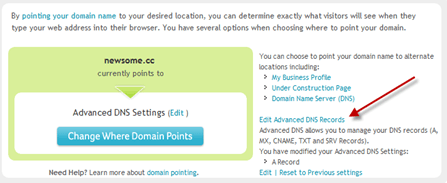
Go to your Account Management page or dashboard, and select the applicable domain (in my case newsome.cc).  Select the link to edit your DNS settings.  At Network Solutions, it is “Edit Advanced DNS Records.”

image

Then the link that allows you to edit the domain’s A-Records.

image

Then replace the “www,” “@ (None),” and “* (All Others)” records with the IP address Bit.ly provided you on the Settings page.

image

The editing form will tell you that it can take hours for the DNS change to take effect.  In my case it happened instantly.  Literally.

Go back you your Bit.ly Settings page and confirm your custom domain by clicking on the button.  Easy peasy.

Now, when you shorten a link via Bit.ly (I use the Bit.ly Chrome extension), instead of the bit.ly domain, your shortened links will use your custom domain.

image

Very, very cool.

Step Four: Set Up a Google Reader Send To

Now that we have our custom sharing domain up and running, we need to create a way to share links from within Google Reader.

From Google Reader, go to Settings.  Then Send To.

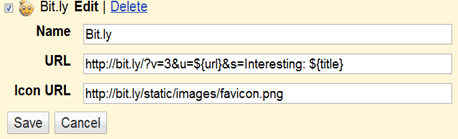
Click on “Create a custom link,” near the bottom of the page.  Fill in the blanks as follows.

image

I put “Interesting” before my shared links.  You can change that to whatever intro you’d like, or delete it altogether.  If you don’t want any intro, the last part would read “&s=${title}”.

Bit.ly Pro rocks.  I love, love, love it.  In a day or so, I’ll tell you about some of its features.  And being a good beta tester, a couple of features I’d like added.

Why not set up a custom sharing domain right now, and test it out by sharing this post!

3 Reasons Why There is Hope for Windows Tablets

ballmerces

I read with interest Paul Thurrott’s post today on the 2011 Consumer Electronics Show (CES), and Microsoft’s underwhelming presence there.

While I completely agree with Paul’s recent theme regarding Microsoft’s dire need to pick up the pace and raise its game, to keep up with new evolution cycle and the rapid migration to the cloud, I don’t know that I agree with Paul about the prospects for Windows tablets.

Paul says:

This year, dozens of companies will ship Windows 7-based tablets and they will all fail. Instead, consumers will continue buying iPads, and they will buy Android-based tablets (and, possibly, the RIM PlayBook), because those products, unlike Windows tablets, have been created specifically for that market.

While it may very well be in spite of- and not thanks to- Microsoft, I think there is a real chance for Windows-based tablets to succeed.

Why?  Three reasons.

Better Content Creation

iPads are great for consuming content.  They are very, very bad for creating content.  Sure, you can read a Word document, but anything more than minor revisions are extremely difficult.  Tracked changes (which are mandatory in corporate America)?  Forget it.  Microsoft keeps hinting that it may one day bring Office to the iPad, and maybe if Microsoft does blow the Windows-based tablet opportunity, it will.  As plan B.  Because I think the fact that it hasn’t yet is very telling: as slow and insular as Microsoft can be, even an old dog knows that Office on a tablet- in any semi-workable form- would be a good selling point.

Consuming is one thing.  But creation is king.

And it’s not just corporate documents.  I knew that I would never be able to manage my flow of Word documents via iPad.  I did think, incorrectly, that I’d be able to blog via one.  To call the WordPress iPad app horrible is a vast understatement.  It’s simply unusable.  Even if they get it fixed, the lack of useful copy and paste and the inability to easily acquire, insert and place photos will always be a frustration.  Live Writer on a tablet?  Sign me up!

The creation hurdle has clearly affected my iPad usage.  I have noticed that the number of days I carry my iPad with me to work has slowly and steadily declined since I bought it.  Now, it’s about one day every two weeks.  That does not sound like a mission-critical device.  Frankly, more than half my iPad usage these days is playing Words With Friends.

Greater Enterprise Acceptance

Like all tech bloggers, I love new technology.  But my company is still running Windows XP and some ancient version of Office.  I’ve only seen one other iPad in my office.  Ever.

A Windows-based tablet, with software that we already have, has a much bigger chance for Enterprise acceptance than the iPad, Steve Jobs and coolness factors notwithstanding.

User Convenience

Again, I’m a tech blogger.  I have Windows computers, Macs, an iPhone, an iPad, several Apple TVs and one (currently highly content deficient) Google TV.  But the large, large majority of people out there in the real world use Windows-based computers.  It would be much easier for a new customer to choose the known- Windows- over the unknown- IOS.  Better does not always trump convenient.

Microsoft clearly needs to be more nimble, and certainly needs a paradigm shift where application naming and marketing are concerned.  But I think the tablet space could be a big win for Windows.

Shoot, I had a Windows based tablet six years ago.

Fujitsu5110

That little tablet can still create content easier than my iPad.  All it needs is a few tweaks here and there: an option to use the stylus or touch; a leaner version of Windows; wireless broadband; a better display.

I’d give it a try.  Wouldn’t you?

Could Slacker Radio Unseat Pandora as the King of Internet Music?

pandoraradio

For the Love of Pandora

I have been a loyal and devoted paid user of Pandora Radio since it was first available back in 2005.  I use it almost every day, in one form or another.  In fact, I may even buy a new truck when it becomes available in-dash, just so I can get my alternative country music fix without having to suffer through the unbearable Mojo Nixon.

While Pandora’s Music Genome has pretty accurately mapped my musical tastes, Pandora is not perfect.  The biggest problem by far is that, thanks no doubt to the idiotic music label cartel, you can only skip 6 songs an hour, even if you’re a paid user.  Even worse, that hour seems to be of playing time, not just of the passage of actual time.  I use Pandora almost every night for the last part of my workout (more on this when I start my “Nerd on the Run” series later this month).  Often, I’ll try to skip a song for the first time that night, only to get the 6 song limitation message- even though it’s been over 20 hours of real time since I last skipped a song.  This is a horrible drawback to an otherwise awesome service.

The Once and Slacker King

Nothing is as good for consumers as choice.  I tried Slacker Radio a couple of years ago.   Even then, it had unlimited skipping for paid users.  I liked Slacker Radio, but I eventually went back to Pandora and stopped using Slacker altogether.

slackerradio 

It looks like that may change.

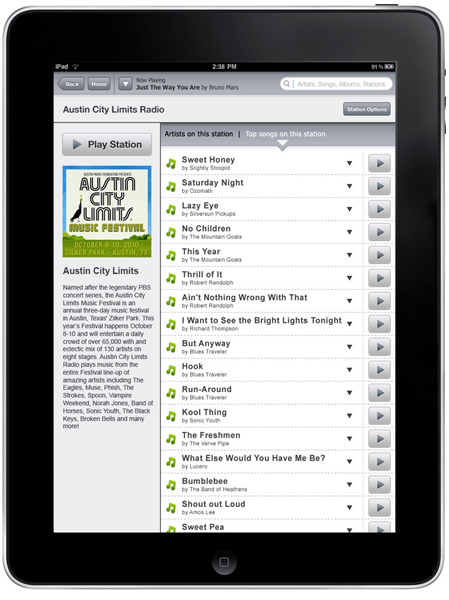
Today I read that Slacker Radio is about to release an on-demand streaming plan, called Slacker Premium Radio, and a related iPad app.  This app will reportedly give you on-demand access to Slacker’s entire song library and playlists.  This feature will work on the web, and with lots of mobile devices, including  iPhones, iPads, Androids and BlackBerries.

image

With my renewed interest in Slacker Radio, I listened briefly to my classic rock station, Kent’s Vinyl, and The Rancho Room, my alternative country station.  I heard some good stuff, including excellent but obscure songs by Old Crow Medicine Show, Luna and the Scud Mountain Boys.  I also heard some ads, which is a no-go for me.  If I start using Slacker again, I will immediately buy a subscription.  Premium subscriptions currently cost $48 a year.  That’s a little more than Pandora’s $36, but it gives you both unlimited skipping and mobile station caching- the ability to cache your stations for offline play.

Web of Confusion

One thing Slacker badly needs to do better is explain the differences between their current and forthcoming offerings.  It seems there has been some manner of on demand streaming available since late 2008, under the same name: Slacker Radio Premium.  It sounds good, until you read this cautionary note: “Saved songs are based on licenses, not all songs are savable to your Slacker Library or Slacker Portable Radio Players.”

The most important question to ask when you hear the phrase “on-demand streaming” is “of what?”  The biggest issue with these services is their ability to provide access to the major label catalogs.  I assume this new service will be a meaningful expansion of the existing premium service, but we won’t know, well, until they tell us. Notwithstanding the web of confusion currently surrounding Slacker’s new service, I’m definitely interested and on the lookout for details.

Pandora’s Device Advantage

Hopefully this flurry of life by Slacker Radio will spur Pandora to make some significant improvements to its service, including unlimited song skipping.  Pandora is not without weapons in the battle for our ears.  It has a much bigger brand.  More importantly, it has made its way onto just about every online media box or service this side of Apple TV (bad call by Apple that will eventually make me all Boxee all the time).  Every newish TV and DVD player in my entire house will play Pandora.  As will a couple of my audio receivers.  I don’t think I’ve ever seen Slacker Radio on any of them.  To reach the top of the hill, Slacker will need to find its way onto more devices.

I know, for example, that it is much easier to listen to Pandora in my home gym, via my DVD player, than it would be to access Slacker Radio.  When I finish a DVD, it’s a two click process to bring up Pandora.  I would have to get off the treadmill and change all sorts of settings to get to Slacker Radio.

Either way, competition is good for us.  So let’s rock on.

Why Big Media Wants to Kill RSS, and Why We Shouldn't Let It

RSS is dead. Long live RSS!

Another year, another attempt to kill RSS.  Sigh.

That means I must once again bring truth to a cacophony of greed and hysteria, where repetitive games of not-really-farming and being not-really a gangster are valued more than anything other than Facebook, the platform where you not-really play said games.

This discussion cycle seems about as boring as I imagine Farmville to be, but we can’t ignore it.  Because there are armies of media companies, developers and investors out there, with dollar signs in our eyes, who can’t wait to usher RSS off to the deadpool.  For one reason and one reason only: they can’t make as much money if we read their content our way- in Google Reader or the equivalent app of our choice- as they can if they can force us to read it their way- at their site, complete with scads of browser-clogging tracking scripts and ads galore.

Let me say it another way.

Anyone- and I mean anyone- who is concerned with the end user experience should be actively promoting and supporting RSS. Unfortunately, like the very important but much maligned climate control movement, those who favor RSS as a medium for content management are on the wrong side of the ledger.  They are waging war against those who have deeper pockets and much to lose.

I can understand why someone who thinks of our eyeballs only as currency would not want us to manage several hundred web site subscriptions and the related content from a single, convenient, web-based app.  I can understand why big media sites want us to click wildly from page to page and site to site, all in the name of page views and ad serves.  Hell, even Google, who makes mint serving ads on so many web sites, doesn’t have much incentive to promote RSS and its handler, the wonderful Google Reader.

In a recent post, Louis Gray sums up my view of online utopia:

I don’t want more places to play games.  I don’t want more places that I can share photos with an increasing array of effects.  I do want better filters so that the best stuff comes to me, from all networks, without my having to sift through the noise.  That’s important to me, and part of what I am working to do.

That sounds a lot more like Google Reader than it does bouncing around between web sites, Twitter and Facebook.  The only people who have a material interest in promoting RSS is us.  The people, who want to control the manner in which we select and consume content.

Someone reading this is about to say, “but wait, what about Twitter!?  Facebook!  RSS is so last decade!”  To them I say, put down the joint or the deposit slip (depending on which bias has possessed their senses).  Twitter is, at the end of the day, nothing more that legitimized spam.  It’s brilliant.  But that’s what it is.  Big media loves Twitter, because it allows them and their hoodwinked fence painters to relentlessly spam people with the equivalent of partial feeds, which lead the end user back- you guessed it- to the content provider’s web site.  Complete with boggy scripts and ads-a-plenty.

Facebook is great.  For conversing with your friends in far off places, or catching up with the freshman roommate you once hated.  But in no way, shape or form is it the place to catalog, access and consume your news and other web-based content.

Again, only those with skin in the game will try to convince you otherwise.

The people can save RSS.  And we should, because if we don’t, we’re the ones who will suffer.  Not old or new media.  Not Twitter or Facebook.

And certainly not those who see our eyeballs as currency.

How to Make Chrome Even Better with Extensions

It’s no secret that I think Google Chrome is, by far, the best web browser.  Ever.   I could write a dissertation on how much I love it.  In fact, it’s so good that I believe the forthcoming Chrome OS is going to change the way we work online.

One of the beauties of Chrome is its functional minimalism.  Unlike most applications, there isn’t even a hint of bloat in Chrome.  It lies at the hard corner of sleek and powerful.  The Chrome experience immediately upon installation is fantastic, and just about anyone could have a great experience without installing any extensions- or add-ons- at all.

There are, however, a few extensions that I use and recommend to make it perfect.
Here, in no particular order, are the Chrome extensions I use, with a rating (1-5) of how essential they are to my online experience.

AdBlock.  I will go out of my way to avoid the clutter of ads.  The continuing malware problem is another reason to block as many online ads as possible.  The combination of AdBlock and AdBlock Plus (see below) results in a completely ad-free experience.  Essential Factor: 4.

Adblock Plus.  This is the recent Chrome port of the ad blocking app I have used for years.  I tried to use it alone, but found that it did not block certain message board ads, which are known to occasionally carry malware.  So I went with a combination.  Eventually, I’d like to settle on a single ad-blocking solution, but for now I’m choosing redundancy over screen bloat and possible malware.  Essential Factor: 4.

Bit.ly.  Like just about everyone else, I use Bit.ly to shorten the links I share on Twitter (Follow me) and elsewhere.  I like being able to see the actual link destination as well as stats on the links I share.  While helpful, this one is not terribly essential.  If I had to uninstall one of my extensions, it would be this one.  Essential Factor: 2.

Google Calendar Checker.  I long ago moved my calendar and my contacts  from Outlook to Google Apps.  I like the ability to see when my next appointment is, and the ability to hover over the icon for pop-up details.  Essential Factor: 3.

Google Dictionary.  This is the first extension I installed and the one I would recommend first.  A single click on any word on a web site will result in a pop-up definition or Wikipedia summary.  This is a must-have extension.  Essential Factor: 5.

Google Mail Checker.  Since I use Gmail, via Google Apps, as my email app, this must-have extension notifies me of new mail.  Essential Factor: 5.

Google News.  This extension wasn’t made by Google, but it sure looks like it was.  A simple click on the icon renders a tabbed, customized news display.  Very nice.  Essential Factor: 3.

Google Voice.  Being pretty-much all-in with Google Apps, I use Google Voice for my voice mail and to make an increasing number of phone calls right from Chrome.  This extension lets me know when I have new messages, texts, etc.  Essential Factor: 3.

iReader.  Much like ads, I hate all the clutter that most media sites append to their web pages, making them look like the TV screen in Idiocracy.

toomanyads

iReader will render the articles you want, in an elegant, scrollable display, complete with powerful, but unobtrusive, sharing features at the bottom.  Essential Factor: 4.

NPR.  I like to get my audio news updates as well as some music via NPR.  This extension lets me quickly access content from the NPR site (even while browsing other sites), as well as  music from great stations like UNCW.  Essential Factor: 3.

PriceBlink.  Since I do most of my shopping online, this extension, which tells you if there is a better online deal on the item you’re looking at, is a real money-saver.  Essential Factor: 4.

RSS Subscription Extension.  This Google created extension detects RSS feeds on the page you are reading and displays an RSS icon in the Omnibox, allowing you to click on it to preview the feed content and subscribe.  Essential Factor: 2.

WOT.   Web of Trust is a safe browsing tool, which warns you about risky sites that cheat customers, deliver malware or send spam.  Essential Factor: 3.

That’s 13 extensions, which, in the interest of bloat-avoidance, is more than I would like.  My plan is to treat extensions like I do stocks: only own a certain number of them.  So if I find one I like, I have to decide if I like it enough to get rid of an existing one.  I haven’t noticed any slow-down after installing these extensions, so I’m not sure what my magic number will be.  Probably more than 10 and no higher than 15.

Another of the beauties of Chrome is the sync feature.  If you install or uninstall an extension on one computer, corresponding changes will be made on the other synced computers.  Just one more reason why you should be using Chrome as your default web browser.

I really dig Chrome.  If you give it I try, you will too.  What are you waiting for?  Go get it.

Chill About Delicious Already

image


I really don’t get all the outrage about Yahoo shuttering or maybe, in a show of how to be swayed by the sound of nerds crying, selling bookmarking site Delicious.  Anyone who is surprised by this development hasn’t been paying much attention- or using much Delicious.

Delicious  was marginally robust back in 2005 when Yahoo bought it.  If it has improved in any meaningful way in the 5 years since, I certainly can’t tell.  Evolving technology is a fast moving process.  Let anything sit dormant for half a decade and it’s already dead.  Taking it offline is just the funeral.

I also don’t buy the argument that bazillions of people still heavily rely on Delicious.  I tried to use it as my primary bookmarking app, but the fact that I had to manually make every bookmark private was a buzz and deal killer for me.  So while I’m sure a lot of people have accounts, I question how active they are.    I still have a Delicious account.  I also still have an AOL account.  I use them about the same amount- almost never.

Not only is Delicious dated, both in look and in features, but there are a million better alternatives to store and share bookmarks.  I use the built-in synching in Chrome for most bookmarks and Google Reader for the few I want to share.

So, yes, Yahoo is a mess.  If you want to skip the crying over spilled links and really understand why, here’s the place to start (as an aside, I consider that post validation of my myth of the endless advertising dollar sermon that I gave for years until I grew bored with the whole internet non-business plan fiasco).

Would I care if Yahoo disappeared tomorrow?  Maybe a little.  Competition is good, and so to the extent I still believe (only a little) that Yahoo is competition for Google, I want it to stick around.  I also think My Yahoo is the best personal news portal option- much better than iGoogle.  But I would only morn the loss for an hour or so.

Yahoo Pipes is the most impressive Yahoo technology, but no one, probably not even Yahoo, remembers that it isn’t already in the Deadpool.

Flickr is the only Yahoo service I rely on heavily.  Google should seize this opportunity to put another nail in Yahoo’s coffin by fixing Picasa.  I doubt it will, though, because Google is busy on a lot of other stuff (hopefully including sending me a Cr48).

At the end of the post, I hope Yahoo can make it, but if it doesn’t, all that means for most of us is a couple of hours moving our photos somewhere else.

But no matter what, the loss of Delicious is not a blow to the internet.  Not even a small one.

Why Chrome OS Will Change the Way You Compute

Sadly, I haven’t received my Cr48 yet, even though (are you listening Google?  Email me and make me happy) I am a devout lover of Chrome and have moved most of my computing life into the cloud.   But there is no doubt that Chrome is about to change the personal computing landscape.

Paul Thurrott explains why it is a huge threat to Microsoft in the latest installment of his excellent Google Chrome Vs. the World series.  If there were a Pulitzer for blog writing, this series should win it.   Probably the best tech read of the year, in part because a guy who likes Microsoft is trying to save Microsoft from itself.

Yes, Chrome is going to hurt Microsoft, and yes it will further extend Google’s empire.  And it will be very good for consumers.  Shoot, if I ever get a Cr48, it will immediately become my primary mobile computing device.

But I think Chrome will also help Apple, by being the final element in a lot of peoples’ decision to leave Windows forever, if not for Chrome, then for OS X with Chrome, in browser form or otherwise, installed.  Sound crazy?  Then consider this.

Just about everyone has capitulated to the iPhone.  Yes, some geeks like Android, and there is no denying that it is a good option.  But it just doesn’t have the penetration into the non-nerd set that the iPhone does.  I know one person in the real world (e.g., people I regularly see face to face) who has an Android phone.  I know one person in the real world who doesn’t have an iPhone.  It’s the same guy.  NOTE: Yes, I am excluding the sad masses who are chained to Blackberries because their companies have not realized that Blackberries are on the Palm road to obscurity.

Apple is soundly winning the handset war, at least for now.  The new battle is for the everyday computing device.  You know, what netbooks (ugh!) were supposed to be, but were not.  Make no mistake, this battle will be fought in the browser.

And as I have told anyone who will listen, Chrome is by far the best browser.  It’s not even close.

There are only four things I have to do regularly that I can’t do right now in a browser.

1. Edit photos with Photoshop.  I can’t do that (yet) in Chrome, but I can on a Mac.  Imagine if you will a MacBook, with the Chrome browser (if not somehow the OS in a Parallels-like configuration) installed.  I could do just about everything in Chrome, and drop into OS X when I need to work with Photoshop.  Nice.

2. Edit videos in a sane, easy Format.  I am on record as to my dislike of the Mac video import and editing process.  I certainly can’t (yet) edit videos the way I want to in a browser.  For people like me who do a lot of video, this is a big issue.  For most people not so much.  Plus, at some point someone will come up with a workable cloud-based video editing solution.  All of this doesn’t scream for a MacBook+Chrome device, but neither is it a strong enough chain to bind many folks to Windows.  Yes, I know that many people believe Macs are infinitely better for video.  I disagree, but all of those who feel that way are certainly not likely to choose a Windows-based computer over a Mac.

3. Manage iTunes.  I’m also on record about the train-wreck, Apple-hampering mess that is iTunes.  I hate it, but I have to use it for my iPhone and iPad.  Once again, a MacBook+Chrome device would let me drop into OS X when needed.  Certainly no reason to stay with Windows.

4. Write Blog Posts with Live Writer.  How bizarre is it that Live Writer is the biggest thing tying me to Windows?  I can’t overstate my love for Live Writer.  But like Romeo and Juliet, it is a love that won’t last.  There are too many forces aligned against a desktop based editing app and pointing to the cloud.  The standard WordPress editor is not horrible (unlike the iPad app, which is).  At some point I will have to say farewell to Live Writer.  Unless, oh please, it finds a home in the cloud.  Then I could use it in a browser.

Taking all of this into account, it seems to me that there are three paths to travel.

A. Chrome OS on a Cr48 or its successors.  I sure would like to try this, Google. . . .

B. A MacBook+Chrome device.  But for the video thing, I’d probably be there now.  At a minimum, I expect Chrome in some form to become my primary day to day computing platform.

C. The status quo, via Windows. I’m not going to sell my Windows-based computers, but I am beginning to wonder if I’ll replace them when they grow old or die.  Even now, the large majority of my computing is being done via the Chrome browser.

All paths involve Chrome in one form or another.  One path definitely benefits Apple.  Unless something unexpected happens, Windows may end up on the path less traveled.

As a less desirable metaphor.