Risky Business: The Windows 8 Story

I’ve been reading a lot about the forthcoming Windows 8. I’ve used the Developer’s Preview a little. There’s a lot to like about it. And there are some problems. I haven’t written much about it, simply because I can’t decide if Microsoft’s Windows 8 plan is brilliant or idiotic. It’s clearly one or the other.

There’s no middle ground. That’s for sure.

Here’s what I think I think. So far.

One, Michael Mace has a fantastic write-up on the state and prospects of Windows 8. Literally one of the best articles I’ve read in a long time. In any medium.

Two, I’m just about certain the bolted together combination of the new Metro interface and the more traditional Windows interface is not going to make anyone happy.  Will people suffer through it as an interim step into Microsoft’s mandated future desktop?  Maybe.  Maybe not.  If I were a Windows user, I would.  Because I’m a computer nerd.  Those who don’t care about anything other than finding, starting and using the programs they need to do their work?  That’s a tougher call.

Three, I think it is very risky for Microsoft to bet the farm on a mobile-first computing experience.  I’ve thought about it a lot, and I simply don’t think anyone is going to use a Windows tablet, when the iPad is so clearly the established, preferred and beloved brand.  Even dedicated Windows computer users have embraced the iPhone and iPad.  I don’t see that changing.  At all.  Even if somehow Windows tablets turn out to be significantly cheaper (and I doubt this will be the case, especially when you add next to latest generation iPads into the mix), then there’s Android to deal with.  It seems like Microsoft is aiming for the lower end of the market.  Or at least drifting that way.

Fourth, pigs will fly before corporate America makes its change-resistant and outspoken workforce retrain under Windows 8, and Metro.  My company is moving from Windows XP to Windows 7 (a tiny step at most), and you’d think they were moving from an Abacus to a Cray.  The IT folks are, rightly so, very worried about the potential hue and cry from the people who create content.  The jump from Windows 7 to Windows 8 would be seen (rightly or wrongly) as an invitation for mutiny.  I think Paul Thurrott may be onto something, when he wonders if Microsoft has already given up on business adoption for this release.

If so, that is straight up crazy.

Fifth, while not specifically Windows 8 related, if I were running Microsoft, I would absolutely, without a doubt, nurture my last remaining monopoly by releasing Office apps for iOS.  As fast as I could.  The iPad experience has conclusively demonstrated that users will not forego a better tablet simply because Microsoft Office isn’t natively on it.  There are multitudes of third party developers standing by to implement work-arounds.

Sixth, Microsoft’s inability to deliver a clear and concise marketing message is catching up with it.  Need some examples?  Well, there’s this.  And the never-ending branding/naming changes.  It seems very haphazard.  Maybe it’s not, but nothing coming from Microsoft proves it.  As much as anything, Microsoft needs someone to step up and become the spokesperson for- and face of- its strategic plan.

In sum, I want Windows 8 to be a roaring success.  For a lot of reasons.  I’m by no means certain it won’t be.  But I am by no means certain it will be either.

Scary times for Microsoft.

How Cult of Mac Went From the Top of My Reading List to the Bottom in a Single Post

It would be hard to overstate how much I have historically liked the website/blog Cult of Mac.  Simply stated, I have long felt it was the single best source for Apple-related news, reviews and videos.  I usually read it first when I open up Google Reader to consume my news of the day.

Until this week, when I saw a post entitled MacKeeper is 911 for Your Mac.

mack911-300x219

Until that moment, I assumed Cult of Mac was a clearinghouse of sorts with respect to all of the things (apps, websites, etc.) that apear in its stories.  The inescapable problem with the above post is that a lot of people- and I mean a whole lot of people- not only disagree that MacKeeper is a good app, they think it is somewhere between unnecessary and nefarious.  Need some examples?  Here’s a thread from today on the Apple Support Community message boards (the first stop for Apple-related questions and troubleshooting).  This is not an isolated response, and it’s not limited to the Apple Support Community.  Here’s a page that goes to great lengths to warn users away.

The comments to the post as well as on Cult of Mac’s Facebook page evidence the controversy.

comcomments-248x300

A couple of important things, in the interest of fairness.  One, Cult of Mac is not alone in recommending MacKeeper.  Two, I have never tried MacKeeper, and have no first hand knowledge of whether it is the greatest thing ever, the worst thing ever, or somewhere in between.  My problem with Cult of Mac is simply this: if you are the premier source for Mac news, you simply cannot toss up a post recommending MacKeeper (or any other controversial app) without addressing the significant anti-MacKeeper sentiment that pervades the internets.  Especially when readers might think (rightly or wrongly- I have no idea) that you are getting a cut of sales driven by said post.

If MacKeeper is wrongly maligned by these other websites, then gut it up and tell the readers why.  Debunk the criticisms, but don’t just willy nilly recommend the app, without comment.  Users at least need to know there is a vigorous opposing view.  I would like to be able to trust any app I see recommended on Cult of Mac, but if they don’t want to do the work to give us the full story, I can’t and won’t do that.

Access Denied: What Good is a Cloud If You Can’t See It?

With all of the hoopla over Dropbox, the reinvention of SkyDrive and the release of Google Drive, it would be easy to envision millions of people, all over the world, happily installing, accessing and using the cloud, in one or more forms.

Except for the unfortunate and frequently overlooked fact that millions of the people who could most benefit from the cloud can’t adequately use it.  These same people also happen to be people who you’d think would be among the most likely to pay for additional space and upgrades.  I’m talking about the big chunk of corporate America whose IT departments block access to the cloud.

People who try to visit Dropbox and end up here:

SkyDrive?  Box?  SugarSync?  Same thing.

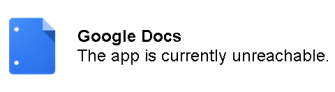
Google Drive?  Yep, except it’s even worse.  The only way to block Google Drive is to also block Google Docs.

So not only can folks not access Google Drive, they can’t access anything they already had in Google Docs.

I don’t use any of the cloud services in connection with my day job (not because I am afraid of them or don’t think they are useful, but because my IT department tells me not to), and wouldn’t even if my IT department trusted me enough not to block them.  And while it would be nice to be able to move non-work stuff around via the cloud, it’s not that hard to do it via my laptop.

But I see this as a huge issue for the cloud providers.  No matter how badly someone may want to use one or more of the services, many people- and many potential paying customers- have that choice made for them.  I’m sure there’s money in personal and small business use, but there’s almost certainly bigger money up and down the halls of corporate America.  None of us who are old enough to read this awesome post are going to live long enough to see corporate America embrace the cloud (at least not the professional services part of corporate America), so the best chance the cloud has to penetrate that market is the iPhone route.  Corporate IT departments ignored iPhones for a while, then tolerated them and ultimately were forced by user demand to embrace them.

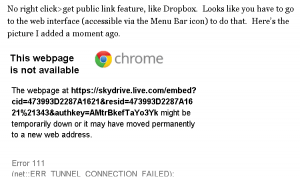
There is another issue for both the cloud providers and their users.  Not only is access to the cloud blocked, but media served from the cloud is often also blocked.  Take for example the photo I posted from SkyDrive in my recent post.

noimage-300x180

The cloud is looking for a way in, but, at least for now, it’s been cut off at the pass.  Or the firewall.

Google Drive: The Good, the Bad and Where is the Embed Option

DISCLAIMER:  I wrote this post over lunch, in real time, as I installed and experimented with Google Drive.  It may be that some of the good things I mention won’t work as well as they seem to at first glance, and it may be that some of the limitations I note below are either already addressed (though clearly not in an obvious manner) or will be addressed in the future.

Google Drive was finally released today.  It will clearly shake-up the cloud space, and, as I noted yesterday, has a huge built-in user base, thanks to Gmail.  My initial impressions are mixed.

The Good

1. It’s Google.  Say what you will about Google mining our data and whatnot, but if I am going to put my life in the cloud, I want a name associated with the service.  For security, backup and general reliability.  I’ve used Gmail (via Google Apps) for a long, long time and it is definitely reliable.  In sum, I just trust Google to take care of its equipment and my files.

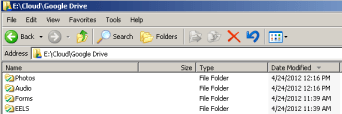
2. It integrates well with your local file system.  My most important requirement for a cloud service is the ability to drag and drop files via Windows Explorer or Finder.  This works well with Google Drive, just like it does for Dropbox and SkyDrive.

3. It integrates well with Gmail and some (but not all- see below) other Google apps.  Emailing from Google Drive is as simple as selecting File>Email as attachment.

4. You can buy as much space as you need.  Paid plans range from 25GB for $30 a year to 100GB for $60 a year to 1TB for $600 a year all the way up to 16TB for $9600 a year.

The Bad

1. Google Drive space is usable by Google Docs (which I use a little) and Picasa Web Albums (which I don’t use at all), but not by Gmail (Google did bump Gmail storage up to 10GB today and paid Google Drive users get another bump to 25GB) and, most disappointingly for me, Google Music.  I want some place I can store and access everything.  Every.  Thing.  Not just some things.  This may be a licensing restriction, forced on Google by the obsolete, empty bag holding, cat stuffing record labels, but it still sucks.

2. There seems to be no way (so far) to play audio files from the cloud.  I tried to play an MP3 and was greeted with this joy.

This is not good, and puts Google Drive at a disadvantage compared to other services, including SkyDrive, which elegantly streamed a video in my test last night (via the iPad app; perhaps this will be a feature in Google’s forthcoming iOS app).  Sure, you can sync your computers and play audio and video from the synced folder, but I am trying to consolidate my stuff in the cloud, not put it everywhere.

If videos streamed from Google Drive, I would almost certainly buy some space, to create a private YouTube for home videos, if nothing else.

Update 1:  Happily, it appears that you can stream videos from Google Drive.  I uploaded a video this evening, clicked on it from Google Drive on the web, and it streamed (just like a YouTube video).  So a private YouTube is possible.

Where is the Embed Code?

3. You can’t embed photos, audios or (I presume, but have not tried) videos in sites other than Google+.

I think Google+ is a beautifully written and robust platform (I’m not just saying that because my friend Louis ended up in that screen cap; I really mean it).  The problem is that I don’t want my cloud service to dictate where I share things.  Even those who  actually have active Google+ circles have to share from Google+.  There should at least be a Share to Google+ option within Google Drive.

The Bottom Line

If Google Drive extended at least to Google Music, and allowed easy sharing (e.g., direct link or embed code) on other services, and streamed audio and video files, I would strongly consider buying a 1TB plan and moving all my stuff there.  Sadly, it doesn’t –  at least so far.  I’ll take a wait and see approach, but based on what I see so far, I don’t think Google Drive is trying to fill the specific need I have.

This leads me back to the other horses in the cloud derby.  SkyDrive (the surprising new entry and maybe leader) and my old standby, Dropbox.

Corrections as errors are discovered and updates as they occur.


Sky Drive Just Became a Contender in the Cloud Derby

Skydrive-Logo-640x440-300x206

With the rumored launch of Google Drive only somewhere between days and infinity away, the other cloud services (you know, the ones that actually exist) are going into overdrive trying to give us reasons to keep (or in some cases start) using their services.  Dropbox (my long-time cloud service of choice), just added additional sharing and viewing options.  Microsoft, whose generous 25GB of space has been hindered by Microsoft’s inability to properly market its online offerings and an arbitrary file size limit, followed suit today with some new features and, most importantly, a Mac (that’s right) and Windows desktop app.

I’m determined to consolidate my cloud use into one primary service.  Dropbox is clearly an option.  SugarSync is too, though I want something less complicated.  Box is not, simply because it makes it too hard to move files to and from its cloud.  Obviously, if Google Drive actually launches, it will be a contender.  In fact, if its space is consolidated and usable across all Google services (including Google Music, which but for the 20,000 song limit, would already be my music service of choice), Google Drive is probably the odds-on favorite, which tells you a lot about the baked-in advantage Google has when it comes to,  you know, the internet.

But let’s not count Microsoft out.  SkyDrive has a lot to offer.  Here’s a real time walk-through of my installation and experimentation with the new SkyDrive.

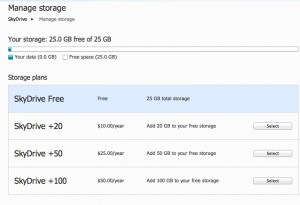
First, if you already have an account, you need to visit the SkyDrive site and get your “free upgrade,” which preserves your 25GB of space.  SkyDrive will soon limit free users to 7GB.  It’s easy to do, so do it.

25g-300x205

Now, let’s get the desktop app.  Without boring you with a bunch of nerd talk, desktop apps are important when it comes to integration with your current file system (i.e., Windows Explorer or Finder) and syncing between computers.  I’m installing the Mac app, but I assume the Windows experience is similar.

desktop-app-300x157

Once you install the app, you get a Menu Bar item (good) and a Dock icon you can’t remove from the dock (Microsoft needs to fix this, but it’s not the end of the world).

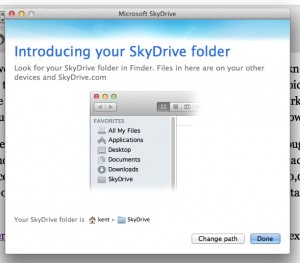
The first time you run the desktop app, you can select the location of your local SkyDrive folder (this works much the same as with Dropbox).  I wanted to put my folder on my second hard drive, as opposed to my main SSD that I try (with only some success) to reserve for the OS and other system-related stuff.

location-300x263

Then it’s off to the races.  Click on the Menu Bar icon to access your local SkyDrive folder.  Looks very Dropbox-ish.

sd-folder-300x203

I’m going to drop a jpg in there.  Very nice.

Now let’s try a big file and see if that file size thing is still a problem. Doesn’t seem to be.

big-file-300x208

No right click>get public link feature, like Dropbox.  Looks like you have to go to the web interface (accessible via the Menu Bar icon) to do that.  Here’s the picture I added a moment ago.

It’s easier with Dropbox, but again, not a huge deal.

Now, I’ll install the app on my laptop and see how syncing works.

Perfectly.  The files started downloading as soon as I installed the app.

I am very impressed with SkyDrive.  I wish there was an option to buy space in more than 100GB increments.  100GB at $50 seem like a pretty fair deal, but I have lots more than 100GB of data I need to safely store/backup.  I will be interested to see the Google Drive space options and price.  I expect Google Drive will be at least as cheap, if not cheaper, but for some (me definitely included) Google’s insistence in weaving Google Docs and, especially, Google+ into every offering is a bit of a negative.  In other words, the race is on, and there is a dark horse making its move on the outside.

SkyDrive is a well designed service that is clearly in the running to be my preferred cloud service.

Great job Microsoft!  It feels good to get to say that again.

Evening Reading: 4/20/12

Here’s today’s evening reading. The most interesting things I read today, a cool picture and the overheard quote of the day.

barking-300x247

Now I know why so many of my cool videos are blocked in Germany: YouTube faces massive music royalty bill in German copyright case.  More from the always read-worthy, TechDirt: Totally Clueless German Court Says ContentID Isn’t Good Enough, YouTube Must Block Infringement By Keywords

I actually use my Chumby, unlike 90% of the other ridiculous gadgets I have bought on impulse: Chumby halts hardware sales, long-term support looking mighty unlikely

So I guess this means I can eat whatever I want, since I’m a goner anyway: He Who Sits the Most Dies the Soonest

Great walk-through by the creator of one of the best shows on TV: Graham Yost walks us through Justified’s third season

Who cares?  Seriously, dogs, cats, ferrets and whatnot do not need to ride next to me on a dadgum plane : Be Ready For A Hassle When Flying With Your Snub-Nosed Dog

Google+ is a ghost town for the average user not named Scoble, but a mention of Yahoo Pipes (the best thing Yahoo ever did) makes me love this post: 4 Ways To Get Your Google Plus RSS Feeds

OQOTD: “How appropriate! Willie Nelson’s statue unveiled at 4:20 on 4/20.”

Bonus video:  The awesome Bill Nye dancing to his theme song AND performing She Blinded Me with Science.

Enjoy!

Evening Reading: 4/19/12

Here’s today’s evening reading.  The most interesting things I read today, a cool picture and the overheard quote of the day.

Age, the Vampire Slayer: R.I.P. Jonathan Frid, Dark Shadows’ Barnabas Collins (I loved that show)

But I already have 20 photo apps I never use: Mattebox Might Be The Best iPhone Camera App Around [Review]

Please don’t suck: Google Drive Interface Leaked in Employee Presentation

Ya think?: Unlike iCloud, Google’s Rumored Cloud Storage Could Be a Privacy Nightmare

I would’ve named my son Levon, but for that horrible Elton John song: Levon Helm, Drummer And Singer In The Band, Dies (I did name my next to last dog Virgil Caine)

Bonus Levon, from my pal Dan: Levon Is Across the Great Divide

OQOTD: “Don’t worry though, hologram Dick Clark should be good to go this December.”

Enjoy!

Giving the WordPress iPad App Another Spin

As I noted earlier, the increasing frequency of Parallels/Windows crashes and the utter lack of any decent Mac blogging apps have led me back to the native WordPress blog editor. With a few good plugins, I think the web-based desktop editor may work.

That leaves mobile. Historically, I’ve been pretty underwhelmed by the mobile WordPress app. But like the web-based editor, it has been steadily improving.

The lack of plugins, especially Post Snippets, is a drag. Adding links has gotten easier, but it’s never going to be really easy on a tablet.

Images are still hard.

20120419-005034.jpg

I like the preview feature, particularly since you never know what a mobile blog post is going to look like.

All in all, it’s good enough. And that’s good enough for me.

Post Snippets: A Mandatory WordPress Plugin

Now that I have been once again foiled in my attempts to find a decent Mac blogging app, I am, once again, considering using the native WordPress front-end.  It’s still not great, but it seems to be improving at a steady pace.

Today, I came across a fantastic plug-in that may be the thing that makes the WordPress front-end good enough.  Post Snippits.  A plugin that will save you a ton of time and effort.

One of the things I do to make my blogging more efficient is create snippets of text or code that I use over and over.

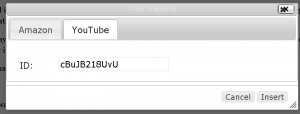
For example, I like to have a snippet that lets me add a YouTube video by simply filling in the video’s ID number.  Create a snippet via Post Snippets’ settings, click on the Post Snippets icon in the post editor…

snipicon-300x133

and the following beautifully simple and easy box appears.

Add the video ID, click Insert and…

insert-300x114

httpv://www.youtube.com/watch?v=cBuJB218UvU

I also created a snippet that lets me create an Amazon Affiliates link to a recommended record.

Wrinkle Neck Mules – Apprentice to Ghosts is available via immediate download at Amazon.  Buy this great record now.

With a little effort, you can automate a lot of stuff this way.  It actually works better than the similar feature in Live Writer.

And that is a promising development.

MacJournal as a Blogging App: So Much Potential, So Much Frustration

macjI continue to keep Parallels and a Windows 7 installation on my iMac, solely so I can use Live Writer. Lately, however, I’ve experienced a lot of unexpected Windows restarts and other (Windows-related) crashes. This adversely affects my joy and greatly increases my interest in finding a decent Mac blogging app, so I can uninstall Parallels and rid myself of the last remnant of Windows.
So I was immediately interested when I came across MacJournal today.

It’s not specifically a blogging app, but it has blogging features that are noted in the write-up and in the user manual. It is clearly a powerful app, that does a lot of things very well. It has good ratings, and seems to be beloved by many as a journaling tool.  But as a blogging app, it has issues.  Some of them are serious.

Need an example? How about the fact that this is the fourth time I’ve written this blog post- the first three tries via MacJournal were lost to a spinning beach ball of lockups. This one is being written in good ol’ Live Writer.  I wish I was raving about the many good features MacJournal has to offer.  Instead, I am  ranting about the lost potential.  And the fact that I can’t yet rid my iMac of Windows.

Let’s take a look at the very good and the very bad.

The good:

1. It is designed to interface well with a self-hosted WordPress installation. Setting up the blog connection is as easy as adding the URL, name and password for your blog.

2. It’s easy to add links, though the app needs to paste any URLs on the clipboard into the URL box. A small thing, yes, but a real time saver.

3. It is generally easy to add and manipulate photos and videos. There needs to be an easy way to resize a photo to a specific width, etc.

4. Categories and tags are supported.

5. I think it would be easy to create time saving templates.  When it comes to adding content and media, the app is very powerful.

Adding photos is as easy as a drag and drop, or you can browse through the included media browser to find media on your Mac.

Adding YouTube videos is even easier.   Paste the iframe code into your post, and MacJournal does the rest. This is very handy.

You can also record audio and video entries right from the app.

You can quickly import audio and video files from your Mac.

The bad:

notresp

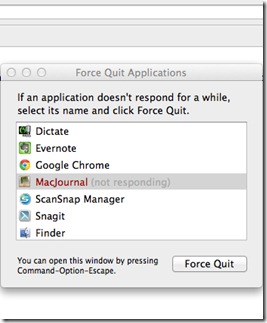
This happens a lot. It’s a deal stopper for me.  The problems seem to arise mostly when I try to publish a media-rich blog post. Problems also arise when I try to open an existing unpublished entry to edit it.

loading

Forever loading. Loading. Forever.

I was never able to successfully publish a media rich blog post via MacJournal.  My initial test post, containing just a photo and a YouTube video published quickly and easily, and looked great.  I could even edit it and republish it.  After that, when I tried to do a full post, with a photo, a YouTube video, several links and a short voice recording, nothing.  Just this.

nopublish

There are some quirks in the editing window (the cursor jumps to the top when you try to resize an image below the fold; I don’t see an easy way to make links open in a new tab or window, etc.), but those are minor annoyances that don’t outweigh the app’s obvious potential. That is, if you could actually post to your blog.

Granted, I am focusing on one aspect of what is, essentially, a journaling app.  But that is the one feature I want, and the only reason I would pay $30 (wow) for the app.

The local journaling features may work fine, but as a blogging app, MacJournal is frustrating, to say the least, and possibly broken (if these issues I am experiencing are widespread; I hope they are not).  The lockups and inability to open an existing entry are huge problems. The worst part is that MacJournal clearly has a ton of potential.  But for now its greatest potential is to frustrate those looking for a native Mac app to replace Live Writer.

Hopefully someone will create a decent Mac blogging app at some point.  I need to get Windows off of my iMac.  Soon.