Delaney had her first swim meet of the summer this morning.
She got first in all three events. Delaney works really hard, and it makes me happy to see her enjoy the payoff.

Delaney had her first swim meet of the summer this morning.
She got first in all three events. Delaney works really hard, and it makes me happy to see her enjoy the payoff.
The 2010 SWAL Championship was held last night at Lamar High School in Houston. Delaney won the Freestyle, in a highly anticipated, very close and unbelievably exciting race. She also won the Breaststroke and was second in the Backstroke. Her medley relay team came in second, giving her two golds and two silvers for the night.
The Freestyle final was among my happiest moments, ever. It’s hard to describe how proud I am of her.
She’s done with SWAL events for the summer, but will continue to swim for Rice Aquatics.
Delaney had her first swim meet of the summer this week. She finished first overall in all four events. I’m really proud of her.
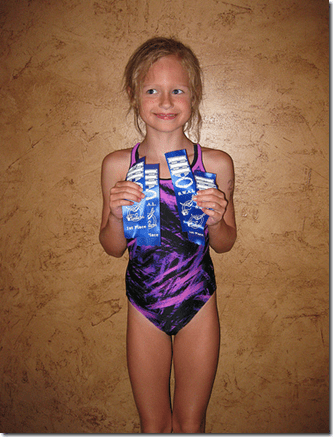
Oh, and she got her final report card of the year yesterday. Straight A’s for the year.
Lots to report this weekend.
On Saturday morning, I shot my first sporting clays competition. There were a few things I didn’t realize before hand. Like that all stations would be at the much harder North Course. And that all shots are doubles. I probably should have done my homework and been aware of these nerves-inducing subtleties in advance, but where’s the fun in that. The bad news is that I shot horribly. The better news is that I still got third in my division. The facts are that I need to practice more and differently. I think I’m going to shoot the tournament at Rio Brazos next weekend. I’d never heard of Rio Brazos before, and I’m not too keen on hunting preserves, but it’s close to Houston, and there aren’t all that many local sporting clays tournaments to choose from.
This afternoon, Cassidy and I went shooting together. She did really well, knocking a bunch of clays down- with her .410. I’m not sure how many I could hit with that small pattern. The only camera I had with me was my iPhone. She hit a bunch of clays, but this is the only shot I got on film.
(Backstroke heat (win), freestyle heat (win), 4×4 relay (backstroke)
and butterfly heat (blue Rice swimcap)).
Raina and Delaney had to leave before 7:00 for the swim meet and Cassidy spent the night at a friend’s house, so Luke and I got up this morning and went for a dude’s breakfast of bacon, eggs and grits. Then we watched some Little Bear and chilled out on the couch.
My kids rock.
Delaney has been a competitive swimmer for most of her 8 years. Currently, she swims for Rice Aquatics. She had a swim meet today at the University of Houston. She swam the individual medley, the freestyle and the backstroke, and did great.
Here are her IM and freestyle swims.
She ran out of gas a little at the end of the IM, but she still had a great time. She swam a beautiful freestyle.
I’ve used VideoStudio Pro to make my videos, going back to the Ulead Systems years and continuing after it was, sadly, bought by Corel. Corel hasn’t screwed up the application- yet, so it is still a robust, easy to use video editing and creation application. But creating a widescreen, high definition video for use on YouTube can be a little confusing.
Here’s a step by step.
After you get your video, audio, titles, etc. in the timeline the way you want them, here are the steps
1. File>Project Properties:
Be sure you have selected MPEG Files in the file format box shown above. Then click the Edit button.
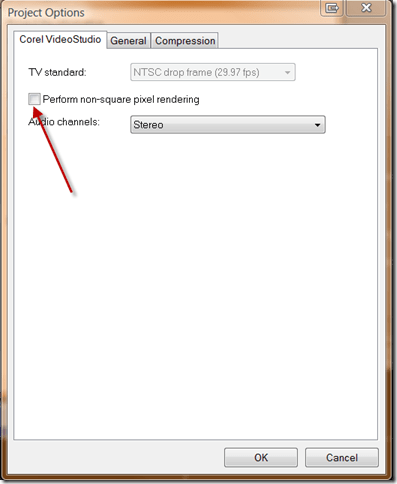
Under the Corel VideoStudio tab, deselect (i.e., no check in the box) “Perform non-square pixel rendering” as shown above.
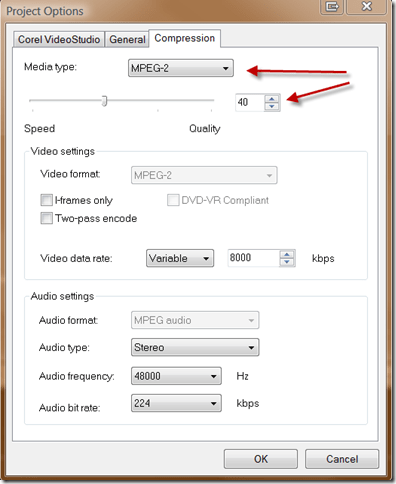
Under the Compression tab, select MPEG-2 and set the Quality at around 40%, as shown above.
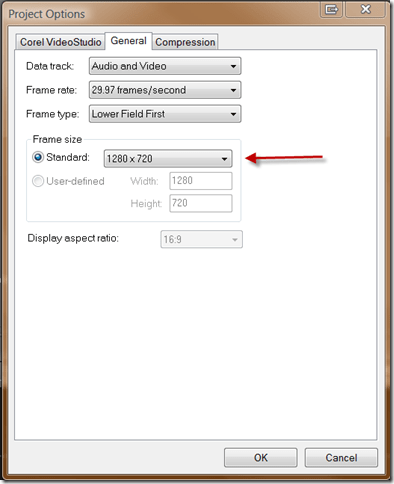
Under the General tab, select 1280×720 as shown above.
Click OK to get back to the application window.

Ignore any cache warnings or notices.
2. The Share Tab:
Click on “Create Video File” and select “Same as Project Settings.” Name and save your video. The application will render your video in widescreen HD.
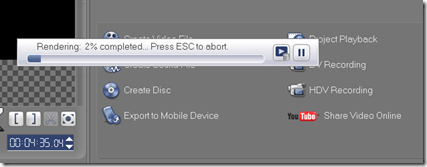
When it’s done, you’re ready to upload your creation to YouTube. Note that it takes a while for YouTube to process the video after it is uploaded, even after it is viewable. The video quality will improve when the processing is complete.
Here’s the result of the project I used as a test case for this post.
Thanks to assasin301 for creating an excellent video tutorial, which taught me the steps I showed you above.

Delaney in the 25 meter backstroke
Cassidy and Delaney had their second swim meet tonight. They both improved most of their times. In their heat of the 25 meter freestyle, Rachael, Cassidy and Evie finished 1-2-3.
 Newsome.Org