Windows Live Messenger

livemessengerI’ve started beta testing Windows Live Messenger, the forthcoming new edition of Windows Messenger.

I’ve never been more than an occasional user of instant messaging programs because nobody I know uses them. In theory, I like the idea of instant messaging as a way to keep in regular touch with family members across the country. Once again, I wish I could get my extended family to try it.

I’m going to give Windows Live Messenger a try for at least the next month or so and see how things go. I use jknpublic@hotmail.com as my email address for instant messaging purposes if you want to give me a shout.

Once I’ve played around with it, I’ll post my thoughts about the features and improvements.

Top Underrated Apps of 2005

Gina Trapani over at Lifehacker has posted her list of the top underrated applications of 2005. I love lists like this because it helps me find out about good stuff I don’t know about.

Of the eight things on the list, I have only heard of half of them. Of the others, I am going to check out Instiki and GTDTiddlyWiki first. I need a good list management tool and these seem promising.

Technorati Tags:
,

How Microsoft Can Win the RSS War

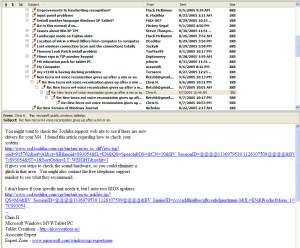
Scoble links to a blog post by Michael Affronti, a program manager for Microsoft’s Outlook team, about planned RSS integration in an upcoming version of Outlook. I use Outlook for email and probably always will. I have often scratched my head about why Outlook (unlike Outlook Express) doesn’t have newsgroup integration- thereby making users launch another program to read newsgroups. Now it looks like Outlook will have a built-in RSS aggregator so users won’t have to look elsewhere to read their RSS feeds (there’s a screen shot on Michael’s blog post).

Here’s how Microsoft can win the RSS war:

1) Make the RSS integration seamless. The screenshot looks pretty sweet in this regard.
outlooknews

2) For the love of Elvis, give us a “mark ALL feeds as read” button. The lack of this is a Sage-killer for me.

3) Figure out a way to give us 3 big viewing panes: a list of feeds; a list of post titles; and the post itself. Give me an integrated way to click to the post page AND home page of the blog I’m reading. In most of the RSS readers I have used, the first two columns make the window where the actual blog post appears too narrow. Outlook has a good pane structure now, so this should be easy.

4) Give us a way to synchronize our feeds, including read and unread, over multiple computers (via Foldershare, perhaps?). Scoble mentions the need for synchronization in his post. Foldershare, Foldershare, Foldershare. Say it with me…

5) Get this release out there before Firefox and/or Sage makes Outlook as an RSS reader as yesterday’s news as it’s in the process of making Internet Explorer. Firefox (and the multitude of extensions for it) is seriously kicking Microsoft’s butt as far as the browser feature war goes. I just don’t know if Microsoft can move fast enough to keep up. I hope it can (I have owned Microsoft stock for a long time), but I bet it can’t.

Alas, there are also ways Microsoft can lose the RSS war:

1) Take forever (see above).

2) Remove elements and features that people are expecting (think Vista).

3) Release something that does what other RSS readers do, but doesn’t represent an evolutionary advance. People need an evolutionary advance to switch. That’s why Internet Explorer dominated the browser market pre-Firefox.

Outlook still owns the email business and no one has come out with the ultimate RSS reader yet. Microsoft can win the RSS war if it moves fast enough and gives people something that is significantly better than what we have now. That sounds easy enough, right?

UPDATE: Mike busted me on my lack of numbering skill in the comments. I just fixed it. There are three reasons why I can’t count : (1) I’m bad at math, (1) I can’t type and (1) I’m bad at proofreading 🙂

Technorati Tags:
,

Lifehacker’s Top 10

top10Lifehacker, one of the best blogs in the world and an everyday read of mine, posted its Top 10 Computer Applications of 2005.

Their list and mine share Flickr and Del.icio.us.

The only app they listed that I affirmatively would not list is Yahoo! Widgets. I used that app back when it was Konfabulator and didn’t find much to get excited about. Otherwise, they list a bunch of very good applications for your consideration.

Technorati Tags:

Top 10 Tech Products of 2005

2005 was a good year for tech products. Here are the top 10 items or services I started using in 2005, in order.

top101) A Flickr Pro Account. For all the reasons I have raved about here, Flickr simply changes the world as far as digital photography management and sharing goes. Too bad none of my friends and family use it, because they are missing some good photos that the public cannot see.

2) My Thinkpad X41 Tablet PC. Again, for all the reasons I have talked about, I can’t imagine ever traveling without it.

3) ACDSee 8. Simply the best desktop photo management program on the market. The batch renaming function alone is worth the price. The photo editing features are not as good as Paint Shop Pro (sadly destined to a painful death now that it’s been bought by Corel), but everything else is perfect.

4) Sony Cybershot DSCV3. Yes, this seems to be the year of the digital photograph. I love this camera. If feel and features are more important to you than small size, this is a great camera choice.

5) Audacity. While not a perfect solution, it makes making podcasts a whole lot easier than it was before.

6) Technorati. Great service. Great founder. It is the backbone of the blogosphere.

7) DigMyPics. This service converted a ton of our old prints to high resolution digital photos for a very reasonable price.

8) Del.icio.us. The runner up to Technorati as the most useful new web service of the year.

9) Linksys WTR54GS Travel Router. Hotel freedom for less than $80.

10) Alias Find and Replace. As I raved about a few months ago, this may be the best software solution to the problem of whole-scale web page revisions I have ever seen.

If 2006 is anything like 2005, there’s some good tech on the horizon!

Technorati Tags:

Performancing for Firefox

firefoxIf you use Firefox as your internet browser and you blog, you owe it to yourself to check out Performancing for Firefox, a plugin that allows you to create a blog post within a split screen right in your Firefox window. This makes it easy to add the links, images and content from one screen, as opposed to clicking around in tabs to get the links, etc. you need.

The extension supports multiple blogs, and it works with most of the major blogging platforms. As Duncan Riley points out, all it needs to be nearly perfect is the ability to easily include Technorati tags.

Technorati Tags:

Washington Post: Firefox Moves Farther Ahead

firefoxRob Pegoraro of the Washington Post has an article today about the advantages that Firefox 1.5 has over Internet Explorer. He and other high-profile writers are starting to put into words what I and many others have been thinking.

Namely, that Firefox has moved so far ahead of Internet Explorer that the browser race, at least for those tech savvy enough to understand the feature differential, is over. Firefox has won.

Rob applauds Firefox’s new automatic update system, it’s better security and its tabbed browsing. Those are great advantages for sure, but here are the reasons I believe Firefox has won the war.

1) Tabbed Browsing– this is not the reason I stay with Firefox, it’s the reason I tried it in the first place. A core feature that gives Firefox a commanding lead. Internet Explorer will soon add this feature, but it’s too little, too late.

2) Extensions- there are so many extensions and add-ons for Firefox that you can basically create your own browser. This is the reason I stay with Firefox.

Here are the ones I have installed: BugMeNot (avoids have to register at a lot of free sites); Greasemonkey (see item 3 below); Onfolio integration (allows me to use my beloved Onfolio with Firefox); del.icio.us (allows me to tab my del.icio.us bookmarks with the click of a button); Sage (a currently less than perfect integrated RSS reader with great potential- it will be my default reader when a couple of much needed features are added); Extended Status Bar (just because it’s cool); Word Count (which helps me with my writing of posts, comments and articles); and Always Remember Password (which doesn’t work in Firefox 1.5, but hopefully will soon).

3) Greasemonkey, which allows me to add even more customizations, including the Blogger “keep current time” script.

4) Google Toolbar for Firefox- now the best thing about Internet Explorer works in Firefox.

5) The infinitely customizable toolbars. Here’s mine, but the possibilities are endless.

firefoxtb-781860

Internet Explorer will keep a lot of corporate users as well as those who don’t feel comfortable moving beyond what’s pre-installed on their computers. But for the rest of use, the war it over. It’s Firefox.

Technorati Tags:
,

Firefox Development Map

firefoxNow that I’ve pretty much switched to Firefox for all of my internet browsing, I was interested to see the development plans and priorities for future versions.

I find Version 1.5 to be stable and, with the addition of extensions and Greasemonkey scripts, very configurable. Integrated RSS functionality is a top priority for Version 2. If implemented well, that will be very useful.

Without some radical move, like going open source, I don’t see how Microsoft can keep up with Firefox in the implemention race. I was originally pulling for Firefox to make a dent in the browser market in order to create competition. Now I’m pulling for Internet Explorer to stay in the game for the same reason.

Interesting times for internet users. As long as both products stay in the game, the users win.

Technorati Tags:
,

Blogs + Lawsuits = Less Spyware

rootkit

Here’s the wrap up on the Song BMG spyware story. Recall that I and many others have posted about hidden and unwanted copy protection software that some Sony music CDs install on your computer if you play the CD on your computer. This software can render your computer’s CD drive useless and is a potential security risk that could allow virus makers to access your computer.

Since I last posted on this topic, a couple of things have happened. First, some lawsuits were filed. These lawsuits added the prospect of economic pain to the immense public relations pain Sony was already self-inflicting on itself. It is my personal opinion (shared by Adrian Kinglsey-Hughes) that most of these lawyers who run around filing class action suits are doing it for only one reason- to pad their pockets with money while the alleged victims each get a coupon for 5% off their next purchase. But once every hundred years or so maybe a class action lawsuit results in some positive change. Maybe this was one of those times.

In addition, some trojans (the software kind, not the condom or USC kind) were discovered that exploit the Sony hidden software. So the argument that this hidden and unwanted software is harmless went out the window.

And most importantly, Sony announced yesterday that it would suspend manufacturing copy protected CDs and re-examine its copy protection strategy. Perhaps getting blasted by The Department of Homeland Security helped move Sony off the dime.

It’s a positive sign that bad publicity generated largely by blogs can actually result in positive change. Hopefully Sony will learn from this mistake and not resume making copy protected CDs or allow itself to get lead down some other improper path.

Technorati Tags:
,