Is It Time for Anonymous Bloggers to Cowboy Up?

I’ve been trying hard not to comment about the ridiculous Skankgate business.  But today my resolve was broken by the final straw.

cowboyupHere’s the background as I understand it.  Some anonymous blogger calls some model a skank (among many other things), the alleged skank considers suing said anonymous blogger and subpoenas Google (who hosted said blogger’s blog for free) for said blogger’s particulars.  Google notifies said anonymous blogger of the subpoena to allow said anonymous blogger to challenge the subpoena, which said anonymous blogger does and fails.  Under court order, Google provides said anonymous blogger’s name to the alleged skank.

Then, rather than defend the alleged skank’s claim, either under some truth as a defense theory, by playing the much misunderstood First Amendment card or otherwise, the no-longer anonymous blogger decides to sue Google for $15 million.

Are you kidding me?

Read carefully.  It’s not the person who was called a skank who’s suing Google.  It’s the person who said it, somehow claiming that Google should have ignored the subpoena in the name of preserving that person’s ability to say seemingly anything behind a self-granted cloak of anonymity.  It’s like the schoolyard bully suing a teacher for pulling him off a weakling.  In other words, it’s backwards.  And illogical.

Some seem to be confusing anonymity with immunity.  Some might say this suit is some combination of offense as a good defense, a bad aim and a money grab.

My issue is not the truth or untruth of what was said.  Who cares- there are laws to deal with that.  My issue is with someone who wants to make all sorts of allegations about someone else, but is unwilling to stand up and say “yeah, I said it.”  And it’s not like this situation involved a single skank reference amid scads of other content and opinion.  According to a  report at Wired, the no-longer anonymous blogger:

published only five posts, all devoted to attacking [the alleged skank], a 37-year-old who has reportedly modeled for Australian Vogue, Georgio Armani and Versace. In the posts, [the alleged skank] was called a “psychotic, lying, whoring . . . skank” and an “old hag,” and was depicted as a desperate “fortysomething” who was past her prime.

As far as I’m concerned, if you don’t want to take credit for it, then don’t cross any legal lines when you crap all over someone.  I have the same respect for anonymous bloggers who attack people as I do for the those who write on bathroom walls.  That sort of thing makes Twitter seem like the Encyclopedia Britannica.

Robert X. Cringely notes in a PCWorld article that “if anonymous speech on the Internet is no longer anonymous, some people will simply stop speaking.” To which I and the rest of the sane world say “so freaking what?”  The mathematical value of some anonymous, tossed-up Blogger blog or some scathing anonymous blog comment is very close to zero.

And, again, no one is saying you can’t be anonymous- the hair trigger First Amendment police tend to get confused about this.  Even the generally reliable Techdirt seems to be misinterpreting the right of free speech as an absolute right to be anonymous, which it is not (though Techdirt did come down on the side of logic with respect to the suit against Google).  If you want to write anonymously, no one can or should stop you, and the very legitimate protection of anonymous speech requires scrutiny before removing the cloak of anonymity.  But if you defame someone, you can’t simply hide behind your self-granted anonymity.  To argue otherwise is to turn the law- and common sense- on its head.

Privacy expert  Dan Solove says:

The Internet shouldn’t mean that people have unbridled freedom to do things they wouldn’t do before without repercussions. We have an unprecedented power to broadcast something to the entire world. Never before in history have you had the power to do this without the aid of the mainstream media.

An interesting footnote.  Upon learning of the no-longer anonymous blogger’s identity, the alleged skank says, “I just dialed her up. I said no more lawyers, it’s OK. I forgive you.”

I say if you want to talk trash about people, cowboy up and say it to their face.
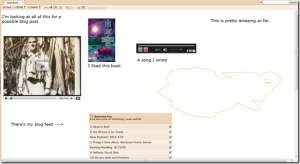
A Profile on Profiles

During the podcast the other night, Dave and I talked a little about public, online profiles.  We experimented a little with our Google Profiles, and wondered about the best way to create and manage a central profile.  The idea is to create and manage something approximating an online card and short biography.  I’ve done some more thinking about it and here’s what I’ve concluded.

Assumptions

First, a couple of assumptions.  Like every other part of our online lives, the sheer number of locations where you can create and maintain a profile can lead to dilution and/or a Sisyphean task of trying to keep everything reasonably fresh and current.  For that reason, I decided I to create one central profile page, and then link to it from the various locations where I maintain a presence.  I’m already spread too thin as far as the so-called social networks go, so I don’t want to add another service just to manage a profile page.  For example, I have an abandoned Linkedin account.  While Linkedin may be (but probably isn’t) the coolest thing since Doug Sahm, over time I want to consolidate- not further distribute- my online presence.

As an aside, those of you who have reached out to me via Linkedin- it’s not personal.  I’d love to connect with you.  Just not there.  Maybe via Facebook?

So, what options did I look at?

Google Profiles

I started out at my Google Profile, since that’s the service Dave and I were exploring.  The immediately obvious problem is the inflexibility of both layout and content.  You can add links to your various online locations and email addresses and phone numbers, but only in a structured, inflexible way.  I don’t want to directly display my email address and phone numbers.  Rather, I want to use a script to hide my email address from spambots, and a Google Voice link for telephone calls.

After a little work, here’s the best Google Profile I could come up with.

image
Click to enlarge

Not good enough.  One of the best and worst things about Google is the policy that lets employees spend company time on pet projects.  The results are a few apps that are super-cool and a lot that seem tossed together and forgotten.  For every must-use Google application, there are scores of ignored or abandoned apps along the information superhighway.

So I decided to abandon my Google Profile.  Once I choose my profile location, I’ll simply put a note on my Google Profile directing people to it.

Facebook

Many people would tell you that Facebook is designed to be precisely the sort of pre-packaged profile I am looking for, and for many people Facebook has become their de facto online profile.  But that won’t work for me.

For one thing, all Facebook content is locked away behind Facebook’s walls, and not easily accessible to the world at large.  Sure, you can sort of create a public profile.  And I guess you can make some of your information public.  But one look at how you do it sent me into a tailspin of frustration.

image
Click to enlarge

Once again, Facebook’s layout and navigation structure, which only a dedicated crackhead could love, thwarts an attempt at doing anything creative.  So, I’ll leave my Facebook profile in place for those who want to remain in Pelbarigan, and add a pointer to my chosen profile location for those who want to venture outside the walls and run with the Shumai axemen.

Yahoo

I didn’t even know Yahoo had a public profile page, but once I happened across it, I was initially impressed.  While pre-packaged, it seems more robust than Google Profiles, and more intuitive than the quagmire at Facebook.

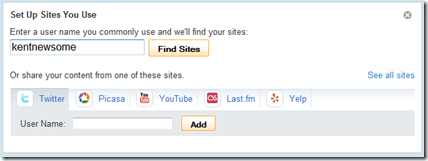
To begin with, it has a blank to fill in your typical user name, after which it will try to locate your online content.

image

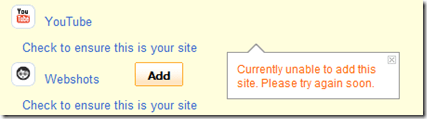
It only searches some sites, but it quickly found my Twitter, Last.fm (abandoned), StumbleUpon (never used), Picasa (never used), YouTube and Webshots (abandoned) accounts.  I got an error message when I tried to add some of them to my Yahoo Profile.

image

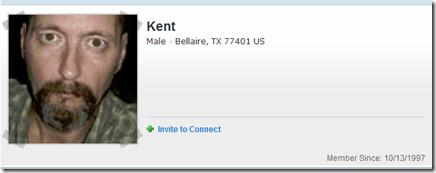
The more I worked with it, the less impressed I was.  I don’t see a way to manage your URL, so your Yahoo Profile ends up at some URL like http://profiles.yahoo.com/u/K6PWN5TRB7AQ344YDMPCIP5HWM.  That’s crazy.  And at the end of the day, you get something that looks like this.

image

Which I guess means that Yahoo has its own walls.  I could have looked into this further, but I decided to just go on living my life.

FriendFeed, Twitter, Etc.

FriendFeed isn’t really set up for the creation of a full profile.  It’s more about content consolidation and being assimilated by the Borg-like Facebook.  Same with Twitter.  I briefly looked at a few other choices.

At the end of the day, that leaves three choices: Google Profiles, Facebook or- you know where this is going- the big, scary web.  You remember the web.  It’s that thing we killed AOL to get to.  That thing that, in a move that would make Tom Sawyer proud, Web 2.0 developers are trying to make us afraid of, so we’ll create content they can use to get rich.

The Big, Scary Web

Much like my experience with Headline News pages, it became very clear that the web is the best place to create and maintain a public profile.  You have total control of the design and content of the page.  For a few dollars a year, you can register and own a domain (yourname.com, etc.).  It’s a better, more flexible and more effective choice.

Here’s mine, and here’s how I built it.

First, I used the same CSS, look and feel as the rest of Newsome.Org, for harmony and branding purposes, and added the standard menu.

Then I hacked a Flickr script to display three random photos every time the page is opened.  This gives the visitor an immediate visual image of who I am.

Next, I found a script that rotates my profile photo.  I have four photos in the rotation, but you can have as many as you want.  I added links to all of my content elsewhere: Twitter, Facebook, FriendFeed, Flickr, YouTube, Qik, my Content Pile and even my day job.

In the middle, I added a short narrative, and a list of upcoming speeches.  I added contact links: a script for email (again, to avoid the spambots) and a Google Voice link for voicemail.  I did not put my phone number on the page, because anyone who has a legitimate reason to call me and doesn’t already have my number won’t mind leaving a message on Google Voice.

On the right, I added education and experience information.  This is not a business page or a resume, so I didn’t add anything about my job experience beyond the summary in the short narrative.

That’s all there was to it, and I’m convinced that this is a better option than managing my profile within the confines of some third party network.  Plus, when I want to add something, I can do it easily without restriction.

All I had to do afterwards was add pointers in my various social network profiles to my handmade profile page.

It’s too bad so many people are leaving the flexible and accessible internet for the faux security of the so-called social networks.  Maybe history does repeat itself, and we’re back in the Compuserve and AOL era.

Regardless, I think a central, web based profile, linked from your various other locations, is the most effective and efficient way to maintain a current online profile.

Improving the Google Reader Send to Feature

I still think Google could do a lot better than it has done so far with the new “Send to” feature.  And I sure hope Google isn’t going to get all sharing and social network obsessed and turn Google Reader into some chaotic FriendFeed wannabe.  But I will admit that half a feature is better than none at all, and I have been experimenting with the “Send to” feature.

To me, of course, experiment means use, customize and improve.

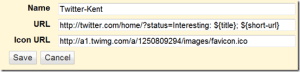
The first thing I wanted to do was add my typical “Interesting:” to the beginning of items I send to Twitter.  Here’s how to hack up a custom “Send to Twitter” link.

image

All you have to do is change the word “Interesting:” to whatever you want to appear at the beginning of your Twitter post.  Easy as pie.  After setting this up, you may want to uncheck the default Twitter “Send to” option in the provided list.

image_3

I also hacked my “Send to Facebook” link to add a shortened link,

image_4

but I haven’t figured out a way to pre-populate the “What’s on your mind?” box yet.

image_5

If there’s a way to do that, I can’t figure it out.  Another example of Facebook making it hard to control what’s inside those walls.  The end result, however, is simply that I will continue to create little or no content from within Facebook.  I’ll just send my content there via an alternate path, for consumption by those who live in Facebook’s Pelbarigan-like city state.

Finally, I hacked the Delicious “Send to” link to include a Note “For future blog post.”  I would have greatly preferred to automatically add a Tag “FNOBP,” but there doesn’t seem to be a way to populate a tag via a URL.  Which is but one of a long list of reasons I almost never use Delicious.  If I could auto-populate a Tag, Delicious might find its way back into my toolbox, so I could store article ideas there and save my “Starred” Google Reader items for other things.

Sooo, the way I got around Delicious’s crappiness was to create a dedicated Gmail sub-email address, and write an “Email to” link to that address.

image_6

Then I set up a Filter in Gmail that identifies these emails, archives them and adds a “For Blog Post” label.

image

All in all, not a bad afternoon’s work.

Apple’s War Against the iPhone

There’s been a lot of talk today over the responses Google and ATT sent to the FCC in response to the FCC’s inquiry into various App Store rejections, most notably the rejection of the much desired- by me and others- Google Voice app.

The short answer is that ATT did not request or require the rejection, which was my scenario number one, back when this rotten business started.  As I noted then:

[It may be] that Apple decided on its own to ban the Google Voice apps for some inexplicable Apple reason, which seems to be what ATT would like us to conclude.  This could be accurate, given that other phones on the ATT network have Google Voice apps.  If so, the torchy mob should immediately descend on Apple’s castle and demand a straight forward explanation.  Don’t buy the duplicative feature canard.  All kinds of duplicative apps are allowed.  It’s only the one that would most improve the iPhone experience that is not.

By all means, the torchy mob should now descend on Apple’s castle and demand that Apple destroy whatever Frankenstein is barring the door to the App Store.  But, wait, we are talking about Apple here.  The company that makes the (zealously) beloved (by a few) Mac.

I have always been amazed and annoyed by the free pass that Apple tends to get when it does something customer-unfriendly:

Why does Apple get a pass when it tries to control our audio, and now video, experience? Everything about the iPod is designed to force you to use iTunes as a gateway to your music. And to sell some downloads, of course. If Microsoft did something like this, all the Apple heads would scream bloody murder.

Well, today it was confirmed that Apple did something very customer-unfriendly.  And it didn’t take long for people to start handing out that free pass.  In a post discussing these latest developments and generally describing Apple’s App Store review process, Harry McCracken, who is usually spot on in his tech analysis, let the Apple flu get the best of him:

Apple is so obsessive about user interfaces and its control thereof that I take it at its word that this is why it hasn’t approved Google Voice. (If Microsoft said it objected to a third-party app on the grounds of interface consistency, it would be a different matter.)

A pass and a swat at Microsoft, in the same sentence.

In fairness, he goes on to say he doesn’t like Apple’s decision, but come on Harry.  No matter what the reason (and we’ll probably never know the real reason, since Apple guards its motives like a State Secret), this is a bullshit denial of another app everybody wants.  As I said the other day, why is it that the greatest phone on earth gets more and more crippled every day?  Usain Bolt is the best sprinter on Earth, but break his legs and make him carry Steve Jobs on his back, and my 3 year old could beat him.

Phones are like sports.  What happens in practice really doesn’t matter.  It’s all about what happens during the game.  And Apple is royally screwing up this game.

It’s time to take back that free pass, and make Apple understand that there is a limit to customer loyalty.  If we have to vote with our feet and pocketbooks, so be it.

Otherwise, Apple will eventually win the inexplicable war it is waging against the iPhone.  And if that happens, no one wins.

Well, except maybe Google.

How to Make a Sporty, Customized News Page

I continue to believe (actually I know, but I’m trying to be diplomatic) that good old html and some cheap server space is a far better choice for creating customized news pages than My Yahoo, iGoogle and the like.  Over the past few days, I decided to make some upgrades and improvements to the Headline News pages I have used for years in lieu of newspapers (we haven’t subscribed to the paper in well over a decade).

Tools

To create these pages, I used Notepad (any text editor will do) and Feed.Informer.  I continue to be irritated by the stupid graphic Feed.Informer adds to the end of every RSS bundle, but the fact is that Feed.Informer is the best tool I have found for rolling up and serving bundles of RSS feeds.  It’s an awesome service.  I just wish they had a real business plan so they’d dispense with the page litter.

National News

I started with the National News Page, since it is the one I use the most.  First, I updated the layout to use the look, feel and CSS of the main Newsome.Org pages.  This creates site harmony, helps with branding and, most importantly, will allow me to implement future design changes across the entire site via Notepad and my CSS document.

imageI used the same basic header as the main Newsome.Org page, for the above reasons.  I used a similar left sidebar, but with a few tweaks.  I added a news-specific menu to the top, followed by the regular site-wide menu.  I added a box to display my latest blog post (via Feed.Informer).  I kept the Quote of the Day, Today in History and Today’s Birthday content, which is provided via scripts from BrainyQuote (script page) and BrainyHistory (script page).

I added the typical links for RSS or Email subscriptions, and a simple site search via Google.  I wanted to keep the page open, so I caused links to open in a new window via a <base target=’_blank’ /> <base target=’_output’ /> command.  This may be annoying to some users, but I greatly prefer it that way when reading news.

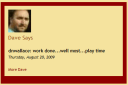
And, last but not least, I made my buddy Dave an involuntary regular contributor by adding a box that displays his latest Twitter post.  For some reason, the native Twitter RSS feed crashes Feed.Informer (it knocks Ruby right off the Rails), so I had to run Dave’s Twitter feed through Yahoo Pipes (what a great, under-appreciated application) first, and then to Feed.Informer.  It’s a roundabout path, but now I can feel like a real Web 2.0 developer by letting Dave unknowingly create content for my benefit.

The main content consists of a sub-table with two RSS bundles (again, via Feed.Informer).  I populated each bundle with my preferred national news sources.  You can add any RSS feed you like.

image_3

I used two bundles because the page looks better and is more functional with two columns of news.  Feed.Informer is very flexible, and allows you to manually configure the way the content displays.

image_4

At the end of the process, you have a highly customized news page, with the content you select, displayed the way you want it.  Plus you can incorporate the page(s) into your blog or website in a way that’s not possible with third party apps like My Yahoo.

Local News

After I finished the National News Page and admired my hard work for about ten seconds, I decided to make a similar page for local news.

The Local News Page (Update: now depreciated) is identical to the national one, except for the content of the two RSS bundles.  And I removed Dave, so he can focus full time on the national/international scene.  In his place, I added weather content from local channel 13.

All, Me, All the Time

Finally, I decided to create a mashup of all of my online content (other than my Facebook content, of course, which is walled-in and inaccessible).  I added my content from Newsome.Org, GoodSongs.Com, Twitter (because of the above mentioned Twitter RSS problem, I used my FriendFeed RSS feed), my shared Google Reader items, my YouTube content and my Flickr feed.  Update: now depreciated.

In lieu of Dave and the weather, I added a box showing my most recent Twitter reply.

The large majority of people I know in the real world don’t have the first clue what RSS is, and don’t use feed readers- despite my efforts to show them the light.  Plus, most people who read blogs via the web don’t visit everyday, so I thought it worthwhile to pile a lot of my content on a single page.  Unlike the traditional news pages, where items are in chronological order, I put this content in random order.  This gives slightly older content another chance at life, and it increases the usefulness of the page to periodic visitors, who may have missed something that I posted since their last visit.

Think of it as my own private FriendFeed.

Conclusion

I like the way these pages turned out.  The great thing is that you can create your own, at little or no cost and- hopefully thanks to this article- in just a few minutes.

If you don’t have server space, fear not.  Web pages can be kept locally and bookmarked, just like online pages.  You won’t be able to access your page(s) from another computer, but you’ll get the same benefits when you’re at
your desk.

How to Make Everything Better: Evernote Edition

There are a lot of cool services and applications on the internet- no doubt about it.  I use a lot of them, and they make my life easier, more organized and more fun.  But they can be better.  And I’m going to tell you how.  This is part 2 of the series.  We’ve already made Google better.

imageI am an everyday user of Evernote, a web service and software application that lets users collect, organize and access notes and information.  I gladly pay $45 a year for the Premium version and have written about Evernote extensively.  My affection for it is well known.  But not unlimited.

There is one feature Evernote absolutely must add, and several that it should add.

Let’s start at the top.

Folders.  Why in the name of Elvis, Jesus and Coca Cola won’t the Evernote developers add the ability to group your notebooks in folders!?  This is a mind boggling omission.  And don’t talk to me about tags.  Tags are poor man’s folder, but why do we have to settle for that?  It does not have to be an either/or equation- we should have both.  The fact that I can’t organize my rapidly expanding number of notebooks into folders is a nagging irritation that simply should not exist.

If you have a few notebooks, you probably don’t miss folders.  If you have been conditioned to dutifully tag everything you add so you can pull the right sock from the laundry pile, good for you.  But if you are a power user, you need folders.  Or at least the ability to have them.

I have teens and teens of notebooks.  For work, home, family, tech, this blog, songwriting, and everything in between.  I want 5-6 top level folders, with subfolders underneath.  If you, like me and 99% of the rest of the computer using world, are coming from the land of Microsoft where folders are abundant, the lack of folders is a real drag.  A big, stinking, unnecessary and annoying drag.

Thus, the Evernote developers should stop all other projects and devote all of their time to implementing folders.  In fact, here’s a deal:  I’ll buy 5 Evernote Premium 1-year subscriptions and give them away to Newsome.Org readers if Evernote adds folders by Thanksgiving.  How’s that for putting my money where my feature request is?  Want to win a free Evernote subscription? Email Evernote (via this page) and demand folders.  Tell ’em Kent Newsome sent you.  Tell them we won’t rest until this wrong is righted.  Give us folders or give us OneNote.  And all that.

After we win that battle, there are a few more improvements to put on the to do list.  Oh, like a full featured “to do” list function, with email reminders.  While a “to do” list is a little different from a standard notebook, it would be intuitive and convenient to manage your to do list within Evernote.  Currently, you can manually create a to-do list, but it would be much better to have ready made “to do” list functions built in.  With that, we’ll need a calendar.  It doesn’t have to be a Google Calendar equivalent; it would be fine if it just showed your upcoming “to do” deadlines.  Or perhaps a Google Calendar widget that would show your Google Calendar in a side bar, with the ability to automatically add “to do” deadlines to your Google Calendar.

You can currently drag notes from one notebook to another.  What you can’t do is change the order of notes within a notebook.  We need to ability to drag notes both between and within notebooks.

The Evernote desktop software is elegant and, except for the aforementioned lack of folders, almost perfect.

image_3

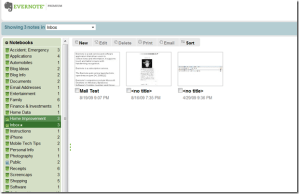
The web version, while completely functional, is not as elegant.  It would be better if the web version looked, felt and operated identically to the desktop version.  This is not a huge issue, since I have Evernote’s desktop application on all my computers, but it would be nice.

image_4

The Evernote Web Clipper makes it easy to grab all or part of your screen and send it to Evernote.  I want the clipper to be more robust, with the ability to edit and annotate the clip before sending it.  One mandatory improvement: all web clips should go to your default notebook (“Inbox” in my case) rather than the most recently accessed folder.  Emailed content works that way already, so it should be easy to have clips work the same way.

From within notes, I’d like the ability to right-click on photos, PDFs and similar files and send them to destinations (i.e., PhotoBucket) with a single click.  Perhaps Evernote could facilitate third party created plug-ins to do this sort of thing.

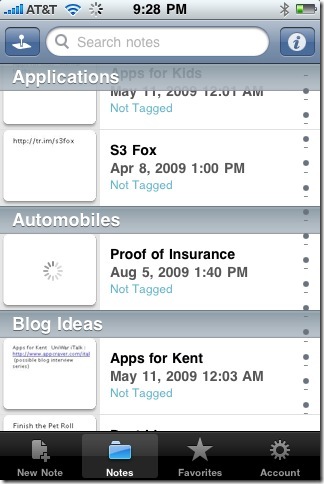
The Evernote iPhone app is well designed and allows easy access to your data.  Like the desktop and web applications, however, it needs folders.  Screen space is limited on a phone, and it would be helpful to group your notebooks in folders to allow faster navigation and retrieval.

photo (11)

Now let’s dream for a moment.

If the Evernote developers wanted to send Evernote into another plane of awesome, how about the ability to embed all kinds of media in a note?  Zoho Notebook, a fine application in its own right, has allowed this for a long time.  Imagine the ability to embed, access and play YouTube videos, audio files and the like- from within a notebook.  Below is a test notebook I created months ago in Zoho.

image_5

I’m not holding my breath for this to happen, but to paraphrase David Wooderson, it’d be a lot cooler if it did.

What I very much want (in case you can’t tell) are folders.  Folders, folder, folders.  So Evernote- get to work.

3 Things I Hate About Windows Home Server

Generally speaking, I am very impressed with the Windows Home Server software in general, and my HP MediaSmart Server in particular.  Unlike every other backup solution I have ever tried, it works.  I love having shared space for media.  I love having a mapped network drive for stuff I want to store on the network.  In other words, it just works, with a lovely combination of simplicity and flexibility.

Most of the time.

There are three things about my home server that drive me stark raving mad.

Slow, Unresponsive Console

Number one, by far, is that the Windows Home Server Console, the control panel for the software, is so slow it makes it impossible to do anything.  Every time I try to use it, I see virtual glaciers flying by my desktop window.

It’s bad enough that it takes a minute or two to connect to the server, but that is bearable.  What’s not bearable is to try and click something and have absolutely nothing happen for minutes at a time.  The only other experience I can compare it to is when you’re trying to slog around a recently drained fish pond, with mud up to your knees.  Anyone who has ever drained ponds knows that getting around down there is slow going.

For example, it took me 5 minutes just to check an “Ignore this issue.”  That is beyond insane.  It’s to the point now that I’d rather not use my server to its fullest than to fight a losing battle with the console.  The home server is such a key and potentially useful part of your home network, that fast and reliable should be job one.  Even if it costs more.

Too Many Home Network Health Warnings

In theory, it’s great that the software notifies you when there is a potential problem with one of the network computers.  In practice, however, this feature comes across like Windows User Account Control on meth.  The sheer magnitude of the warnings combined with the slower than freeze-dried molasses console creates gridlock.  Grid. Freaking. Lock.

I ended up taking a number of lesser computers off the network, just so I could go on living my life.

Blank

Backup Failures

Of course, this only happens with my computer, which has the most important stuff on it, but over half of my backups fail, because for some inexplicable reason, “The computer failed to take a snapshot of the volume for backup.”  No shit Sherlock.  A Google search confirms that others are having this problem, but no solution was evident.

hp_mediasmartserver

Is There a Solution?

I’m not sure.  I could buy one of the newer servers, which have more memory, and cross my fingers.  Nah.  I could make my own server out of an extra computer, but I’d lose all the stuff on my current server.  I could soldier on, and just take it.

I don’t know what I’m going to do, but this is driving me nuts.

Evening Reading: 8/13/09

Bizarre Headline of the Year: Yahoo Tech says that Microsoft is courting the-get this- “Macintosh business crowd” by making Outlook for Macs.  Other than some graphic design industries, do any businesses actually use Macs?  They are more expensive and most employees would have no idea how to use them.  If someone wanted to make a hilarious reality show, they should replace PCs with Macs in some big corporate office and then film the ensuing chaos.

Incomplete Wish List Department: I agree with the things on PC World’s iTunes 9 wish list, but I strongly disagree with what’s not on it.  Like a completely new interface.  And folders.  At this point I would support a constitutional amendment requiring that every software application have folders.

Jargon Smackdown Department: I love this quote from Harry McCracken: “In the end, there are really no such thing as netbooks-there are just notebooks in various sizes with different specs at different price points.”  Amen.

imageSpeaking of Dell:  Am I the only one who thinks Dell’s entire lineup of desktops are butt-ugly?  Every time I visit the Dell site and look at computers, I can’t get past the photos.  I’d pay $100 to interview the person who decided those cases were anything less than heinous.
Advertising Nonsense Department:  Harry McCracken asks what if all web ads were blocked, and gives us 10 possible results.  He forgot number 11: Companies would have to create business plans that actually make sense.  Without going into an economics/philosophy lecture, let me just say that (a) advertising cannot support an entire economy, because if there is nothing to sell, there is nothing to advertise, (b) our economic shift from manufacturing to largely a financial/service economy coincided with the economic mess we are now struggling with, and (c) when you don’t produce or provide something that people will pay for, you don’t have a business.  Paywalls will not work.  You cannot go backwards from free, unless you are a drug dealer.

Friendfeed Facebook Thing: I would write something about it, except I don’t really care about it.  Yawn.

Fitly Physical: DrugMonkey writes a good read on the so-called myth about exercise.  I average over 90 minutes a day on the treadmill, and I can tell you from personal experience that I am one hell of a lot fitter than I was when I thought I was exercising hard by doing a measly 3 miles a day.  On a related note, Dr. Isis explores how much water you really need when exercising.  The photo alone would have made that the best blog post of the day.

Lack of Privacy Department: Now you can opt-out of Google’s plan to control everything about you.  Here‘s a good story.

Getting Ripped: MakeUseOf has a great primer on how to rip a CD, and get the track names right.

I Tweet Dead People: Lance Ulanoff has a list of 6 dead people he’d follow on Twitter.  Here are mine:

1. John Lennon. Watch just a little of Imagine and you’ll see that he was a very smart and thoughtful dude.
2. Robert Heinlein. I don’t love all of his books, but I love a lot of them.
3. Shel Silverstein. He was really good at a lot of the things I like.
4. Jesus. So I could find out where he was for those 17 years.  And see if this is really him.
5. Townes Van Zandt. He was one of the greatest story tellers ever, both on stage and off.
6. Becky Newsome.  My mom, just because she was cool and I miss her.  And that would mean she finally learned how to use a computer.

What the World Needs is More Ringtones:  And you can help.  Make and share your own ringtone with Make Own Ringtone.  Here’s one I made from my song Dreams of McKenzie.

I thought ringtones had to be in some special file format?

A Halfway Good Idea

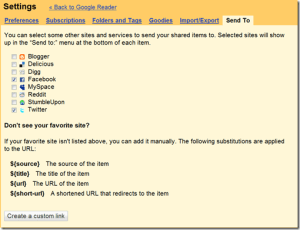
I noticed tonight that Google Reader has added a new sharing function, which lets you send items you share to various social networks, including Facebook and Twitter.  You can even create custom “send to” links.

image

This is a good idea, and would be really helpful- if they had implemented it right.  Which, unfortunately, they didn’t.

As implemented, you are presented with a new link at the bottom of each item.

image_3

When you click that link, you are directed to the destination application, where you can then add the desired item to your social network content.

This is about infinity times more complicated than it should be.  Google Reader should give users the option to fill in your social network name and password on the Google Reader Settings page and then automatically add either (at the user’s election):

1. selected items, on a one-click basis (i.e., without having to visit the destination application); or

2. every item you share,

to that social network.

I would very quickly implement the second option, thereby giving me a faster, more flexible way to push my shared items.  It would allow me to avoid the link-dump problem with Twitterfeed.  It would just be a whole lot better.

This was a good idea, halfway done.