Windows 8, Farting Goblins and Why Windows 9 is the One that Really Matters

windows8While I was watching Brian Boyko’s hilarious and somewhat accurate and somewhat over the top bash-fest on Windows 8, a few things kept coming to mind.  One, while Windows 8 is clearly frustrating, it’s not as bad as all that.  Especially since it is, I believe strongly, a transitional OS, bridging the gap between the former desktop world and the future mobile/touch world.  Two, every time he raged about the weather app that kept opening, I thought about the way the stupid Mail app on my iMac does that, popping up and begging for me to set up a mail account.  I use Gmail via Google Apps.  All I need from the Mail app is for it to go away.  Third, I kept imagining Ed Bott beating out a response, that I can’t wait to read.  It’s hard enough to carry the Windows banner without all the negative hyperbole.

Nevertheless, Brian makes some good points, and this is a worthwhile way to spend 20 minutes.

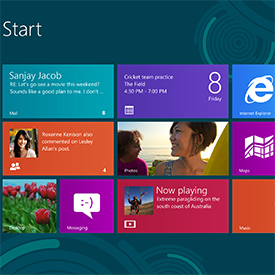
Without a doubt, the dual interfaces Microsoft jammed into Windows 8 are non-intuitive.  I am sure Windows 8 will look and work much better on a Surface Pro than on a legacy desktop.  I also expect computer makers will build hardware- eventually- to take advantage of the touch interface.  Most of all, I believe the next version of Windows is the one that really matters.  It’s a little hard to tell where the operating system is going in 2012.  In other words, will everything really be touch based at some point (I guarantee you Apple is thinking about the same thing).  It will be clear by 2014 or so.  Microsoft is getting a lot of crap for moving too much cheese.  Windows 8 seems to me to be a concerted effort to move cheese in stages.  I have a hard time faulting Microsoft for that.

And it’s not like some of the problems aren’t shared by other operating systems.

All the hand wringing about the lack of an installation disk, while accurate, is no different than OS X.  I needed to do a clean install of Mountain Lion on an iMac the other day because the computer would not stay in target mode (e.g., serving as a second monitor for my primary iMac).  It was doable, but not easy.  No problem for a computer geek, but impossible for grandma.

At the end of the day, much of the frustration with Windows 8 revolves around the dual Metro (or whatever we’re supposed to call it) and desktop interfaces.  Sure, grandma is going to have some trouble getting around Windows 8, but imagine if Microsoft had decided not to “staple” Metro onto the desktop interface, but instead moved all the cheese and dumped the desktop interface altogether?  Sometimes you need to take a long journey in smaller segments.

Windows 8 is a big gamble for Microsoft.  It doesn’t look like it’s going swimmingly so far, but the game isn’t over.  Apple’s computer (as compared to phone and tablet) business is largely consumer based.  Sadly for us Mac users in corporate America, Apple doesn’t have to worry about how an upgrade will go over in a huge office with hundreds or thousands of desktop computers staffed by people who only want to create and manage Word documents and Excel spreadsheets.  Microsoft has to worry about exactly that.  In three years, Windows 8 will be the operating system that set Microsoft’s course into either the future or the ditch.  I’m still thinking the future.  Not because it is so wonderful, because it’s not.  But because it will pave the way for the next version of Windows.  That’s the one that will more clearly define Microsoft’s vision for the operating system of the future.  I can tell you unequivocally that if you installed Windows 8 in a large corporate office overnight, there would be panic, bedlam and mutiny the next morning.  But here’s the thing, you don’t really have to.

Corporate America likes Windows 7, and is not moving away from desktops any time soon.  You can be sure Microsoft knows this.  The typical large company upgrade path often skips versions (think Vista, for example).  It’s the next version of Windows that really matters.  That’s where Microsoft needs to pull everything together into an operating system that works intuitively on tablets and desktops, with fingers and mice.

Is is guaranteed?  No, it’s not.  Microsoft could panic over its passion for the tablet market at the expense of the corporate desktop-oriented market.  But I don’t think that’s going to happen.

Appearances and hilarious videos the the contrary.

Tech: What I Use at Home and on the Road

As the local tech nerd, I get asked fairly often what tech I use, locally and when on the road.  The list changes with time, and here is the list as of the end of 2012.

Desktop Computer

kentsimac

I use a 2011 iMac as my desktop, where most of my computing is done.  I have a second 2011 iMac that doubles as both a backup drive and a second monitor, when I need to Command F2 my way into some dual monitor goodness.  I looked at the new iMacs, but there’s nothing compelling enough about them to force me to upgrade.  I also like having the built-in DVD drive.  DVDs are sort of like the police.   You don’t think much about them until you need them, and when you need them you usually need them badly.

magictrackpad

I absolutely love my magic trackpad.  I like having a number pad, so I use the usb Apple keyboard in lieu of the wireless one.  I still find the Apple keyboards a little small.

Hey, there’s my cuz and my favorite game of all time, in the same video

I started out on a Mac, went to Windows for many years, then ended up back on a Mac.  With the arrival of Lion/Mountain Lion, I can say this without reservation: there is simply no reason for the typical computer user to use anything other than a Mac.  They are not perfect (I just had to do a clean OS install on my second iMac to fix a target mode issue I was having), but they are as close to perfect as a computer can be.

Laptop

I use a 2011 13 inch MacBook Air as my only laptop.  I was afraid 13 inches would seem too small, but it doesn’t.  It’s light, fast and powerful.  Cassidy has a newish MacBook Pro, and while it’s nice, there’s nothing it can do that my little Air can’t. I may upgrade in a year or two, but again there’s nothing about my laptop that feels old.

Tablets

ipadminiI have a next to last generation iPad that I use for general tablet stuff and a new iPad Mini that serves as my bedside Kindle replacement.  I find that I don’t use the full size iPad very often when at home.  I use it more when on the road.  I use the iPad Mini every night to play Words with Friends and Draw Something, and to read a little.  It never leaves my bedside, but it is indispensable.

Yes, I tried an Android tablet.  It sucked.  Sorry.  The amazing part was how bad Gmail was on it.  I’m sure they have gotten better, but the fact that you never know when and if your device will be upgraded and to what, is a deal stopper for me.  I also tried a Surface RT.  It’s not really useable in its current state, but as I noted in the earlier post, the Surface Pro is going to be a player in the tablet space.

Phone

I use an iPhone 5 every day, all day long.  It’s the first phone-like device that has felt like a pocket computer to me.  I can’t really say why.  It just does.

Cameras

cx360v

I use my iPhone 5 for lots of day to day stuff, but make no mistake- its camera is not on par with most dedicated cameras.  I get a lot of blur.  I have a Canon EOS 60D, which I should use a lot more than I do.  It takes phenomenal photos and videos, but it is big.  Big, I tell you.  For videos, I still use my trusty Sony HDR-CX360V.  It works great with iMovie and takes good video.

Scanning

I use a Fujitsu ScanSnap S1500M.  But the Mac software is not even close to as good as the Windows version.  So I’m still looking for a good scanning platform.  I tried iDocument, but didn’t like it.  I think we are still waiting on the killer Mac scanning solution.

Software

I use a ton of software on a regular basis.  Here’s a run down of the stuff I use the most.

Documents: Office for Mac.  Google Docs is better than it used to be, but not good enough for business use.  I’ve never used the Apple apps, nor has anyone else I trade documents with regularly.

Photos: Instagram (with uploads to Flickr, which is my primary online photo repository); iPhoto, which is reason enough to switch to a Mac.  Photoshop, to make logos and whatnot.

Videos: iMovie, even more than Final Cut Pro, which is supposedly so much more powerful; YouTube has become my only online repository.

Notes: Evernote.  There is no substitute.

Music:  Spotify mostly.  Google Music would be great but for the 20,000 song limit.  iTunes still sucks, just not as much.  VLC is awesome for playing local files.  I listen to Newsome.fm on the web.

Blogging:  The WordPress web app, and sometimes the iPhone one.  I had to abandon Live Writer when I deleted Parallels.  I use BBEdit when doing html.

Zipping and unzipping: I use StuffIt.

FTP: I don’t use it much now that I’ve moved to WordPress.Com, but FileZilla is the best FTP app I’ve found.

Cloud: Dropbox (you and I each get free space if you sign up via this link) and Box.  I dumped SugarSync in favor of a local backup via a Time Capsule.  I dumped Google Drive as too kludgy.  In fact, I really dislike Google Drive.  I use, but don’t really understand, iCloud.  Apple has not done a good job explaining how awesome it is, if it is.

That’s what I use.  Do you have better ideas?  I’m all ears.

The Home Place Has Moved (Here’s How to Get It Back)

For many, many years, I have operated and used The Home Place as a custom internet start page. Back in the very early days of the web, it actually got a little press, as being cutting edge.

thpclip
click for larger image

Not so much anymore, but I still use it, as do various family members and friends. As I noted the other day, however, things are changing around here. I’m moving Newsome.Org to WordPress.Com (the hosting company; I’ve been using the WordPress blogging platform for a long time).  This will save me a lot of money.  I like money.

The move makes it impossible to keep The Home Place at Newsome.Org. Without too much nerdity, the reason is because WordPress.Com does not allow you to have custom named web pages in a custom location in your web directory. So, I have set up The Home Place at another location.

Here is the new address:

http://newsome.cc/jknstart (click here to go there now). Update:  see below for new, better plan.

If your company, like mine, annoyingly blocks cloud services- in this case Dropbox- and I know you, email me and I’ll send you a zip file with the web page files in it. You can unzip them onto your computer, and set your home page (via Options or Preferences in your browser) as the local (e.g., on your computer) jknstart.html file. I have to do that at work, and it works fine.

Sorry for the inconvenience.

Update:  OK, so none of that worked well.  In fact, it sucked.  So The Home Place is back, new and improved.  It does have a new web address:

http://ranchodenada.com/

Set that address as your browser home page (via the Settings or Preferences in your browser) and you’ll be all set.

Why You Shouldn’t Buy a Microsoft Surface, Yet

I exist pretty happily in my Apple-filled tech cocoon.  I use an iMac on my desk, carry a MacBook Air in my backpack when on the road, have an iPhone 5 in my pocket, an iPad lying around somewhere, and an iPad Mini on the way to replace my ancient Kindle.  But that doesn’t mean I ignore or reject other tech, or treat Apple as a religion.  OK, well at least it doesn’t mean I ignore other tech.

I have been following the development and release of Windows 8 and Microsoft’s Surface tablet closely.  I installed most of the Windows 8 betas on an old laptop.  Without going into a lot of detail, my view of Windows 8 is that it is a transitional OS that will ultimately be much more Metro (or whatever we’re supposed to call it) and much less traditional desktop.  But they can’t move all our cheese at once, so we get the best (or perhaps worst) of both worlds for now.  I have no problem with this, although as a committed desktop user, I wonder how desktops fit into the largely mobile-focused evolution we are experiencing (a touch screen iMac- which I firmly believe will happen, one day- would put my mind at rest, but that’s a topic for another day).

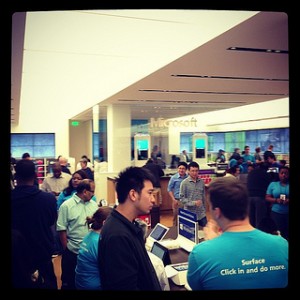
MSStore-300x300

I bought a Microsoft Surface RT shortly after they were released.  Here’s the bottom line.  The hardware is very, very nice.  Way better than any Android device.  The tablet looks and feels sturdy and nice, and the keyboard/cover works amazingly well.  The software, however, is very, very frustrating.  For two reasons.  One, there are simply very few compelling apps in the App Store.  This problem will likely be addressed over time, as developers fill what looks to be more than sufficient demand.  Two, the Surface RT cannot run regular Windows applications.  You get a bundled version of Office in the desktop environment, and Metro (or whatever we are supposed to call it) apps from the App Store.  This problem will not be fixed, as far as the Surface RT is concerned.

But there is hope.  And not just a fool’s hope.

Sometime next year, Microsoft will release the Surface Pro, which will run a full version of Windows 8- meaning you can install and use both Metro (or whatever we are supposed to call it) apps and regular Windows software.  This will be much, much better.  As good as an iPad at being an iPad?  Probably not, but as my pal Ed Bott correctly points out, that is not the standard by which it should be judged.  Will I dump my iPads for a Surface Pro?  Nope.  Will I buy one, thereby having an additional tool in my tech bag and a Windows computer in a house that otherwise would be devoid of one?  Probably not.  Especially if I’d have to pay for a subscription to get useful Office apps on my iPad (that plan irritates me, but makes sense from Microsoft’s perspective).  Will it be infinitely better than any manner of Android device, if for no other reason than Microsoft will manage the upgrade process with some semblance of logic and predictability?  Certainly.

So, if you want a Surface you should get one.  Next year.

The Houston Chronicle Gets the (Document) Cloud

Our local paper has always been in front of the curve when it comes to tech-related things, in large part thanks to my Twitter feed check-in hating cyberbuddy, Dwight Silverman.  Today, it seems the Chronicle dove head first into the Cloud, the “Document Cloud.”

chroncloud-300x287

At least now I know what Lorem Ipsum is:

Lorem Ipsum is simply dummy text of the printing and typesetting industry. Lorem Ipsum has been the industry’s standard dummy text ever since the 1500s, when an unknown printer took a galley of type and scrambled it to make a type specimen book. It has survived not only five centuries, but also the leap into electronic typesetting, remaining essentially unchanged. It was popularised in the 1960s with the release of Letraset sheets containing Lorem Ipsum passages, and more recently with desktop publishing software like Aldus PageMaker including versions of Lorem Ipsum.

 I don’t know about any of that, but I bet the Document Cloud is going to be awesome!

Is the Demise of iGoogle an Opportunity for Yahoo?

I’ve been a proponent and user of internet start pages for a long, long time. My primary start page is a handmade one here. All of my desktop browsers are set to start and open new tabs there. I even have a mobile version, which I rarely use, simply because almost all mobile computing is done via apps (no one surfs the web on a phone; those who claim to are kidding, confused or lying).

I also use a third party start page for news, weather, sports, stocks, etc., because it is much easier to add widgets to third party start pages than to write them yourself. I used My Yahoo for years. Eventually, Yahoo’s neglect of My Yahoo (as a part of its apparent overall policy of neglecting every useful part of its web-based assets) and my growing dependence on Google, led me to largely abandon My Yahoo for iGoogle. Just in time for Google to announce the discontinuance of iGoogle, in what I interpret to be another doomed attempt at forcing users to embrace Google+.

Is this an opportunity for Yahoo?

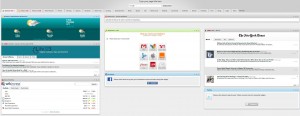
There are a few alternatives out there. Netvibes is one that people are talking about. I’ve had a Netvibes account since the early beta, but I had to recover my credentials to see what my page looks like (e.g., I never use it).

netvibes-300x116

Netvibes

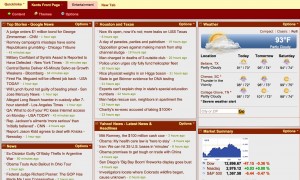
That page screams 5 years ago, but with a little effort I could make it look and work OK. But My Yahoo could be so much better, if Yahoo would spend a fraction of the time nurturing it that it spends hiring and firing CEOs.

myyahoo1-300x180

My Yahoo

My biggest criteria for a third party start page used to be which one was better. Now, it’s which one will likely exist longer. On the one hand, any start page could be trashed or bought or ignored into complete obsolescence at any moment. On the other, sometimes a market that everyone is abandoning is an opportunity in disguise.

Particularly if you have a built-in advantage.

Neither Google nor Netvibes is a content producer. Thus, most content they serve up is third party content. Yahoo, on the other hand, seems- at least at the moment- to be interested in producing content:

Levinsohn also will expand Yahoo’s effort to create its own news coverage of big events, such as the Olympics and national elections.

That fact, combined with the ad-serving potential and stickiness of an online home-base, sounds like an opportunity. Create a place people will actually want to use.  Fill it up with your content and that of your content partners, sell some ads. Make some money. Reclaim your mojo. And so on.

For this to work, Yahoo has to (a) be paying attention, (b) recognize this opportunity, (c) seize the opportunity now, not months from now, and (d) allocate the resources to make it awesome. Sounds like a long shot, but that’s better than no shot. I hope Yahoo gives it a try. I’d love to love My Yahoo.

Again.

Why I Love Reddit

I can take or leave Facebook.  I think Twitter is largely a spam-fest.  Google+ is a beautifully designed, empty place.  But let me be clear about one thing: I love me some Reddit.

reddit-300x300

For those about to be rocked, Reddit is an online community:

known for its open nature and diverse user community that generate its content.  Its demographics allows for wide-ranging subject areas, or main subreddits, that receive much attention, as well as the ability for smaller subreddits to serve more niche purposes.  The unique possibilities that subreddits provide create new opportunities for raising attention and fostering discussion across many areas.  In gaining popularity in terms of unique users per day, Reddit has been a platform for many to raise publicity for a number of causes.  And with that increased ability to garner attention and a large audience, users can use one of the largest communities on the Internet for new, revolutionary, and influential purposes.

Think of it as a very active message board populated, largely, by tech-savvy and knowledgeable users.

Enough nerd-talk.  Let me show you why I love it.

Today, I came across an article describing a guy’s 10-year old Civilization game:

The world is a hellish nightmare of suffering and devastation.  There are 3 remaining super nations in the year 3991 A.D, each competing for the scant resources left on the planet after dozens of nuclear wars have rendered vast swaths of the world uninhabitable wastelands.

I was a huge fan of Civilization for a long time.  So this was something I was very interested in reading about.  And of course it originated on Reddit.  Not only is there a great write-up by the player himself, there are (as of this moment) 3000 comments.

civ-300x244

Even better, there is now a subreddit dedicated to ending the 1700 year war between the Celts, the Vikings and the Americans.

Nowhere on the internets is the potential for interesting reading higher than at Reddit.

If you are just learning about Reddit, go check it out.  You can thank me later.

Cult of Mac Doubles Down on MacKeeper Craziness

My once favorite blog, Cult of Mac, has responded to the predictable outcry over its hawking of the extremely controversial MacKeeper software.  Did they respond by actually installing, using and (this is important) trying to uninstall the program?  Nope.  They just did some Google searches and concluded, mostly, that it’s all good.

Except it ain’t.

As I noted before, I’ve never used MacKeeper and I never will.  I don’t need to test my suspicions about it, because the marketing strategy alone (pop-unders, ripe for abuse affiliate program, etc.) tells me all I need to know.

Here’s MacKeeper’s PR manager’s explanation for that strategy:

We believe that we have a great product and we want people to know about it and the only way to do this is to explore every medium of advertisement.

What they want is to make money.  Cash.  Bucks.  A desire they seem to share with Cult of Mac.  If the program is so awesome and this is all about informing the unsuspecting masses that their Macs are in great danger, there would be no need for sketchy marketing and ineffective uninstallers.  It’s not even about whether MacKeeper is good or bad; it’s the way they go about it.

But I don’t really care about MacKeeper.

What I care about is the fact that I can no longer trust Cult of Mac.  If I have to wonder whether every app or service I read about on Cult of Mac is a great benefit or disguised malware, Cult of Mac is useless to me.  If Cult of Mac’s response to that question is a Google search and some second hand anecdotal gibberish, in lieu of first hand analysis, then it’s not just useless- it’s dangerous.

I hope Cult of Mac made a butt load of money selling MacKeeper to its readers.  Because they paid a big price in the process.