The WordPress Process, Part 6

The WordPress Process is a series of posts at Newsome.Org, documenting my forced march from the comfort of Blogger to the uncharted territories of WordPress.  Parts 1 & 2 are here, Part 3 is here, Part 4 is here, and Part 5 is here.

image At long last, we have arrived at the Promised Land.  Newsome.Org is up and running on WordPress.  Most (I have identified one casualty so far, and there may be a few more) of my 1600+ posts made the trip, and we have preserved the permalinks (more on that below).  While I was able to get WordPress installed, hack-up a theme and generally get the system operational, the hardest and most important step is the importation of old blog posts and the preservation of your existing inbound links.

In that regard, there are two important things those moving established blogs from FTP published Blogger to WordPress need to consider.

It’s Easy to Do it Wrong

I imported my old posts in a way that I thought would preserve all of my permalinks.  It looked like it worked, and I started going back through old posts and adding Categories and Tags.  But, of course, my approach didn’t preserve the links correctly, so we had to start the importation process over.

By we, I mean Aaron Brazell, of Technosailor, who I hired to help me with theimage importation and permalink preservation part.  Aaron is extremely knowledgeable (and by that I mean Jedi-like) with respect to all things WordPress.  In fact, he literally wrote the book (WordPress Bible; purchase at Amazon).  I bought and am reading Aaron’s book, and highly recommend him for those in need of a WordPress guru.  Aaron was able to fix my mess correctly and preserve the permalinks.  As punishment, I got to start over on the Categories and Tags job.  After a month or so, we are going to change the permalink structure to the default WordPress form and do 301 redirects to forward old-style links to the new WordPress-style pages.  I’ll write about that in a future installment of this series.

Use Care When Hacking

While I crashed and burned when I tried to handle the post importation and permalink work by myself, I am pretty good with html, css and most scripts.  I got my theme installed easily, and once I explored a bit I felt pretty comfortable hacking the various files to change the look and layout of my pages.

The problem with this, as with any coding, is that it’s always all good, until it ain’t.  I got too confident, stopped saving incremental back-ups and promptly trashed my header (the part at the top where the Newsome.Org logo and photo banner are located).  A little help from my friend Steven Hodson and some surgery by Aaron got things back up and running.  The moral is to use caution when hacking your WordPress files and to always make a back up before you change anything.

Comments

I was able to get get Disqus comment and reaction numbers to show on the main WordPress pages, with some great help from the Disqus team.  One helpful tip, and something I stupidly failed to notice: if your comment numbers aren’t displaying properly, go to Settings>DISQUS>Advanced Options in your WordPress Dashboard and check this box:

image

I could have saved me and the Disqus guys some time if I had seen that earlier.  Disqus is a pretty amazing service.  If you don’t use it, you should.  For sure.

The Punchlist

So what’s left to do?  Here are a few things I know of.

1. Finalize the permalinks, and make sure the old links are properly redirected, and then coordinate my URL structure with Google Webmaster Tools. I learned my lesson, and will let Aaron advise me on this.

2. Identify any posts that didn’t get imported and, if I can’t live without them, add them manually.  I only know of one so far, so hopefully this will be a small job.

3. I noticed that some applicable posts that got imported do not show up in the appropriate monthly archives.  I’ll consult with Aaron and see what can be done about that.

4. Decide whether to install the All in One SEO Pack.  Again, I’ll consult with Aaron on this.

5. Consider what additional plugins I want to install.  Part 7 of this series will cover plugins, so we’ll address current and future plugins then.  In the meantime, good plugin suggestions are encouraged via the comments.

6. Delete the old FTP Blogger-created directories on my server.  But only when Aaron tells me it’s OK.  I have to resist my techy inclination to jump first and worry about the parachute later.

7. Delete the old Newsome.Org Blogger blog, which currently resides at Blogspot, as part of the post importation process.

That’s where we are so far.

Any other tips from veteran WordPress users?

5 Reasons Why I Dig the Biggest Loser

I was late to the reality show party, but at the same time I cannot stand it when a bunch of eggheads blather on about how reality shows are beneath them, and all that.  I already have a job, so what I want from TV is entertainment.  Mindless entertainment is much preferred over some high-brow nonsense that reminds me how much I hated all those books they made me read Cliff’s Notes for in English Lit classes.

image So, once I discovered Survivor and The Amazing Race a few years ago, I became a fan of both.  In fact, I bought bootleg copies of some of the old seasons that aren’t on commercial DVD.

I was even later to The Biggest Loser party.  I started watching a year or so ago.  First last season on TV (how awesome were Danny’s and Rudy’s final numbers!?), then a couple of seasons via iTunes, and finally some bootleg DVDs of other seasons.

Good stuff, and here’s why.

1. Physical Reality TV is My New Pro Sports

When I was a kid and a young adult, I loved pro sports.  Football, basketball, baseball, I watched and followed it all.  Somewhere along the way, it stopped being about the game and became about the bling and the money.  That stuff doesn’t interest me.  I still watch a lot of college sports, and a little Major League Baseball.  But, other than the occasional game I attend for business purposes, I haven’t watched 5 consecutive minutes of an NBA game in close to a decade.  After my fantasy football league folded last year, I didn’t watch one minute of an NFL game this past regular season.  And only the second half of the Super Bowl.

Over time, reality shows that emphasize physicalimage challenges have filled the void left by pro sports.  Survivor (which also has significant outdoor and camping elements, which also appeal to me), The Amazing Race and The Biggest Loser have become my new pro sports.

And let’s not overlook the actual sports embodied in many of the challenges the contestants face.  Marathons, rock-climbing, etc.  The actual sports elements of The Biggest Loser are often more interesting that what passes for pro sports.

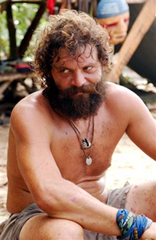
Which I guess makes Rupert, who I happily get to watch tonight, my new Kenny Stabler.  I think that’s just fine.

2. It Generally Shows the Good Side of Human Nature

Sure, there’s a game element to it, and some people play the game full-on.  But there are many more examples of people being supportive, and doing the right thing.  Last season, among others, contestants actually asked to be voted off, because others needed more time with the trainers.  People generally support each other, both physically and emotionally, which is uplifting.  It’s nice to see people on TV making, for the most part, good decisions.  Sadly, that’s a rare thing these days.

A related element I really enjoy are the emotional transformations people often go through while on the show.  For many, weight gain is a symptom of some other problem.  For others, weight gain causes emotional issues that further complicate recovery.  I love to see someone get their head on straight while getting their body fit.  Mark in Season 5 and Courtney in Australia’s Season 2 are great examples of this.

It’s really cool when these transformations are embodied in amazing feats.  Consider Courtney, who faced- in epic fashion- a fear of heights.


3. It Promotes a Healthy Lifestyle

Without going into the rant that I could easily give, I think just about every single thing we see on TV these days promotes an unhealthy lifestyle in one way or another.  So a show that teaches people how and why to exercise and eat right is a fresh and much needed change of pace.

I have learned a little about training, and a lot about nutrition from watching the show.  My kids like the show for the drama and the excitement, but I have seen them, perhaps subconsciously, using things they learned from the show, in the kitchen and at snack time.

4. It is Great for Multi-tasking

One of my core approaches to life is to try to do more than one thing at a time, where reasonable to do so.  I don’t have a ton of free leisure time, so what time I have needs to be used wisely.  As a result, I watch the lion’s share of my TV in the garage, where we have set up a family gym.  I can run on the treadmill and watch TV at the same time.

Some shows (think Lost) just aren’t conducive to multi-tasking.  The Biggest Loser is perfect for it.  Plus, you can’t help but be inspired to work harder when watching others working out.

5. I Really Like the Trainers

I really like Bob Harper and Jillian Michaels (even if she does make some interesting endorsement choices).  I think they care deeply about the contestants, and I think they do a good job of being tough (in a world that needs a lot more of it) and supportive.  I loved it when Jillian refused to back down from her statements this season about Melissa’s game-playing failure to lose weight while having immunity.

When I think of people who have positively affected a lot of peoples’ lives, Bob and Jillian always end up near the top of that list.

So, yes, I’m a Biggest Loser fan.  Sure, there’s a lot of manufactured drama and a few too many tears shed, but for my money, it’s among the best entertainment out there.

And unlike most TV shows, it’s good for you.

How to Enable YouTube’s (Sort of) Parental Controls

parentalcontrolMy two oldest kids ( 11 and 8 ) are pretty intensive computer users, for both school and, to a lesser extent, fun.  They have a shared computer, here in my study.  Sometimes you can find them working away on their homework while I’m writing these exciting blog posts.
I use- and recommend- Windows Live Family Safety to control what they access on their computer.  It’s a good program, that does much of what I want it to do.  But there are holes to plug and redundancy is a good thing where my kids’ eyes and ears are concerned.

YouTube is one of their favorite web sites, and I have given access to it via Windows Live Family Safety.  But I want them to be able to see the things they should see there, without seeing the things they shouldn’t.  This has been a bit of a challenge, so I was happy to read today that YouTube has added parental controls.

If you want to control your or your kids’ YouTube experience, you can now do so via an opt-in feature known as Safety Mode (not to be confused with Safety Dance).

Let’s take a quick song break to dance around for a moment. . .

OK, back to YouTube.

The problem with YouTube’s implementation of these controls is that each YouTube user has to opt-in to Safety Mode separately.  Which means (from the FAQ):

Q: My kids and I each have separate profiles on our family computer. Do I have to log in to the same browser on each profile to lock strict filtering on each profile?
A:
Yes, each profile operates independently, so you would have to lock your preference on each browser on each separate profile.

There are a heap of problems with that, but I’ll pick three.  One, I have to log in to each of my kid’s computer accounts on every applicable computer (they have accounts on one of my laptops and the rarely-used Netbook), and enable Safety Mode.  Two, none of my kids have YouTube accounts, so I guess I log in as me from their computer account and enable this feature.  Three, it will take any kid who’s smart enough to use a computer about 30 seconds to disable this restriction.  Surely there’s an better way.

Let’s give it a try anyway.

After clicking over to YouTube and logging into my account, I see a recommendation of The Bangles doing one of the best songs ever.  Maybe it’s the fact that I’m hearing a great Big Star song without Alex Chilton, but, so far this feature seems a little half-baked.

So let’s take a better song break, shall we?

At the bottom of a YouTube page, you’ll see a link to enable Safety Mode.

image

You can lock Safety Mode if you are signed into your account (from the FAQ):

Locked Safety Mode:

  • Sign In to your YouTube account
  • Click Safety Mode at the bottom of every page to open the preference setting
  • Click On and Save and Lock to opt-in and lock this browser
  • You are now in Locked Safety Mode!
    To opt out open preferences and Click Unlock Safety Mode.
    Enter your YouTube password to unlock Safety Mode.

This all seems like a lot of work to put a system in place on lots of accounts on lots of computers, which could be easily disabled.  I guess it’s better than nothing, but content filtering and parental controls could be addressed in a much more effective, easier way.

Note that Safety Mode is being rolled out gradually, so it may not be available to everyone yet.  In the meantime Read/WriteWeb has a detailed look at the feature, and its shortcomings.

Windows Live Movie Maker: An Often Overlooked Gem

I, along with many others, constantly rave about Windows Live Writer.  It is probably my favorite current application.  I could easily give another sermon about it.

But not tonight.  Rather, I’m going to talk about Live Writer’s often-overlooked Microsoft Live Essentials suitemate: Windows Live Movie Maker.  It’s free, it’s relatively powerful, and it makes great videos.

I use it mostly for creating slideshows- a series of photos set to music.  Here’s how I made a pretty cool little video of some old photos of my parents and some of their friends.  In less than 10 minutes.

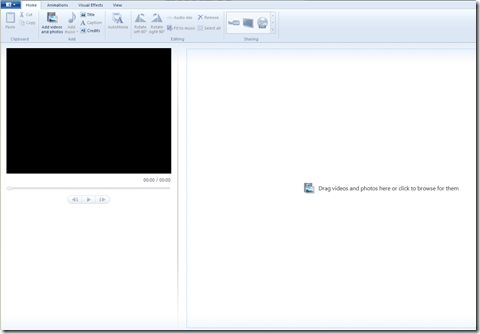
Step 1: Drag and Drop Photos

image

Open the application, click on the “Add videos and photos” button and drag and drop photos into the space on the right.  I grabbed photos from a folder in my Pictures Library called Old Prints.

image

Step 2: Add Music

Next, click on the “Add music” button, navigate to an MP3 you want to use and click on it.  I chose one of my favorite songs, Valse de Grand Pere, by the Bluerunners, from their excellent LP Honey Slides (purchase @ Amazon; Lala link).  The green band above the photos tells you there is audio associated with the movie project.

You’ll want to pick a song with a length consistent with the duration you want for each photograph.  For example, if you have 50 photos and you want each photo to be on-screen for 5 seconds, you’ll want a song that lasts around 4:10 (50×5=250; 250 seconds=4:10).

Step 3: Fit to Music

Next, click on the “Fit to music” button, which will automatically configure your movie length to equal the length of the song you added.

Step 4: Make Your Movie, Automatically

Next, click on the “AutoMovie” button, which will immediately and automatically add a title, cross-fade transitions between photos, and pan and zoom effects.

Step 5: Customize Your Titles

image

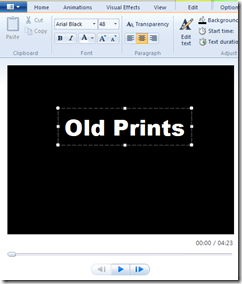
Click on the first and last slides, and replace the default text with the text of your choice.  You can add nifty text effects via the “Text Tools” tab.

Step 6: Choose Your Format

From the “Home” window, select your format via the “Sharing” box at the top.  I wanted an HD movie, so I clicked on the TV icon (which is the HD option), named my video file and, presto, an HD Windows media file is quickly rendered.

There is also an option to upload directly to YouTube or to burn a DVD.

Step 7: Upload and Enjoy


That’s all there is to it.  Not a bad way to spend 10 minutes.

An Epidemic of Me-too-ism?

Back in the day, after I developed the original ACCBoards.Com (which later became a part of and was merged into what is now the Scout network of sports sites), saw my traffic shoot through the roof, partnered up with a TV network and a major cable company, and started getting some serious checks in the mail, I decided that I was an expert in all things communal.  And that I should expand my empire accordingly.

I started with SECForums.Com, an SEC sports site.  It never took off, and I don’t own that domain any longer.  Then I developed AVBoards.Com, for audio-video enthusiasts.  It started off strong, based almost solely on traffic diverted from ACCBoards.Com, then died almost as quickly.  I let that domain lapse last month.

Others followed, and while a few of them survived, none of them were a fraction as successful as ACCBoards.Com.  Why?  Because I didn’t have the passion, the industry connections or- most importantly- the timing that I had with ACCBoards.Com.

I was neither good nor lucky, and to be successful on the web, you have to be both.

Pretty quickly my little web empire became diluted, scattered and lost in a sea of existing, entrenched alternatives.  I stopped doing one thing well and started doing a lot of things poorly.

There was a lesson there, and it’s one I learned, albeit at some significant opportunity costs.

hatesharingIn light of all that, I was a little dismayed this week when I read that Facebook was launching a full-fledged email client, and it was soul-crushing to learn that Google is going to add Twitter-like social network features to Gmail.

A little dismayed over the Facebook thing, because I am a light user of Facebook, so nothing that happens over there is going to materially affect my life.

Completely bummed out by the Google thing, because I use Gmail every day, and whatever happens there definitely affects my life.

Here’s the thing. . .

image Facebook, you can’t invent Gmail because Gmail already exists.  Do what you do.  Let Gmail do what it does.
Google, you can’t invent Twitter because Twitter already exists.  Not to mention that there are a thousand better ways your development time and money could be spent.  Like improving the spotty integration of Google Apps, so they actually look and feel like a suite of apps, and not a bunch of unrelated products crammed ineffectively together.

Either make Google Apps a robust, business-ready tool, or make it an awesome toy.  Don’t create some crappy combination of both.

Google and Facebook, more than their peers, have a good track record of staying on course, even if that course isn’t readily apparent to the rest of us.  I’d like to believe there is a brilliant master plan in play here.

But I don’t.  I think it’s just a case of mass me-too-ism.

Do Boy Scouts Matter Anymore?

Today is the 100 year anniversary of the Boy Scouts of America.  Wired has a very interesting article asking if the Boy Scouts are still relevant.

That’s a fair question.

I was a Boy Scout.  In fact I am an Eagle Scout, having obtained that rank in November of 1973, at the ripe old age of 13.  Two years later, I went to the Scout World Jamboree in Lillehammer, Norway.  When I got home, I retired from Scouting, at the top of my Scouting game.  Sandy Kofax-style.

I learned a lot from Scouts, and my love of the outdoors was certainly nurtured by the many campouts and other outdoor activities provided by Scouting.  I had some cool Scout Masters, and made some good friends via my troop (long live the Err Bear Patrol!).

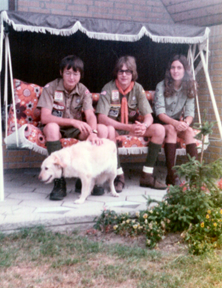
image But even then, in the midst of it, I remember feeling just a little like a nerd.  I hate to admit that, given my general tendency to embrace the trappings of my simpler past.  But I’m not going to lie.  My love of the outdoors, my competitive nature that led me to work to become an Eagle and some of the contraband that we smuggled into camp, kept me involved.

But, again, under no one’s definition was I ever a gung-ho Boy Scout.

Only much later did I come to really appreciate the experience.

Me (on the left) at the 1975
Scout World Jamboree

Much like I came to appreciate some (though not all) of the at-the-time-hated so-called great literature that was forced upon me at school- because I came to realize that it was good for me.  So when I try to assess Scouting in 2010, I have to do it from both the perspective of the active Scout (is it fun?) and the adult ex-Scout (was it good for you?).

I’d have to say sort of and yes.

Let’s start with the yes.  Scouting was definitely good for me.  I don’t volunteer the fact that I was a Scout, but when people learn I am an Eagle Scout, they are generally impressed.  Many of my outdoorsman skills were learned through Scouts.

Was it fun?  Yeah, mostly.  More importantly, is it fun now?

Like many parts of life, the Scouting experience has been politicized and watered down to the point that, I suspect, the Scouting experience now is very different from the one I had.  For one thing, as I understand it, entire families now go on Scout campouts.  Sorry, but I think that’s odd.  I go camping all the time with my family.  But Boy Scouts should be a different experience.  How can you really learn to get along outdoors if dad and mom are in the tent with you?

Perhaps these rules are mainly for younger Scouts, but still.  I remember when I was initiated into the Order of the Arrow.  They made us work like dogs for 14 hours clearing trees from a future campsite.  Then they gave us a sleeping bag and an egg, and dropped us off in the woods for the night, each of us alone.  That was the high point of my Scouting experience, even if I never did get that egg cooked.

I hope I’m wrong, but I doubt it’s like that now.

I’m going to intentionally leave aside the issue of gays as Scout Masters and atheists being oppressed by the Scout Oath, and whatnot.  I see both sides of the former issue (though if pressed I will always end up on the pro-gay-rights side), and I am bored by the latter.

So is it fun?  Is it relevant?

At the end of the day, I have to say yes.  I come down on the pro-Scouting side largely because I think the Scouting experience, however diluted it may be, is better than just about any of the alternative ways for a boy to spend his weekend.

A campout, even one that everyone and his entire family attends where people tip-toe around on eggshells to avoid offending the ready-to-be-offended, has to be better than sitting in front of a computer or TV.  Learning to build a fire (assuming they still allow fires), has to be better than learning how to frag some other kid in some super-violent online, inside Xbox game.

It ain’t perfect.  Maybe it’s a little nerdy at times.  But it’s an existing framework that allows kids to get outside.  Maybe learn a skill or two.

That’s got to be OK.

Absurd, Irritating Ad from a Ford Dealership

My dad was a Ford dealer.  Until I bought my Toyota Tundra a couple of years ago, I was a loyal Ford customer.  When I bought my Toyota, I felt a little guilty.

No more.

This week, in the wake of the Toyota recalls, I received a very official looking envelope, with a large, ominous message on the front” “IMPORTANT TOYOTA RECALL INFO ENCLOSED.”

image

So I put it aside, and opened it today.

Much to my surprise and Ford-hate inducing irritation, it was not a letter explaining how to get my truck fixed.  It was an ad from a Ford dealership trying to get me to buy a Ford.  Look, there is one reason and only one reason they dressed-up the envelope like this.  To get me to open some paper-spam that I would otherwise have immediately tossed in the trash.  I don’t know if this is illegal, but it should be.

image

Candidly, I hope Freeway Ford never sells another vehicle if this is the way it tries to attract customers.

Guess what Freeway Ford?  We are shopping for a car for my wife right now.  Guess what else?  We’re not going to buy a Ford.

Travel Irritations and Hope for the iPad

So here I sit in a fancy hotel room in Austin, watching Paranormal Activity, which is shaping up to be a scary movie, and feeling irritated that the supposedly world-class fitness center in this hotel closes at 9:00 p.m.  Meanwhile people in Days Inns across America are happily running on lesser treadmills in non-world-class exercise rooms.  That are open.

Compounding my irritation is the fact that after deciding to freeze my butt off and run outside, I found the nearby trails to be pitch black- not a light anywhere.  It was hard to stay upright and on the trails walking.  Running would have been impossible.

It’s annoying.

Sort of like reading and responding to email on my laptop.  It’s too small to create a desktop monitor or keyboard experience, and too big to easily place in my lap or use as a quasi-handheld.  It’s just not a fulfilling experience.

I wonder if the iPad will fill this gap I have fallen into?

image

It could.  After all, much of the work we do on laptops- reading email, surfing the web, listening to music, etc.- doesn’t require a desktop-like experience.  And, again, how much worse could it really be than trying to hold this laptop and deal with this tiny keyboard?  I can tell you this- I can type emails much faster on my iPhone than this tiny, non-ergonomic keyboard.

For me to fully embrace the iPad, I need three things to happen.

One, I need Microsoft to recognize the huge market for Office applications.  As I have said a million times, Google Docs suck epicly.  Document intensive users are still bound to Word.  Microsoft should not give conflicted users another reason to try to free themselves of Office.  Rather, make it easy to stay hooked by creating some sort of Word app for the iPad.

Two, I need the iPad (and ATT) to permit the iPad to do what the iPhone still can’t do- tether.  That way I can dump my ATT wireless broadband card, and apply that money to 3G service on the iPad.  The lack of standard ports on the iPad doesn’t bode well for this, but I can hope.

Three, I need the rumors about a camera on the iPad to, miraculously, be true.  Maybe I won’t use the camera that much, but philosophically I can’t get past the lack of one.

If that happens, I’m in.  What are your must-have features?

By the way, Paranormal Activity is seriously scary. . .

Newsome.Org Radio

image

Update 2:  Newsome.fm is now managed and hosted via Spotify.

Update:  Our official and most curated radio station is now Newsome.fm.

If you want good music via Pandora or Slacker, our old stations are still available and rocking along.

We have numerous handcrafted Pandora and Slacker Radio stations to choose from.

Pandora Stations

Newsome.Org Country Rock Radio
Newsome.Org Alt. Country Radio
Newsome.Org Blues Radio
Newsome.Org Jukebox Deluxe Radio
Newsome.Org Zydeco Radio
Newsome.Org Early Reggae Radio
All Station QuickMix

Slacker Radio Stations

The Rancho Room (Alt. Country)
Classic Vinyl
Blues Mix

You can easily access these stations via the menu in the left hand column of these pages.  Enjoy!

For more great music try:
Errbear Music: Kent Newsome’s original songs (RSS)
Goodsongs.Com: Newsome.Org’s music recommendation page (RSS)
Kent’s MixCloud page: Great, themed, streaming playlists (RSS)