10 Applications I Can't Live Without (Part 1)

I named this post like an Isely Brothers song. I don’t know why I noticed and feel compelled to point that out, but there you go.

My original love of computers back in the 80’s arose via gaming. I can’t tell you how many hours I spent swapping out big floppies while playing Starflight. The first one is always special, and this still may be my favorite game of all time.

Now I love my computer because it makes me more efficient. At working, writing, communicating. There are so many things the computer helps me do better and faster.

Here is the first half of the 10 applications that help me the most.

1) Nero

Between my backup needs, my songwriting needs and my desire to take stuff with me when I go places, I use CD and DVD burning software all the time. Many years ago, I dumped that often pre-installed bloatware Easy CD Creator and started using Nero Burning Rom. Even Nero has gotten a little bloaty by adding in a bunch of ancillary stuff no one ever uses, but Nero is still the best at doing what counts. Burning CDs and DVDs.

2) J. River Media Center

I have been way into music since the late 60’s. I have over 26,000 songs (all legal; none shared) on my music server. I have tried every music library manager and player in the book. Winamp (killed by AOL), MusicMatch (killed by Yahoo), Windows Media Player (actually not a bad choice), jetAudio, Real Player (bloatware) and teens of others.

And the best one by far is J. River’s Media Center. It’s the best for large libraries, and for network use, and for playing. I love this program and cannot understand why it doesn’t get more run in the music space.

3) ACDSee

I love digital photography, and as a result I have a ton of digital photos. And the best photo organization and management program I have found is ACD System’s ACDSee. The batch renaming works great, and its lossless rotating is great. I like Paint Shop Pro (in the process of being ruined by Corel) better for pure editing, but for one stop shopping, ACDSee is the answer.

4) UltraMon

The only power users who don’t use two monitors on their computers are the ones who have never tried it. Nothing else, and I mean nothing, has ever increased my productivity as much as a second monitor. And UltraMon makes it even better. It allows you to move windows and maximize windows across the desktop, manage more applications with a second taskbar, use different wallpapers and screen savers and much more.

If you have multiple monitors, it’s a must have.

5) PaperPort

I went to a paperless document filing system for my personal statements and data years ago. I tried all kinds of scanning programs, but the one I settled on back then and the one I still use every day is PaperPort.

It makes scanning and filing a breeze. Combine it with a scanner with an automatic document feeder and the scanning job becomes much easier. It lets you easily scan 2 sided statements and is very reliable.

These are some of my most valued applications. Tell me about yours in the Comments.

Stay tuned for Part 2 in the next day or two.

Half Stepping the Big Stairs: the Irrelevance of IM

Fred Wilson is excited about AOL opening up AIM (sort of) to third party developers for incorporation into their products. He challenges AOL to take the only step that matters by allowing interoperability with the other IM applications. Jason Calacanis, who now works for AOL, agrees.

Letting developers build on top of AOL is fine. Steve Rubel points out the potential benefits to marketers via add-ons like AIM bots and feed alerts.

But this is a half step up a giant staircase. Rather than a parade and confetti, we need to be looking and AOL and saying “And……what else???”

Until IM applications are like phones, IM will never, ever be adopted by the masses. Text messaging has already passed IM in race for the instant communication mindshare primarily because you don’t need 5 cell phones in your pocket to make it work. Text messaging works cross-provider.

The IM race is still being run by closed, proprietary horses because they are competing based on user base and not on features and reliability. AIM has most of the AOL users (though you do not have to be an AOL customer to use it) and a large base of other users. Yahoo (the only company that can compete head to head with Google based on anything other than a large war chest of dollars) has a big user base. Microsoft has a program that is embedded into Windows, a large user base and a war chest of billions it can use to remain in the game. Google launched Google Talk, which promptly faded only to suffer relentless CPR at the hands of Gmail.

Each of these companies wants to win the user base war. Sharing protocols and allowing interconnectivity would turn IM programs into a commodity. These companies who are competing to become the one-stop internet shop for the masses do not want IM programs to become a commodity. Certainly AOL, trying unsuccessfully to stem the flow from behind the walls of its newbie castle, doesn’t want to give those newbies one more reason to cross the moat into the real internet.

Unless and until the day anyone can IM anyone else, all of this talk about IM applications is much ado about nothing.

In August of last year I wrote about the IM situation. I can’t sum it up any better today than I did then:

Until IM programs become like telephones, where the provider and the manufacturer of the telephone have nothing to do with who you can and can’t call, IM will simply not be adopted by grown-ups and businesses.

And that’s really too bad. IM could have been a contender.

Tags: ,

The Doctrine of Slow and Old: Big Business and New Applications

oldandslow

Stephen Bryant posts 5 reasons why Web 2.0 and big business don’t mix. I think he’s right and I think his post is a must-read for any Web 2.0 developer who is aiming for the corporate market.

One of my themes, of course, is that big business doesn’t care about Web 2.0.

Let’s take a closer look at one of Stephen’s reasons.

Enterprise software needs to be personalized for each company, and enterprises have also invested heavily in legacy software.

This may be the truest thing I’ve read yet on this issue. You could found a religion based on that statement. Most big companies are using old versions of old software, with a bunch of customized stuff (or stuff they think is customized) layered on top.

All this extra stuff makes it a royal pain to push new operation systems and new versions of applications. The party line is that some of the allegedly custom stuff (much of which is bloatware, but they don’t know it) won’t work with a new operating system or a new version of an application. The real reason is that (a) it’s hard to push new stuff out to thousands of computers and (b) corporate risk aversion. Regardless, the effect is that big companies fall way behind the new application curve.

And of course some new applications don’t play well with older operating systems, so you get caught in a cycle of obsolescence.

Which results in slow and old computers running slow and old applications.

Which means that big business is a long way from caring about the lastest and greatest Web 2.0 application.

Tags:

Bug or Feature: Microsoft Spyware Disables NAV

It seems that Microsoft’s AntiSpyware program is identifying Norton Antivirus as spyware and disabling it. Everybody is all up in arms saying that this is a terrible bug that must be immediately fixed.

Are we certain it’s not a feature? For all the reasons I mentioned the other day, Norton Antivirus has crossed the line from important safeguard to some combination of bloatware and adware. Much of my hatorade for Norton Antivirus is a result of the inclusion of the Norton Protection Center in the new version, but Norton Antivirus has long been known for creating conflicts with other programs and causing shutdown problems in Windows.

Plus, a lot of the current Norton stuff seems more interested in selling you new products than protecting you from harm.

Obviously, I am (mostly) kidding when I describe this as a feature. But of all the programs on all the computers in all the world, none has less standing to complain about conflicts caused by another program than Norton Antivirus.

Norton Antivirus complaining of a conflict creating program? As my daughters would say “I know you are, but what am I?”

‘Tis But a Firewall

google

Google, taking a break from trying to build some more internets, has announced that it will combine its instant messaging service with Gmail, its web based email service. No word yet whether there would be one joint service for all internets or a separate service for each of the internets (can you tell I am irritated by the prospect of Google’s new internets?).

Anyhow, the idea seems to be that you’ll be able to chat directly from your Gmail account, without having to log into a separate chat program. Google figures that saving those 5 seconds will cause a cyber-stampede of users to drop their AIM and Yahoo IM accounts and thunder on over to Google. Somebody needs to tell Google that most companies not owned by Google block chat and web based email programs so their employees will actually do some work.

The good (by good I mean only mildly ludicrous) news is that the chat application will be able to communicate with other chat programs, including Earthlink’s chat program. It will be handy to be able to chat with the nine people who use it. Still no interconnectivity with AOL, Yahoo or MSN for all the reasons I talked about back in August.

I’m starting to think that Google took all that money it should have used to buy Flickr, Delicious and Technorati and bought some lost episodes of Monty Python’s Flying Circus.

Tell Me Why I Should Care About IE 7

ie7I’ve been vaguely following the release of the public beta of Internet Explorer 7. There have been some good reviews, some bug reports and a lot of hubbub in general.

In the past, I would have immediately downloaded the program, installed it and used it exclusively. But this time…I am profoundly uninterested. I am convinced that IE has fallen so far behind Firefox (mostly thanks to the multitude of add-ons and extensions) that the race is over. Some reviews cheer the addition of RSS and predict that IE 7 will spell the end of many feed readers. I think not.

For one thing, there are a lot of very good feed readers out there now, and anyone who is already using one is, by virtue of knowing what RSS is and how to read it, reasonably tech savvy and unlikely to abandon whatever reader he or she is currently using in favor of IE 7. Additionally, the killer news reader application will be an online, not offline, reader. The sole reason I use Bloglines is because, while not perfect, it provides synchronization of my feeds, regardless of whether I use my home computer, my office computer or my laptop. If I mark a feed as “read” at home, it’s still “read” when I check later from the office. No need to reread and remark old posts, the way I would have to with an offline reader.

I suggested weeks ago that Microsoft figure out some way to easily synchronize feeds over multiple computers, perhaps via Foldershare. Until that happens, RSS in IE is a nice feature, but it won’t reshape the RSS world.

The other stuff IE 7 adds is nice, but again, Firefox is so far ahead, I think Microsoft is playing for second- at least as far as the technorati goes. Granted, IE will always have a huge user base because it will be the browser of choice for the out of the box computer users. But I just can’t get fired up about it.

Can anyone tell me why I should care about IE 7?

Scoble: Death by Risk Aversion

Scoble has a post today about the widespread corporate fear of the new. He says:

I present to a lot of corporations. Everywhere I go I smell the fear. People are scared to do something different.

His post was inspired by this excellent post by Kathy Sierra. Among many good points she makes is the following:

Sometimes managers are putting the best interests of the company first. That’s great–they’re often more experienced and have a better grasp of the bigger context. But (and it’s a really big but) sometimes they’re just worried about their own damn job.

Both of these quotes are completely consistent with my experiences. In fact, in one of my 2006 predictions posts I talked about this exact issue, oddly enough in the context of Microsoft Office’s move towards the web:

Yes, Microsoft Office will be more “web like,” which is a very good thing, but no major corporation (and certainly no law or accounting firm) is going to allow mass storage of documents online for two reasons: one, liability; two, the fear of a bad decision (“if it’s always been done this way and I keep doing it this way, I’m not responsible if it doesn’t work; but if I change how it’s done and it doesn’t work, I’m toast”- I’ve actually had clients say this very thing to me before on more than one occasion).

riskaversionActually, I can’t count on two hands the times I have heard this spiel in one form or another. The safest decision for the fearful manager will always be the status quo. If the status quo isn’t possible, then the easiest choice will be the thing that is the most consistent with the status quo. With innovation or a change in direction comes responsibility and with responsibility comes risk. And many corporate managers are taught, not by the company, but through their experiences and observations, to be risk averse above all other things.

People believe that if they can get what they want while making someone else responsible for the decision, they are much safer in the corporate environment. At the crossroads of safety and innovation, safety wins almost all the time.

I agree that a company is better served by people who are willing to make decisions, seek innovation and take responsibility. But I think it’s going to be very hard to change this behavior without a significant paradigm shift in corporate training, management and advancement.

Kent’s Firefox Toolbar Wishlist

Mathew Ingram isn’t impressed with the new version of the Google Toolbar for Internet Explorer. Mike Arrington likes it.

Having once idiotically said that I didn’t see what the big deal was about Firefox, I now use it exclusively. So I don’t get to try out the new Google Toolbar.

When Google does update the Google Toolbar for Firefox, here are 5 things I’d like to see added (the things I really want added, like embedded Delicious and Flickr searches aren’t feasible since Google fell asleep and let Yahoo buy those sites first):

1) Bloglines support. Build a plugin or let Bloglines build one that alerts me when my blogroll content is updated. Even better, let me read the new content in a pop up window, or click on a link to pull up my Bloglines page.

2) Technorati AND Google Blog Search support. Give me an option to search via Technorati and Google Blog Search from the toolbar and to easily see a list of other blogs that link to the page I am reading. Google may feel that Technorati is a competitor to its blog search feature. I don’t think so, but if Google bought Technorati like I’ve been telling it to, that would solve any perceived problem.

3) Give me multiple auto-fill options. I want to have my home and business particulars available at the click of a button. Multiple credit card information would be a plus too.

4) Wikipedia support. Let me search words and phrases in Wikipedia the way I can with Google and Google Groups, etc.

5) Embed a Pandora player. If Google wants to buy Pandora, fine. That would be a great kick-start to and advantage for the rumored Google Music site. But either way, give me a one click play button for my Pandora account.

Oil Meet Water: Link Tracking in Firefox

firefoxFirefox developer Darin Fisher posted recently that the Firefox development team is adding a feature that will notify a designated server every time a link is clicked on. The idea is that, every time a visitor clicks on a link that includes this feature, Firefox will send notification pings to the designated server.

Correctly anticipating the community response, Darin assures us that “this change is being considered with the utmost regard for user privacy.” The idea, he says, is to enable commonly used link tracking mechanisms to get out of the critical path and thereby reduce the time required for visitors to see the page they clicked on.

Leaving aside the bigger question of why anyone should be allowed to track our comings and goings from a web site (lots of sites do this, including, to an extent, Newsome.Org, which currently uses Google Analytics for traffic analysis purposes), let’s think about this for a second.

Wishful Thinking

In a perfect world, no one would do any sort of link tracking and we could all come and go in perfect and blissful privacy. Of course in a perfect world, everyone would turn in all of their weapons too, and we’d live in peaceful, weapon-free harmony. Since people are as unlikely to stop link tracking as they are to destroy all their weapons, we have to deal with the fact that link tracking and traffic analysis are here to stay.

We also have to keep in mind, however, that privacy is both an important requirement of most web users and a rallying cry for both reasonable people and the lunatic fringe any time someone screams that someone else is trying to take it away. So Firefox has to proceed carefully and with caution.

Here in the Real World

If we have to accept link tracking, does the proposed Firefox implementation improve things? Embedding objects and redirecting links in the name of traffic analysis is not my area of expertise, so I have to go on what I’m told and logic.

First of all, if this implementation will, in fact, materially reduce server loads and wait times as I move from one page to the next, I’m all for it. On the other hand, if it will only marginally do so, but will further erode my already limited privacy, them I’m not for it. Also, I wouldn’t want to encourage even more link tracking by making it too easy.

Just to show off my math skills, let’s do some formulas on the whiteboard:

Faster surfing + equal privacy = OK

Much faster surfing + only slightly less privacy = Probably OK

Much faster surfing + materially less privacy = Not OK

Anything + more link tracking and similar stuff = Not OK

Let me put my slide rule back in my pocket and we’ll continue.

Will It Work With What We Have?

Another issue that I wonder about but can’t address is whether this new approach will be usable by and embraced by all of the tracking services and implementations currently in use. In other words, can Google Analytics use this implementation to make its service more efficient? If so, would it?

I don’t have the know-how or the inclination to change the way I handle my traffic analysis just to save a few milliseconds between pages, and I bet most other bloggers feel the same way. Ease of implementation seems to me to be the key to widespread effectiveness.

Opting Out

One potentially saving grace is that this feature can be disabled via your Firefox configuration. Granted, not many people will know about the feature (pinging, unlike some redirects, is invisible) or enough about the issue to think of disabling it, but it’s better to have the ability and not use it than to want it and not have it.

Conclusions

The jury’s still out on this feature. My knee-jerk reaction is that it’s a bad idea, because Firefox is supposed to be one of the freedom fighters working to keep “The Man” out of our hair and off our computers. But if all it does is make something that’s going to happen anyway less intrusive, then maybe it’s OK.

As is often the case, the devil will be in the details.

More Discussion on this issue at:

Download Squad
RC3.Org

The Sad Tragic Death of Norton Utilities

Get out your crying towels, because I’m going to tell you a sad story.

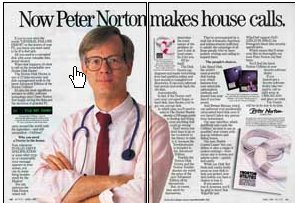
Way back in the days of DOS there was this great suite of programs created by a genius named Peter Norton. They were called Norton Utilities. These programs helped maintain your computer by diagnosing and fixing problems and defragmenting the hard drive. The suite also included a disk editor, which I used all the time. In sum, most computer experts used Norton Utilities all the time back in the day.

nortonad-747951

In 1990 Norton sold his products, including Norton Utilities, to Symantec. Symantec kept the Norton brand and issued new versions of Norton Utilities and released new programs under the well respected Norton name, including Norton Antivirus. I used Norton Utilities up until Windows XP and still use Norton Antivirus. But that’s about to change, for three reasons.

Reason Number One: Conflicts and Resource Hogging

Symantec continues to load too many features into both Norton Utilities and Norton Antivirus that I don’t need and that I don’t want. Both programs have been notorious for years for creating conflicts with other programs and for causing startup and shutdown problems. All of that is irritating, but, given my historical loyalty to the Norton brand, I have thus far overlooked these problems. In the newest version of Norton Antivirus, however, Symantec has added the incredibly annoying Norton Protection Center. This bloatware takes up system tray space and generally seems to be yet another unnecessary resource hog. I don’t want this program, and if I’d known about it before I installed the new version, I would have taken the box back and found another antivirus program. After spending 10 minutes on the net trying unsuccessfully to find out how to remove or disable Norton Protection Center, I gave up and uninstalled Norton Antivirus completely. Simple is better, and with this unwelcome addition, Symantec has finally waddled across the bloatware line.

Reason Number Two: Shameless Upselling

Not only is the Norton Protection Center a blight on my computer in and of itself, it also seems to be nothing more than a thinly disguised ad for other Symantec products. C|Net had this to say about the Norton Protection Center:

[W]ith this year’s debut of the Norton Protection Center, Norton AntiVirus 2006 has lost that uncluttered usability. The Norton Protection Center appears both as a separate icon in the system tray as well as a separate window within the software’s control console. Most of the Protection Center’s functions are useful, such as the alerts it sends if you don’t have the latest virus definitions or haven’t run a system scan in a while and the bar graph in the Status window. However the Protection Center is focused on upselling Symantec’s other products to you rather than providing any new, useful security information. For instance, if you ask to learn more about data recovery, you’re taken directly to the Norton SystemWorks 2006 product page on Symantec’s Web site.

Reason Number Three: Rootkit, Round 2

eWeek reported yesterday that, on the heels of the Sony rootkit fiasco, Symantec has admitted using a rootkit-type feature in Norton SystemWorks that could provide the perfect hiding place for attackers to place malicious files on computers. Symantec, of all people, should know better than this.

It took 15 years, but Symantec has managed to ruin what was once a great set of utilities. I am in the market for a new antivirus program and would love some suggestions in the Comments.

If you want to see more neat old ads like the one above, check out this page.