
Now that I have been once again foiled in my attempts to find a decent Mac blogging app, I am, once again, considering using the native WordPress front-end. It’s still not great, but it seems to be improving at a steady pace.
Today, I came across a fantastic plug-in that may be the thing that makes the WordPress front-end good enough. Post Snippits. A plugin that will save you a ton of time and effort.
One of the things I do to make my blogging more efficient is create snippets of text or code that I use over and over.
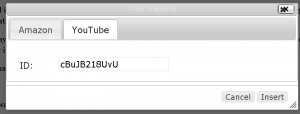
For example, I like to have a snippet that lets me add a YouTube video by simply filling in the video’s ID number. Create a snippet via Post Snippets’ settings, click on the Post Snippets icon in the post editor…

and the following beautifully simple and easy box appears.
Add the video ID, click Insert and…
httpv://www.youtube.com/watch?v=cBuJB218UvU
I also created a snippet that lets me create an Amazon Affiliates link to a recommended record.
Wrinkle Neck Mules – Apprentice to Ghosts is available via immediate download at Amazon. Buy this great record now.
With a little effort, you can automate a lot of stuff this way. It actually works better than the similar feature in Live Writer.
And that is a promising development.
 Newsome.Org
Well, the YouTube embed doesn’t show up in the RSS feed (in Google Reader at least). It’s only a link to YouTube…
Thanks for the heads up. I was using a combo of Post Snippets and Smart YouTube Pro. I modified the snippet to use the iframe html and bypass Smart YouTube. My test post embedded the video in the feed.
It’s working fine now!