
One of the first iPad apps I downloaded was the new, iPad optimized version of WordPress. While only time and blog posts will tell how often I do it, I can tell you that it is very easy to configure and use the WordPress app on an iPad.
Photos and links will continue to be a problem, until someone comes up with a better way to create links on an iPad. The photo insert tool within the app seems to be pretty straight forward, but since the iPad doesn’t have a camera, you’d have to import photos to use them. I suppose I should try a screen cap.
I added a screen cap of the app interface, and sadly it seems the app still adds photos to the end of a post, and only then when published. I suspect it will also be sideways (it was, and I couldn’t even fix it with Live Writer).
I also had a mild lockup, that required me to close and reopen the app. This happens after previewing a post, and seems to be caused by the categories and tags overlapping the text box. I’ll attempt another screen cap.
It’s not perfect, but it’s good enough. And I suspect it will only get better.
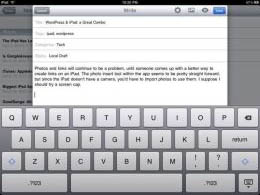
The interface, including the keyboard, works well. Photos
are still a huge issue, as they get added to the end of the post,
sideways and far too big (I resized these via Live Writer).

Notice the jumbled words. The categories and tags are
on top of the text box.

 Newsome.Org