

One of the primary purposes of Newsome.Org is to introduce and explain computer-related programs and features to other in-betweeners like me- people who are the parents of the youngsters to whom computers and the internet are as integral as the telephone and the children of our parents who have no intention of ever using computers.
I have a pretty extensive home network. Most rooms and all bedrooms have wired network access leading to a Linksys 10/100/1000 Router. I also have a secured wireless network with access points upstairs and downstairs. It works fine except for one thing: backup.
The computer in my home office is so loud that putting another computer in there for backups simply isn’t an option. Raina’s office is too small (and chaotic) to accomodate another computer. The kids don’t and won’t have computers (or TVs) in their rooms. With the pending arrival of child number three, we’re down to one guest room that cannot double as my backup server room. Even when I had my backup server in that room, it was not a good solution. Everytime we lost power and often when we didn’t, that computer would be down or inaccessible over the network for some reason- requiring me to trudge upstairs, reboot and hope.
So, I decided to find another solution. After considering and quickly rejecting online backup, I elected to try network storage- specifically Maxtor’s Network Storage drive. Here’s the skinny.
Basically, a network storage device is an external hard drive that has a network connection and can be accessed from other computers on the network. After installation, it appears as a hard drive just like the other hard drive(s) on the computers.
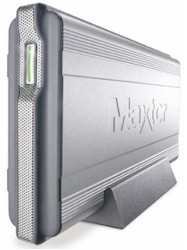 The Maxtor drive was a breeze to set up and install. You take the drive out of the box, plug it in, attach the included network cable to the drive and then to your network outlet, and turn the unit on. Then you insert the included CD on each computer you want to access the network drive and follow the step by step instructions to set up an access ID and password. It is that simple. Without cracking the instruction manual, I had the drive up and running and accessible by three computers in under 15 minutes.
The drive has a USB port that supposedly allows you to connect additional drives and increase the capacity. I haven’t tried that, but if it works it’s a very nice feature.
My only mild complaint is that the software you install on each computer to allow access to the network drive automatically creates a bunch of folders on the network drive (My Documents, My Music, etc.). I am not a big fan of the “My” naming convention. Fortunately, it was easy to rename or delete the created folders.
So what does this do for me? It gives me the very important backup capability without the necessity of maintaining a second computer. Plus, the network drive is much smaller and easier to place than an entire computer, monitor, keyboard, etc.
This is a great product.
Technorati Tags:
network storage, backup
 Newsome.Org