
One of the most useful software accessories you can install on your computer is a good, reliable screen capture utility. Screen capture utilities let you grab a portion of whatevet’s on your computer screen. They are helpful for storing snippets of information in Onfolio, grabbing a portion of your computer screen to email error messages to the appropriate technical support address, and capturing content to redisplay it (as I did with my Firefox problem).
My favorite screen capture utility is Snag-It. It’s easy to buy online, easy to install and easy to use.
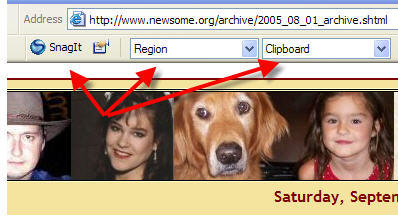
It integrates seamlessly with Internet Explorer and places these buttons at the top of Internet Explorer that allows you to instantly grab all or part of a screen (this image was captured with Snag-It). You can configure how much of the screen to capture (I use the “Region” setting which allows me to draw a box with my mouse and capture everything in the box) and how to output the image (I output to my Windows clipboard so I can paste the image wherever I want it).
It is also a stand alone program, accessible from the Start Menu, that allows you to capture any desktop content, whether internet content or otherwise.
My only mild complaint about Snag-It is that the developer updates it very often and you have to pay for significant upgrades (“maintenance upgrades” are free). It seems like I get an email every month or so offering me an updated version for a price. It’s a great program, so I pay to upgrade to every other version or so.
Snag-It is $40 for new users. Upgrades are cheaper.
Technorati Tags:
software review, screen capture
 Newsome.Org