A Halfway Good Idea

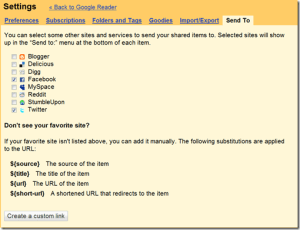
I noticed tonight that Google Reader has added a new sharing function, which lets you send items you share to various social networks, including Facebook and Twitter.  You can even create custom “send to” links.

image

This is a good idea, and would be really helpful- if they had implemented it right.  Which, unfortunately, they didn’t.

As implemented, you are presented with a new link at the bottom of each item.

image_3

When you click that link, you are directed to the destination application, where you can then add the desired item to your social network content.

This is about infinity times more complicated than it should be.  Google Reader should give users the option to fill in your social network name and password on the Google Reader Settings page and then automatically add either (at the user’s election):

1. selected items, on a one-click basis (i.e., without having to visit the destination application); or

2. every item you share,

to that social network.

I would very quickly implement the second option, thereby giving me a faster, more flexible way to push my shared items.  It would allow me to avoid the link-dump problem with Twitterfeed.  It would just be a whole lot better.

This was a good idea, halfway done.

18 Stories High and Fearless

We spent the last few days in New Braunfels, Texas.  We tubed the Comal River, saw a great Jesse Dayton show at Gruene Hall, and spent a full and fun day at the Schlitterbahn.  Highly recommended, and a great family vacation.

While we were at the Schlitterbahn, Cassidy, once again, begged to do a high, scary ride- this time the Skycoaster, which basically involves being dropped from the equivalent of the top of an 18 story building.  Her friend Charlotte, who is visiting from France, quickly agreed to join her.  I wasn’t all that excited about letting Cassidy do it, but I decided to call her bluff.  Well, without a second’s hesitation, she filled out the form, jumped in the harness and took off.  Cassidy is on the right on the way up.

I’m pretty doggone proud of her.

Create a Free Graffiti Wall in 5 Seconds

Do you feel cramped by Facebook‘s enclosed and neatly ordered wall?  Is Twitter‘s wall of self-promotion getting you down?

If so, you’re in luck.  Thanks to YourWorldOfText.com, a Google App Engine based site, you can now create your own wall, right out here in the big, scary internet.  Updates are visible in real time.

All you have to do is add a page name after http://www.yourworldoftext.com.  Here’s one I made.

worldoftext
click for larger view

I have no idea what this is good for, and I can imagine things getting chaotic fast.  But it’s still kinda cool.

(via Google Blogoscoped)

Why It’s Good that Scoble Un-followed Me

unfollowRobert Scoble, the incredible hulk of the social networking space, un-followed over 100,000 people on Twitter this week.  I was one of them.

But that’s OK.  In fact it’s a very good thing.  Here’s why.

My single biggest gripe about social networks in general, and Twitter in particular, is that far too many people use them to blast out the content they want others to see.  With little or no concern about what others are saying.  When that happens, the platform becomes a stage at best and a spam-fest at worst.  I’m all about conversation and back and forth.  And face it, that is impossible when there are 100,000 people in the room.

There’s nothing even remotely social about trying- or pretending to try- to interact with that many people.  A follow becomes a virtual autograph.  Most of us don’t want autographs, and even real celebrities are beginning to realize that they are better served with a more direct connection to a smaller group of people.

So when an influential person like Scoble makes a considered decision to manage his content in a way that is actually manageable and allows meaningful social interaction, that’s a very good thing.  If Robert rejects, even indirectly, lecturing as a proxy for interaction and follower numbers as a proxy for authority, then maybe others will follow suit.  When that happens, the social networking space might actually become social.  And useful.  Maybe even a little conversational.

Granted, it would have been better to adopt this approach from the start, before building up a six figure following.  To do it this way necessarily opens the door for criticism- non-reciprocity, the gatekeeping thing, etc.  There’s nothing to be done about that, and I say better late than never.

A manageable social network is better, in every way that counts.  I hope others will un-follow me too, if that’s what it takes.

Can TIVO Emerge from the Grave?

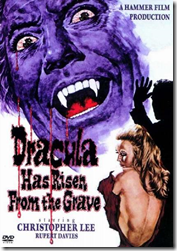
imageAs long time readers know, my TIVO cycle went from deep and abiding love, to concern as the horizon darkened, to anger at DirecTV for abandoning TIVO, to a cynical Deathwatch and, finally, to irritation at what I saw as irrational death throes.  Well, there have been recent signs that, like Dracula, TIVO may soon emerge from the grave and retake its place with the living gadgetry.

First, there came news that DirecTV had seen the error and avarice of its ways and was partnering up with TIVO to develop a high definition DirecTV TIVO.  Initially, I put the odds on this happening just above the odds of me ever using Facebook.  Which at the time were astronomically low.

Well, guess what. . .

But the new DirecTV TIVO story had some staying power.  At the moment, it looks like DirecTV customers might get a new TIVO option next yearMaybe.  You can sign up here for relevant announcements.

image_thumbIt gets better.

Today, I read that TIVO has enabled a feature that lets users subscribe to and download video podcasts.  There are potential devils in the details (most significantly, the ability or lack thereof to create a “season pass” equivalent for custom video feeds), but there’s no denying that if executed correctly this will be a neat feature.

Does this mean I will trash my semi-functional but nowhere near a TIVO DirecTV HD recorders?  I don’t know.  It depends on the cost.  Much more delay and I will be out of the contract period I agreed to when DirecTV gave me the new boxes (after I threatened to go crawling back to cable).  If I can get a fancy, new TIVO.  If it doesn’t cost me too much.  And if I believe that history will not repeat itself.  Then I might.

Either way, competition is good for consumers.  And it would be psychologically rewarding to see a technology as good as TIVO survive.  Even if it is, to some extent, in spite of itself.

How to Make Everything Better: Google Edition

There are a lot of cool services and applications on the internet- no doubt about it.  I use a lot of them, and they make my life easier, more organized and more fun.  But they can be better.  And I’m going to tell you how.  Starting right now.

I’m going to improve the various services and applications I use, one or two at a time.  Starting at the top, with Google.

googleI have capitulated to Google and have moved a lot of my information and data to the various Google apps.  Most of them work very well, though it was a mistake to abandon Google Notes, since a full featured application suite needs a note taking app.  So Google improvement number one is to bring back Google Notebook with a commitment, or better yet buy Evernote.

Google Calendar is very elegant, and the sync app works well.  I have generally moved my personal calendar to Google Calendar.  I wish there was a better, more flexible way to sync multiple calendars, so I could sync my Outlook calendar at home and at work with Google Calendar.  Much of the business population that Google covets has this issue, and Google could make great inroads with that population by making it easier to sync multiple calendars, without the soul crushing multiple (upon multiple, in some cases) event problem that many of us have experienced.

While Google Calendar is elegant and works, Google Contacts is an absolute train wreck.  It looks like something that was tossed in as an afterthought.  But people need a central contacts application just as much as they need a calendar.  Google needs to put 10 or 20 of its best people in a room for a week (or however long it takes) and tell them to completely rewrite Google Contacts, including a way to sync contacts along with calendars.

Some will point to Google’s exchange-based sync option, which works reasonably well.  The fatal flaw in that approach is that the much-desired business population uses Exchange to access their work email and, as we all lament, you can only configure one Exchange sync.  So Google needs to create a way to do the same thing via desktop applications.  And while they’re at it, add the ability to sync email via the exchange-based sync.  Currently, only contacts and calendar are supported.

The easiest and perhaps most needed improvement is to make the various Google apps more integrated.  Google has made strides in this area, but too many of the apps still look and act like separate programs.  They should look, feel and act integrated.  One giant, easy step would be to give the user more control over the links at the top of the various Google app pages.  Why can’t I add Contacts, Google Voice, Google Maps, Tasks and even custom links to other sites (like Flickr) to this list?

image_3

Google needs to give the user more control to create a personal control center, from which the user can easily access the things the user needs- not just the stuff Google thinks we might need.

I’m slowly learning to like, if not yet love, Gmail, and I’m not going to preach again about Gmail folders, though folders should be implemented, at least as an option.  Another mandatory thing Gmail needs is a one click way to backup all of your Gmail on your hard drive or to the cloud location of your choice.  With the backed up data to be searchable, perhaps via Google desktop search.  Also, while the ability to use a third party mail server to avoid the annoying “on behalf of” confusion is wonderful, Google should not limit the ports you can use to do that.  For various reasons, some people have to use another port to access their mail server.  Google should accommodate this.
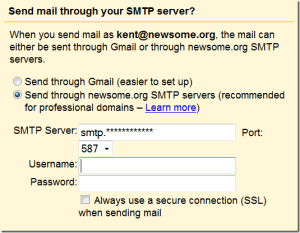
image_4

The port choices above are limited to 587, 465 and 25

I use Google Reader more than any other Google app.  It works great, with one small annoyance that, like dripping water, can drive you mad over time.  Google badly needs to figure out a way to speed up the process of marking a group of items as read.  There is a small but aggravating delay between clicking the “Mark all as read” button and the moment the applicable items disappear.  I don’t care how much of my computer resources it takes, I want that action to be instantaneous.  I’m talking speed of light fast.  That one little thing would vastly improve the quality of my online life.

image_5

Google Documents is very close to becoming a legitimate alternative to Microsoft Office.  I have migrated my wife and kids to Google Documents, and I’d like to migrate there too.  But for me- or any other corporate user- to have the option to use Google Documents full time, Google must implement a way to show document edits in a track changes compatible manner.  If someone sends me a document, I simply must have the ability to edit the document and send it back with my changes apparent.  Google Documents has a way to view versions and edits (Tools>Revision history), but the compare feature is not elegant and there’s no way to send a document with revisions marked that can then be accepted or rejected by the recipient.  Sure, it would be nice- for Google- if everyone collaborated online via Google Documents, but that is never going to happen.  If Google really wants business users, it is going to have to come up with a workable, emailable, track changes equivalent.

That’s enough to keep Google busy for a while.

Coming up next: Evernote