Was Apple’s Partnership with ATT the Worst Business Decision Ever?

I finally got around to trying Qik, and I’m really impressed with it.  It’s too bad I have an iPhone which, unlike so many phones, won’t allow users to stream live video.  At least I can now upload video to Qik over the 3G network.  I guess that’s something.  You see, us iPhone users have to take comfort in small victories.

One day they’ll build a bad business decision hall of fame.  The featured display will be the Apple/ATT exclusive iPhone partnership.  People will flock to see how something that could’ve been so good turned out so bad.  Courses will be taught, degrees may even be awarded, on iPhone Launch Disaster Avoidance.  “Yes sir, I got my ILDA from Stanford back in 2017, magna cum laude.  I started out in the MBA program, but I wanted to go where the jobs are.”

This Apple/ATT business fell off the tracks when we found out that our dream phones can’t send MMS messages.  Nor can you use them as a wireless broadband modem, the way I used my Blackberry years ago.

Since then, we’ve seen a parade of new apps and improved features.  For other phones.  Google Latitude, Google Voice, the SlingPlayer app, Qik, etc.  If you can think of it, there’s probably an application.  For other phones.

Meanwhile we wait.  We wait for someone at Apple and/or ATT to come to their senses and call bullshit on what has become the biggest technology failure in memory.  We wait for other carriers to save the day.  We hope the government will step in and restore order.

Mostly, we hope that one day our iPhones will do what other, less heralded, mobile phone can already do.  We bought and re-bought our iPhones to be at one end of the technology curve, and we ended up at the other.  Oh, the iRony.

At this point, we don’t know who to blame.  Is this Apple being paternalistic and arrogant?  Is it ATT being hapless?  Or is it some combination of the two?  I don’t know how to allocate all the blame, but that’s OK because there’s plenty to go around.  Here’s what I do know.  When the iPhone and the ATT partnership was launched, there is no way the executives involved intended things to turn out like they did.  This phone was supposed to change the world.  The fact that it had the impact it did in spite of the multitude of problems says more about the cult of Apple and the design of competing handsets than it does about the execution of the iPhone launch.

Consider where the iPhone- and the horde of developers writing for it- would be if just half of the subsequent failures had not occurred.  The race would be over.  Only the Apple/ATT failfest is keeping the other handsets in the game.  I bet people at competing companies give thanks for ATT’s network infrastructure (or the lack thereof) every day.

So while I can’t allocate the blame, it doesn’t look to me like anyone is getting what they wanted out of this deal.  Apple is shackled to a bad network that can’t handle nineties-era features and/or its misguided desire to over-control the user experience.  ATT is the punching bag for those who want their iPhones to realize their potential, and has turned people who bought out of their contracts to become ATT customers into a shipful of rats looking to jump at the first opportunity.

And then there are all the iPhone owners.  People who try to be excited and loyal in the face of daily reminders of all the things their phones can’t do.

Everyone is losing in this game.  Someone needs to change the rules.

Get the Best Alt. Country Record Ever Made – Free

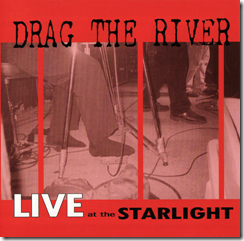
I just learned from my pals over at A Truer Sound that Suburban Home Records has decided to make Drag The River‘s Live At The Starlight free for download on their site.

I’ve written about Drag the River over at GoodSongs.Com.  It’s absolutely one of my favorite bands.

image

This live record from 2005 could very possibly be the best alt. country record ever made.  Don’t take my word for it.  Go get it.

Need some more incentive? Listen to their ass-kicking cover of She Thinks I Still Care.  This record should be played loud.  Preferably in your truck.  With the windows down.

Once you get hooked, go buy the rest of their records.

Fontcapture: Free Handwriting Font & Secret Codes

fotncapture

A long time ago in a galaxy far away (e.g., the mid-nineties) there was this service that would create a font from your handwriting.  I’m not certain, but I think it was called Signature Software and it may have been the predecessor to this.  As I recall, the application inserted a button or menu tool in Word.  You would type the document, a letter at a time, in your custom font, and then with a single click the writing would be converted to almost perfect cursive writing.

It was really hard to tell the result from real handwriting.  It worked really well.  So well in fact that I used it to write thank you notes to people who sent remembrances after my mom died.  No, I didn’t send a form letter.  I just used copy and paste for the common parts.

Today I read about Fontcapture, a free service, currently in public beta, that lets you make a font out of your handwriting.  In less than 15 minutes, I printed the font form, filled it out, scanned it, uploaded it, created a font and installed it on my computer.

It looks a lot like the Signature Software font did, before you hit the magic button that transformed the letters into connected, authentic looking cursive.  Without that magic button, I’m not all that impressed with the result, at least as far as an actual handwriting replacement goes.

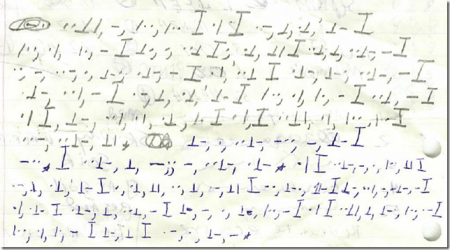
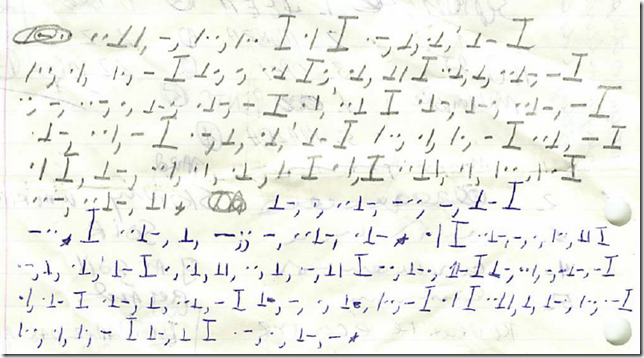
But it does occur to me that you could use Fontcapture to make some wicked secret codes.  My buddy Tad and I had a secret code in grade school.  Believe it or not, I still have one of our secret messages.

image

I have no earthly idea what that says, but based on the actual English on the other side of the page, at the time we were talking about dove hunting, rock bands and cars.  Number 4 on Tad’s car wish list was a Pinto.  The man always had taste.

If we’d had Fontcapture back then (well, that and computers, the internet, etc.) we could have created a whole new language.  Then maybe Tad could have traded up to a Bobcat.

Or maybe even a Maverick.

Tossing the Disqus

Or how I overcame Disqus and Blogger and by sheer force of will installed the Disqus commenting system on my remotely hosted, FTP published, highly customized Blogger blog template.

disqus

Whew.  OK, listen up ’cause I’m gonna tell you a sad story.

I have been watching Disqus for months, and considering trying to install it here at Newsome.Org.  Since I have a remotely hosted, FTP published, highly customized blog template and a Leopard-Skin Pillbox Hat (not really, but I’m punch drunk), both one of which I publish via Blogger, it was hard.  Now when I say it was hard, what I mean is that is was really, absolutely, just about impossibly, freaking hard.

So here’s how I did it.  All of this assumes you have registered at Disqus and have an account to use.  If this confuses you, move to Step 2 and skip Steps 1 and 3-7.

Step 1: Unsuccessfully Seek Help

First I tried the various options suggested by the Minimalist-inspired Disqus help pages.  I tried to manually upload my template, which I knew wouldn’t work.  I tried to manually add the code via these instructions.  No go.  I googled around looking for something to show me the way.  Nada.

Next I emailed Disqus to see if there was any other documentation I could look at.  I got a prompt response, telling me I should use a different blog template, thereby simultaneously experiencing both an epic instance of the tail trying to wag the dog as well as another reminder that I’m not as cool as my friend Louis.  I know that, of course, but I generally blame it on age.  Whatever the half-life of cool is, I have to be 2-3 half lives older than him.  If Dave Winer had invented the internet back when I was a young man, I’d be Robert Scoble and Louis Gray combined, baby.  Of course if I’d had the internet as a kid, I’d also be degreeless, homeless and living under a bridge somewhere.  In fact, the only technology we had when I was a kid were tractors and the phone.  And both got me in lots of trouble lots of times.  Generally when I should have been walking those four snowy miles to and from school.  And all that.

Anyway, after respectfully passing on Disqus’s suggestion that I demolish my blog and rebuild it just so I could use their application and pulling my bruised ego together, I got to work.

Step 2: Drink Some Bourbon

Locate a bottle of bourbon.  Open it, take a big gulp.  Place it within easy reach of your keyboard.

Step 3: Add the Standard Disqus Header

Add the standard Disqus header right before the </body> tag:

<!– Begin Disqus Header–>
<script type=”text/javascript”>
//<![CDATA[
(function() {
var links = document.getElementsByTagName(‘a’);
var query = ‘?’;
for(var i = 0; i < links.length; i++) {
if(links[i].href.indexOf(‘#disqus_thread’) >= 0) {
query += ‘url’ + i + ‘=’ + encodeURIComponent(links[i].href) + ‘&’;
}
}
document.write(‘<script charset=”utf-8″ type=”text/javascript” src=”http://disqus.com/forums/myusername/get_num_replies.js&#8217; + query + ‘”></’ +

‘script>’);
})();
//]]>
</script>
<!– End Disqus Header->

Step 4: Create the New Comment Link

Here’s where I had to start figuring stuff out on my own.  I changed the code at the end of the blogPost <div> to:

<$BlogItemBody$>
<div class=”byline”>
Posted by <$BlogItemAuthorNickname$> @ <$BlogItemDateTime$> |
<a href=”<$BlogItemPermalinkURL$>”>Permalink</a> |
<a href=”<$BlogItemPermalinkURL$>”>Leave Comment</a>

I did it that way so it would show both a Permalink and an obvious “Leave a Comment” link.  Yes, they go to the same place, but I want to make it easy for people to find the place to write a comment.

Step 5: Display the Comment Count

In my “Discuss” links, I changed the code to:

Discuss:
<a class=”comment-link” href=”<$BlogItemPermalinkURL$>#disqus_thread”>View Comments</a> |
<BlogItemCommentsEnabled><a class=”comment-link” href=”<$BlogItemPermalinkURL$>#comments”><$BlogItemCommentCount$> Pre-Disqus Comments</a></BlogItemCommentsEnabled> |
<a href=”
http://search.blogger.com/blogsearch?q=link:<$BlogItemPermalinkUrl$>” target=”_blank”>Inbound Links</a>
<br />

The <BlogItemCommentsEnabled>/Pre-Disqus Comments part was required to preserve my existing comments (see Step 6 below).

The only other change was to add the required #disqus_thread after the Permalink URL.

NOTE: This is before the <ItemPage> tag.  I want new commenters to use Disqus.

Step 6: Preserve Your Existing Comments

That got me up and running, with one gigantic problem.  I have lots and lots of existing comments, and inexplicably there doesn’t seem to be a ready-made way to import Blogger comments into Disqus.  Obviously, Disqus should spend some of that mad coin to write one.  I saw some roundabout ways that might work, but they were on the wrong side of the possible benefit – time required – likely result calculation.

So I needed to preserve my existing comments in place.

After some trial and horror, I ended up with this:

<ItemPage>
<BlogItemCommentsEnabled>
<a name=”comments”></a>
<h4><$BlogItemCommentCount$> Comment(s):</h4>

<BlogItemComments>
<a name=”<$BlogCommentNumber$>”></a>

<p class=”comment-body”>
<$BlogCommentBody$>
</p>

<p class=”comment-data”>
By <$BlogCommentAuthor$>, at
<a href=”#<$BlogCommentNumber$>”>
<$BlogCommentDateTime$></a>
<$BlogCommentDeleteIcon$>
<br />
**************************
</p>
</BlogItemCommen
ts
>

</BlogItemCommentsEnabled>
</p>

<div id=”disqus_thread”></div><script type=”text/javascript” src=”http://disqus.com/forums/newsome/embed.js&#8221;></script><noscript><a href=http://myusername.disqus.com/?url=ref>View the discussion thread.</a></noscript>
</div></div>
</ItemPage>

All of that brain damage does three things.  It displays my previous comments (recall the “Pre-Disqus Comments” code I added in Step 5).  It’s not ideal to have two Comments linkcounts, but you need to let people know those previous comments are still in place.  It removes (i.e., doesn’t contain) the code that creates the Blogger “Leave a Comment” link (because I want new commenters to use Disqus).  And it displays the Disqus comment box and comments underneath the previous comments.

NOTE:  All of this is within the <ItemPage> tags, because we only want the comments and the Disqus comment box to appear on the item pages, which are sometimes referred to as post pages.  Or, in the case of uninspired writing, ghost towns.

Step 7: Update Your Blog Via Blogger

After updating my blog, which takes forever (come on Blogger, please get a handle on the disintegrating Blogger/FTP experience), I have Disqus comments, while preserving my previous comments.

If needed, repeat Step 2.

So there you have it.  I hope this is helpful to someone.

Now, why not leave a comment and reward an old, un-cool man’s effort!

Drinking from a Fire Hose: In Defense of RSS

There’s lots of talk today about how RSS is dead, and whatnot.  Let me set things straight.

firehoseFirst of all, as a practical matter, RSS has never been alive.  Ask anyone other than a hard core geek (like me) what RSS is and they won’t have any earthly idea.  RSS is probably the most useful tool on the internet, but regular people don’t use it.  Why?  Because no one has figured out how to make money pushing RSS feeds, and so the informal brotherhood of mercenary content producers (e.g., old media and big new media) don’t embrace it.  In fact, they really don’t want you to use it.  They’d rather force you to their web sites where they can serve those ads you never click on, but that advertisers still pay for.

It’s the desire for money once again screwing up something beautiful.  The environment, professional sports, our computers, etc.

This conspiracy to kill RSS is just one more attempt to prolong the death of an antiquated system.  It’s the same sort of battle the record label cartel is waging against the digital distribution of music.  In the case of RSS, the system they are desperately trying to save is the one in which the provider selects and aggregates content, either on paper or a website, and the consumer accesses that content at the provider’s place.  Where the experience is tightly controlled, complete with ads, etc.  Under the new system, which will be much better for the consumer once it matures a little, the consumer selects both the content and the package, and then accesses it wherever he or she wants: internet browser, phone, RSS reader, Facebook, etc.  Of those choices, the RSS reader is currently the best choice, by far.

Why?

It is easy to use.  It’s free.  It has archival and search features. You can organize it any way you want.  There are tons of ways to slice, dice and organize your feeds.  Only the fishy smelling partial feeds used as bait by those trying to keep control of the experience detract from what would otherwise be a nearly perfect experience.

A perfect experience that the brotherhood is trying to ignore and the attention deficient bloggerati are trying to replace.

Many are boldly stating that, while simultaneously saving the entire world, Twitter is the best way to get our news in 2009.  There’s a lot wrong with that argument, but I’ll settle for three gigantic and obvious flaws:

1. Twitter is nothing more than a shared partial RSS feed.  Other than a headline, every bit of the content one consumes via Twitter is located elsewhere.    Someone tosses you a scrap, but to get the meat, you have to take a walk- usually right back to one of the brotherhood’s sites.  If you don’t think this has something to do with old media’s love affair with Twitter, you’re not watching closely.

2. Twitter has no meaningful archival value.  The ability to save a big pile of “Favorites” takes us back at least a decade, to the era of chaotic browser bookmarks.  Nobody, other than the deeply Twitter-addicted, sits in front of his or her computer all day staring at Twitter, which means that if you aren’t staring at the screen when something happens, that something will soon drift away on a river of quotes, links, self-promotion and spam.  If you have any meaningful number of Twitter follows, that breaking news story that Robert Scoble talks about will be buried in a matter of minutes, if not seconds.  Meanwhile, your RSS feeds wait patiently for you in Google Reader, nestled in topical folders (paging Evernote) and ready to be read by you, on your timetable.

3. Twitter’s search capabilities are rudimentary at best.  You can search your feeds via Google Reader (and no doubt other feed readers) in just about any manner you can think of.

Now, about that real time thing.  I have complained loud and long that RSS needs to be faster.  But when I talk about slow, I’m talking hours.  The difference between two hours and 15 minutes is one thing.  The difference between 15 minutes and 5 minutes is another.

And about this single criteria speed assumption. . .

Why are people assuming that faster is always the goal?  That more is better?  I don’t know about you, but I’m not really in a race to find out some piece of news before anyone else.  If you’re a gossip hound and you get your news from any online source, you’ll have plenty of time to blab to those who still wait for the TV news or morning paper.  And if you’re just someone who wants to stay informed, why do you need instant?  And if you demand instant, what price are you paying in terms of the experience?

It’s like skipping the movie to watch the credits, in fast forward.  Maybe it saves you a little time, but at great detriment to the experience.

Once again, there are way too many people drinking the Twitter Kool-Aid- apparently from a fire hose.

If RSS is really dead, it’s the brotherhood that killed it, not Twitter or any other flavor of the week.  People need to wake up and realize before it’s too late that RSS is the best thing going.  It is the single best way for users to take maximum control of the content and presentation of their news, simply because the man doesn’t own RSS.  The people do.

The man doesn’t like RSS because it’s disruptive of the establishment.  We can kill it, but if we do we’ll be sorry.

So what’s it going to be, the man or the people?

Is It Time for Anonymous Bloggers to Cowboy Up?

I’ve been trying hard not to comment about the ridiculous Skankgate business.  But today my resolve was broken by the final straw.

cowboyupHere’s the background as I understand it.  Some anonymous blogger calls some model a skank (among many other things), the alleged skank considers suing said anonymous blogger and subpoenas Google (who hosted said blogger’s blog for free) for said blogger’s particulars.  Google notifies said anonymous blogger of the subpoena to allow said anonymous blogger to challenge the subpoena, which said anonymous blogger does and fails.  Under court order, Google provides said anonymous blogger’s name to the alleged skank.

Then, rather than defend the alleged skank’s claim, either under some truth as a defense theory, by playing the much misunderstood First Amendment card or otherwise, the no-longer anonymous blogger decides to sue Google for $15 million.

Are you kidding me?

Read carefully.  It’s not the person who was called a skank who’s suing Google.  It’s the person who said it, somehow claiming that Google should have ignored the subpoena in the name of preserving that person’s ability to say seemingly anything behind a self-granted cloak of anonymity.  It’s like the schoolyard bully suing a teacher for pulling him off a weakling.  In other words, it’s backwards.  And illogical.

Some seem to be confusing anonymity with immunity.  Some might say this suit is some combination of offense as a good defense, a bad aim and a money grab.

My issue is not the truth or untruth of what was said.  Who cares- there are laws to deal with that.  My issue is with someone who wants to make all sorts of allegations about someone else, but is unwilling to stand up and say “yeah, I said it.”  And it’s not like this situation involved a single skank reference amid scads of other content and opinion.  According to a  report at Wired, the no-longer anonymous blogger:

published only five posts, all devoted to attacking [the alleged skank], a 37-year-old who has reportedly modeled for Australian Vogue, Georgio Armani and Versace. In the posts, [the alleged skank] was called a “psychotic, lying, whoring . . . skank” and an “old hag,” and was depicted as a desperate “fortysomething” who was past her prime.

As far as I’m concerned, if you don’t want to take credit for it, then don’t cross any legal lines when you crap all over someone.  I have the same respect for anonymous bloggers who attack people as I do for the those who write on bathroom walls.  That sort of thing makes Twitter seem like the Encyclopedia Britannica.

Robert X. Cringely notes in a PCWorld article that “if anonymous speech on the Internet is no longer anonymous, some people will simply stop speaking.” To which I and the rest of the sane world say “so freaking what?”  The mathematical value of some anonymous, tossed-up Blogger blog or some scathing anonymous blog comment is very close to zero.

And, again, no one is saying you can’t be anonymous- the hair trigger First Amendment police tend to get confused about this.  Even the generally reliable Techdirt seems to be misinterpreting the right of free speech as an absolute right to be anonymous, which it is not (though Techdirt did come down on the side of logic with respect to the suit against Google).  If you want to write anonymously, no one can or should stop you, and the very legitimate protection of anonymous speech requires scrutiny before removing the cloak of anonymity.  But if you defame someone, you can’t simply hide behind your self-granted anonymity.  To argue otherwise is to turn the law- and common sense- on its head.

Privacy expert  Dan Solove says:

The Internet shouldn’t mean that people have unbridled freedom to do things they wouldn’t do before without repercussions. We have an unprecedented power to broadcast something to the entire world. Never before in history have you had the power to do this without the aid of the mainstream media.

An interesting footnote.  Upon learning of the no-longer anonymous blogger’s identity, the alleged skank says, “I just dialed her up. I said no more lawyers, it’s OK. I forgive you.”

I say if you want to talk trash about people, cowboy up and say it to their face.

A Profile on Profiles

During the podcast the other night, Dave and I talked a little about public, online profiles.  We experimented a little with our Google Profiles, and wondered about the best way to create and manage a central profile.  The idea is to create and manage something approximating an online card and short biography.  I’ve done some more thinking about it and here’s what I’ve concluded.

Assumptions

First, a couple of assumptions.  Like every other part of our online lives, the sheer number of locations where you can create and maintain a profile can lead to dilution and/or a Sisyphean task of trying to keep everything reasonably fresh and current.  For that reason, I decided I to create one central profile page, and then link to it from the various locations where I maintain a presence.  I’m already spread too thin as far as the so-called social networks go, so I don’t want to add another service just to manage a profile page.  For example, I have an abandoned Linkedin account.  While Linkedin may be (but probably isn’t) the coolest thing since Doug Sahm, over time I want to consolidate- not further distribute- my online presence.

As an aside, those of you who have reached out to me via Linkedin- it’s not personal.  I’d love to connect with you.  Just not there.  Maybe via Facebook?

So, what options did I look at?

Google Profiles

I started out at my Google Profile, since that’s the service Dave and I were exploring.  The immediately obvious problem is the inflexibility of both layout and content.  You can add links to your various online locations and email addresses and phone numbers, but only in a structured, inflexible way.  I don’t want to directly display my email address and phone numbers.  Rather, I want to use a script to hide my email address from spambots, and a Google Voice link for telephone calls.

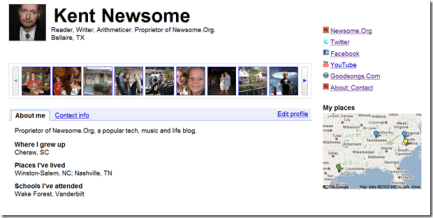
After a little work, here’s the best Google Profile I could come up with.
image
Click to enlarge

Not good enough.  One of the best and worst things about Google is the policy that lets employees spend company time on pet projects.  The results are a few apps that are super-cool and a lot that seem tossed together and forgotten.  For every must-use Google application, there are scores of ignored or abandoned apps along the information superhighway.

So I decided to abandon my Google Profile.  Once I choose my profile location, I’ll simply put a note on my Google Profile directing people to it.

Facebook

Many people would tell you that Facebook is designed to be precisely the sort of pre-packaged profile I am looking for, and for many people Facebook has become their de facto online profile.  But that won’t work for me.

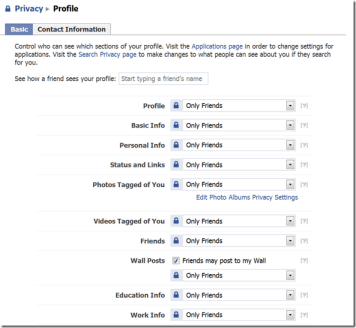
For one thing, all Facebook content is locked away behind Facebook’s walls, and not easily accessible to the world at large.  Sure, you can sort of create a public profile.  And I guess you can make some of your information public.  But one look at how you do it sent me into a tailspin of frustration.
image
Click to enlarge

Once again, Facebook’s layout and navigation structure, which only a dedicated crackhead could love, thwarts an attempt at doing anything creative.  So, I’ll leave my Facebook profile in place for those who want to remain in Pelbarigan, and add a pointer to my chosen profile location for those who want to venture outside the walls and run with the Shumai axemen.

Yahoo

I didn’t even know Yahoo had a public profile page, but once I happened across it, I was initially impressed.  While pre-packaged, it seems more robust than Google Profiles, and more intuitive than the quagmire at Facebook.

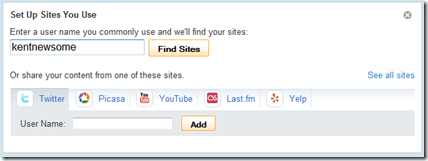
To begin with, it has a blank to fill in your typical user name, after which it will try to locate your online content.
image

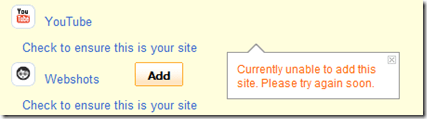
It only searches some sites, but it quickly found my Twitter, Last.fm (abandoned), StumbleUpon (never used), Picasa (never used), YouTube and Webshots (abandoned) accounts.  I got an error message when I tried to add some of them to my Yahoo Profile.
image

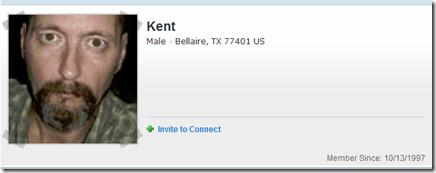
The more I worked with it, the less impressed I was.  I don’t see a way to manage your URL, so your Yahoo Profile ends up at some URL like http://profiles.yahoo.com/u/K6PWN5TRB7AQ344YDMPCIP5HWM.  That’s crazy.  And at the end of the day, you get something that looks like this.
image

Which I guess means that Yahoo has its own walls.  I could have looked into this further, but I decided to just go on living my life.

FriendFeed, Twitter, Etc.

FriendFeed isn’t really set up for the creation of a full profile.  It’s more about content consolidation and being assimilated by the Borg-like Facebook.  Same with Twitter.  I briefly looked at a few other choices.

At the end of the day, that leaves three choices: Google Profiles, Facebook or- you know where this is going- the big, scary web.  You remember the web.  It’s that thing we killed AOL to get to.  That thing that, in a move that would make Tom Sawyer proud, Web 2.0 developers are trying to make us afraid of, so we’ll create content they can use to get rich.

The Big, Scary Web

Much like my experience with Headline News pages, it became very clear that the web is the best place to create and maintain a public profile.  You have total control of the design and content of the page.  For a few dollars a year, you can register and own a domain (yourname.com, etc.).  It’s a better, more flexible and more effective choice.

Here’s mine, and here’s how I built it.

First, I used the same CSS, look and feel as the rest of Newsome.Org, for harmony and branding purposes, and added the standard menu.

Then I hacked a Flickr script to display three random photos every time the page is opened.  This gives the visitor an immediate visual image of who I am.

Next, I found a script that rotates my profile photo.  I have four photos in the rotation, but you can have as many as you want.  I added links to all of my content elsewhere: Twitter, Facebook, FriendFeed, Flickr, YouTube, Qik, my Content Pile and even my day job.

In the middle, I added a short narrative, and a list of upcoming speeches.  I added contact links: a script for email (again, to avoid the spambots) and a Google Voice link for voicemail.  I did not put my phone number on the page, because anyone who has a legitimate reason to call me and doesn’t already have my number won’t mind leaving a message on Google Voice.

On the right, I added education and experience information.  This is not a business page or a resume, so I didn’t add anything about my job experience beyond the summary in the short narrative.

That’s all there was to it, and I’m convinced that this is a better option than managing my profile within the confines of some third party network.  Plus, when I want to add something, I can do it easily without restriction.

All I had to do afterwards was add pointers in my various social network profiles to my handmade profile page.

It’s too bad so many people are leaving the flexible and accessible internet for the faux security of the so-called social networks.  Maybe history does repeat itself, and we’re back in the Compuserve and AOL era.

Regardless, I think a central, web based profile, linked from your various other locations, is the most effective and efficient way to maintain a current online profile.

This Film Will Break Your Heart

And you will be forever grateful for having witnessed such a pure expression of love and strength.

dearzLet me get this out of the way.  One, I don’t believe I have ever been as emotionally affected by any other film or movie.  Two, this is absolutely one of the best documentaries I have ever seen.  It is horribly, horribly sad, but in the midst of all that horror, you’ll find that the goodness of the people before the camera, with one giant exception, will stay with you long after you’ve repressed the wickedness of the one.

The film I’m talking about is Dear Zachary (2008).  Netflix (it can be streamed); Amazon (video on demand accessible); iTunes.

On November 5, 2001, Dr. Andrew Bagby was murdered in a parking lot in western Pennsylvania.  The prime suspect, his ex-girlfriend Dr. Shirley Turner, promptly fled the United States for St. John’s, Canada, where she announced that she was pregnant with Andrew’s child. She named the little boy Zachary.

Filmmaker Kurt Kuenne, Andrew’s oldest friend, began making a film for little Zachary as a way for him to get to know the father he’d never meet. But when Shirley Turner was released on bail in Canada and was given custody of Zachary while awaiting extradition to the United States, the film’s focus shifts to Zachary’s inspirational (to put it mildly) grandparents, David & Kathleen Bagby, and their desperate efforts to win custody of the boy from the woman they knew had murdered their son.

There’s more.  A lot more.  But go watch it.  Keep a towel handy.

It’s not only the story.  This is an extremely well-made film.  The editing, in particular, is excellent.

But at the end of the day, the story is about people.  The filmmaker, who is only rarely seen, narrates the same heartfelt way he filmed and edited.  The friends.  So many friends.  For sure, the grandparents.  Andrew Bagby himself, in home videos.

Here’s the trailer. . .

which gives the impression that it’s something of a “true crime” film.  But it’s not.  It’s a lot more than that.