I am testing a gadget. Here’s a link about using Twitter for link building.
And yes, I am still working on my turbo-charged iGoogle page.

I am testing a gadget. Here’s a link about using Twitter for link building.
And yes, I am still working on my turbo-charged iGoogle page.
Until last night, I hadn’t looked at iGoogle, Google’s personalized homepage service in some time. But I was interested in Steve Rubel’s Twitter setup, so I took a look. It became instantly clear to me that I could use iGoogle, along with some other applications, to create a fun and efficient page to consume content and push it to various places, including Twitter.
So, with thanks to Steve for the idea, here’s how I turbo-charged my iGoogle page for content and for Twitter.
There are a couple of limitations to Steve’s initial setup that I wanted to fix. First, ironically the weakest link in the iGoogle implementation is the Google Reader gadget. If you have a lot of feeds, it is hard to access and manage them via a single Google Reader gadget. There also needs to be an easier way to share items from the iGoogle page to your Google Reader shared items. That is important to me, because I use those shared items to populate the “Interesting Reading Elsewhere” box on the right hand side of this page (or, if you’re reading this in a feed reader, the Newsome.Org pages). Finally, I wanted to access more data, more ways, and without cluttering up my iGoogle page.
So here’s how I created what I think is the most efficient content reading and pushing (to Twitter, etc.) page reasonably possible with readily available and easy to use tools. The resulting setup allows me to consume content centrally and quickly and to add lots of cool stuff to Twitter by dragging and dropping right into the TwitterGadget message box.
Feed Mashups
This part is, by far, the most time consuming part of this exercise, but it also resulted in one of the best features of my iGoogle page. You can skip to the next section if you don’t want to create these feed mashups (but I am going to make it easy).
Largely because of my concerns with the Google Reader gadget, I wanted to create a list of headlines only – no photos, no summaries – for the feeds I read the most. And I wanted to group them into genre-specific lists, like “Tech,” “Hardware,” “Music,” etc. Fortunately, there is a free, powerful and largely underappreciated tool that will let me do this.
Yahoo Pipes. Oh how I love Yahoo Pipes.
I decided to create a combined feed for several genres. I used Tech Blogs (broken into 3 separate feeds, because there are a lot of them), iPhone, Music, Entertainment, Life, Blogs (broken into 2 separate feeds), Tech, and Hardware. You can choose your own. All you have to do is create one Yahoo Pipe and then clone it and replace the source RSS feeds.
Let’s take a look at my Tech Blogs 1 group. Here are the steps to create this Pipe.
1. Select Fetch Feed from Sources menu, and add the feeds you want. I try to keep each pipe at around 10-12 feeds, otherwise, the feeds can become unwieldy.
2. Select Sort from the Operators menu and select Sort by “item.pubDate” and in “descending” order.
3. Select Loop from the Operators menu and select emit “all” results.
4. Select Item Builder from the Sources menu and place it in the box on top of the Loop module (here’s a picture):

5. Complete the options in the Item Builder module as shown above.
6. Connect the items above together by dragging between connection points and connect output of the Loop module above to the Pipe Output module.
This will generate a combined feed of the sources you added in step 1, with links and headlines only.
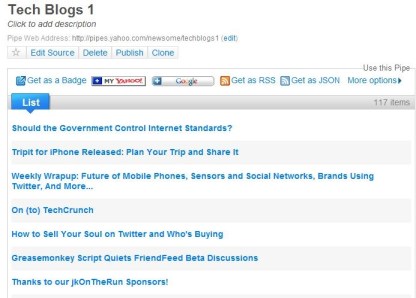
Note the “Get as RSS” button above. You can right click on that button and copy the combined RSS feed for use in iGoogle. Once you have one pipe working, all you have to do is clone that Pipe, rename it and replace the source RSS feeds.
Configuring iGoogle
Now, back to iGoogle. The first problem I had to address was to avoid screen clutter. iGoogle makes it easy to do this, by allowing you to have multiple pages. Click the down arrow in the left column beside the page you’re on and select “Add a tab.” The new page will be added to the left hand column. You can rename it, and (and this is a big timesaver) you can drag gadgets from one page to another. Thus, if you want to have a gadget on three pages, you can add it three times (by refreshing the gadget page and adding it again) to one page and then drag the extra copies to their desired location.
At the moment, I have three pages on iGoogle: Google Reader, Headlines (for the feeds I created above with Yahoo Pipes) and Google News. Let’s take a look.
First, there are two gadgets you’ll want on every page. TwitterGadget and Google Mini Search. Add them as described above.
My first page is for reading and pushing content from Google Reader. Yes, the Google Reader gadget can be unwieldy, but we can vastly improve it with one simple trick: you have have multiple instances of the Google Reader gadget on any page. I have a 24″ monitor, so I used the three column layout for this page (only) and added Google Mini Search and TwitterGadget to the middle, and eight Google Reader gadgets on the sides. In the first one, I show All Items and hide items I have already read. This lets me quickly scan for fresh content. The other seven show other of my Google Reader folders (the display selection stays in place when you close iGoogle). I show items I’ve already read in the other seven boxes, since I may have seen something in the native Google Reader application that I want to push to Twitter. Here’s what it looks like (click on the picture for a larger view).

A Cornucopia of Tweeting goodness.
My second page is for the headlines I created above with Yahoo Pipes. If I’m in a hurry, I want the ability to scan lots of headlines very quickly. A great gadget for serving those headlines is Feed Tabs Reader. I added each one of the genre-based combined feeds that I made with Yahoo Pipes to this gadget. I love the efficient tabs-based navigation. This allows me to quickly scan headlines and push a little content, even when I don’t have time to fully consume my feeds. Note that on this page, I use the two column layout to make TwitterGadget bigger.
Here’s what this page looks like.

You can quickly tab through the various topics.
My third page is dedicated to Google News. In addition to TwitterGadget and Google Mini Search, this page has the Google News gadget. Along with selectable regular sections (news, sports, etc.) the Google News Gadget makes it beautifully simple to create custom news sections. Click the + button at the top right of the gadget and enter the applicable topic in the blank. So far I have custom sections for “Social Networks,” “Blogging,” and “Digital Music.” Again, I love the efficient tabs-based navigation. Again, on this page, I use the two column layout to make TwitterGadget bigger
Here’s what this page looks like.

The Google News gadget is extremely flexible.
The Shared Items Problem
Inexplicably, the Google Reader gadget does not allow you to add items to your shared items list with a single click (you can add a star with one click). So we need a work-around. The best I have found so far is to install the Google Reader bookmarklet. You can add to your shared items by clicking on the bookmarklet, though this requires that you have the actual article or post open. It’s not ideal, but it works. Another option I tried and discarded is to have the mobile version of Google Reader open in the browser’s sidebar. You can one-click items to your shared items that way, but even a big monitor starts to get crowded.
Putting it All Together, via TwitterGadget
Once you have everything in place, this setup rocks. Completely. And largely thanks to TwitterGadget.
You can drag and drop items from any of these sources into TwitterGadget. Once the link is in the TwitterGadget message box, simply highlight the link, click “Control+Y” and the link is shortened. Following, unfollowing and retweeting are also easier- just hold the cursor over the user’s picture. Again, there’s simple, tab-based navigation for replies, DMs, favorites and even the public timeline (“Everyone”).
The beauty of this setup is that it is both infinite and flexible. You can tailor it to your preferences.
I hope this helps. Enjoy!
Websense is a company that develops and sells web security gateway software. This is the sort of software that companies use to keep employees from surfing porn, downloading virus infested files from peer to peer sharing sites and visiting other unacceptable sites. There are various levels of restriction and the customer (e.g., the company IT department) decides how restrictive it wants to be.
 Some folks have an emotional reaction to any sort of access restriction and claim that companies like Websense are inherently evil. Websense has also come under criticism on the grounds that its software assists repressive regimes in restricting freedom of speech. All of these points are worth discussing, but we have to realize that the issue is not as black and white as emotional reasoning may make it seem.
Anyone who has kids or lots of employees who will click on anything knows that sometimes you simply have to protect people from themselves. And you have to protect your network from the people who need protection from themselves. Blaming Websense because some dictator de jour uses its software to oppress freedom of speech is not too far from blaming Google because someone types hate mail using Google Docs. While it might be a small victory to whip the pen and paper, it would be a more effective victory to whip the person writing with it. Sure, it would be nice to live in a world where these applications weren’t necessary, but we don’t.
Having said that, I believe strongly that the developers and operators of these blocking applications have a duty to ensure that access to legitimate sites is not affected. Legitimate should be broadly defined, without regard for politics, religion or philosophy. If that duty is not met, then the developers and operators should be held accountable. These blocking applications are the online equivalent of weapons- they can kill a website in an instant. Just like guns, you need to be trained to use them, and you must handle them with utmost care.
Of course, that doesn’t always happen. This family oriented, tech and music blog has been snared in Websense’s blocking net. Twice.
For reasons that I never understood, Newsome.Org was first blocked by Websense back in 2006. Eventually, I was able to get it off of whatever blacklist it had accidently been placed on, and Newsome.Org happily rejoined online society and we all went about our business. For a while.
Earlier this week, while trying to figure out why Evernote occasionally has authentication problems when I synch the desktop client from my office, I tried to click through to Newsome.Org to test my internet connection. I ran straight into this.

I’ve seen that before. In three years I have moved from a bad “Entertainment” site to a really bad “Malicious” site. I was greatly irritated, to put it mildly.
So I resolved to get out of Websense’s net, again. Here’s what to do if Websense is blocking your blog or website. While I was dealing with Websense, the same general approach should be applicable for any blocking application.
Email No. 1 (to my IT department)
First, I wanted to get the IT guys at my company on my side. These guys are the customer of some security vendor who is a customer of Websense. I figured if Websense wouldn’t listen to me, it might listen to them:
I just noticed that Websense has somehow added my blog (tech, music, etc.) to its list of malicious web sites. My blog has been operational for years, and has been quoted by C|Net, Business Week, etc. In other words, it’s a legitimate web site and not malicious.
Do we have a contact there who I can speak to about this? It would be a lot easier if I could talk to someone and work it out the nice, friendly way. I am concerned that people all over the place are unable to read my blog because these jerks have somehow decided to censor me.
Thanks,
Kent
The IT guys at my company are cool guys and friends of mine. They very quickly reached out to their security vendors to see what could be done.
Research
Next, I did a little Google work to see what I could find out. I saw a lot of discussion about what to do if your site gets blocked, with several links to a Websense “suggest a URL category” page that looked promising. Unfortunately, that page no longer exists. Eventually, I saw a reference to an email address for “suggesting” a site (suggest@websense.com). So I decided to write and suggest that they stop blocking Newsome.Org. I was irritated, but in most cases it’s best to start out friendly, as you can generally catch more flies with honey and you call always get meaner later if you have to. Once you’ve been an asshole, it’s really hard to go the other direction.
Email No. 2 (to Websense)
Next, I wrote a short, but thoughtful, email to Websense.
Hello.
My name is Kent Newsome. I am a partner at ################ (a Websense customer). Here is my bio for confirmation.
[link to my company bio]
I also have a personal blog, Newsome.Org (www.newsome.org), which focuses on technology, music and family life. You will note the frequent references to my family, kids, etc.- all very family friendly. Newsome.Org has been online since 1996, has a lot of readers, and has been quoted/linked by Business Week, C|Net, CBS news and numerous other major media publications.
And it is apparently being blocked by Websense as a “malicious site.” See the attached screencap.
I have spent over a decade building Newsome.Org into the popular website it is today. It is a family friendly site. In fact, I have written for CBS news on family-related issues.
http://www.newsome.org/2006/06/cbs-reaches-out-to-bloggers/
http://www.cbsnews.com/stories/2006/06/12/gentech/main1704170.shtml
Blocking my site has a huge adverse impact on my traffic, and it is unnecessary and unfair. Please remove Newsome.Org from whatever list it was incorrectly placed on, so that it will not be blocked by the Websense application.
Thanks,
Kent Newsome
See, I was courteous, but made my point. I gave them a way to verify who I am and evidence that my blog was legitimate and certainly not a “Malicious” site. Meanwhile, my IT friends filed a similar request with Websense.
The Happy (and Quick) Resolution
Less than 24 hours later, I received a satisfactory response from Websense:
Thank you for writing to Websense.
The site you submitted has been reviewed by Websense Security Labs. We have made an update to the following URL(s) in our master database to address this issue:
http://www.newsome.org/ – Social Networking and Personal Sites
Categorization updates should be available in the next scheduled publication of the database. A new database is published every business day, five days a week, Pacific Standard Time. You should notice any updates referred to in this message within 72 hours.
Thank you for your assistance,
The Websense Database Services Staff
You know, I really can’t argue with that. It would have been better if I’d never gotten snared. Or if once I got out the first time, I was put on some whitelist to avoid a second problem. But Websense responded very quickly and did the right thing. Sure, their algorithm for indentifying malicious sites needs some work, but it’s hard to find fault with their response once the problem was pointed out.
A Cautionary Note
As noted above, Websense and undoubtedly other blocking applications have various administrator-selectable restriction levels. My IT guys told me that Newsome.Org should not have been blocked based on my company’s Websense configuration. But if a company blocks “music” or “social networking” sites, it would likely be inaccessible from that company’s network. In that case, I would have to take it up with the company. Or drop it.
Resources
Here are a few more resources that may be helpful if you’ve been snared.
Lightspeed Database Search
Blog Herald: How Do You Know if Your Blog is Banned or Blocked
Boing Boing: Guide to Defeating Censorware
 Dave, Mike and I got together for The Extraordinary Everyday Lives Show #62 last night. Those guys are super-smart and very interesting. It is absolutely an honor to get to kick topics around with them every couple of weeks. If you don’t already follow them on Twitter, you should do it right now: @dnwallace and @fang.
We talked about the pending death (or perhaps rebirth?) of newspapers, online advertising as a crappy business model, getting major media content on mobile devices, the link economy and my favorite application, Evernote.
Lots of good discussion, debate and laughs. Read more details here, or give us a listen by clicking here. I’m the one with the funny accent.
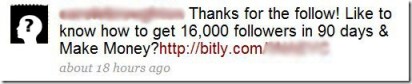
Worst First Impression Ever: Here is the absolute worst possible way to start a Twitter relationship with me. This is an actual DM I received (picture, name and link removed to protect the mercenary).
Backwards Department: Here’s Guest Poster’s (what a serendipitous name) recipe for doing better on Twitter. There’s more strategy in that post than there is in Chess and Risk combined. What’s wrong with just saying something interesting and leaving it at that? Many, many, many people focus on the value they receive from a Twitter post and not on the value their readers get from the Twitter post.
SemiPhone: You too can turn your kid’s iPod Touch into almost a phone.
Private Cloud Department: Pogoplug helps you easily create a private cloud. I hope it is easier and more accessible than my private cloud has turned out to be. The lack of easier local access is probably a deal-stopper for me.
Take Yourself too Seriously Much: This is a fun video, and an interesting post in general. I completely agree with this quote: “I would rather start with ten people saying something nice about me, because I was good to them, than to have 100,000 people to shout my message at.” You would think one of Guy’s ghost writers could have taken a break from spamming Twitter long enough to give the little kids props for making a clever video. By all accounts, Guy (upper case) seems like a decent guy (lower case) in person, but for a so-called social networking expert, he does a bad job of projecting likeability online. Demi Moore is significantly more humble and much more interesting, and she’s a real celebrity who actually writes her own Twitter posts.
Terminator Terminated Department: Here is a really well done and concise run down of the Terminator: The Sarah Connor Chronicles story line leading into tomorrow’s finale. I like the show, but I don’t love it. Still, any science fiction that doesn’t start with Stargate is better than another stupid sitcom or reality show.
One Good Apple: Most productivity lists are 90% fluff, but here’s a reasonably good one.
Him Draw Pretty: For those who, like me, are bored to tears by the WSJ and the Economist, here’s a nifty visual guide to deflation.
More Boring Stuff from Andy: It’s bad enough that he keeps tossing out these operas and whatnot that someone may one day try to make me go see, now Andrew Lloyd Weber is crapping all over the internet. That’s about what I’d expect from a dude who goes by three names. I don’t trust any guy who goes by three names. I used to work with a guy who went by four names. I could write a novel on how messed up that is.
More Interesting Stuff from Jerry: I think Guns, Germs, and Steel is a very interesting book. Here’s a lecture from Jared Diamond on the evolution of religion.
Teach Your Children Well: Here’s a list of 10 Tech Skills Your Teen Needs Now. How about a little code writing? Hardware building?
Rockwell Department: HubSpot has a primer on monitoring your social media presence in 10 minutes a day. I agree that Google Alerts are great for monitoring relevant mentions, etc. I think a FriendFeed filter is another good way to monitor conversations.
Archaeology Department: I used to want to be an archeologist so I could dig up dinosaurs and such. Looks like I have to give up that idea. Good thing anthropology is still going strong, so we can find out that male chimps like hookers.
Poor Little Rich Guy Department: So the guy who co-wrote the Rickrolling theme says he is getting exploited by Google. He compares his treatment to the exploitation of migrant workers in the Middle East: “I feel like one of those workers, because I earned less for a year’s work off Google or YouTube than they did off the Bahrain government.” Nice. Some also exploited by Google newspaper estimated that this dude was worth $68,000,000.00 or so back in 2004. My heart breaks for him.
In an effort to bring some of the Web 2.0/social networking flexibility and features to fellow Wake Forest Demon Deacon sports fans, I have created a Wake Forest sports page at FriendFeed. The new FriendFeed design allows for a seamless integration of news content and message board discussion- things that have traditionally been separate.
It is and will remain a work in progress, as I and hopefully others locate and import relevant news feeds for centralized reading and to serve as discussion starters. I have added a few Deacon sports-related news feeds. Others will be added, and some will likely be dropped over time as we zero in on the best feeds for content and discussion purposes.
The thing I like about this structure is that discussion threads, resembling traditional message board threads, can be started by any user, via the message box at the top of the page. Additionally, each news item has an associated comment box beneath it. If I can get a critical mass of WFU fans to give it a try, I think people will really like the flexibility inherent in the FriendFeed design.
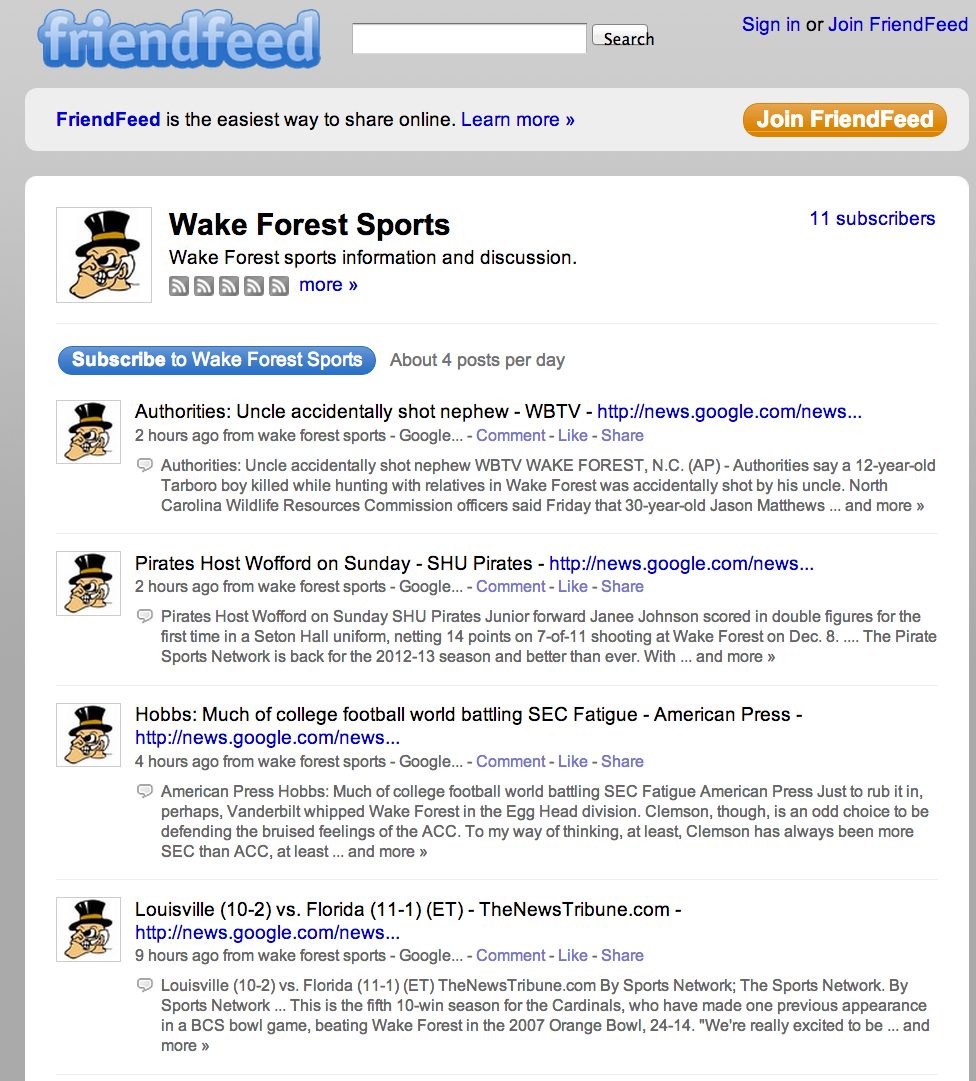
Here’s the message box, where users can create discussion topics. You
can add photos and/or links to your post. You can also select to push
any post you make to Twitter, Facebook or other external sites.

Here’s the way discussion threads display. Yes, it’s different
from traditional message board posts, but the ability to import
all kinds of relevant content and to view discussions on the same
page creates a vastly improved experience.
Note that you can “Like” a news story and/or start a Comment (e.g., discussion thread) below the story.
I hope some other WFU fans will join me in my efforts to create a new and improved news and discussion experience.
Go Deacs!
DRM Protection Racket: PC World has the run down on what the new DRM-infestation free iTunes means for you. It doesn’t mean squat to me, because I buy my music via Amazon, who will almost certainly take this opportunity to raise its prices too.
Deacon Blues Department: I pull for Yahoo, I really do- as a Wake Forest college sports fan I am well conditioned to pull for the underdog. But much of the time I think the train has left the station while Yahoo was looking for its ticket. Yahoo has launched a new version of its music site. Candidly, I didn’t know it had a music site. I took a quick look at the new Yahoo Music design tonight and, well, I don’t see anything all that great about it. A DBT search resulted in a lot of links to buy music via Rhapsody- and that simply ain’t going to happen. There were a couple of music videos at the top, and then a link to more on YouTube, including this version of the most rocking Women Without Whiskey.
Of course, if I wanted to see DBT videos, I’d go straight to YouTube (like I had to do to get the embed code for that video). Supposedly, you can play songs courtesy of Rhapsody via a box on the right hand side, but I couldn’t get it to work on the DBT page. I was able to play some Elliott Smith songs from the Elliott Smith page, but many of the songs were only 30 second clips. I have much less than no interest in playing 30 second clips. And even then, the media player indicates that you can only play 25 songs, presumably a month. In sum, I guess this is an improvement over whatever was there before, but I’m not seeing anything that will keep me coming back for more (or less). Read/WriteWeb seems to agree. AppScout, on the other hand, says at least the Yahoo Music pages suck less than many band pages.
Round 2: Google responded to the vague chest beating by the AP yesterday, basically saying that Google complies with the Fair Use Doctrine and reminding all the angry newspapers that Google will remove their snippets from Google’s database upon request. If I were Google, I’d take any paper that even thinks about complaining out of the database and then make it pay to get back in. But that’s just me.
LSD and Unix Department: Here are 20 amazing coincidences. Reminds me of a quote I read once: “There are two major products that came out of Berkeley: LSD and UNIX. We don’t believe this to be a coincidence.”
Disclaiming Molasses: I’ve been wondering whether the glacier-like speed we’ve been suffering through at Twitter is caused by Amazon’s S3 web service, the site that hosts some Twitter data. No, says Amazon in a preemptive PR strike.
On the Road with Biff and Muffy: BMW has a car that, like a Model B-9, Class M-3 General Utility Non-Theorizing Environmental Control Robot, can sense danger. I wonder if it can sense the yuppies that drive around in it looking for a Starbucks?
Call Me Omega Man: Am I the only person on the planet who doesn’t know or care what Boxee is? I deeply hope that no one ever inadvertently explains it to me. Because I really, really don’t care.
PC World reports that the Associated Press plans to take legal action against web portals and other web sites that use its content without paying for a license. Taking a page from the record labels, the AP blames “news theft” for some of the news industry’s recent difficulties.
But here’s the thing: if it wasn’t for sites like Google News and Yahoo pointing to specific stories of interest on newspaper web sites, tons and tons of people would never see them. Does anyone actually click through a newspaper’s web site looking for news anymore? It seems to me that an argument could be made that the portals ought to be charging the newspapers for sending traffic to the newspaper, not the other way around.
Take Google News, for example.
I count 3 links to newspapers, 1 each to Reuters and the AP and one to ABC news. Maybe I’m missing something, but how is it hurting those news organizations to be at the top of the Google News page?
The question, of course, is what constitutes “news theft.” If we’re talking about the full or substantial reproduction of an article, OK. But I suspect the AP will try to draw the battle lines at something less than that. Are they saying links with headlines are impermissible? So far, it’s not exactly clear what they are saying. PaidContent has a brief interview with the AP’s commander in chief, which sheds no real light on what the AP really wants. At the moment it seems they are developing “rules of engagement.” It could be these rules have something to do with the pending expiration of the AP’s existing deal with Google.
And if the issue is search results, how exactly are we supposed to find news stories on topics we’re interested in? Surf from news site to news site and read thousands of headlines to find the 10 articles we actually want to read? Obviously, that’s not going to happen. And this is good for advertisers how?
Warner Crocker calls it like he sees it, saying the news organizations have:
thrown down gauntlets and are gearing up the legal rhetoric in what appears to be a desperate attempt to stop the bleeding that is going on in the news industry. In reality it will stir up a lot of fuss . . . and eventually prove to be last big noise before the big flame out that scorches the paper some of their products are printed on.
TechCrunch draws the obvious comparison:
The AP, it appears, wants to become the RIAA of the flailing newspaper industry-ferreting out information pirates and threatening lawsuits if they don’t turn over some of their Google gold.
Perhaps I am missing something, but it looks to me like the AP wants its readers to find their way along the information superhighway without a map and without exit signs. I don’t see how that’s good for anyone.
Lots of people still hoarse from crying about the new Facebook design got another punch in the pocket protector today when everyone’s third favorite place to bleat at lots of other nerdly dudes and a few nerdly women, FriendFeed, unveiled a new design. Since I didn’t like Facebook even before the new design, I skipped that whole brouhaha.
While I’m not a member of the migrating, new social network site of the day, let’s speak in massive hyperbole so regular people will laugh at us crowd, I have been a regular, and generally happy, FriendFeed user. I think it provides a nice way to aggregate content in a central place for easy access. I think it is a huge mistake from a content control and personal branding perspective to use any social network as the springboard for (and thus beneficiary if not owner of) your content, but I do believe it makes sense to push your content to various places where prospective readers may dwell. So while Newsome.Org will always be the hub of my online life, services like Twitter and FriendFeed have a place in my online toolbox.
Roll Call
First, we’ll see what some folks whose opinion I value have to say about the new FriendFeed. Then we’ll take a look for ourselves.
Louis Gray (I remember him when he was a pup; now he’s a virtual mastiff of tech blogging) likes the way the developers focus on the interface and listen to user feedback. He also has some ideas for further improvement.
Robert Scoble has a quick list of what he likes, and follows up with some tips for swimming in the new real time river. Based on my experience tonight, I agree with this: “if you’ve followed more than about 400 people, your feed will probably move too fast.” I only follow 111 people, and at times the real time river looked like end of movie credits in fast forward.
Thomas Hawk (the photographer/blogger, not those birds they mentioned in the best science fiction series ever) has the best and most effusive review I have seen so far. He likes the new FriendFeed more than Steve Rubel likes Gmail. Which is more than most people ever like anything.
Mike Arrington risks more spittle by staring at the bandwagon without jumping on. Let’s get serious for a moment. No one in the real world has ever heard of FriendFeed. Everyone at every LARP convention in the world has. It all depends on which end of the elephant you are talking about. As much as I hate to do it, I agree with Mike that FriendFeed is not going to slow Twitter’s momentum. Twitter will do that itself by being slow and crash-prone.
ReadWriteWeb took a break from talking endlessly about the “semantic web” to wonder if the new interface is really the path to mainstream (e.g., people who have never played WOW) acceptance.
Hutch Carpenter says that the new design is taking aim at Facebook. Hilarious, yes. But ever since David metaphorically slayed the giant, every little thing has to be the killer of some big thing.
Taking a Look (Updated- see below)
So let’s go see what the hubbub is all about.
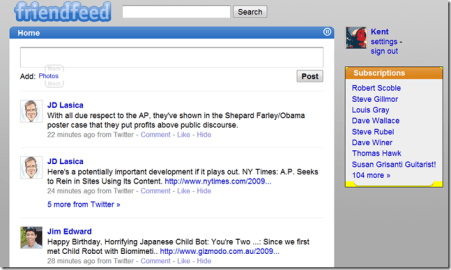
Here’s the right screencap, this time.
So far, this looks the same. But over at the top right hand side of the page is a new option of “Real-Time.” The new page has a cleaner, more stylish look. You can’t tell from this screencap, but the entries scroll, supposedly in near real-time, with new entries appearing at the top of the list. At one point, the new entries were moving so fast I couldn’t read them if I’d wanted to. Note the pause button to stop things as needed to read or reply.
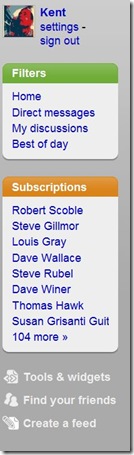 Navigation is at least somewhat more intuitive via the right hand column, which has settings, filters to selectively display data, subscriptions and some additional tools (see screencap below).
The filters allow you to choose what information appears in the main window. “My discussions” is helpful if you want to see things you have posted, or to follow up on comments you have made. Best of all, you can create and save custom filters to help you categorize and access particular types of information and/or users. I created a filter to mine for people discussing alternative country music. Right away I found some information that I would not have otherwise seen, including a post about an alt. country band from my home state, and one about the talented Neko Case.
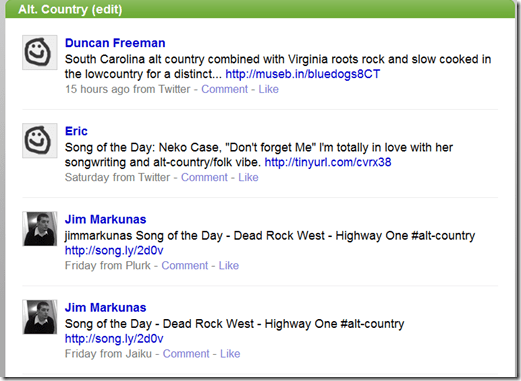 My nifty alt. country filter
Initially, I noticed one little problem. There was a lag of around 20 minutes between the time a tweet was posted on Twitter and the time it showed up in the FriendFeed stream. Later, it looked like the lag time was shorter.
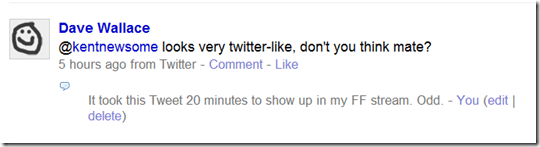
Delayed twitter post. Nice photo of Dave, though.
Early Conclusions
I don’t know that the new interface is going to bring FriendFeed to Main Street, USA, but I don’t think FriendFeed is going to get there anyway. For those of us who already use it, I think the new design is a definite improvement.
Like a new slide rule.
UPDATE:
I stupidly grabbed my original screencaps from the current FriendFeed page and not from the beta site which is here. Thanks to the Commenters for setting me straight. I replaced the original screencaps, added one of a custom filter I created in the meantime and ate a murder of crows.
Warm, Glowing, Warming Glow: We have a string of Christmas lights that are lizards with little lights inside of them. Here’s the real thing, frog-style. If you haven’t bookmarked National Geographic’s Daily Dozen photographs page, you should.
Unnecessarily Hard Software Department: I’ve been experimenting with Adobe Lightroom, based on a number of positive reviews. Once again, an Adobe product seems as intuitive as pig-latin in Chinese. I’m sure Lightroom is the bees knees, but I have to believe they make those programs difficult on purpose.
Stupid Web Tricks: I was going to link to this story about strange, extinct creatures, but Discovery spread the article across 10 pages. If every site that engaged in article spreading- normally done in the name of page views for serving ads- would immediately disappear off the face of the net, the net would be a better, more efficient and reader-friendly place.
Planet of the Twits: Robert Scoble has a very interesting read about what Twitter could and should become. I would really like to see native, expanded photo and music integration. In sum, I’d like to see Twitter add some of the features that Pownce had. But I don’t want Twitter to become too intermingled with Facebook or FriendFeed. I really don’t like the Facebook interface and I think FriendFeed, while interesting and useful, is greatly overrated by many. Sort of like Twitter, actually.
Musical Mashup Department: Southern Shelter, one of the web’s best music sites, has some live tracks from the Drive-By Truckers and Booker T. I’m looking forward to that new record. Here’s Angels and Fuselage, with DBT, Booker T. and Kelly Hogan. I know a Cajun girl that is going to dig this set.
He’s Not that Kat Anymore: Speaking of music, my other favorite music site, Twangville, pays tribute to Townes and Sir Douglas.
I Guess that’s Not the Word After All: Lifehacker asks if Thunderbird (the email app, not the wine) is dying on the vine (pun intended). I tried Thunderbird (the app) for the first time about a month ago and was epically unimpressed. And I am a rare in the nerd-zone desktop email user.
Till Her Daddy Takes the iPhone Away: Here are 60 free tabletop games for your iPhone.
About Time Department: An upcoming version of Firefox will allow you to install add-ons without restarting Firefox.
 Newsome.Org