Content Master Page (2.0)

After using Version 1.0 of my Content and Twitter Juggernaut Page for a couple of weeks, I decided it was time to knock it down and see if I could come up with something simpler and better.  Among the areas I wanted to improve were:

1. A more unified interface, on a single page.
2. One instance of Google Reader and one instance of TwitterGadget.
3. An easier way to add items to my Google shared items.
4. Avoidance of the flashing/font reset problem I was experiencing when posting via TwitterGadget.

After trying several iGoogle hacks and scripts, some hand-written, I decided to trash iGoogle completely and do something I never thought I’d do again.  I decided to use. . . a frameset.  Why?  Because by using frames, I could solve all four of the above issues, and enhance navigation too.  By creating a frameset with a menu frame across the top, a 40% width TwitterGadget frame on the right and a 60% full Google Reader (not the gadget) frame on the left, I can do several things that improve my content reading, blogging and Twitter posting.

I can keep a TwitterGadget box open and always visible on the screen on the right hand side.  This is critical for dragging links into the message box for commentary and posting.

By taking all of my content that was previously in the Google News gadget and the Feeds Tab Reader gadget and adding them to organized folders in Google Reader, I can access all of my content in one, unified window.  If I am reasonably current in my feed reading, there is little need for scrolling, but if not I find scrolling to be preferable to stacked windows.  All of this is done in a single instance of Google Reader and one instance of Twitter Gadget.

Because I now have the full Google Reader open in the left column, I can add items to my Google Reader shared items directly, instead of having to use the bookmarklet.  Plus, I can access my starred items more easily.

And by having the Twitter Gadget in its own window, I avoid the annoying flashing/font reset problem.

In other words, I went through old school to get to new school.

The drawback to Version 2.0 is that it requires some work to organize your feeds within Google Reader.  I don’t always want my traditional news feeds to be in alphabetical order.  For example, I want Google News “Top” items to be at the top, not the “Business” items.  To solve this I added a numbering convention at the front of the renamed feeds (the ability to rename a feed being one of Google Reader’s best features).
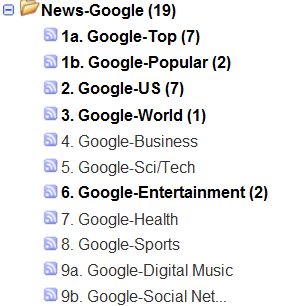
I was also able to add a navigation bar at the top of the page to allow me to return to another of my most common destinations.

At the end of the day, I have a content reading and Twitter pushing page that is smaller, faster and easier to use (click the image below for a bigger view).
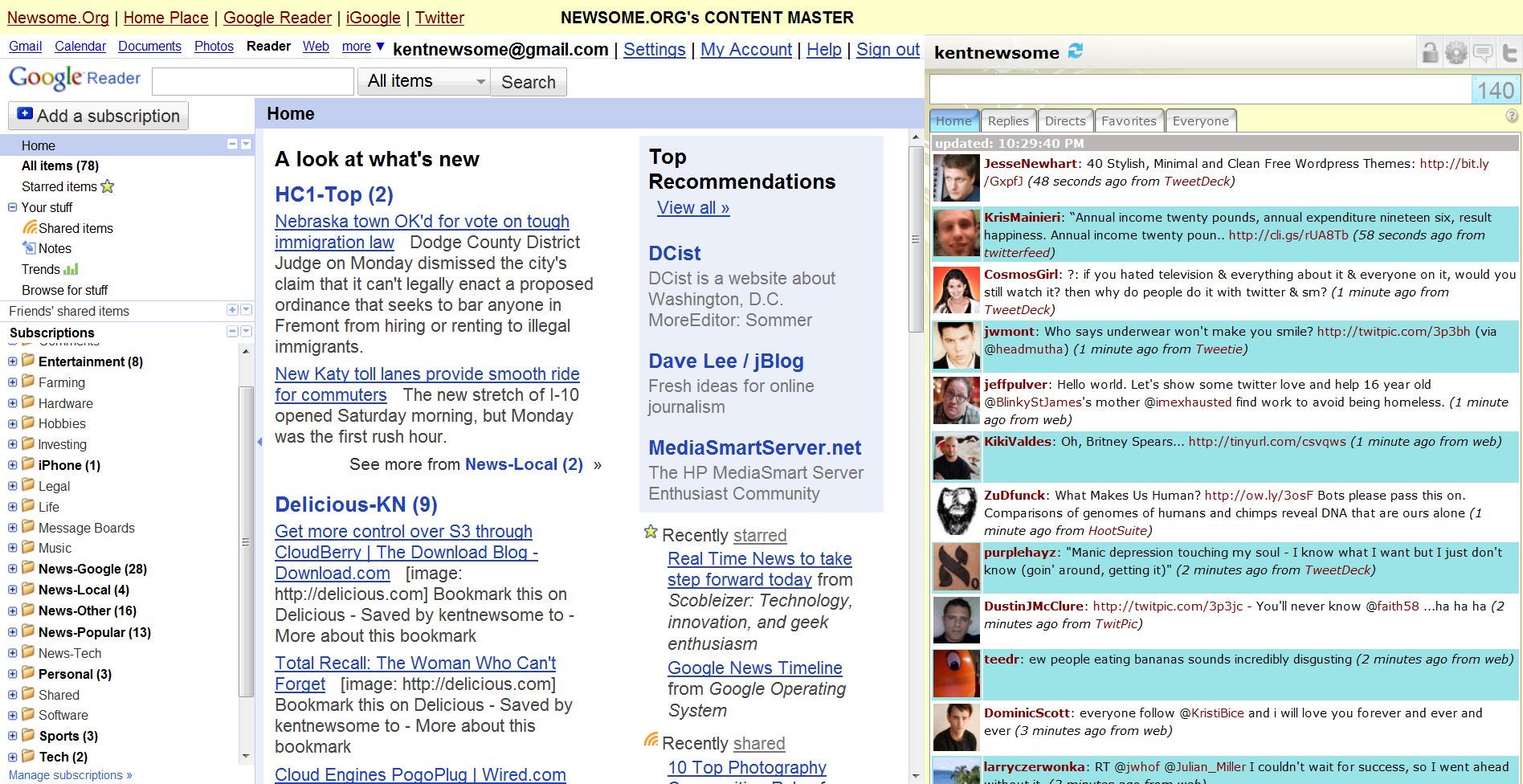
If you’re interested in experimenting with this setup, here is the frameset.  You don’t have to have server space- you can open the file from your hard drive.  If you don’t want to do that, you can use the Newsome.Org Content Master (Update: now depreciated) page.  If you are logged into Twitter and Google, your information will appear in the appropriate windows.  All I ask is that if you use that page, please Tweet about this post and subscribe to the Newsome.Org RSS feed.

There is still room for improvement.  I would like to get rid of some of the screen waste on the Google Reader Home page, such as the entire right hand column, but all that unnecessary stuff is hidden once you start clicking on folders and individual feeds, so it’s not a huge problem.  Additionally, Google needs to implement native column resizing in Google Reader.

What I really want is for TwitterGadget to add a feature to copy the headline, followed by a shortened URL (and not just the URL) when you drag a headline into the message box.  That one feature would reduce Twittering time by over 50%.

Otherwise, I’m pretty pleased with this setup.

For now.

PimpMyNews: Make Blogs Talk

I have been experimenting a bit with PimpMyNews, an Xzibitly named service that allows users to create a feed list of blogs, news and other selected sources and listen to that content over the web or on an iPhone, iPod Touch or other mobile device that can play MP3s.  While this is a pretty handy tool for anyone, I think it’s greatest potential may be as an accessibility device.

Let’s take a look.

According to co-founder John Atkinson, PimpMyNews, which launched its first generation platform in 2008, “puts consumers in control by automatically collecting the news and blogs they wish they had time to read – and converting them to audio – so they can listen while doing other things, like driving, working out, riding the train and more.”  The service allows users to choose from over 1,200 sources to create personalized audio playlists, and to share that content with friends via email or on Facebook, Twitter, MySpace, Digg and other social networking sites.

Once you’ve completed the quick registration process, and clicked on the expected email confirmation link, you can easily create playlist of feeds.  You can start with a pre-selected group of feeds via a “FastPack” or you can browse the available feeds and create your own mix.  There are FastPacks for Apple, Entertainment, Politics, Sports and Technology.  At present, you can’t add feeds to your playlist that aren’t already available in the various PimpMyNews categories.  If the ability to add new feeds is ever added, it would be cool if you could also import OPML files exported from your feed reader.

But there are plenty of feeds available to get you started.  After you have your initial feed mix set up, you can access your playlist via the My Account tab at the top of page and you’re off and listening.

The audio conversion is excellent, with the read text sounding about as natural as can be expected.  I like the fact that you get an assortment of voices.  Here’s a sample of how it sounds.  Note that you can view the text by hovering over the View Summary link.

Once you have your playlist set up, you’ll want to enable your podcast so you can listen on the road.  Click the set up link, and add the content from your playlist you want to include (which can be all the feeds or just some of them).  Click the save button, and you’re presented with a one-click button to subscribe in iTunes and a link to use to subscribe elsewhere.  Here’s my feeds podcast link if you’re interested.

You can rate posts and share them easily, via the handy buttons at the bottom of the View Summary pop-up box.

And, of course, there’s an iPhone app (iTunes link).  A Blackberry app is forthcoming.

I’ll be using the iPhone app this weekend as I run errands and do my chores.  As noted above, I also think people with accessibility issues could find PimpMyNews very useful.  I can’t wait to see what new features are added in the coming months  There are lots and lots of cool possibilities.

And the best thing is, now I can make those so-called A-List bloggers talk to me, whether they want to or not!

Take a Email, Betty

Send a copy to my inbox, gotta organize my life.  Apologies to R.B. Greaves.

Cc:Betty, not to be confused with CC Rider, CCR or the German techno band C.C.C.P., is a service that turns an email exchange into a threaded message board-like page, and archives attachments for easy access.  Getting started is a simple as adding betty@ccbetty.com to the cc (e.g., carbon copy) field in an email.

When you do that, the service creates a page like this:

Email replies (assuming they leave betty in the cc field) show up on the list, and attachments are archived too.  Additionally, participants can comment and leave attachments directly from the Cc:Betty web page.  The process works smoothly, with attachments showing up as thumbnails (see the screen clip above) you can click on for a full size view:

More info via the FAQ.

I’m not exactly sure how I can use Cc:Betty, but I want to find something to do with it.

Because it’s just cool.  Sometimes just cool is enough.

There’s Something About Mixx

As a part of my content/Twitter superpage I have created on iGoogle, I set up a section for feeds from various content sharing sites.  I used the handy Feed Tabs Reader gadget, which lets me create a tab for each site so I can quickly scan for interesting stuff to read, blog about or push to Twitter (follow me on Twitter to enjoy the fruits of all this work).

I populated this section with RSS feeds for Delicious (Popular), my Delicious bookmarks, the Onion, Fark, Digg-Tech and Digg-Entertainment (which will soon be deleted unless I get relief from the hated DiggBar), Yahoo Buzz, Mixx, Reddit, Propeller and my FriendFeed feed (which is useless because people tend to post a lot of items at once to their FriendFeed and there isn’t a feed for one item from each person you follow).  Let me know in the Comments if there are other feeds I should add.

Until I was surfing around looking for sites to include, I had never used Mixx.  I decided to add every promising site I could come up with and then delete over time those I find unhelpful.  Boy, am I glad I added the Mixx (Popular) feed.  So far, it has proven to be, by a large margin, the site with the best ratio of interesting content to static.  The current Mixx tab shows 20 items (the most you can have in a Feed Tabs Reader tab), all of which are at least semi-interesting.

According to Wikipedia, Mixx was created in 2007 by a team of industry veterans with deep internet, news publishing and online content expertise, including several former executives from Yahoo, USA Today and AOL. The private beta version of the site was launched on September 21, 2007, and the public beta of was introduced on October 10, 2007.  It has content partnerships with various old media outlets, including USA Today, Reuters and CNN. The LA Times owns a stake in Mixx.

There is a Mixx blog for more information (though it should be a lot more active), a Firefox plugin and some other tools.

I played around a bit with the Digg-like adding stories and voting up features, but those don’t interest me nearly as much as the content feeds, which just seem to be of a higher quality that the alternatives.  I wish Mixx had a private bookmarking feature like Delicious.  If it did, I would consider consolidating my bookmarks there.  I’m far from a Delicious power user, but I do use it to store content I find on the web- as opposed to in Google Reader– for future use.  You can add content to your Mixx Conversations page from within Mixx and there’s an RSS feed for your saved Conversations, but I didn’t see an easy way to add content from the web directly and privately to your Conversations page.  Still, I came to Mixx for content and as long as the ratio of interesting content to static stays high, Mixx will have a place in that Feed Tabs Reader.

My only material complaint about Mixx is that its front page doesn’t render well, at least in Firefox.  I have seen this word jumbling issue with other sites, but in 2009 there ought to be a design fix to prevent this from occurring, regardless of font selections (I generally “control+” sites in Firefox to take advantage of my large monitors and to assist my aging eyeballs).

I’m surprised it took me a year and a half to find my way to Mixx.  But as they say, better late than never.

Evening Reading: 4/15/09

Marriage Made in Nerdville: You can now send stuff to my beloved Evernote via Twitter.  What they need to do now is to convert #hashtags to tags on importation.

Spam vs the World Department: Crap like this and that stupid, obvious and utterly idiotic Twitter traffic machine nonsense are the worst thing about Twitter.  I don’t know what Twitter’s position or plan is with regard to spam, but if they aren’t proactive, spam will kill Twitter.  You can count on it.  At least all those self-affirming, very serious and unintentionally hilarious Deep Thoughts-like posts are funny.

Oversharing Department: Speaking of all those Deep Thoughts, the New York Times tries and generally fails to play the role of Twitter apologist.  Few if any of the examples mentioned in that article couldn’t be done much better via email or text message.

That’s Not a Nut, that’s a Cherry Bomb: What do all parks do for self-improvement?  Why detonate some squirrels, of course.

Saying a Lot Department: Here are Rush Limbaugh’s 10 dumbest remarks.  I’m profoundly apolitical, but I lose a lot of respect for someone who lives on either end of the spectrum, when we all know the truth lies somewhere in the middle.  End dwellers aren’t looking for truth or justice.

Still Whining: Dave Winer is still crying about not being included in Twitter’s suggested users list.  Now he points a green finger at Mashable.  I wonder if he has convinced himself it’s about who’s on that list as opposed to that he’s not?  Dave will not talk to me, so I’d love the thoughts of some of his minions.

Yes, Yes, Yes Department: Feedburner is completely and totally messed up.  It is unforgivable that Google would acquire a tool used by so many bloggers and then completely ignore it to death.  If Google isn’t going to take care of it, give it to Mozilla and let it go open source.

Horrifying Twitter Post of the Week:


I’d like to add a witty comment, but there’s nothing I could possibly add to that.

OK, Maybe I Can: Why do I feel like I’m caught in a yelling match between Jack Handy and P.T. Barnum every time I visit Twitter?

7 Ways to Improve Blip.fm

blipfm

I’m a big fan of Blip.fm, the “Twitter for music” service that lets you search for songs, post them to your Blip.fm page with brief, Twitter-like commentary and, if you want to, export that post to Twitter or another service.  It’s a great way to introduce others to good music, and to allow others to do the same for you.

While my primary music genres are classic rock, blues and alternative country, I am in the middle of an A-Z survey of new wave bands.  Using these two lists from Wikipedia, I am finding and “blipping,” the Blip.fm jargon equivalent of “tweeting,” a song from as many new wave bands as possible.  At the end of this exercise, I’ll have the greatest new wave mix on the internet!  In the meantime, I am turning people on to some great music, and the Twitter integration facilitates some good discussion.

As cool as Blip.fm is, it could be better.  Here are 10 things that would improve the Blip.fm experience.

1. Survival.

This sounds trite, but it is probably the biggest hurdle Blip.fm has to overcome.  Between the catless bag holding RIAA slinking around looking for innovation to quash and the inevitable end of the Web 2.0 cash supply (undoubtedly heavily contributed to by said slinking by the RIAA), there is the unpleasant possibility that Blip.fm could just shut its doors. leaving music lovers sad and silent.  Unlike most Web 2.0 services, Blip.fm actually has at least one revenue source- Amazon affiliate purchase links to each song.  See the “Buy MP3” link at the bottom of the box below.

image

I have long proposed that services like Blip.fm be permitted by the priority-challenged record industry to pay a share of the affiliate revenue in lieu of royalties.  Face it, lots of people hear songs on Blip.fm, especially via the Twitter integration, that they would not otherwise hear.  Some of those people buy the songs.  That market simply would not exist without services like Blip.fm.  In other words, the RIAA should be thrilled about Blip.fm, and not anxious to kill it.

2. Queued Blips.

While the process to search for, locate and blip a song is not hard or time consuming, it would be a lot easier if there was a dedicated place to store blips until you are ready to post them.  That would make it easy to search for and save a queue of songs and blip them later, one or two songs at a time.  Currently, I use my playlist to queue blips.  Your playlist is a separate page where you can add songs by clicking on the star (see the star at the bottom right of the box above).  If you’re willing to use your playlist for this purpose, you can store songs there to blip later, but it would be preferable to have a separate place to queue blips without having to use your playlist page for that purpose.

For example, I don’t want to blip any non-new wave songs until I get through my alphabetical survey.  But I see other good songs all the time on Blip.fm and via Twitter.  There should be a dedicated place to save those songs for easy access later.  Sure, you can do this with a third party service like Blipster, but it should be a native feature.

3.  Multiple Playlists.

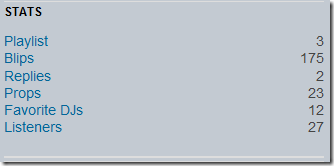
Speaking of playlists, an easy way to solve both the queued songs problem and vastly improve the playlist concept would be to allow the creation and naming of multiple playlists.  Currently, you get one playlist (see the navigation box below; the 3 means I have 3 songs in my playlist).  I’d like the ability to have a separate playlist for classic rock, blues, alt. country and queued blips.

image

4. Ability to Rearrange All Songs.

Once you have blipped a song, you can delete it from your main Blip.fm page, but you can’t rearrange the order on that page.  You can drag songs around to rearrange the order on your playlist page.  But I’d like the ability to rearrange songs on my main Blip.fm page.  The lack of this feature prevents me from dragging other new wave songs I previously blipped up into the grouping of the new wave songs I am currently adding.  It also limits my ability to control the genre, tempo, etc. mix for better effect, as more blips are added.

5. More Developer Interactivity.

On the one hand, I could argue that @blipfm is a clinic on how not to use Twitter.  None of my @ twits have been answered, even though I write often and positively about Blip.fm, and the activity there is sporadic at best.  On the other hand, it seems Blip.fm may be operating with a skeleton crew.  I want to see Blip.fm secure its survival, and then take advantage of the built-in interactivity of Twitter and other networks to improve its service and build its brand.  You don’t have to hire people to do that.  You can create an group of dedicated volunteer users (like Blogger does, and like Microsoft’s MVPs) and let them brand build Montessori style.

6. Improve Embedding.

Blip.fm allows you to embed songs.  Here’s a great one:

The problem of course is that gigantic, space eating graphic and the fact that the embedded player is just too big in general.  The graphic needs to be a lot smaller, as does the player in general.  Compare Blip.fm’s embedded player to the much more elegant divShare one (more on divShare here):

7. Don’t Get Bought by Last.fm.

There has been speculation that someone will scoop up Blip.fm if it gets in dire straits, rather than let it die.  If that’s the only way Blip.fm can survive, so be it.  But please don’t let Last.fm buy it.  I tried to like Last.fm. I really did.  But it is the Photobucket of the music space.  Good idea, but horrible design.  If someone has to save Blip.fm, let it be Google.

I really want Blip.fm to survive and thrive.  I hope it happens, and I hope we see some of these features added over the coming months.  If I am ever able to connect with anyone at Blip.fm, I will invite him or her to our next podcast to discuss Blip.fm in more detail.

Evening Reading 4/13/09

Lots of good stuff tonight.

Wally Bangs Department: When a blog post starts off with this sentence, you know it’s going to be good: “Twenty four years ago I loaned Ken Kesey’s Garage Sale to a dude that worked with me at McDonalds.”  I wish Wally Bangs would quit all other pursuits and just write blog posts all day.

Make Light Not War: I was really surprised it wasn’t via Facebook.  Or Twitter.  This is an interesting video.  I love it when scientists talk about scientific topics without sounding like eggheads.

Beautiful Math Department: I like this math game for the iPhone or iPod Touch.  I have to somehow let Delaney see it on her own and ask for it so she won’t realize it’s the “E” word.

Stupid Jargon Department:  I am fired up that Alan Meckler is fired up about the “Semantic Web.”  Anything that increases the chance that the entire “Semantic Web” concept will disappear into deep obscurity, like Virtual Reality World Magazine or CD-ROM World, is a very good thing.  If you doubt that, don’t take my word for it.  Take a moment to consider Business 2.0’s attempted definition:

[The Web is] basically a compendium of billions of text documents designed to be read by humans. You can search it for keywords, but the results aren’t much use until you sort through them to find the page that has the info you want. To take the Web to the next level – to move from Web 2.0 to Web 3.0 – the information in those documents will have to be turned into data that a machine can read and evaluate on its own. Only then will computers be able to take over tasks we now do by hand: find the nearest restaurant, book the best flight, buy the cheapest CD.

A Truly Smart Server:  HP is preparing an update for its MediaSmart Sever software to add video streaming functionality for remote devices.  Yes, including the iPhone.  Plus, an improved Time Machine configuration.  My pal Ed Bott has more on this.  Unfortunately, this update doesn’t work on first generation MediaSmart Servers- like mine.

Great Record of the Day: 30 Days Out, one of my favorite music blogs, has a post on the Byrds’ excellent 1968 record.  This was the great Gram Parsons’ only album with the band.  Gram Parsons and Clarence White is a combination that would make a Reece’s Cup feel inadequate.  Here’s the most excellent track, You Ain’t Going Nowhere.

Expensive Hardware Department: Engadget has a detailed review of the very expensive and, in my opinion, not worth the high price Dell Adamo.  Engadget says it’s pretty, but tends to agree with me about the price thing.

HD Camcorder Roundup:  PC World has a primer on shopping for an HD camcorder, a list of cameras that also take HD video and a link to Macworld’s HD camcorder buying guide.  As noted before, here is my HD camcorder buying guide.  I’m going to buy one the day they are available.

Desperately Seeking Smartphone: After reports that some carriers thought their proposed Smartphone was boring, Dell is looking to partner up with China Mobile to release a Smartphone in China.

Light a Firecracker, Mini-Explosion Results: I generally enjoy Penelope Trunk’s posts.  And she seems like a good person, if perhaps not at the very top of the curve on the self-awareness scale.  But how a parent can tell the worldNo school today and the nanny’s on vacation. A whole day with the kids gets so boring: all intergalactic battles and no intellectual banter” (here‘s the Twitter post in question) and then go nuts when someone craps all over you is a supreme mystery to me.  Yes, parenting is hard work and yes there are times every parent gets frustrated.  But there’s such a thing as over-sharing.  And another thing.  There’s a whole lot more to life than so-called intellectual banter.  Now I’m sure that Penelope knows and appreciates that, and I bet she’s a good mom.  But for crying out loud, don’t say something like that to a world full of devoted parents and then act surprised by the resulting firestorm.  And not just because it might be banal (that’s an intellectual word that would be useful in bantering).

Twazzup: Don’t Judge a Web 2.0 Application by Its Name

Compare how cool most new wave bands were named to how stupidly most Web 2.0 applications are named.  Where is Prefab Sprout when you need them.

Speaking of stupid names, Twazzup, perhaps a new low in naming, wants to be your better Twitter search engine.  Taking a page from the FriendFeed beta, Twazzup search results are real-time (assuming Twitter is, which it often ain’t) with a pause button.  Stupid name aside (and it’s a little hard to put it aside), Twazzup has a really well designed interface.  I like the tabs at the top, and the photos on the right side.  And even the colors.

twazzup

I don’t see an RSS feed to export search results to a feed reader or to my new love iGoogle, which is the feature of Twitter Search I use the most.  As part of my very half-hearted efforts to monitor my “online reputation” I have a Twitter Search feed that picks up my Twitter mentions, replies and retweets.  Here it is, if you want to use it as a go-by to create one for yourself:

h t t p://search.twitter.com/search.atom?q=%40kentnewsome+OR+%22Kent+Newsome%22+OR+Newsome.Org.

A try or two at Boolean searches also came up empty.  I didn’t find any meaningful help or support options, and job one for Twazzup should be an FAQ.  I would also like to have a list of saved searches that I could click on for easy access, and maybe a way to search only people I follow or who follow me.  Or better yet, who follow a particular user.

One cool feature it does have is a clickable tab for relevant hash tags.  For example a Grateful Dead search returned hash tag tabs for #musicmonday, #grateful dead, and #1071 (which is some sort of Grateful Dead playlist thingy).  Another thing I like is the way thumbnails of attached photos show up in the applicable Tweet.  You’d think Twitter would have added that functionality months ago.

ReadWriteWeb likes the fact that Twazzup displays a list of the “most authoritative” Twitter users for any given topic.  I suspect we are, once again, confusing popular with authoritative, which is probably the single biggest fallacy of Web whatever.whatever.  Just because there isn’t a readily available method to accurately measure something doesn’t mean you have to come up with inaccurate methods.  The New York Times doesn’t call its bestsellers list the most authoritative books on the subject.

Mashable wonders if we really need a Twitter search alternative.  I agree with the point that most if not all of these alternative search engines may shortly suffer the dual death knell of redundancy and remoteness once Twitter integrates a better search component on Twitter pages.

CNet likes the fact that Twazzup doesn’t monkey with the time-sorted results, but also likes the fact that it does have those popularity features in the right hand column.  The CNet post looks at three Twitter search alternatives and concludes that Twazzup is the best.

Like many, I suspect these Twitter search alternatives may have a limited shelf life, but so far, only the lack of an RSS feed for search results is keeping me from making Twazzup my preferred choice for Twitter search.  At least for a while.