More New Music

tj-760871I may have come across some good new music today. After checking out a page about my current favorite band Chuckanut Drive, I followed a link to Tresa Jordan‘s web page.

All I can hear so far are the sound clips on that page, but boy do they sound good. She’s got a great voice and an excellent fiddle player. She seems to be somewhere between Alternative Country/Americana and commercial Nashville. I’m going to see if I can get a review copy of her record. If so, I’ll post a full review later.

If she is as good as she sounds (and looks) based on the sound clips and photos on her page, she ought to be on a major label.

Technorati Tags:

Top 10 Tech Products of 2005

2005 was a good year for tech products. Here are the top 10 items or services I started using in 2005, in order.

top101) A Flickr Pro Account. For all the reasons I have raved about here, Flickr simply changes the world as far as digital photography management and sharing goes. Too bad none of my friends and family use it, because they are missing some good photos that the public cannot see.

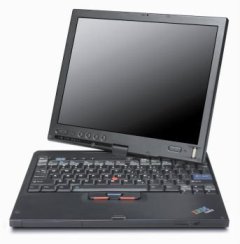
2) My Thinkpad X41 Tablet PC. Again, for all the reasons I have talked about, I can’t imagine ever traveling without it.

3) ACDSee 8. Simply the best desktop photo management program on the market. The batch renaming function alone is worth the price. The photo editing features are not as good as Paint Shop Pro (sadly destined to a painful death now that it’s been bought by Corel), but everything else is perfect.

4) Sony Cybershot DSCV3. Yes, this seems to be the year of the digital photograph. I love this camera. If feel and features are more important to you than small size, this is a great camera choice.

5) Audacity. While not a perfect solution, it makes making podcasts a whole lot easier than it was before.

6) Technorati. Great service. Great founder. It is the backbone of the blogosphere.

7) DigMyPics. This service converted a ton of our old prints to high resolution digital photos for a very reasonable price.

8) Del.icio.us. The runner up to Technorati as the most useful new web service of the year.

9) Linksys WTR54GS Travel Router. Hotel freedom for less than $80.

10) Alias Find and Replace. As I raved about a few months ago, this may be the best software solution to the problem of whole-scale web page revisions I have ever seen.

If 2006 is anything like 2005, there’s some good tech on the horizon!

Technorati Tags:

Performancing for Firefox

firefoxIf you use Firefox as your internet browser and you blog, you owe it to yourself to check out Performancing for Firefox, a plugin that allows you to create a blog post within a split screen right in your Firefox window. This makes it easy to add the links, images and content from one screen, as opposed to clicking around in tabs to get the links, etc. you need.

The extension supports multiple blogs, and it works with most of the major blogging platforms. As Duncan Riley points out, all it needs to be nearly perfect is the ability to easily include Technorati tags.

Technorati Tags:

BOB Awards – Rock the Vote

Qumana is hosting a Best of Blogs Award. The idea behind these awards is to recognize some lesser known blogs that don’t get the sort of publicity the most popular blogs receive.

I think this is a great idea and I plan to nominate a blog or two.

While I’d never solicit a nomination (well, I always say never say never), the entry form for the best overall blog is here and the one for the best daddy blog is here. Just in case anyone has any blogs they’d like to nominate 🙂

Whether you deem my blog worthy or not, consider nominating someone in one or more of the categories (there are a lot of categories to choose from). There are a lot of people writing away who would love the approbation and exposure.

Technorati Tags:

One More Kudo for the X41

x411012-725491

Michael Gartenberg picks the X41 as his Best Laptop of 2005.

He likes the cake and eat it too advantage that I have talked a lot about:

It’s the first Tablet PC I’ve used where there is no penalty at all for the Tablet OS feature. It just works as a great notebook and when you need it in Tablet mode (like in that middle seat in coach on the way to CES) it’s just there for you.

The more I use the X41 the more convinced I become that it’s simply the best laptop (and the best tablet pc) on the market.

Technorati Tags:
,

ScobleFeeds A-Z: The G’s

This is part seven of my A-Z review of Scoble‘s feeds. The rules and criteria are here.

There’s a lot to choose from in the G’s, and here are my favorites:

Greg Hughes – dot – net (RSS Feed)

Greg Hughes covers tech, movies and anything else that catches his eye. He has the sort of broad interests that make for a truly interesting blog. I really like his 48 Random Things post. I hope he does more of posts like that.

Honorable Mention:

Gizmodo
(RSS Feed) (ineligible since I already read it daily)

Global Voices
(RSS Feed)

Technorati Tags:
, ,

More Good Reviews of the X41

Rob Bushway has a post today about his experiences with the Thinkpad x41. His conclusions are pretty positive so far, though he promises to cover things he doesn’t like about the X41 in a subsequent post. JKOnTheRun comments on the X41 as well today.

One thing Rob and JK point out is that the power management settings out of the box are set to conserve battery power, which may result in a performance hit. I changed the power settings on my X41 soon after I got it, and I have not noticed any sluggish behavior.

The thing that I like the most about the X41 is that it seems to hit the sweet spot between power and portability. It has everything a laptop needs, with the exception on an internal DVD player/recorder (see my travel workaround here). Plus, it is very light and easy to carry around.

I find the switch between landscape (regular laptop orientation) and portrait (the slate, tablet pc orientation) to be really fast and easy. On a typical flight, I’ll switch back and forth numerous times as I work in Word, watch a Movielink movie, do a crossword puzzle, read a book, etc. And once I’m on the ground, the X41 looks, acts and feels like a traditional laptop.

I really like this computer and cannot imagine traveling with anything else.

Technorati Tags:
,

JKOnThe DualCor cPC

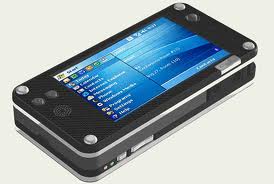
dualcorJKOnTheRun has some good scoop on the forthcoming DualCor cPC, a handheld device that will run Windows XP 2005 Tablet Edition for regular computing and Windows Mobile 5.0 when you need a more traditional PDA.

Between the risk of getting sued out of business and my Treo envy, my Blackberry has lost some of its luster. The DualCor cPC will have 3 USB 2.0 ports (2 Type A, 1 Type B), a mini-VGA port, stereo headset port, telephone headset port, and a CF Type II slot. It will have a 40G hard drive and a whopping 1GB of RAM. This sounds about like the Tablet PC I carry around now, and with with the ability to instantly switch to Windows Mobile 5.0 it promises to be a powerful PDA.

The clincher for me will be if the phone part is fully realized. I am determined to carry one device for PDA and phone use- that’s why the newer Blackberry has been in my pocket. This article from C|Net has a little information on the phone features, but I haven’t seen any details about this aspect of the device. If I can use a DualCor cPC with my existing cell phone number and have reliable phone service, I will be very, very tempted to buy one.

Keep an eye on JKOnTheRun for more details about this promising device.

Technorati Tags:
,

Washington Post: Firefox Moves Farther Ahead

firefoxRob Pegoraro of the Washington Post has an article today about the advantages that Firefox 1.5 has over Internet Explorer. He and other high-profile writers are starting to put into words what I and many others have been thinking.

Namely, that Firefox has moved so far ahead of Internet Explorer that the browser race, at least for those tech savvy enough to understand the feature differential, is over. Firefox has won.

Rob applauds Firefox’s new automatic update system, it’s better security and its tabbed browsing. Those are great advantages for sure, but here are the reasons I believe Firefox has won the war.

1) Tabbed Browsing– this is not the reason I stay with Firefox, it’s the reason I tried it in the first place. A core feature that gives Firefox a commanding lead. Internet Explorer will soon add this feature, but it’s too little, too late.

2) Extensions- there are so many extensions and add-ons for Firefox that you can basically create your own browser. This is the reason I stay with Firefox.

Here are the ones I have installed: BugMeNot (avoids have to register at a lot of free sites); Greasemonkey (see item 3 below); Onfolio integration (allows me to use my beloved Onfolio with Firefox); del.icio.us (allows me to tab my del.icio.us bookmarks with the click of a button); Sage (a currently less than perfect integrated RSS reader with great potential- it will be my default reader when a couple of much needed features are added); Extended Status Bar (just because it’s cool); Word Count (which helps me with my writing of posts, comments and articles); and Always Remember Password (which doesn’t work in Firefox 1.5, but hopefully will soon).

3) Greasemonkey, which allows me to add even more customizations, including the Blogger “keep current time” script.

4) Google Toolbar for Firefox- now the best thing about Internet Explorer works in Firefox.

5) The infinitely customizable toolbars. Here’s mine, but the possibilities are endless.

firefoxtb-781860

Internet Explorer will keep a lot of corporate users as well as those who don’t feel comfortable moving beyond what’s pre-installed on their computers. But for the rest of use, the war it over. It’s Firefox.

Technorati Tags:
,